
ASP.NET Core 程序集注入(一)
1.创建【特性】用于标注依赖注入
using Microsoft.Extensions.DependencyInjection;

using System;

using System.Collections.Generic;

namespace Util.Attributes

{

    /// <summary>

    /// 标注要运用DI的类 被此属性标注的类 要被注册到依赖注入容器中 并且可以指定类要映射的接口或者类

    /// 此属性只能运用于类,并且此属性不能继承

    /// </summary>

    [AttributeUsage(AttributeTargets.Class,Inherited =false)]

    public class UseDIAttribute:Attribute

    {

        //Targets用于指示 哪些接口或者类 要被 "被属性修饰了的类" 进行依赖注入

        public List<Type> TargetTypes=new List<Type>();

        public ServiceLifetime lifetime;

        public UseDIAttribute(ServiceLifetime argLifetime,params Type[] argTargets)

        {

            lifetime = argLifetime;

            foreach (var argTarget in argTargets)

            {

                TargetTypes.Add(argTarget);

            }

        }

        public List<Type> GetTargetTypes()

        {

            return TargetTypes;

        }

        public ServiceLifetime Lifetime

        {

            get

            {

                return this.lifetime;

            }

        }

    }

}
2.对程序集中要注入的类进行标记
using Microsoft.EntityFrameworkCore;

using Microsoft.Extensions.DependencyInjection;

using System.Linq;

using System.Threading.Tasks;

using User.Domain;

using User.Domain.POCOModels;

using Util.Attributes;

namespace DDD.Repositories.UserRepositories

{

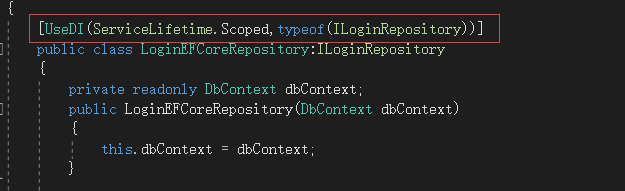
    [UseDI(ServiceLifetime.Scoped,typeof(ILoginRepository))]

    public class LoginEFCoreRepository:ILoginRepository

    {

        private readonly DbContext dbContext;

        public LoginEFCoreRepository(DbContext dbContext)

        {

            this.dbContext = dbContext;

        }

    }

}
3.为IserviceCollection扩展一个方法 可以实现对程序集进行操作
using Microsoft.Extensions.DependencyInjection;

using System;

using System.Collections.Generic;

using System.Linq;

using System.Reflection;

using Util.Attributes;

namespace Util.DIPlugin

{

    public static class NetCoreDIModuleRegister

    {

        /// <summary>

        /// 自动注册服务

        /// </summary>

        /// <param name="services">注册服务的集合(向其中注册)</param>

        /// <param name="ImplementationType">要注册的类型</param>

        public static void AutoRegisterService(this IServiceCollection services, Type ImplementationType)

        {

            //获取类型的 UseDIAttribute 属性 对应的对象

            UseDIAttribute attr = ImplementationType.GetCustomAttribute(typeof(UseDIAttribute)) as UseDIAttribute;

            ////获取类实现的所有接口

            //Type[] types = ImplementationType.GetInterfaces();

            List<Type> types = attr.GetTargetTypes();

            var lifetime = attr.Lifetime;

            //遍历类实现的每一个接口

            foreach (var t in types)

            {

                //将类注册为接口的实现-----但是存在一个问题,就是担心 如果一个类实现了IDisposible接口 担心这个类变成了这个接口的实现

                ServiceDescriptor serviceDescriptor = new ServiceDescriptor(t, ImplementationType, lifetime);

                services.Add(serviceDescriptor);

            }

        }


        /// <summary>

        /// 根据程序集的名字获取程序集中所有的类型集合

        /// </summary>

        /// <param name="AssemblyName">程序集名字</param>

        /// <returns>类型集合</returns>

        public static Type[] GetTypesByAssemblyName(String AssemblyName)

        {

            Assembly assembly = Assembly.Load(AssemblyName);

            return assembly.GetTypes();

        }

        #region 将程序集中的所有符合条件的类型全部注册到 IServiceCollection 中 重载1

        /// <summary>

        /// 将程序集中的所有符合条件的类型全部注册到 IServiceCollection 中

        /// </summary>

        /// <param name="services">IServiceCollection</param>

        /// <param name="AassemblyName">程序集名字</param>

        public static void AutoRegisterServicesFromAssembly(this IServiceCollection services, string AassemblyName)

        {

            //根据程序集的名字 获取程序集中所有的类型

            Type[] types = GetTypesByAssemblyName(AassemblyName);

            //过滤上述程序集 首先按照传进来的条件进行过滤 接着要求Type必须是类,而且不能是抽象类

            IEnumerable<Type> _types = types.Where(t => t.IsClass && !t.IsAbstract);

            foreach (var t in _types)

            {

                IEnumerable<Attribute> attrs = t.GetCustomAttributes();

                //遍历类的所有特性

                foreach (var attr in attrs)

                {

                    //如果在其特性中发现特性是 UseDIAttribute 特性 就将这个类注册到DI容器中去

                    //并跳出当前的循环 开始对下一个类进行循环

                    if (attr is UseDIAttribute)

                    {

                        services.AutoRegisterService(t);

                        break;

                    }

                }

            }

        }

        #endregion

        #region 将程序集中的所有符合条件的类型全部注册到 IServiceCollection 中 重载2

        /// <summary>

        /// 将程序集中的所有符合条件的类型全部注册到 IServiceCollection 中

        /// </summary>

        /// <param name="services">IServiceCollection</param>

        /// <param name="AassemblyName">程序集名字</param>

        /// <param name="wherelambda">过滤类型的表达式</param>

        public static void AutoRegisterServicesFromAssembly(this IServiceCollection services,

            string AassemblyName, Func<Type, bool> wherelambda)

        {

            //根据程序集的名字 获取程序集中所有的类型

            Type[] types = GetTypesByAssemblyName(AassemblyName);

            //过滤上述程序集 首先按照传进来的条件进行过滤 接着要求Type必须是类,而且不能是抽象类

            IEnumerable<Type> _types = types.Where(wherelambda).Where(t => t.IsClass && !t.IsAbstract);

            foreach (var t in _types)

            {

                IEnumerable<Attribute> attrs = t.GetCustomAttributes();

                //遍历类的所有特性

                foreach (var attr in attrs)

                {

                    //如果在其特性中发现特性是 UseDIAttribute 特性 就将这个类注册到DI容器中去

                    //并跳出当前的循环 开始对下一个类进行循环

                    if (attr is UseDIAttribute)

                    {

                        services.AutoRegisterService(t);

                        break;

                    }

                }

            }

        }

        #endregion

    }

}
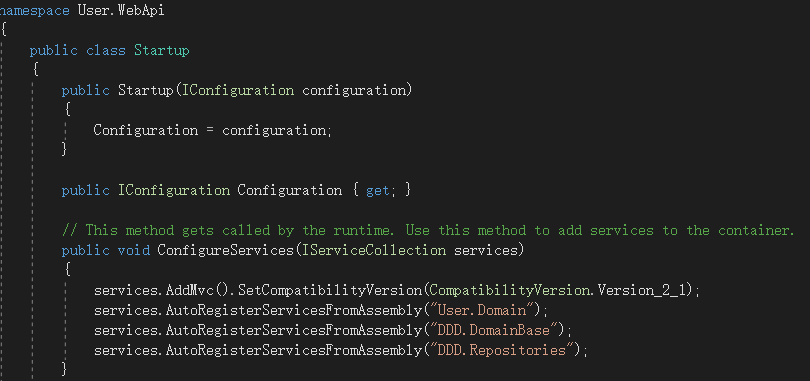
4.在webapi的startup.cs类中注册 需要处理的程序集:
ASP.NET Core 程序集注入(一)的更多相关文章
- # ASP.NET Core依赖注入解读&使用Autofac替代实现
标签: 依赖注入 Autofac ASPNETCore ASP.NET Core依赖注入解读&使用Autofac替代实现 1. 前言 2. ASP.NET Core 中的DI方式 3. Aut ...
- 实现BUG自动检测 - ASP.NET Core依赖注入
我个人比较懒,能自动做的事绝不手动做,最近在用ASP.NET Core写一个项目,过程中会积累一些方便的工具类或框架,分享出来欢迎大家点评. 如果以后有时间的话,我打算写一个系列的[实现BUG自动检测 ...
- [译]ASP.NET Core依赖注入深入讨论
原文链接:ASP.NET Core Dependency Injection Deep Dive - Joonas W's blog 这篇文章我们来深入探讨ASP.NET Core.MVC Core中 ...
- asp.net core 依赖注入几种常见情况
先读一篇注入入门 全面理解 ASP.NET Core 依赖注入, 学习一下基本使用 然后学习一招, 不使用接口规范, 直接写功能类, 一般情况下可以用来做单例. 参考https://www.cnblo ...
- ASP.NET Core依赖注入——依赖注入最佳实践
在这篇文章中,我们将深入研究.NET Core和ASP.NET Core MVC中的依赖注入,将介绍几乎所有可能的选项,依赖注入是ASP.Net Core的核心,我将分享在ASP.Net Core应用 ...
- 自动化CodeReview - ASP.NET Core依赖注入
自动化CodeReview系列目录 自动化CodeReview - ASP.NET Core依赖注入 自动化CodeReview - ASP.NET Core请求参数验证 我个人比较懒,能自动做的事绝 ...
- ASP.NET Core 依赖注入最佳实践——提示与技巧
在这篇文章,我将分享一些在ASP.NET Core程序中使用依赖注入的个人经验和建议.这些原则背后的动机如下: 高效地设计服务和它们的依赖. 预防多线程问题. 预防内存泄漏. 预防潜在的BUG. 这篇 ...
- ASP.NET Core依赖注入最佳实践,提示&技巧
分享翻译一篇Abp框架作者(Halil İbrahim Kalkan)关于ASP.NET Core依赖注入的博文. 在本文中,我将分享我在ASP.NET Core应用程序中使用依赖注入的经验和建议. ...
- ASP.NET Core依赖注入解读&使用Autofac替代实现【转载】
ASP.NET Core依赖注入解读&使用Autofac替代实现 1. 前言 2. ASP.NET Core 中的DI方式 3. Autofac实现和自定义实现扩展方法 3.1 安装Autof ...
- ASP.NET Core 依赖注入基本用法
ASP.NET Core 依赖注入 ASP.NET Core从框架层对依赖注入提供支持.也就是说,如果你不了解依赖注入,将很难适应 ASP.NET Core的开发模式.本文将介绍依赖注入的基本概念,并 ...
随机推荐
- Chart.js (v2.9.4) 2-主要的函数和对象介绍
Color() :主要负责渲染图表时候,针对颜色处理相关函数 helpers_core:工具对象,提供了基础的工具函数功能,遍历数组,扩展对象,合并对象,克隆对象等等. core_defaults:负 ...
- Vue cli之项目打包
在项目根目录中执行如下命令: npm run build 注:Vue脚手架打包的项目必须在服务器上运行,不能直接双击运行: 在打包之后项目中出现 dist 目录,dist 目录就是 Vue脚手架项目的 ...
- 企业级私有仓库Harbor
仓库的概念也就是用于存储,docker仓库用于存储镜像. 镜像构建完成后,很容易可以在宿主机上运行,但是如果要在其他服务器上运行,则需要考虑镜像的分发,存储的问题. 共有/私有/仓库 Docker R ...
- 模拟登录之web监控
1.什么是web监控 zabbix除了能通过 脚本+自定义key,实现服务器数据提取监控以外 也支持对网页的HTTP请求.响应监控. 2.web监控需求 以zabbix-UI页面的登录监控,模拟登录, ...
- php监控
1.开启php的监控数据监控功能 # 使用部署了php-fpm的机器即可 # yum install php-fpm -y # 1.修改参数 [root@web-7 /etc/php-fpm.d]#g ...
- C程序函数调用&系统调用
理解程序的执行 我们要知道CPU可以自由地访问寄存器.内存.另外,程序是由操作系统执行的,所以操作系统能够控制程序的所有执行情况,限制程序的行为. 程序地执行过程: 程序是一个二进制文件,包含程序的代 ...
- 在线Bcrypt加密、验证工具
在线bcrypt加密,bcrypt算法是一种密码哈希算法,它是基于Blowfish加密算法改进的,能够生成安全性很高的哈希值,并且可以通过调整计算时间来提高安全性.本工具支持在线Bcrypt加密及验证 ...
- java读取txt文件行的两种方式对比
import java.io.BufferedReader; import java.io.FileInputStream; import java.io.IOException; import ja ...
- CAT监控指标
CAT监控指标 CAT 是基于 Java 开发的实时应用监控平台.官方文档:https://github.com/dianping/cat CAT提供以下几种报表:Transaction报表 一段代码 ...
- 简单理解IOC控制反转和DI依赖注入
用过.net core框架的同学都知道,框架默认支持"构造函数"注入引用对象的方式.使用.net core框架也有一段时间了,最近去了解了一下到底什么是"依赖注入&quo ...