
总结:BGP和静态路由并存,达到故障自动倒换的目的。
总体结论:
在上云的场景中,客户需要本地数据中心到云上VPC,出现网络故障时做到自动倒换,保证业务不中断。
一、客户需求
1、客户有总厂、分厂、总厂是通过专线和VPN连接上云,分厂是通过专线先连接到总厂,分厂也有VPN连接上云。
2、客户要求,无论是总厂的专线故障,还是分厂的专线故障,都需要进行网络链路自动倒换,切换到VPN连接,从而保证业务快速恢复。
二、组网图:

说明:1、在总厂和分厂的路由器上,分别使用loopback口模拟客户总厂和分厂的网络。
2、AR5作为VPN网关,此处只配置了静态路由,IPSEC VPN的配置忽略。
三、配置思路与关键点
1、专线OK时,优选专线。
CE1设备要求:到达总厂、分厂的网段,可以从AR5(VPN网关)得到,也可以从AR2(总厂路由器)得到,为了优选从AR2得到,需要配置与AR2(总厂路由器)的BGP邻居的本地优先级更高。
#

bgp 65001

 timer keepalive 20 hold 60

 peer 10.0.0.2 as-number 65002

 peer 20.0.0.2 as-number 65004

 #

 ipv4-family unicast

  network 10.0.0.0 255.255.255.0

  network 20.0.0.0 255.255.255.0

  network 169.254.195.0 255.255.255.0

  network 192.168.0.0 255.255.255.0

  peer 10.0.0.2 enable

  peer 10.0.0.2 preferred-value 10

  peer 20.0.0.2 enable

#
对于总厂设备AR2,到达VPC网段也有两个路径,一个是从CE1通过BGP交互得到,一个是通过本地静态路由,下一跳是VPN网关AR5,为了确保专线的优先级更高,需要配置BGP的外部优先级比静态路由的外部优先级更高。不过,这里有两种方法达到此效果,见另外一篇博客。
总厂路由器关键配置:
#

bgp 65002

 timer keepalive 20 hold 60

 peer 10.0.0.1 as-number 65001

 peer 40.0.0.2 as-number 65003

 #

 ipv4-family unicast

  undo synchronization

  preference 50 50 50

  network 10.0.0.0 255.255.255.0

  network 40.0.0.0 255.255.255.0

  network 60.0.0.0 255.255.255.0

  peer 10.0.0.1 enable

  peer 40.0.0.2 enable

#
对于分厂设备而言,到达VPC网段也有与总厂相同的诉求,专线优先级高于VPN,所以,分厂路由器也有提高BGP优先级的相同配置。
分厂路由器配置:
#

bgp 65003

 timer keepalive 20 hold 60

 peer 40.0.0.1 as-number 65002

 #

 ipv4-family unicast

  undo synchronization

  preference 50 50 50

  network 40.0.0.0 255.255.255.0

  network 70.0.0.0 255.255.255.0

  peer 40.0.0.1 enable

#
2、修改BGP心跳报文间隔为更短,以便尽早检测到网络故障。全部调整为20秒,也就是BGP邻居在1分钟后可以感知到网络故障。
配置见上面的BGP配置上的timer.
四、实测效果
1、专线OK时,流量优选专线。
云上VPC --- > 总厂:
AR4 (默认路由) ---> AR1 (默认路由) ---> CE1 (BGP路由) ---> AR2
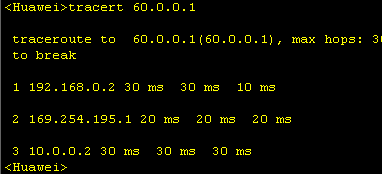
云上VPC --- > 总厂(回程):
AR2(BGP路由) ---> CE1 (静态路由) ---> AR1 (直连路由) ---> AR4
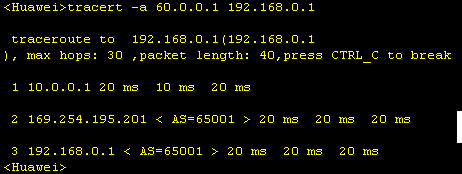
云上VPC ---> 分厂:
AR4 (默认路由) ---> AR1 (默认路由) ---> CE1 (BGP路由) ---> AR2(BGP路由) ---> AR3
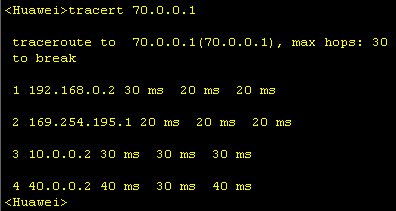
云上VPC ---> 分厂(回程):
AR3(BGP路由) ---> AR2(BGP路由) ---> CE1 (静态路由) ---> AR1 (直连路由) ---> AR4
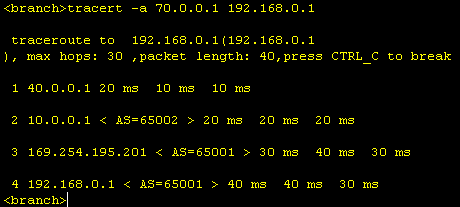
2、总厂专线故障 (总厂AR2 shutdown GE0/0/0端口, 等待1分钟后)
云上VPC --- > 总厂:
AR4 (默认路由) ---> AR1 (默认路由) ---> CE1 (BGP路由) ---> AR5(静态路由)---> AR2
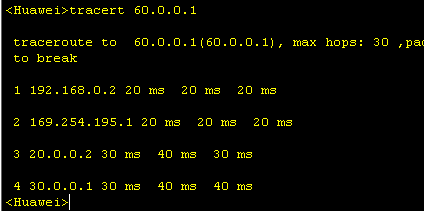
云上VPC --- > 总厂(回程):
AR2(静态路由) ---> AR5(BGP路由)---> CE1 (静态路由) ---> AR1 (直连路由) ---> AR4
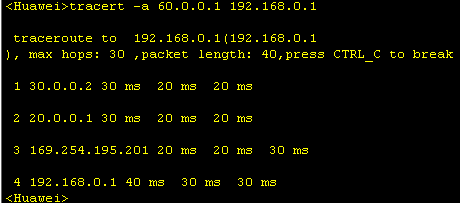
云上VPC ---> 分厂:
AR4 (默认路由) ---> AR1 (默认路由) ---> CE1 (BGP路由) ---> AR5(静态路由)---> AR3
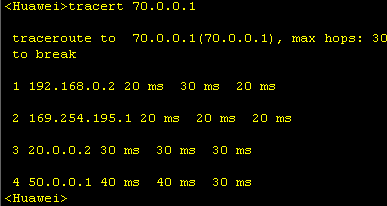
云上VPC ---> 分厂(回程):
AR3(静态路由) ---> AR5(BGP路由)---> CE1 (静态路由) ---> AR1 (直连路由) ---> AR4
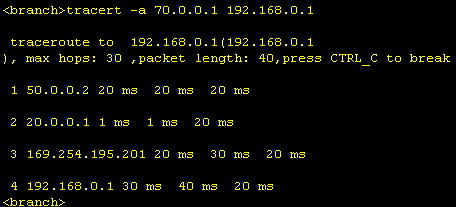
总厂专线故障恢复后,可以看到流量正常回切走总厂专线。
实测效果,同“1、专线OK时,流量优选专线。”
3、分厂专线故障(分厂AR3 shutdown GE0/0/0端口, 等待1分钟后)
云上VPC --- > 总厂:
AR4 (默认路由) ---> AR1 (默认路由) ---> CE1 (BGP路由) ---> AR2
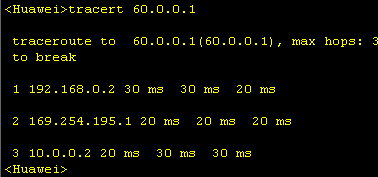
云上VPC --- > 总厂(回程):
AR2(BGP路由) ---> CE1 (静态路由) ---> AR1 (直连路由) ---> AR4

云上VPC ---> 分厂:
AR4 (默认路由) ---> AR1 (默认路由) ---> CE1 (BGP路由) ---> AR5(静态路由)---> AR3
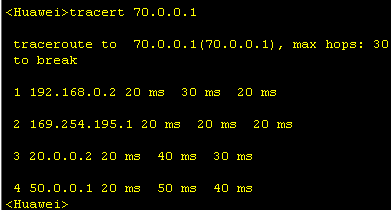
云上VPC ---> 分厂(回程):
AR3(静态路由) ---> AR5(BGP路由)---> CE1 (静态路由) ---> AR1 (直连路由) ---> AR4
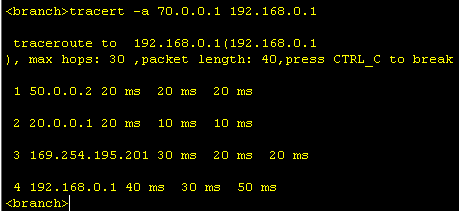
分厂专线故障恢复后,可以看到流量正常回切走分厂专线。
实测效果,同“1、专线OK时,流量优选专线。”
五、所有设备的配置
云上VPC
AR4配置
[V200R003C00]

#

 snmp-agent local-engineid 800007DB03000000000000

 snmp-agent

#

 clock timezone China-Standard-Time minus 08:00:00

#

portal local-server load portalpage.zip

#

 drop illegal-mac alarm

#

 set cpu-usage threshold 80 restore 75

#

aaa

 authentication-scheme default

 authorization-scheme default

 accounting-scheme default

 domain default

 domain default_admin

 local-user admin password cipher %$%$K8m.Nt84DZ}e#<0`8bmE3Uw}%$%$

 local-user admin service-type http

#

firewall zone Local

 priority 15

#

interface GigabitEthernet0/0/0

 ip address 192.168.0.1 255.255.255.0

#

interface GigabitEthernet0/0/1

#

interface GigabitEthernet0/0/2

#

interface NULL0

#

ip route-static 0.0.0.0 0.0.0.0 192.168.0.2

#

user-interface con 0

 authentication-mode password

user-interface vty 0 4

user-interface vty 16 20

#

wlan ac

#

return
AR1配置
[V200R003C00]

#

 snmp-agent local-engineid 800007DB03000000000000

 snmp-agent

#

 clock timezone China-Standard-Time minus 08:00:00

#

portal local-server load flash:/portalpage.zip

#

 drop illegal-mac alarm

#

 wlan ac-global carrier id other ac id 0

#

 set cpu-usage threshold 80 restore 75

#

aaa

 authentication-scheme default

 authorization-scheme default

 accounting-scheme default

 domain default

 domain default_admin

 local-user admin password cipher %$%$K8m.Nt84DZ}e#<0`8bmE3Uw}%$%$

 local-user admin service-type http

#

firewall zone Local

 priority 15

#

interface GigabitEthernet0/0/0

 ip address 192.168.0.2 255.255.255.0

#

interface GigabitEthernet0/0/1

#

interface GigabitEthernet0/0/2

 ip address 169.254.195.201 255.255.255.0

#

interface NULL0

#

ip route-static 0.0.0.0 0.0.0.0 169.254.195.1

#

user-interface con 0

 authentication-mode password

user-interface vty 0 4

user-interface vty 16 20

#

wlan ac

#

return
专线网关CE1交换机
!CfgFileCrc:1b29a473

!Software Version V800R013C00SPC560B560

!Last configuration was updated at 2018-05-06 11:32:22 UTC

!Last configuration was saved at 2018-05-06 11:41:11 UTC

!MKHash 0000000000000000

#

sysname HUAWEI

#

device board 1 board-type CE-MPUB

#

aaa

 #

 authentication-scheme default

 #

 authorization-scheme default

 #

 accounting-scheme default

 #

 domain default

 #

 domain default_admin

#

interface MEth0/0/0

 undo shutdown

#

interface GE1/0/0

 undo portswitch

 undo shutdown

 ip address 20.0.0.1 255.255.255.0

#

interface GE1/0/1

 shutdown

#

interface GE1/0/2

 undo portswitch

 undo shutdown

 ip address 169.254.195.1 255.255.255.0

#

interface GE1/0/3

 undo portswitch

 undo shutdown

 ip address 10.0.0.1 255.255.255.0

#

interface GE1/0/4

 shutdown

#

interface GE1/0/5

 shutdown

#

interface GE1/0/6

 shutdown

#

interface GE1/0/7

 shutdown

#

interface GE1/0/8

 shutdown

#

interface GE1/0/9

 shutdown

#

interface GE1/0/10

 shutdown

#

interface GE1/0/11

 shutdown

#

interface GE1/0/12

 shutdown

#

interface GE1/0/13

 shutdown

#

interface GE1/0/14

 shutdown

#

interface GE1/0/15

 shutdown

#

interface GE1/0/16

 shutdown

#

interface GE1/0/17

 shutdown

#

interface GE1/0/18

 shutdown

#

interface GE1/0/19

 shutdown

#

interface GE1/0/20

 shutdown

#

interface GE1/0/21

 shutdown

#

interface GE1/0/22

 shutdown

#

interface GE1/0/23

 shutdown

#

interface GE1/0/24

 shutdown

#

interface GE1/0/25

 shutdown

#

interface GE1/0/26

 shutdown

#

interface GE1/0/27

 shutdown

#

interface GE1/0/28

 shutdown

#

interface GE1/0/29

 shutdown

#

interface GE1/0/30

 shutdown

#

interface GE1/0/31

 shutdown

#

interface GE1/0/32

 shutdown

#

interface GE1/0/33

 shutdown

#

interface GE1/0/34

 shutdown

#

interface GE1/0/35

 shutdown

#

interface GE1/0/36

 shutdown

#

interface GE1/0/37

 shutdown

#

interface GE1/0/38

 shutdown

#

interface GE1/0/39

 shutdown

#

interface GE1/0/40

 shutdown

#

interface GE1/0/41

 shutdown

#

interface GE1/0/42

 shutdown

#

interface GE1/0/43

 shutdown

#

interface GE1/0/44

 shutdown

#

interface GE1/0/45

 shutdown

#

interface GE1/0/46

 shutdown

#

interface GE1/0/47

 shutdown

#

interface NULL0

#

bgp 65001

 timer keepalive 20 hold 60

 peer 10.0.0.2 as-number 65002

 peer 20.0.0.2 as-number 65004

 #

 ipv4-family unicast

  network 10.0.0.0 255.255.255.0

  network 20.0.0.0 255.255.255.0

  network 169.254.195.0 255.255.255.0

  network 192.168.0.0 255.255.255.0

  peer 10.0.0.2 enable

  peer 10.0.0.2 preferred-value 10

  peer 20.0.0.2 enable

#

ip route-static 192.168.0.0 255.255.255.0 169.254.195.201

#

ssh authorization-type default aaa

#

user-interface con 0

#

vm-manager

#

return
VPN网关AR5
[V200R003C00]

#

 snmp-agent local-engineid 800007DB03000000000000

 snmp-agent

#

 clock timezone China-Standard-Time minus 08:00:00

#

portal local-server load portalpage.zip

#

 drop illegal-mac alarm

#

 set cpu-usage threshold 80 restore 75

#

aaa

 authentication-scheme default

 authorization-scheme default

 accounting-scheme default

 domain default

 domain default_admin

 local-user admin password cipher %$%$K8m.Nt84DZ}e#<0`8bmE3Uw}%$%$

 local-user admin service-type http

#

firewall zone Local

 priority 15

#

interface GigabitEthernet0/0/0

 ip address 20.0.0.2 255.255.255.0

#

interface GigabitEthernet0/0/1

 ip address 30.0.0.2 255.255.255.0

#

interface GigabitEthernet0/0/2

 ip address 50.0.0.2 255.255.255.0

#

interface NULL0

#

bgp 65004

 peer 20.0.0.1 as-number 65001

 #

 ipv4-family unicast

  undo synchronization

  network 20.0.0.0 255.255.255.0

  import-route static

  peer 20.0.0.1 enable

#

ip route-static 60.0.0.0 255.255.255.0 30.0.0.1

ip route-static 70.0.0.0 255.255.255.0 50.0.0.1

#

user-interface con 0

 authentication-mode password

user-interface vty 0 4

user-interface vty 16 20

#

wlan ac

#

return
总厂AR2配置
[V200R003C00]

#

 snmp-agent local-engineid 800007DB03000000000000

 snmp-agent

#

 clock timezone China-Standard-Time minus 08:00:00

#

portal local-server load flash:/portalpage.zip

#

 drop illegal-mac alarm

#

 wlan ac-global carrier id other ac id 0

#

 set cpu-usage threshold 80 restore 75

#

aaa

 authentication-scheme default

 authorization-scheme default

 accounting-scheme default

 domain default

 domain default_admin

 local-user admin password cipher %$%$K8m.Nt84DZ}e#<0`8bmE3Uw}%$%$

 local-user admin service-type http

#

firewall zone Local

 priority 15

#

interface GigabitEthernet0/0/0

 ip address 10.0.0.2 255.255.255.0

#

interface GigabitEthernet0/0/1

 ip address 30.0.0.1 255.255.255.0

#

interface GigabitEthernet0/0/2

 ip address 40.0.0.1 255.255.255.0

#

interface NULL0

#

interface LoopBack1

 ip address 60.0.0.1 255.255.255.0

#

bgp 65002

 timer keepalive 20 hold 60

 peer 10.0.0.1 as-number 65001

 peer 40.0.0.2 as-number 65003

 #

 ipv4-family unicast

  undo synchronization

  preference 50 50 50

  network 10.0.0.0 255.255.255.0

  network 40.0.0.0 255.255.255.0

  network 60.0.0.0 255.255.255.0

  peer 10.0.0.1 enable

  peer 40.0.0.2 enable

#

ip route-static 192.168.0.0 255.255.255.0 30.0.0.2

#

user-interface con 0

 authentication-mode password

user-interface vty 0 4

user-interface vty 16 20

#

wlan ac

#

return
分厂AR3配置
[V200R003C00]

#

 sysname branch

#

 snmp-agent local-engineid 800007DB03000000000000

 snmp-agent

#

 clock timezone China-Standard-Time minus 08:00:00

#

portal local-server load flash:/portalpage.zip

#

 drop illegal-mac alarm

#

 wlan ac-global carrier id other ac id 0

#

 set cpu-usage threshold 80 restore 75

#

aaa

 authentication-scheme default

 authorization-scheme default

 accounting-scheme default

 domain default

 domain default_admin

 local-user admin password cipher %$%$K8m.Nt84DZ}e#<0`8bmE3Uw}%$%$

 local-user admin service-type http

#

firewall zone Local

 priority 15

#

interface GigabitEthernet0/0/0

 ip address 40.0.0.2 255.255.255.0

#

interface GigabitEthernet0/0/1

#

interface GigabitEthernet0/0/2

 ip address 50.0.0.1 255.255.255.0

#

interface NULL0

#

interface LoopBack0

 ip address 70.0.0.1 255.255.255.0

#

bgp 65003

 timer keepalive 20 hold 60

 peer 40.0.0.1 as-number 65002

 #

 ipv4-family unicast

  undo synchronization

  preference 50 50 50

  network 40.0.0.0 255.255.255.0

  network 70.0.0.0 255.255.255.0

  peer 40.0.0.1 enable

#

ip route-static 192.168.0.0 255.255.255.0 50.0.0.2

#

user-interface con 0

 authentication-mode password

user-interface vty 0 4

user-interface vty 16 20

#

wlan ac

#

return
总结:BGP和静态路由并存,达到故障自动倒换的目的。的更多相关文章
- Windows操作系统添加永久静态路由
1.比如:添加一条去往 10.10.10.0/24网段的静态路由,指定去往此网段的路由都走 172.20.153.254网关 route -p add 10.10.10.0 mask 255.255. ...
- HCIE笔记-第十节-静态路由
协议 :标识 前方的目的网络 是通过什么协议形成的 优先级:代表形成路由的协议的优先级数值 [厂商规定] 开销值:代表该路由协议形成此路由时的开销 -- 不同的协议计算开销值的方式有区别(越小越优) ...
- 静态路由、RIP、OSPF、BGP
主要内容包含以下四点:(1)静态路由 (2)动态路由 (3)生成树 (4)VLAN 1. 什么是静态路由? 答:静态路由是管理人员手动配置和管理的路由 2. 静态路由由那些优点? 答:配置简单 ...
- 总结:当静态路由和BGP同时存在时路由优选BGP的两种方法
结论: 方法一.配置BGP协议的外部优先级比静态路由的优先级高,优选BGP. 优点:配置简单. 缺点:全局生效,如果用户有针对某个静态路由想提高优先级,不受动态路由影响,则针对每个静态路由都需要人为提 ...
- 使用bfd监控静态路由,达到网络故障及时切换功能。
结论:通过BFD可以联动静态路由,从而监控整个网络上的网络情况,当出现故障时及时进行切换. 下面的例子,就是通过BFD监控上面的这个往返路由,当中间网络出现故障时,两端全部切换到下面的第二条路由进行通 ...
- RIP、OSPF、BGP、动态路由选路协议、自治域AS
相关学习资料 tcp-ip详解卷1:协议.pdf http://www.rfc-editor.org/rfc/rfc1058.txt http://www.rfc-editor.org/rfc/rfc ...
- 路由知识 静态路由 rip eigrp ospf
第1章 路由选择原理 1.1 几个概念 1.1.1 被动路由协议 用来在路由之间传递用户信息 1.1.2 主动路由协议 用于维护路由器的路由表 R2#show ip route Codes: C - ...
- CCNA - Part12 - 路由协议 (1) - 静态路由,动态路由 RIP
路由器 在之前关于路由器的介绍中,我们知道它是网络互联的核心设备,用于连接不同的网络,在网络之间转发 IP 数据报.对于路由器来说,路由表是其内部最为重要的构成组件.当路由器需要转发数据时,就会按照路 ...
- Cisco(思科)路由器静态路由的配置
实验拓扑 实验步骤 我们要使得 1.1.1.0/24.2.2.2.0/24.3.3.3.0/24 网络之间能够互相通信. (1) 步骤 1:在各路由器上配置 IP 地址.保证直连链路的连通性 R1( ...
随机推荐
- MapReduce计算模型的优化
MapReduce 计算模型的优化涉及了方方面面的内容,但是主要集中在两个方面:一是计算性能方面的优化:二是I/O操作方面的优化.这其中,又包含六个方面的内容. 1.任务调度 任务调度是Hadoop中 ...
- i春秋官网4.0上线啦 文末有福利
爱瑞宝地(Everybody)期待了很久的 i春秋官网4.0上线啦 除了产品的功能更加完善 性能和体验也将大幅度提高 清新.舒适的视觉感受 搭配更加便捷的操作流程 只需一秒,扫码立即登录 即刻进入网络 ...
- [Swift]LeetCode266.回文全排列 $ Palindrome Permutation
Given a string, determine if a permutation of the string could form a palindrome. For example," ...
- [Swift]LeetCode581. 最短无序连续子数组 | Shortest Unsorted Continuous Subarray
Given an integer array, you need to find one continuous subarray that if you only sort this subarray ...
- ubuntu中环境变量的几个问题思考
问题一:export PATH=$PATH:/usr/local和export PATH=/usr/local:$PATH这两个的区别是什么?可以随便用吗? 这两个都是要把该目录加到环境变量中,一般的 ...
- java程序员的NodeJS初识篇
摘要 作为一个一直用java来写后端的程序员用NodeJS来写后台,实在不是很爽.这里记下这两个月的NodeJS学习所遇之坑,与java转NodeJS的同仁共勉.学习时间不长,若有理解错误,望指正. ...
- Python内置函数(17)——divmod
英文文档: divmod(a, b) Take two (non complex) numbers as arguments and return a pair of numbers consisti ...
- Python内置函数(67)——zip
英文文档: zip(*iterables) Make an iterator that aggregates elements from each of the iterables. Returns ...
- SpringBoot入门教程(七)整合themeleaf+bootstrap
Thymeleaf是用于Web和独立环境的现代服务器端Java模板引擎.Thymeleaf的主要目标是将优雅的自然模板带到您的开发工作流程中—HTML能够在浏览器中正确显示,并且可以作为静态原型,从而 ...
- 聚类——FCM
聚类——认识FCM算法 作者:凯鲁嘎吉 - 博客园 http://www.cnblogs.com/kailugaji/ 一.FCM概述 FCM算法是基于对目标函数的优化基础上的一种数据聚类方法.聚类结 ...