
js密码修改显示与隐藏效果
一、添加input框
<form class="login_form">

        <input class="password inputpwd" id="oldpwd" name="oldpwd" type="password" placeholder="请输入旧密码" />

        <div class="invisible" onclick="changepicture(this,'oldpwd')">

            <img src="~/Content/images/login/不可见.png" />

        </div>

        <input class="password inputpwd" id="newpwd" name="newpwd" type="password" placeholder="请输入新密码" />

        <div class="invisible" onclick="changepicture(this,'newpwd')">

            <img src="~/Content/images/login/不可见.png" />

        </div>

        <input class="password inputpwd" id="quepwd" name="quepwd" type="password" placeholder="请确认密码" />

        <div class="invisible" onclick="changepicture(this,'quepwd')">

            <img src="~/Content/images/login/不可见.png" />

        </div>

</form>
二、添加css样式
    .inputpwd {

        outline: medium;

        border: none !important;

        border-bottom: 1px solid rgba(235,235,235,1)!important;

        width:100%!important;

    }

    /*1).隐藏按钮css ,图片用webpack做了压缩,做了加密*/

    .invisible {

        margin-top: -50px;

        margin-left: 80%

    }
/*给input添加一个背景图片,no-repeat不平铺,设置padding-left的值为背景图片的宽度*/
.login_form input {
width: 80%;
padding-left: 80px;
border: #E7E7E7 1px solid;
font-size: 26px;
color: #72828f;
height: 75px;
border-radius: 10px;
margin: 0 3%;
}
.login_form .username {
background: #FFFFFF url(../../Content/weixinImage/登录/用户.png) 25px 20px no-repeat;
background-size: 30px 30px;
margin-top: 60px;
}
.login_form .password {
background: #FFFFFF url(../../Content/weixinImage/登录/密码.png) 28px 22px no-repeat;
background-size: 26px 33px;
margin-top: 30px;
}
三、js控制文本框的type
///密码显示与隐藏

    function changepicture(obj, name) {

        var showPwd = $('#' + name + '');

        if (showPwd.prop('type') =='password') {

           showPwd.prop('type', 'text');

           $(obj).find('img').attr("src", "@Url.Content("~/Content/images/login/可见.png")");

        }

        else {

            showPwd.prop('type', 'password');

            $(obj).find('img').attr("src", "@Url.Content("~/Content/images/login/不可见.png")");

        }

    }
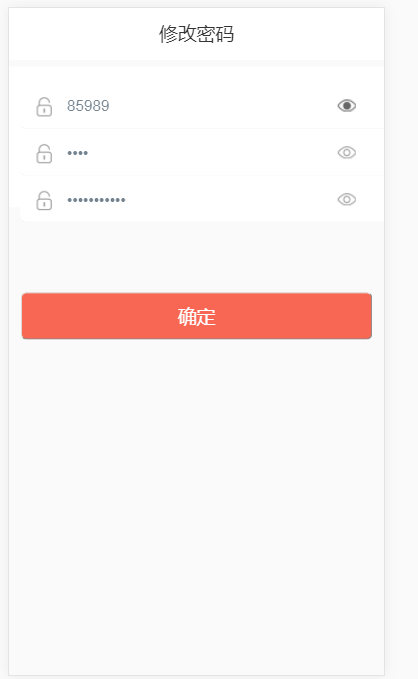
效果图如下:
js密码修改显示与隐藏效果的更多相关文章
- js控制密码的显示与隐藏实例
原理是建立2个input,一个type是text,一个type是password.在点击按钮时,这两input个的显示状态与val()的值在切换. html: <!DOCTYPE html> ...
- JS实现登录页密码的显示和隐藏功能
在登录页经常会用到通过点击文本框的类似小眼睛图片来实现隐藏显示密码的功能,其实实现原理很简单,通过点击事件来改变input的type类型,具体过程看代码: 在没给大家分享实现代码之前,先给大家展示下效 ...
- 在 jQuery 中使用滑入滑出动画效果,实现二级下拉导航菜单的显示与隐藏效果
查看本章节 查看作业目录 需求说明: 在 jQuery 中使用滑入滑出动画效果,实现二级下拉导航菜单的显示与隐藏效果 用户将光标移动到"最新动态页"或"帮助查询" ...
- 使用 jQuery 选择器获取页面元素,然后利用 jQuery 对象的 css() 方法设置其 display 样式属性,从而实现显示和隐藏效果。
查看本章节 查看作业目录 需求说明: 使用 jQuery 选择器获取页面元素,然后利用 jQuery 对象的 css() 方法设置其 display 样式属性,从而实现显示和隐藏效果. 具体要求如下: ...
- Android文本输入框(EditText)切换密码的显示与隐藏
package cc.c; import android.app.Activity; import android.os.Bundle; import android.text.Selection; ...
- IOS swift实现密码的显示与隐藏切换
最近做项目遇到一个需要做密码的显示与隐藏功能,简单从功能上讲是比较简单的,但是,ios有个恶心的BUG,就是在切换显示密码后再隐藏密码时输入就被清空了,这个非常不友好,为了解决这个问题,我在网上找了相 ...
- el-input 标签中密码的显示和隐藏
效果展示: 密码隐藏: 密码显示: 代码展示: 一:<el-input>标签代码 <el-form-item label="密码" prop="pass ...
- Android之密码的显示与隐藏
很多应用都是显示与隐藏密码的功能. 之前的项目都没这个功能要求,也没有专门研究这个.最近项目有加这个功能,我这里也刚好整理一下. 我的思路是设置EditText的InputType.代码如下: if ...
- js 与JQuery显示及隐藏方法
虽然以后两种方式都能让文本信息隐藏和显示 第一种文本隐藏以后还是会占居位置, 第二种则不会占位置. <p id="p1">这是一段文本.</p> <i ...
随机推荐
- Elasticsearch 滚动重启 必读
关键词:elasticsearch , es , 滚动重启 , 禁止分片 由于之前es GC没有怎么调优,结果今天被大量scroll查询查挂了,GC 卡死了.然后为了先恢复给业务使用,也没什么其他办法 ...
- Centos服务器上NFS灾备环境及KVM的搭建及使用
1.概述 由于在单台服务器上搭建灾备环境需要KVM和NFS的支持,下面先列出KVM的搭建流程,再列出使用NFS实现单台服务器灾备的流程. A.搭建KVM环境 1>.主机环境准备 Linux Sy ...
- 使用COOKIE实现登录 VS 使用SESSION实现登录
注:本文使用的代码基于PHP,其他语言逻辑同理. 一:使用COOKIE实现登录验证 使用cookie实现登录的方式,主要通过一些单向的加密信息进行验证.比如admin用户登录了之后,服务端生成一个co ...
- git 本地同步分支数,删除远程已经删除掉的多余分支
git remote show orgin (展示当前本地分支和远程上的分支差异,多余分支后会被标注 use 'git remote prune' to remove.) git remote pr ...
- 创建Jdbc封装工具类
jdbc.propertie url=jdbc:mysql:///empye user=root password=root driver=com.mysql.jdbc.Driver 读取资源文件 ...
- MySql的编译安装
一 前期准备 1 cmake包,要求2.8以上版本 https://cmake.org/download/ 2 boost库包 boost Boost库是一个可移植.提供源代码的C++库,作为标准库的 ...
- [Swift]LeetCode464. 我能赢吗 | Can I Win
In the "100 game," two players take turns adding, to a running total, any integer from 1.. ...
- [Swift]LeetCode878. 第 N 个神奇数字 | Nth Magical Number
A positive integer is magical if it is divisible by either A or B. Return the N-th magical number. ...
- Python内置函数(44)——next
英文文档: next(iterator[, default]) Retrieve the next item from the iterator by calling its __next__() m ...
- BBS论坛(二十四)
24.1.编辑板块 cms/js/banners.js $(function () { $('.edit-board-btn').click(function () { var self = $(th ...