
关于 vue 不能 watch 数组变化 和 对象变化的解决方案
原文地址:关于 vue 不能 watch 数组变化 和 对象变化的解决方案
vue 监听数组和对象的变化
vue 监听数组
vue 实际上可以监听数组变化,比如:
data () {

  return {

    watchArr: [],

  };

},

watchArr (newVal) {

  console.log('监听:' + newVal);

},

created () {

  setTimeout(() => {

    this.watchArr = [1, 2, 3];

  }, 1000);

},
再如使用 splice(0, 2, 3) 从数组下标 0 删除两个元素,并在下标 0 插入一个元素 3:
data () {

  return {

    watchArr: [1, 2, 3],

  };

},

watchArr (newVal) {

  console.log('监听:' + newVal);

},

created () {

  setTimeout(() => {

    this.watchArr.splice(0, 2, 3);

  }, 1000);

},
push 数组也能够监听到
vue 无法监听数组变化的情况
但是,数组在下面两种情况无法监听:
- 利用索引直接设置一个数组项时,例如:arr[indexOfItem] = newValue;
- 修改数组的长度时,例如:arr.length = newLength;
举例无法监听数组变化的情况
- 利用索引直接修改数组值
data () {

  return {

    watchArr: [{

      name: 'krry',

    }],

  };

},

watchArr (newVal) {

  console.log('监听:' + newVal);

},

created () {

  setTimeout(() => {

    this.watchArr[0].name = 'xiaoyue';

  }, 1000);

},
- 修改数组的长度
长度大于原数组就将后续元素设置为 undefined
长度小于原数组就将多余元素截掉data () {
return {
watchArr: [{
name: 'krry',
}],
};
},
watchArr (newVal) {
console.log('监听:' + newVal);
},
created () {
setTimeout(() => {
this.watchArr.length = 5;
}, 1000);
},
上面的 watchArr 变成
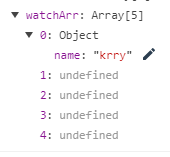
vue 无法监听数组变化的解决方案
- this.$set(arr, index, newVal);
data () {

  return {

    watchArr: [{

      name: 'krry',

    }],

  };

},

watchArr (newVal) {

  console.log('监听:' + newVal);

},

created () {

  setTimeout(() => {

    this.$set(this.watchArr, 0, {name: 'xiaoyue'});

  }, 1000);

},
使用数组 splice 方法可以监听,例子上面有
使用临时变量直接赋值的方式,原理与直接赋值数组一样
data () {

  return {

    watchArr: [{

      name: 'krry',

    }],

  };

},

watchArr (newVal) {

  console.log('监听:' + newVal);

},

created () {

  setTimeout(() => {

    let temp = [...this.watchArr];

    temp[0] = {

      name: 'xiaoyue',

    };

    this.watchArr = temp;

  }, 1000);

},
vue 监听对象
vue 可以监听直接赋值的对象
this.watchObj = {name: 'popo'};
vue 不能监听对象属性的添加、修改、删除
vue 监听对象的解决方法
- 使用 this.$set(object, key, value)
- 使用深度监听 deep: true,只能监听原有属性的变化,不能监听增加的属性
mounted () {

  // 这里使用深度监听 blog 对象的属性变化,会触发 getCatalog 方法

  this.$watch('blog', this.getCatalog, {

    deep: true,

  });

},
- 使用 this.set(obj, key, val) 来新增属性(vue 无法监听 this.set 修改原有属性)
this.$set(this.watchObj, 'age', 124);
delete this.watchObj[‘name’](vue 无法监听 delete 关键字来删除对象属性)
- 使用 Object.assign 方法,直接赋值的原理监听(最推荐的方法)
this.watchObj = Object.assign({}, this.watchObj, {

  name: 'xiaoyue',

  age: 15,

});
原文地址:
关于 vue 不能 watch 数组变化 和 对象变化的解决方案
关于 vue 不能 watch 数组变化 和 对象变化的解决方案的更多相关文章
- vue 不能检测数组长度 值变化原因解析
1.vue不能检测数组长度或者值的变化 (1)数组长度变化 未检测到 <!DOCTYPE html> <html lang="en"> <head&g ...
- vue中改变数组的值视图无变化
今天开发的时候遇到一个多选取消点击状态的,渲染的时候先默认都选中,然后可以取消选中,自建了一个全为true的数组,点击时对应下标的arr[index]改为false,数据改变了状态没更新,突然想起来单 ...
- 在vue中使用watch监听对象或数组
最近发现在vue中使用watch监听对象或者数组时,当数组或者对象只是单一的值改变时,并不会出发watch中的事件. 在找问题过程中,发现当数组使用push一类的方法时,会触发watch,如果只是单一 ...
- vue数组更新界面无变化
1. vue数组更新界面无变化 1.1. 说明 对数组进行更新或者添加,一定要注意方式,我的情况是数组套数组,双重循环,在造数据的时候,不断从尾部添加数据,所以写成了如下形式,每次下拉都会去加载一批相 ...
- vue 绑定class、v-bind:style(对象语法、数组语法)
绑定 HTML Class 我们可以传给 v-bind:class 一个对象,以动态地切换 class: 内联样式在模板里 <div id="div1" :class=&qu ...
- vue : watch、computed、以及对象数组
watch和computed是vue框架中很重要的特性. 那么,他们是怎么作用于对象数组的? 今天我们就来探究一下. 上代码. <template> <div class=" ...
- vue 快速入门 系列 —— 侦测数据的变化 - [基本实现]
其他章节请看: vue 快速入门 系列 侦测数据的变化 - [基本实现] 在 初步认识 vue 这篇文章的 hello-world 示例中,我们通过修改数据(app.seen = false),页面中 ...
- vue 快速入门 系列 —— 侦测数据的变化 - [vue 源码分析]
其他章节请看: vue 快速入门 系列 侦测数据的变化 - [vue 源码分析] 本文将 vue 中与数据侦测相关的源码摘了出来,配合上文(侦测数据的变化 - [基本实现]) 一起来分析一下 vue ...
- vue 快速入门 系列 —— 侦测数据的变化 - [vue api 原理]
其他章节请看: vue 快速入门 系列 侦测数据的变化 - [vue api 原理] 前面(侦测数据的变化 - [基本实现])我们已经介绍了新增属性无法被侦测到,以及通过 delete 删除数据也不会 ...
随机推荐
- gridlayout代码注释
<div class="wrapper"> //定义一节或者一部分区域,它的css样式对应的css中class选择器的wrapper <div class=&qu ...
- Android系统架构及内核简介
(来源于ThinkPHP) Android是Google公司开发的基于Linux平台的开源手机操作系统,它包括操作系统.中间件.用户界面和应用程序,而且不存在任何以往阻碍移 动产业创新的专利权障碍,并 ...
- 微信小程序开发---自定义组件
开发者可以将页面内的功能模块抽象成自定义组件,以便在不同的页面中重复使用:也可以将复杂的页面拆分成多个低耦合的模块,有助于代码维护.自定义组件在使用时与基础组件非常相似. 创建自定义组件 类似于页面, ...
- pycharm 中 django 导入静态文件不提示补全
File—>setting----->Languages & Frameworks ------> Python Template Languages ------> ...
- ps入门学习
快捷键 打开 ctrl+O 切换显示窗口 ctrl+tab 隐藏工具栏和面板 tab 只隐藏面板不隐藏工具栏 shift+tab 切换屏幕模式 F 文件的新建与格式 1.新建文档Ctrl+N,存 ...
- 史上最全java面试题
基本概念 操作系统中 heap 和 stack 的区别 什么是基于注解的切面实现 什么是 对象/关系 映射集成模块 什么是 Java 的反射机制 什么是 ACID BS与CS的联系与区别 Cookie ...
- [Swift]LeetCode327. 区间和的个数 | Count of Range Sum
Given an integer array nums, return the number of range sums that lie in [lower, upper] inclusive.Ra ...
- Android studio的错误:radle sync failed: Cause: failed to find target android-21 :
这个错误在Android studio中经常出现,特别是你在编译不同的app的时候,到底是什么原因会导致该错误产生呢? 首先看错误信息,是找不到目标android版本-21导致的,这就很明显了,你的目 ...
- python网络-计算机网络基础(23)
一.网络简介 网络是由节点和连线构成,表示诸多对象及其相互联系. 一个人玩: 两个人玩: 多个人玩: 说明 网络就是一种辅助双方或者多方能够连接在一起的工具 如果没有网络可想单机的世界是多么的孤单 使 ...
- python学习笔记(十)、文件操作
在前面我们了解到了没得模块,其中有一个模块为fileinput,为文件操作模块,不知道小伙伴们是否还记得? 1 打开文件 要打开文件,可以使用fileinput中的fileinput.input函数进 ...