
TensorRT&Sample&Python[fc_plugin_caffe_mnist]
本文是基于TensorRT 5.0.2基础上,关于其内部的fc_plugin_caffe_mnist例子的分析和介绍。
本例子相较于前面例子的不同在于,其还包含cpp代码,且此时依赖项还挺多。该例子展示如何使用基于cpp写的plugin,用tensorrt python 绑定接口和caffe解析器一起工作的过程。该例子使用cuBLAS和cuDNn实现一个全连接层,然后实现成tensorrt plugin,然后用pybind11生成对应python绑定,这些绑定随后被用来注册为caffe解析器的一部分。
1 引言
假设当前路径为:
TensorRT-5.0.2.6/samples
其对应当前例子文件目录树为:
# tree python

python

├── common.py

├── fc_plugin_caffe_mnist

│   ├── CMakeLists.txt

│   ├── __init__.py

│   ├── plugin

│   │   ├── FullyConnected.h

│   │   └── pyFullyConnected.cpp

│   ├── README.md

│   ├── requirements.txt

│   └── sample.py
其中:
- plugin包含FullyConnected 层的plugin:
- FullyConnected.h 基于CUDA,cuDNN,cuBLAS实现该插件;
- pyFullyConnected.cpp 生成关于FCPlugin和FCPluginFactory插件的python绑定;
- sample.py 使用提供的FullyConnected 层插件运行MNIST网络;
2 安装依赖
git clone -b v2.2.3 https://github.com/pybind/pybind11.git
- 安装python包:
Pillow

pycuda

numpy

argparse
3 编译该插件
- 创建build文件夹,然后进入该文件夹
mkdir build && pushd build
- cmake生成对应Makefile,此处可以自由设定一些参数。如果其中有些依赖不在默认位置路径上,可以cmake手动指定,关于Cmake的文档,可参考
cmake .. -DCUDA_ROOT=/usr/local/cuda-9.0 \

         -DPYBIND11_DIR=/root/pybind11/ \

         -DPYTHON3_INC_DIR=/usr/local/python3/include/python3.5m/ \

         -DNVINFER_LIB=/TensorRT-5.0.2.6/lib/libnvinfer.so  \

         -D_NVINFER_PLUGIN_LIB=/TensorRT-5.0.2.6/lib/ \

         -D_NVPARSERS_LIB=/TensorRT-5.0.2.6/lib \

         -DTRT_INC_DIR=/TensorRT-5.0.2.6/include/
注意cmake打出的日志中的VARIABLE_NAME-NOTFOUND
- 进行编译
make -j32
- 跳出build
popd
4 代码解析
首先,按上面编译过程所述,在build文件夹中会需要调用cmake命令,而该命令会读取上一层,也就是CMakeLists.txt,
其中关于find_library, include_directories, add_subdirectory的可以参考cmake-command文档
cmake_minimum_required(VERSION 3.2 FATAL_ERROR) # 最小cmake版本限定

project(FCPlugin LANGUAGES CXX C) # 项目名称和对应的编程语言

# 设定一个宏set_ifndef,用于操作当变量未找到时的行为:此处将未找到变量var 设定为val

macro(set_ifndef var val)

    if(NOT ${var})

        set(${var} ${val})

    endif()

    message(STATUS "Configurable variable ${var} set to ${${var}}")

endmacro()

# -------- CONFIGURATION --------

# Set module name here. MUST MATCH the module name specified in the .cpp

set_ifndef(PY_MODULE_NAME fcplugin)

set(CMAKE_CXX_STANDARD 11) # 设定C++11标注

set(PYBIND11_CPP_STANDARD -std=c++11) # pybind11 defaults to c++14.

set_ifndef(PYBIND11_DIR $ENV{HOME}/pybind11/)

set_ifndef(CUDA_VERSION 10.0)

set_ifndef(CUDA_ROOT /usr/local/cuda-${CUDA_VERSION})

set_ifndef(CUDNN_ROOT ${CUDA_ROOT})

set_ifndef(PYTHON_ROOT /usr/include)

set_ifndef(TRT_LIB_DIR /usr/lib/x86_64-linux-gnu)

set_ifndef(TRT_INC_DIR /usr/include/x86_64-linux-gnu)

# 寻找依赖

message("\nThe following variables are derived from the values of the previous variables unless provided explicitly:\n")

find_path(_CUDA_INC_DIR cuda_runtime_api.h HINTS ${CUDA_ROOT} PATH_SUFFIXES include)

set_ifndef(CUDA_INC_DIR ${_CUDA_INC_DIR})

find_library(_CUDA_LIB cudart HINTS ${CUDA_ROOT} PATH_SUFFIXES lib lib64)

set_ifndef(CUDA_LIB ${_CUDA_LIB})

find_library(_CUBLAS_LIB cublas HINTS ${CUDA_ROOT} PATH_SUFFIXES lib lib64)

set_ifndef(CUBLAS_LIB ${_CUBLAS_LIB})

find_path(_CUDNN_INC_DIR cudnn.h HINTS ${CUDNN_ROOT} PATH_SUFFIXES include x86_64-linux-gnu)

set_ifndef(CUDNN_INC_DIR ${_CUDNN_INC_DIR})

find_library(_CUDNN_LIB cudnn HINTS ${CUDNN_ROOT} PATH_SUFFIXES lib lib64 x86_64-linux-gnu)

set_ifndef(CUDNN_LIB ${_CUDNN_LIB})

find_library(_TRT_INC_DIR NvInfer.h HINTS ${TRT_INC_DIR} PATH_SUFFIXES include x86_64-linux-gnu)

set_ifndef(TRT_INC_DIR ${_TRT_INC_DIR})

find_library(_NVINFER_LIB nvinfer HINTS ${TRT_LIB_DIR} PATH_SUFFIXES lib lib64 x86_64-linux-gnu)

set_ifndef(NVINFER_LIB ${_NVINFER_LIB})

find_library(_NVPARSERS_LIB nvparsers HINTS ${TRT_LIB_DIR} PATH_SUFFIXES lib lib64 x86_64-linux-gnu)

set_ifndef(NVPARSERS_LIB ${_NVPARSERS_LIB})

find_library(_NVINFER_PLUGIN_LIB nvinfer_plugin HINTS ${TRT_LIB_DIR} PATH_SUFFIXES lib lib64 x86_64-linux-gnu)

set_ifndef(NVINFER_PLUGIN_LIB ${_NVINFER_PLUGIN_LIB})

find_path(_PYTHON2_INC_DIR Python.h HINTS ${PYTHON_ROOT} PATH_SUFFIXES python2.7)

set_ifndef(PYTHON2_INC_DIR ${_PYTHON2_INC_DIR})

find_path(_PYTHON3_INC_DIR Python.h HINTS ${PYTHON_ROOT} PATH_SUFFIXES python3.7 python3.6 python3.5 python3.4)

set_ifndef(PYTHON3_INC_DIR ${_PYTHON3_INC_DIR})

# -------- BUILDING --------

# 增加include文件夹路径

include_directories(${TRT_INC_DIR} ${CUDA_INC_DIR} ${CUDNN_INC_DIR} ${PYBIND11_DIR}/include/)

# CMAKE_BINARY_DIR:表示build的根路径,这里是在build文件夹增加pybind11文件夹

add_subdirectory(${PYBIND11_DIR} ${CMAKE_BINARY_DIR}/pybind11)

# CMAKE_SOURCE_DIR:表示项目的根路径

file(GLOB_RECURSE SOURCE_FILES ${CMAKE_SOURCE_DIR}/plugin/*.cpp)

# Bindings library. The module name MUST MATCH the module name specified in the .cpp

# 是否支持python3

if(PYTHON3_INC_DIR AND NOT (${PYTHON3_INC_DIR} STREQUAL "None"))

    pybind11_add_module(${PY_MODULE_NAME} SHARED THIN_LTO ${SOURCE_FILES})

    target_include_directories(${PY_MODULE_NAME} BEFORE PUBLIC ${PYTHON3_INC_DIR})

    target_link_libraries(${PY_MODULE_NAME} PRIVATE ${CUDNN_LIB} ${CUDA_LIB} ${CUBLAS_LIB} ${NVINFER_LIB} ${NVPARSERS_LIB} ${NVINFER_PLUGIN_LIB})

endif()

# 是否支持python2

if(PYTHON2_INC_DIR AND NOT (${PYTHON2_INC_DIR} STREQUAL "None"))

    # Suffix the cmake target name with a 2 to differentiate from the Python 3 bindings target.

    pybind11_add_module(${PY_MODULE_NAME}2 SHARED THIN_LTO ${SOURCE_FILES})

    target_include_directories(${PY_MODULE_NAME}2 BEFORE PUBLIC ${PYTHON2_INC_DIR})

    target_link_libraries(${PY_MODULE_NAME}2 PRIVATE ${CUDNN_LIB} ${CUDA_LIB} ${CUBLAS_LIB} ${NVINFER_LIB} ${NVPARSERS_LIB} ${NVINFER_PLUGIN_LIB})

    # Rename to remove the .cpython-35... extension.

    set_target_properties(${PY_MODULE_NAME}2 PROPERTIES OUTPUT_NAME ${PY_MODULE_NAME} SUFFIX ".so")

    # Python 2 requires an empty __init__ file to be able to import.

    file(WRITE ${CMAKE_BINARY_DIR}/__init__.py "")

endif()
运行结果如图:
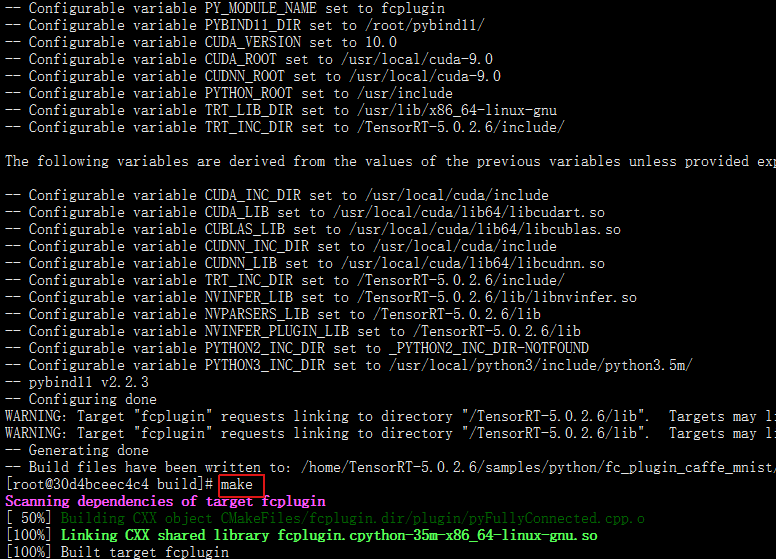
现在来看FullyConnected.h,因为长期不写cpp,所以对cpp代码都生疏了
#ifndef _FULLY_CONNECTED_H_

#define _FULLY_CONNECTED_H_

#include <cassert>

#include <cstring>

#include <cuda_runtime_api.h>

#include <cudnn.h>

#include <cublas_v2.h>

#include <stdexcept>

#include "NvInfer.h" //在路径 /TensorRT-5.0.2.6/include/

#include "NvCaffeParser.h" //在路径 /TensorRT-5.0.2.6/include/

#define CHECK(status) { if (status != 0) throw std::runtime_error(__FILE__ +  __LINE__ + std::string{"CUDA Error: "} + std::to_string(status)); }

// 将数据从host移动到device

nvinfer1::Weights copyToDevice(const void* hostData, int count)

{

	void* deviceData;

	CHECK(cudaMalloc(&deviceData, count * sizeof(float)));

	CHECK(cudaMemcpy(deviceData, hostData, count * sizeof(float), cudaMemcpyHostToDevice));

	return nvinfer1::Weights{nvinfer1::DataType::kFLOAT, deviceData, count};

}

//将数据从device移动到host

int copyFromDevice(char* hostBuffer, nvinfer1::Weights deviceWeights)

{

	*reinterpret_cast<int*>(hostBuffer) = deviceWeights.count;

	CHECK(cudaMemcpy(hostBuffer + sizeof(int), deviceWeights.values, deviceWeights.count * sizeof(float), cudaMemcpyDeviceToHost));

	return sizeof(int) + deviceWeights.count * sizeof(float);

}

//-----------------------------

/*建立FCPlugin类*/

class FCPlugin: public nvinfer1::IPluginExt

{

public:

	// In this simple case we're going to infer the number of output channels from the bias weights.

	// The knowledge that the kernel weights are weights[0] and the bias weights are weights[1] was

	// divined from the caffe innards

	FCPlugin(const nvinfer1::Weights* weights, int nbWeights)

	{

		assert(nbWeights == 2);

		mKernelWeights = copyToDevice(weights[0].values, weights[0].count);

		mBiasWeights = copyToDevice(weights[1].values, weights[1].count);

	}

	// 构造函数,用于从一个字节流中创建plugin

	FCPlugin(const void* data, size_t length)

	{

		const char* d = reinterpret_cast<const char*>(data), *a = d;

		mKernelWeights = copyToDevice(d + sizeof(int), reinterpret_cast<const int&>(d));

		d += sizeof(int) + mKernelWeights.count * sizeof(float);

		mBiasWeights = copyToDevice(d + sizeof(int), reinterpret_cast<const int&>(d));

		d += sizeof(int) + mBiasWeights.count * sizeof(float);

		assert(d == a + length);

	}

	virtual int getNbOutputs() const override { return 1; }

	virtual nvinfer1::Dims getOutputDimensions(int index, const nvinfer1::Dims* inputs, int nbInputDims) override

	{

		assert(index == 0 && nbInputDims == 1 && inputs[0].nbDims == 3);

		return nvinfer1::DimsCHW{static_cast<int>(mBiasWeights.count), 1, 1};

	}

	virtual int initialize() override

	{

		CHECK(cudnnCreate(&mCudnn));

		CHECK(cublasCreate(&mCublas));

		// Create cudnn tensor descriptors for bias addition.

		CHECK(cudnnCreateTensorDescriptor(&mSrcDescriptor));

		CHECK(cudnnCreateTensorDescriptor(&mDstDescriptor));

		return 0;

	}

	virtual void terminate() override

	{

		CHECK(cudnnDestroyTensorDescriptor(mSrcDescriptor));

		CHECK(cudnnDestroyTensorDescriptor(mDstDescriptor));

		CHECK(cublasDestroy(mCublas));

		CHECK(cudnnDestroy(mCudnn));

	}

    // This plugin requires no workspace memory during build time.

	virtual size_t getWorkspaceSize(int maxBatchSize) const override { return 0; }

	virtual int enqueue(int batchSize, const void* const* inputs, void** outputs, void* workspace, cudaStream_t stream) override

	{

		int nbOutputChannels = mBiasWeights.count;

		int nbInputChannels = mKernelWeights.count / nbOutputChannels;

		constexpr float kONE = 1.0f, kZERO = 0.0f;

		// Do matrix multiplication.

		cublasSetStream(mCublas, stream);

		cudnnSetStream(mCudnn, stream);

		CHECK(cublasSgemm(mCublas, CUBLAS_OP_T, CUBLAS_OP_N, nbOutputChannels, batchSize, nbInputChannels, &kONE,

				reinterpret_cast<const float*>(mKernelWeights.values), nbInputChannels,

				reinterpret_cast<const float*>(inputs[0]), nbInputChannels, &kZERO,

				reinterpret_cast<float*>(outputs[0]), nbOutputChannels));

        // Add bias.

		CHECK(cudnnSetTensor4dDescriptor(mSrcDescriptor, CUDNN_TENSOR_NCHW, CUDNN_DATA_FLOAT, 1, nbOutputChannels, 1, 1));

		CHECK(cudnnSetTensor4dDescriptor(mDstDescriptor, CUDNN_TENSOR_NCHW, CUDNN_DATA_FLOAT, batchSize, nbOutputChannels, 1, 1));

		CHECK(cudnnAddTensor(mCudnn, &kONE, mSrcDescriptor, mBiasWeights.values, &kONE, mDstDescriptor, outputs[0]));

		return 0;

	}

	// For this sample, we'll only support float32 with NCHW.

	virtual bool supportsFormat(nvinfer1::DataType type, nvinfer1::PluginFormat format) const override

	{

		return (type == nvinfer1::DataType::kFLOAT && format == nvinfer1::PluginFormat::kNCHW);

	}

	void configureWithFormat(const nvinfer1::Dims* inputDims, int nbInputs, const nvinfer1::Dims* outputDims, int nbOutputs, nvinfer1::DataType type, nvinfer1::PluginFormat format, int maxBatchSize)

	{

		assert(nbInputs == 1 && inputDims[0].d[1] == 1 && inputDims[0].d[2] == 1);

		assert(nbOutputs == 1 && outputDims[0].d[1] == 1 && outputDims[0].d[2] == 1);

		assert(mKernelWeights.count == inputDims[0].d[0] * inputDims[0].d[1] * inputDims[0].d[2] * mBiasWeights.count);

	}

	virtual size_t getSerializationSize() override

	{

		return sizeof(int) * 2 + mKernelWeights.count * sizeof(float) + mBiasWeights.count * sizeof(float);

	}

	virtual void serialize(void* buffer) override

	{

		char* d = reinterpret_cast<char*>(buffer), *a = d;

		d += copyFromDevice(d, mKernelWeights);

		d += copyFromDevice(d, mBiasWeights);

		assert(d == a + getSerializationSize());

	}

	// 析构函数,释放buffer.

	virtual ~FCPlugin()

	{

		cudaFree(const_cast<void*>(mKernelWeights.values));

		mKernelWeights.values = nullptr;

		cudaFree(const_cast<void*>(mBiasWeights.values));

		mBiasWeights.values = nullptr;

	}

private:

	cudnnHandle_t mCudnn;

	cublasHandle_t mCublas;

	nvinfer1::Weights mKernelWeights{nvinfer1::DataType::kFLOAT, nullptr}, mBiasWeights{nvinfer1::DataType::kFLOAT, nullptr};

	cudnnTensorDescriptor_t mSrcDescriptor, mDstDescriptor;

};

/*建立FCPluginFactory类*/

class FCPluginFactory : public nvcaffeparser1::IPluginFactoryExt, public nvinfer1::IPluginFactory

{

public:

	bool isPlugin(const char* name) override { return isPluginExt(name); }

	bool isPluginExt(const char* name) override { return !strcmp(name, "ip2"); }

    // Create a plugin using provided weights.

	virtual nvinfer1::IPlugin* createPlugin(const char* layerName, const nvinfer1::Weights* weights, int nbWeights) override

	{

		assert(isPluginExt(layerName) && nbWeights == 2);

		assert(mPlugin == nullptr);

        // This plugin will need to be manually destroyed after parsing the network, by calling destroyPlugin.

		mPlugin = new FCPlugin{weights, nbWeights};

		return mPlugin;

	}

    // Create a plugin from serialized data.

	virtual nvinfer1::IPlugin* createPlugin(const char* layerName, const void* serialData, size_t serialLength) override

	{

		assert(isPlugin(layerName));

        // This will be automatically destroyed when the engine is destroyed.

		return new FCPlugin{serialData, serialLength};

	}

    // User application destroys plugin when it is safe to do so.

    // Should be done after consumers of plugin (like ICudaEngine) are destroyed.

	void destroyPlugin() { delete mPlugin; }

    FCPlugin* mPlugin{ nullptr };

};

#endif //_FULLY_CONNECTED_H
现在来看pyFullyConnected.cpp该源码中用到了pybind11,关于其文档
#include "FullyConnected.h"

#include "NvInfer.h"

#include "NvCaffeParser.h"

#include <pybind11/pybind11.h>

PYBIND11_MODULE(fcplugin, m)

{

    namespace py = pybind11;

    // 以python方式导入tensorrt模块.

    py::module::import("tensorrt");

    // Note that we only need to bind the constructors manually. Since all other methods override IPlugin functionality, they will be automatically available in the python bindings.

    // The `std::unique_ptr<FCPlugin, py::nodelete>` specifies that Python is not responsible for destroying the object. This is required because the destructor is private.

    py::class_<FCPlugin, nvinfer1::IPluginExt, std::unique_ptr<FCPlugin, py::nodelete>>(m, "FCPlugin")

        // Bind the normal constructor as well as the one which deserializes the plugin

        .def(py::init<const nvinfer1::Weights*, int>())

        .def(py::init<const void*, size_t>())

    ;

    // Since the createPlugin function overrides IPluginFactory functionality, we do not need to explicitly bind it here.

    // We specify py::multiple_inheritance because we have not explicitly specified nvinfer1::IPluginFactory as a base class.

    py::class_<FCPluginFactory, nvcaffeparser1::IPluginFactoryExt>(m, "FCPluginFactory", py::multiple_inheritance())

        // Bind the default constructor.

        .def(py::init<>())

        // The destroy_plugin function does not override the base class, so we must bind it explicitly.

        .def("destroy_plugin", &FCPluginFactory::destroyPlugin)

    ;

}
cpp的代码就先不解释了。。。
接着分析sample.py
# This sample uses a Caffe model along with a custom plugin to create a TensorRT engine.

from random import randint

from PIL import Image

import numpy as np

import pycuda.driver as cuda

import pycuda.autoinit

import tensorrt as trt

try:

    from build import fcplugin

except ImportError as err:

    raise ImportError("""ERROR: Failed to import module ({})

Please build the FullyConnected sample plugin.

For more information, see the included README.md

Note that Python 2 requires the presence of `__init__.py` in the build folder""".format(err))

import sys, os

sys.path.insert(1, os.path.join(sys.path[0], ".."))

# import common

# 这里将common中的GiB和find_sample_data,do_inference等函数移动到该py文件中,保证自包含。

def GiB(val):

    '''以GB为单位,计算所需要的存储值,向左位移10bit表示KB,20bit表示MB '''

    return val * 1 << 30

def find_sample_data(description="Runs a TensorRT Python sample", subfolder="", find_files=[]):

    '''该函数就是一个参数解析函数。

    Parses sample arguments.

    Args:

        description (str): Description of the sample.

        subfolder (str): The subfolder containing data relevant to this sample

        find_files (str): A list of filenames to find. Each filename will be replaced with an absolute path.

    Returns:

        str: Path of data directory.

    Raises:

        FileNotFoundError

    '''

    # 为了简洁,这里直接将路径硬编码到代码中。

    data_root = kDEFAULT_DATA_ROOT = os.path.abspath("/TensorRT-5.0.2.6/python/data/")

    subfolder_path = os.path.join(data_root, subfolder)

    if not os.path.exists(subfolder_path):

        print("WARNING: " + subfolder_path + " does not exist. Using " + data_root + " instead.")

    data_path = subfolder_path if os.path.exists(subfolder_path) else data_root

    if not (os.path.exists(data_path)):

        raise FileNotFoundError(data_path + " does not exist.")

    for index, f in enumerate(find_files):

        find_files[index] = os.path.abspath(os.path.join(data_path, f))

        if not os.path.exists(find_files[index]):

            raise FileNotFoundError(find_files[index] + " does not exist. ")

    if find_files:

        return data_path, find_files

    else:

        return data_path

#-----------------

TRT_LOGGER = trt.Logger(trt.Logger.WARNING)

class ModelData(object):

    INPUT_NAME = "input"

    INPUT_SHAPE = (1, 28, 28)

    OUTPUT_NAME = "prob"

    OUTPUT_SHAPE = (10, )

    DTYPE = trt.float32

# 用一个解析器从binary_proto中检索mean data.

def retrieve_mean(mean_proto):

    with trt.CaffeParser() as parser:

        return parser.parse_binary_proto(mean_proto)

# 创建解析器的plugin factory. 设定成全局是因为可以在engine销毁之后再销毁.

fc_factory = fcplugin.FCPluginFactory()

'''main第二步:构建engine '''

def build_engine(deploy_file, model_file):

    with trt.Builder(TRT_LOGGER) as builder, \

         builder.create_network() as network, \

         trt.CaffeParser() as parser:

        builder.max_workspace_size = GiB(1)

        # 设定解析器的plugin factory。这里将其绑定到引用是为了后续能够手动销毁

        # parser.plugin_factory_ext 是一个 write-only属性

        ''' plugin_factory_ext是CaffeParser特有的接口,为了接入用户定义的组件

       https://docs.nvidia.com/deeplearning/sdk/tensorrt-api/python_api/parsers/Caffe/pyCaffe.html?highlight=plugin_factory_ext

        '''

        parser.plugin_factory_ext = fc_factory

        # 解析该模型,并构建engine

        model_tensors = parser.parse(deploy=deploy_file, model=model_file, network=network, dtype=ModelData.DTYPE)

        # 标记网络的输出

        network.mark_output(model_tensors.find(ModelData.OUTPUT_NAME))

        return builder.build_cuda_engine(network)

'''main中第三步:分配buffer '''

def allocate_buffers(engine):

    inputs = []

    outputs = []

    bindings = []

    stream = cuda.Stream()

    for binding in engine:

        size = trt.volume(engine.get_binding_shape(binding)) * engine.max_batch_size

        dtype = trt.nptype(engine.get_binding_dtype(binding))

        # 分配host和device端的buffer

        host_mem = cuda.pagelocked_empty(size, dtype)

        device_mem = cuda.mem_alloc(host_mem.nbytes)

        # 将device端的buffer追加到device的bindings.

        bindings.append(int(device_mem))

        # Append to the appropriate list.

        if engine.binding_is_input(binding):

            inputs.append(HostDeviceMem(host_mem, device_mem))

        else:

            outputs.append(HostDeviceMem(host_mem, device_mem))

    return inputs, outputs, bindings, stream

'''main中第四步:选择测试样本 '''

def load_normalized_test_case(data_path, pagelocked_buffer, mean, case_num=randint(0, 9)):

    test_case_path = os.path.join(data_path, str(case_num) + ".pgm")

    # Flatten图像为1维数组,然后归一化,并copy到pagelocked内存中。

    img = np.array(Image.open(test_case_path)).ravel()

    np.copyto(pagelocked_buffer, img - mean)

    return case_num

'''main中第五步:执行inference '''

# 该函数可以适应多个输入/输出;输入和输出格式为HostDeviceMem对象组成的列表

def do_inference(context, bindings, inputs, outputs, stream, batch_size=1):

    # 将数据移动到GPU

    [cuda.memcpy_htod_async(inp.device, inp.host, stream) for inp in inputs]

    # 执行inference.

    context.execute_async(batch_size=batch_size, bindings=bindings, stream_handle=stream.handle)

    # 将结果从 GPU写回到host端

    [cuda.memcpy_dtoh_async(out.host, out.device, stream) for out in outputs]

    # 同步stream

    stream.synchronize()

    # 返回host端的输出结果

    return [out.host for out in outputs]

def main():

    ''' 1 - 读取caffe生成的模型文件'''

    data_path, [deploy_file, model_file, mean_proto] = find_sample_data(

          description="Runs an MNIST network using a Caffe model file",

          subfolder="mnist",

         find_files=["mnist.prototxt",

                 "mnist.caffemodel",

                 "mnist_mean.binaryproto"])

    ''' 2 - 基于build_engine构建engine'''

    with build_engine(deploy_file, model_file) as engine:

        ''' 3 - 构建engine, 分配buffers, 创建一个流 '''

        inputs, outputs, bindings, stream = allocate_buffers(engine)

        mean = retrieve_mean(mean_proto)

        with engine.create_execution_context() as context:

            ''' 4 - 读取测试样本,并归一化'''

            case_num = load_normalized_test_case(data_path, inputs[0].host, mean)

            ''' 5 -执行inference,do_inference函数会返回一个list类型,此处只有一个元素 '''

            [output] = do_inference(context, bindings=bindings, inputs=inputs, outputs=outputs, stream=stream)

            pred = np.argmax(output)

            print("Test Case: " + str(case_num))

            print("Prediction: " + str(pred))

    ''' 6 - 在engine销毁之后,这里手动销毁plugin'''

    fc_factory.destroy_plugin()

if __name__ == "__main__":

    main()
运行结果如图:

TensorRT&Sample&Python[fc_plugin_caffe_mnist]的更多相关文章
- TensorRT&Sample&Python[yolov3_onnx]
本文是基于TensorRT 5.0.2基础上,关于其内部的yolov3_onnx例子的分析和介绍. 本例子展示一个完整的ONNX的pipline,在tensorrt 5.0的ONNX-TensorRT ...
- TensorRT&Sample&Python[uff_custom_plugin]
本文是基于TensorRT 5.0.2基础上,关于其内部的uff_custom_plugin例子的分析和介绍. 本例子展示如何使用cpp基于tensorrt python绑定和UFF解析器进行编写pl ...
- TensorRT&Sample&Python[network_api_pytorch_mnist]
本文是基于TensorRT 5.0.2基础上,关于其内部的network_api_pytorch_mnist例子的分析和介绍. 本例子直接基于pytorch进行训练,然后直接导出权重值为字典,此时并未 ...
- TensorRT&Sample&Python[end_to_end_tensorflow_mnist]
本文是基于TensorRT 5.0.2基础上,关于其内部的end_to_end_tensorflow_mnist例子的分析和介绍. 1 引言 假设当前路径为: TensorRT-5.0.2.6/sam ...
- TensorRT&Sample&Python[introductory_parser_samples]
本文是基于TensorRT 5.0.2基础上,关于其内部的introductory_parser_samples例子的分析和介绍. 1 引言 假设当前路径为: TensorRT-5.0.2.6/sam ...
- tensorRT使用python进行网络定义
- Python API vs C++ API of TensorRT
Python API vs C++ API of TensorRT 本质上,C++ API和Python API应该在支持您的需求方面接近相同.pythonapi的主要优点是数据预处理和后处理都很容易 ...
- (原)pytorch中使用TensorRT
转载请注明出处: https://www.cnblogs.com/darkknightzh/p/11332155.html 代码网址: https://github.com/darkknightzh/ ...
- 基于TensorRT 3的自动驾驶快速INT8推理
基于TensorRT 3的自动驾驶快速INT8推理 Fast INT8 Inference for Autonomous Vehicles with TensorRT 3 自主驾驶需要安全性,需要一种 ...
随机推荐
- Once More
Topic Link http://ctf5.shiyanbar.com/web/more.php 1)源代码分析 发现 ereg()函数使得password必须是数字或字母同时长度必须是小于8val ...
- Linux 中Ctrl + s 的作用
在Linux下使用vim编辑程序时,常常会习惯性的按下Ctrl + s保存文件内容.殊不知,这一按不紧,整个终端再也不响应了. 事实上Ctrl + s在终端下是有特殊用途的,那就是暂停该终端,这个功能 ...
- eclipse导入别人工程项目后,出现红叉的各种情况
原文:http://www.cnblogs.com/mmzs/p/7662863.html 1.多半是因为jdk版本的原因,调整一下即可: 解决方法:Build Path ==> Configu ...
- es简单打造站内搜索
最近挺忙的,在外出差,又同时干两个项目.白天一个晚上一个,特别是白天做的项目,马上就要上线了,在客户这里 三天两头开会,问题很多真的很想好好静下来怼代码,半夜做梦都能fix bugs~ 和客户交流真的 ...
- [转]BAT 批处理脚本 教程
第一章 批处理基础第一节 常用批处理内部命令简介 批处理定义:顾名思义,批处理文件是将一系列命令按一定的顺序集合为一个可执行的文本文件,其扩展名为BAT或者CMD.这些命令统称批处理命令.小知识:可以 ...
- Could not load file or assembly 'System.ValueTuple'
项目目标框架:.Net Framework 4.6.2 报错:Could not load file or assembly 'System.ValueTuple' 在4.6.2项目中,想要使用C#7 ...
- vb.net連接SQL数据库
'導入命名空間Imports System.Data.SqlClient '定義變量 Dim Sql As String 'SQL字串 Dim Sqlado As SqlConnection '连接数 ...
- 【学习笔记】tensorflow实现一个简单的线性回归
目录 准备知识 Tensorflow运算API 梯度下降API 简单的线性回归的实现 建立事件文件 变量作用域 增加变量显示 模型的保存与加载 自定义命令行参数 准备知识 Tensorflow运算AP ...
- dsu on tree入门
先瞎扯几句 说起来我跟这个算法好像还有很深的渊源呢qwq.当时在学业水平考试的考场上,题目都做完了不会做,于是开始xjb出题.突然我想到这么一个题 看起来好像很可做的样子,然而直到考试完我都只想出来一 ...
- 【20190328】CSS-transform-origin(变形原点)解析
因为搜遍网上也没有一篇文章把transform-origin讲得很清楚的,所以自己总结了一下 transform-origin是变形原点,也就是该元素围绕着那个点变形或旋转,该属性只有在设置了tran ...