
iOS UILabel 文字 置顶/置底 实现
iOS UILabel控件默认文字位置是居中的,如图所示:

但是我们经常碰到这样的需求,希望文字向上置顶,或者向下置底,但是很遗憾,iOS API中并没有提供相应的属性和方法,需要我们手动设置。
利用 分类(category)为UILabel添加属性 isTop 和 isBottom来控制文字是否置顶和置底。
实现:利用往文字后面活前面下面添加”\n”来实现文字填充满整个UILable控件实现置顶/置顶效果
.h文件
#import <UIKit/UIKit.h>

@interface UILabel (TextAlign)

@property (nonatomic, assign) BOOL isTop;

@property (nonatomic, assign) BOOL isBottom;

@end
.m文件
#import "UILabel+TextAlign.h"

@implementation UILabel (TextAlign)

-(void)setIsTop:(BOOL)isTop {

    if (isTop) {

        CGSize fontSize = [self.text sizeWithFont:self.font];

        //控件的高度除以一行文字的高度

        int num = self.frame.size.height/fontSize.height;

        //计算需要添加换行符个数

        int newLinesToPad = num  - self.numberOfLines;

        self.numberOfLines = 0;

        for(int i=0; i<newLinesToPad; i++)

            //在文字后面添加换行符"/n"

            self.text = [self.text stringByAppendingString:@"\n"];

    }

}

-(void)setIsBottom:(BOOL)isBottom {

    if (isBottom) {

        CGSize fontSize = [self.text sizeWithFont:self.font];

        //控件的高度除以一行文字的高度

        int num = self.frame.size.height/fontSize.height;

        //计算需要添加换行符个数

        int newLinesToPad = num  - self.numberOfLines;

        self.numberOfLines = 0;

        for(int i=0; i<newLinesToPad; i++)

            //在文字前面添加换行符"/n"

            self.text = [NSString stringWithFormat:@" \n%@",self.text];

    }

}

@end
使用方法:
导入头文件
#import "UILabel+TextAlign.h"然后设置属性
//置顶

self.lb.isTop = YES;

//置底

self.lb.isBottom = YES;源码免费下载地址:http://www.jinhusns.com/Products/Download/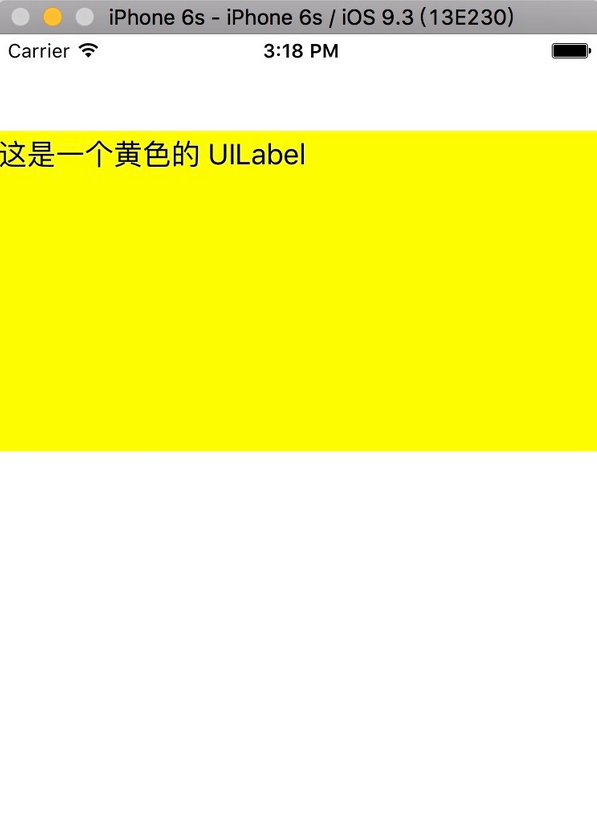
iOS UILabel 文字 置顶/置底 实现的更多相关文章
- iOS UILabel文字自适应高度自适应
第一步:创建UILabel对象,并设置一些基本设置 UILabel *label = [[UILabel alloc] init]; label.text = @"8月29日,在雅加达亚运会 ...
- iOS UILabel文字缩进
使用NSMutableParagraphStyle实现label文字首尾的缩进 NSMutableParagraphStyle *paraStyle = [[NSMutableParagraphSty ...
- jQuery 元素的选中, 置顶、上移、下移、置底、删除
如截图: <ul> <li class="li01" onclick="C_columnSetTop(this)"><i>& ...
- js上移、下移、置顶、置底功能实现
实现页面上列表内容上移.下移.置顶.置底 功能,主要实现思路是节点操作,比如说:上移,直接把点击项移动到前一个节点,以此类推,当然实际代码实现还要加些判断,如当前点击操作项是否已经是置底或置底了,如果 ...
- js滚动显示: 滚动条置顶/底
<script> //当聊天室的内容超出页面范围时, 如何让页面刷新后 显示最下面的内容 document.getElementByIdx ( 'chatboard').scrollTop ...
- jquery中的置顶,置底,向上,向下的排序功能
css .selectedLi{background: #f0ad4e;color:#fff;} html部分 <ul class="seetSelect2" id='sys ...
- FMX 窗口置顶 或置底 xe10
FMX 窗口置顶 或置底 xe10 Popup 置底 StayOnTop 置顶
- IOS 作业项目 TableView两个section中cell置顶功能实现
点击cell会置顶,其他的下移
- 【iOS开发系列】cell切割线置顶
废话不多说,直接上代码: /** * tableViewCell切割线左側置顶 < 1 > */ -(void)viewDidLayoutSubviews { if ([_tableVie ...
随机推荐
- React 轮播图实现
接到项目, 用react和material-ui实现轮播图. 搜索了一些方法参考, 不论语言/框架的使用,大体上分为两种思路 超宽列表实现法 在原生JS或者JQuery中,轮播图的实现一般是这样子的 ...
- L2-013 红色警报 (25 分) (并查集)
链接:https://pintia.cn/problem-sets/994805046380707840/problems/994805063963230208 题目: 战争中保持各个城市间的连通性非 ...
- python中的MySQL使用 + pickle使用
(1)python中有一个包“sqlite3”,可以用来进行数据库相关的操作: 参考下面一个例子: import sqlite3 import pickle img_list = [('a' , 0) ...
- Git(1):版本库+工作区+暂存区
参考博客:https://blog.csdn.net/qq_27825451/article/details/69396866
- Mongodb 相关链接
http://www.cnblogs.com/lanceyan/tag/mongodb/
- Mac下的unity兼容问题,打开项目提示错误:!GetPersistentManager().IsStreamLoaded(assetPath)
安装unity成功之后,打开unity提示如下 那么打开的unity项目很有可能出现找不到资源的错误. 在检查一下你的Mac宗卷格式,如果是APFS格式的话,基本都会不兼容低版本的32位unity应用 ...
- express 实践
截图: 这个项目的数据是根据之前瓜子网爬虫爬的北京区数据 express + mongodb + pug(jade) + flex.css: 项目地址: https://github.com/uust ...
- js实现多个小球碰撞
实现思路:小球的移动,是通过改变小球的left和top值来改变,坐标分别为(x,y)当x/y值加到最大,即加到父级的宽度或者高度时,使x值或者y值减小,同理当x值或者y值减到最小时,同样的使x值或者y ...
- CentOS Linux Jenkins安装、部署、更新
1.安装:https://wiki.jenkins.io/display/JENKINS/Installing+Jenkins+on+Red+Hat+distributions2.部署: 注意事项: ...
- Docker commit 命令保存的镜像文件太大的问题
基础镜像: centos7.5 进入容器后, 先后安装了 jdk1.8, maven3.6.0, git, rocketmq4.3.2 安装完成后使用 docker commit 命令保存为镜像 结果 ...