
Jenkins-client模式配置
Jenkins配置master-slave模式
本来想着先写一篇jenkins安装的流程,但是现在jenkins做的已经非常完善了,有.war文件,直接在tomcat启动即可,所以这里就不多说了,小白自己试试就行,有问题可以给我留言。
先说说master-slave模式,因为Jenkins是一个持续集成平台,像我们现在做的SSD的测试系统,需要有client端运行测试工具,将测试结果返回给Jenkins进行汇总显示,所以这就用到master-client模式,下面是我的具体步骤:
1.管理员建立新账户,client使用该账户登录
使用管理员账户在用户管理中添加一个新用户,这里我是使用zwj作为举例。
2.添加client节点
A) Manage Jenkins->New Node
B) 设置新节点信息
·Name:非必须的识别信息,一般情况使用client账户名,应避免重复;
·Description:主要描述client主机的信息
# of executors:Jenkins在该代理(client)上支持的最大并发生成数,一般情况与client的CPU核数一致即可。
Tips:1.A good value to start with would be the number of CPU cores on the machine. Setting a higher value would cause each build to take longer, but could increase the overall throughput. For example, one build might be CPU-bound, while a second build running at the same time might be I/O-bound — so the second build could take advantage of the spare I/O capacity at that moment.
2.ents must have at least one executor. To temporarily prevent any builds from being executed on an agent, use the Mark this node temporarily offline button on the agent's page.
3.is does not apply to the Jenkins master — setting the number of executors to zero will prevent any builds from being executed on the master.
·Remote root directory:client节点需要有一个文件夹专门用于Jenkins,这里填写路径,比如:windows环境下,是:D:\Jenkins
Tips:1.client(代理)并不保存/持有重要数据信息。比如logs和artifacts存储在master上。Agent一般存储cache data比如installations,build workspace。
2.如果填写的是相对信息,那么将会以jenkins的Launch目录来选取相对地址信息。
·Labels:用于多个代理组组成一个逻辑组。
Tips:1.For example, if you have multiple Windows agents and you have a job that must run on Windows, then you could configure all your Windows agents to have the label windows, and then tie that job to this label.
This would ensure that your job runs on one of your Windows agents, but not on any agents without this label.
2.Labels do not necessarily have to represent the operating system on the agent; you can also use labels to note the CPU architecture, or that a certain tool is installed on the agent.
3.Multiple labels must be separated by a space. For example, windows docker would assign two labels to the agent: windows and docker.
4.Labels may contain any non-space characters, but you should avoid special characters such as any of these: !&|<>(), as other Jenkins features allow for defining label expressions, where these characters may be used.
·Usage:两种模式,控制该节点上,Jenkins的生成方式。
Tips:1.Use this node as much as possible
This is the default setting.
In this mode, Jenkins uses this node freely. Whenever there is a build that can be done by using this node, Jenkins will use it.
2.Only build jobs with label expressions matching this node
In this mode, Jenkins will only build a project on this node when that project is restricted to certain nodes using a label expression, and that expression matches this node's name and/or labels.
This allows a node to be reserved for certain kinds of jobs. For example, if you have jobs that run performance tests, you may want them to only run on a specially configured machine, while preventing all other jobs from using that machine. To do so, you would restrict where the test jobs may run by giving them a label expression matching that machine.
Furthermore, if you set the # of executors value to 1, you can ensure that only one performance test will execute at any given time on that machine; no other builds will interfere.
·Launch methos:控制Jenkins在该节点上如何启动。
Tips:Launch agent via Java Web Start
Allows an agent to be launched using Java Web Start.
In this case, a JNLP file must be opened on the agent machine, which will establish a TCP connection to the Jenkins master.
This means that the agent need not be reachable from the master; the agent just needs to be able to reach the master. If you have enabled security via the Configure Global Security page, you can customize the port on which the Jenkins master will listen for incoming JNLP agent connections.
By default, the JNLP agent will launch a GUI, but it's also possible to run a JNLP agent without a GUI, e.g. as a Window service.
·Avaliability:控制Jenkins何时启动或关闭该代理(client)
Tips:1.Keep this agent online as much as possible
In this mode, Jenkins will keep this agent online as much as possible.
If the agent goes offline, e.g. due to a temporary network failure, Jenkins will periodically attempt to restart it.
2.Take this agent online and offline at specific times
In this mode, Jenkins will bring this agent online at the scheduled time(s), remaining online for a specified amount of time.
If the agent goes offline while it is scheduled to be online, Jenkins will periodically attempt to restart it.
After this agent has been online for the number of minutes specified in the Scheduled 3.Uptime field, it will be taken offline.
If Keep online while builds are running is checked, and the agent is scheduled to be taken offline, Jenkins will wait for any any builds that may be in progress to complete.
Take this agent online when in demand, and offline when idle
In this mode, Jenkins will bring this agent online if there is demand, i.e. there are queued builds which meet the following criteria:
They have been in the queue for at least the specified In demand delay time period
They can be executed by this agent (e.g. have a matching label expression)
This agent will be taken offline if:
There are no active builds running on this agent
This agent has been idle for at least the specified Idle delay time period
·Node Properties:
Environment variables
Tool Locations
以上两个参数暂时还不清楚会起什么作用,暂时跳过不够选。
直接save。
3.Client登录配置
A) Agent登录
在新加入的节点计算机(client)上,打开浏览器,使用之前注册的新用户信息登录Jenkins。
B) 配置打开JNLP功能
Manage Jenkins->Configure Global Security
在Agents分类中修改TCP port for JNLP agents选项为Random.
点击Agent protocols…,勾选Java Web Start Agent Protocol/4 (TLS encryption)即可。
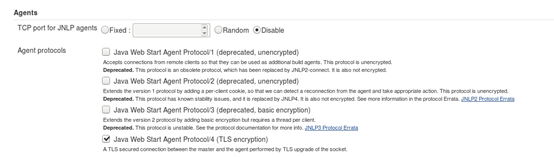
C) 启动client连接
Manage Jenkins->Manage Nodes
选择刚才添加的client节点计算机
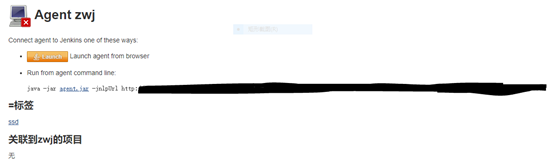
点击Launch
这时,会下载一个文件slave-agent.jnlp,双击打开(前提需要安装Java Web Start Launcher或jdk环境)会有如下所示:
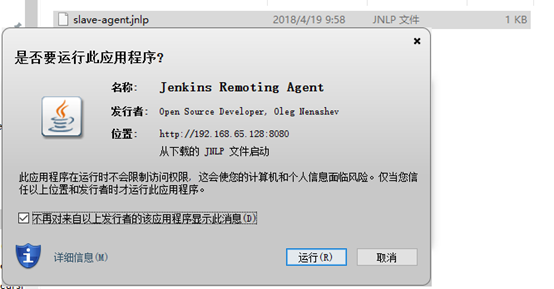
选择“运行”,将会启动连接程序,等待一会儿
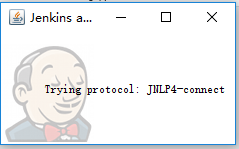
当出现Connected,就说明已经连接上Master
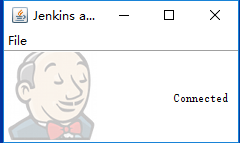
打开Manage Jenkins->Manage Nodes,然后就可以看到如下列表,显示client的信息:

点击client,可以跳转至其信息,如下所示:

4.设置自启动(optional)
如果需要client在启动时,自动连接,则需要如下设置:
A)在Agent program running界面,选择File->Install as a service
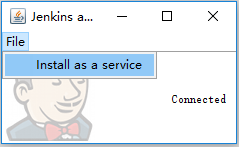
Tips:该功能需要有“.NET Framework 3.5 Features”

点击确定进行安装。
安装失败,显示如下错误,此处并未亲测解决:
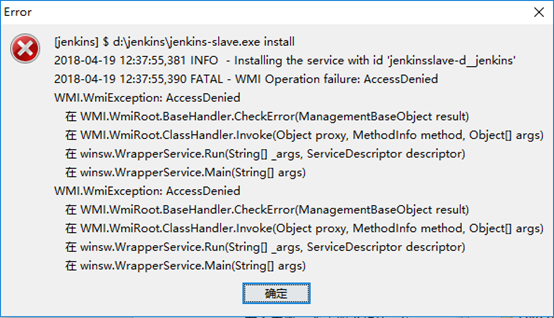
查找到d:\jenkins\jenkins-slave.exe,双击运行,出现:
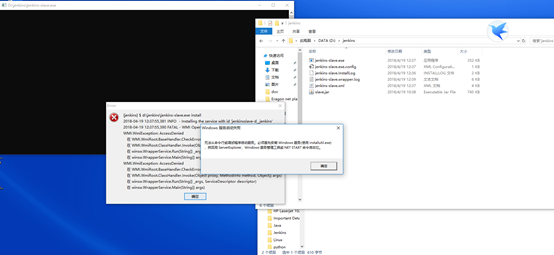
怀疑installutil的问题,电脑已安装.net3.5,但是仍然报错,具体定位到.net目录,通过cmd命令运行,结果如下:
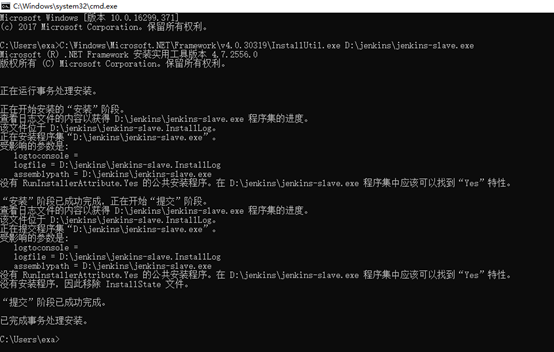
然而关闭页面后,仍然无法自动连接。
这里考虑两方面的问题:
1) 理解层面:可能这里的启动并不是通过installutil
2) 技术层面:自动启动部分的安装还有原理不清楚
希望这里的问题有人可以解决的话,我们相互讨论和交流,期待您的不吝赐教,谢谢~
Jenkins-client模式配置的更多相关文章
- Java虚拟机6:内存溢出和内存泄露、并行和并发、Minor GC和Full GC、Client模式和Server模式的区别
前言 之前的文章尤其是讲解GC的时候提到了很多的概念,比如内存溢出和内存泄露.并行与并发.Client模式和Server模式.Minor GC和Full GC,本文详细讲解下这些概念的区别. 内存溢出 ...
- client模式下对应接口加入桥接出错
client模式下,响应的接口wlan0 加入桥接时出现如下错误: root@root:~# brctl addif br-lan wlan0brctl: bridge br-lan: Operati ...
- JVM的Client模式与Server模式
概述 JVM有两种运行模式Server与Client.两种模式的区别在于,Client模式启动速度较快,Server模式启动较慢:但是启动进入稳定期长期运行之后Server模式的程序运行速度比Clie ...
- Spark代码中设置appName在client模式和cluster模式中不一样问题
问题 Spark应用名在使用yarn-cluster模式提交时不生效,在使用yarn-client模式提交时生效,如图1所示,第一个应用是使用yarn-client模式提交的,正确显示我们代码里设置的 ...
- Puppet nginx+passenger模式配置
Puppet nginx+passenger模式配置 一.简述:Puppet 运行在单台服务器上默认启动的是一个puppetmaster进程,当遇到client高并发的请求时,基于ruby的WEBRi ...
- Java虚拟机10:Client模式和Server模式的区别
部分商用虚拟机中,Java程序最初是通过解释器对.class文件进行解释执行的,当虚拟机发现某个方法或代码块运行地特别频繁的时候,就会把这些代码认定为热点代码Hot Spot Code(这也是我们使用 ...
- Apache 工作模式配置优化
Apahce 工作模式配置 1.查看当前MPM工作模式 /usr/local/apache2/bin/apachectl -V Server version: Apache/2.4.27 (Unix) ...
- haproxy+keepalived主备与双主模式配置
Haproxy+Keepalived主备模式 主备节点设置 主备节点上各安装配置haproxy,配置内容且要相同 global log 127.0.0.1 local2 chroot /var/lib ...
- JVM client模式和Server模式
我们把jdk安装完成后,在命名行输入java -version 不仅可以看到jdk版本相关信息,还会看到类似与 Java HotSpot(TM) 64-Bit Server VM (build 25. ...
随机推荐
- react - next.js 设置body style
因为next.js可以用pages文件夹中的js文件进行route,所以不需要public文件夹和html,因此没有body tag. body自带8px的maigin,我想要给整个页面设置背景颜色, ...
- Element.scrollIntoView()
Element.scrollIntoView() 方法让当前的元素滚动到浏览器窗口的可视区域内 语法 element.scrollIntoView(); element.scrollIntoView( ...
- day 03 数据类型
1.作业讲解 2.数据类型 什么是数据类型? (1)int 1,2,3用于计算. (2)bool:True,False,用户判断. (3)str:存储少量数据,进行操作 'fjdsal' '二哥',' ...
- C# 多线程 类构造函数 类方法之间的关系
先定一个类,既有构造函数又有类方法: public class WriteNumber { /// <summary> /// 构造函数 /// </summary> publ ...
- linux 线程详解
线程 是计算机中独立运行的最小单位,运行时占用很少的系统资源.可以把线程看成是操作系统分配CPU时间的基本单元.一个进程可以拥有一个至多个线程.它线程在进程内部共享地址空间.打开的文件描述符等资源.同 ...
- 从excel表中生成批量SQL,将数据录入到数据库中
excel表格中有许多数据,需要将数据导入数据库中,又不能一个一个手工录入,可以生成SQL,来批量操作. 1.首先在第二行的H列,插入函数:=CONCATENATE("INSERT ...
- PYTHON实现算术表达式构造二叉树
LEETCOCE 224. Basic Calculator Implement a basic calculator to evaluate a simple expression string. ...
- Java中java.util.concurrent包下的4中线程池代码示例
先来看下ThreadPool的类结构 其中红色框住的是常用的接口和类(图片来自:https://blog.csdn.net/panweiwei1994/article/details/78617117 ...
- FPGA设计中的复位
(1)异步复位与同步复位的写法 1.异步复位与同步复位的区别? 同步复位:若复位信号在时钟有效边沿到来时刻为有效,则执行一次复位操作. 优点: 1)同步复位是离散的,所以非常有利于仿真器的仿真: 2) ...
- webdriver的三种时间等待( sleep(); implicitly_wait(); WebDriverWait();)
https://blog.csdn.net/HeatDeath/article/details/71774572 基于<Selenium 2自动化测试实战>的学习笔记(11)—— 设置等待 ...