
Topshelf的使用
一、简介
Topshelf可用于创建和管理Windows服务。其优势在于不需要创建windows服务,创建控制台程序就可以。便于调试。
二、官方地址:
1、官网:http://topshelf-project.com/
2、官方文档:https://topshelf.readthedocs.io/en/latest/
3、github地址:https://github.com/Topshelf/Topshelf
三、详细示例
1、创建控制台程序“Topshelf测试”,Nuget中引入Topshelf,如图所示:
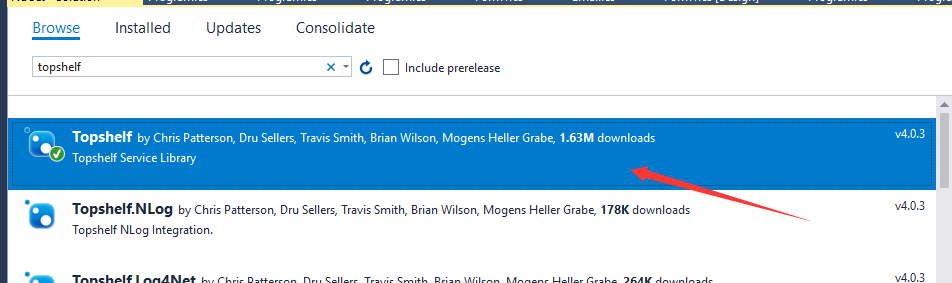
也可以用Nuget的命令行引入,命令如下:
- Install-Package Topshelf
2、在项目中添加类,命名为:TopshelfTest
内容如下:
    public class TopshelfTest

    {

        readonly Timer _timer;

        public TopshelfTest()

        {

            _timer = new Timer() { AutoReset = true };

            _timer.Elapsed += (sender, eventArgs) => { Run(); };

        }

        public void Start() { _timer.Start(); }

        public void Stop() { _timer.Stop(); }

        public static void Run()

        {

            Console.WriteLine("hello Topshelf");

        }

    }
3、在Main函数中加入如下代码:
        public static void Main(string[] args)

        {

            HostFactory.Run(x=>

            {

                x.RunAsLocalSystem();

                x.SetDescription("topshelf测试");

                x.SetDisplayName("topshelftest");

                x.SetServiceName("topshelftest");

                x.Service<TopshelfTest>(s =>

                {

                    s.ConstructUsing(name => new TopshelfTest());

                    s.WhenStarted(tc => tc.Start());

                    s.WhenStopped(tc => tc.Stop());

                });

            });

        }
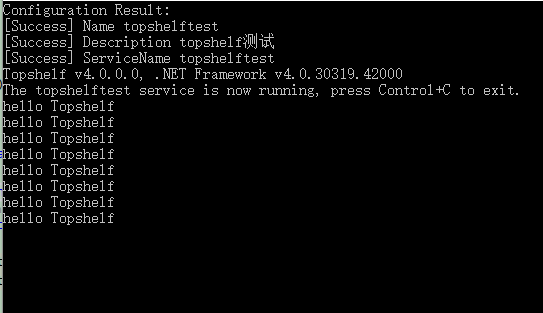
4、运行程序,输出如下,每秒中会执行一次Run函数,也就会打印一次“hello Topshelf”
5、安装服务:
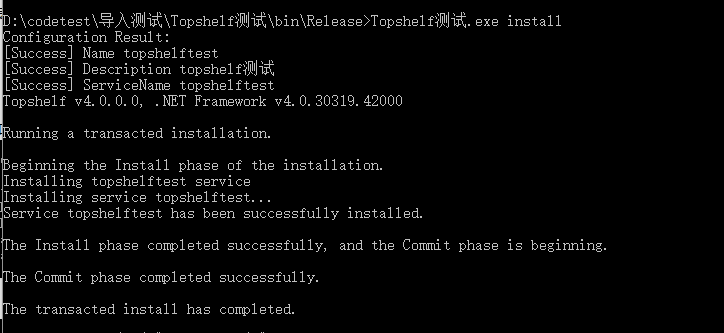
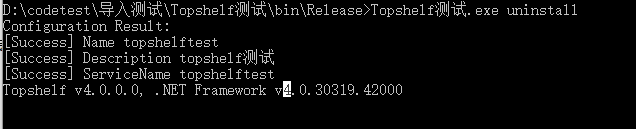
以管理员权限打开cmd命令,管理服务的命令如下:
启动服务:

安装后可以看到服务中出现了安装的服务:

四、示例代码
using System;

using System.Timers;

using Topshelf;

namespace Topshelf测试

{

    public class Program

    {

        public static void Main(string[] args)

        {

            HostFactory.Run(x=>

            {

                x.RunAsLocalSystem();

                x.SetDescription("topshelf测试");

                x.SetDisplayName("topshelftest");

                x.SetServiceName("topshelftest");

                x.Service<TopshelfTest>(s =>

                {

                    s.ConstructUsing(name => new TopshelfTest());

                    s.WhenStarted(tc => tc.Start());

                    s.WhenStopped(tc => tc.Stop());

                });

            });

        }

    }

    public class TopshelfTest

    {

        readonly Timer _timer;

        public TopshelfTest()

        {

            _timer = new Timer() { AutoReset = true };

            _timer.Elapsed += (sender, eventArgs) => { Run(); };

        }

        public void Start() { _timer.Start(); }

        public void Stop() { _timer.Stop(); }

        public static void Run()

        {

            Console.WriteLine("hello Topshelf");

        }

    }

}
Topshelf的使用的更多相关文章
- Topshelf 支持Mono 扩展Topshelf.Linux
使用Topshelf 5步创建Windows 服务 这篇文章大家可以了解到使用Topshelf可以很好的支持Windows服务的开发,但是它和Mono不兼容,Github上有一个扩展https://g ...
- Topshelf 学习 跨平台
Topshelf是一个开源的跨平台的宿主服务框架,支持Windows和Mono,只需要几行代码就可以构建一个很方便使用的服务宿主. 官网:http://topshelf-project.com Git ...
- topshelf和quartz内部分享
阅读目录: 介绍 基础用法 调试及安装 可选配置 多实例支持及相关资料 quartz.net 上月在公司内部的一次分享,现把PPT及部分交流内容整理成博客. 介绍 topshelf是创建windows ...
- 使用topshelf包装redis为windows服务
Redis服务端目前用的是控制台程序运行,部署的时候能作为windows服务后台运行感觉更好.找到一篇文章Running Redis as a Windows Service,利用win ...
- TopShelf框架创建Windows服务作为Remoting的宿主案例:
1.创建服务 using System; using System.Collections.Generic; using System.Linq; using System.Text; using S ...
- 使用Topshelf快速搭建Windows服务
1.创建控制台程序 2.安装Topshelf组件 Install-Package Topshelf using System; using System.Timers; using Topshelf ...
- Topshelf + ServiceModelEx + Nlog 从头构建WCF
前言 Topshelf可以很方便的构建windows service,而且在本地开发时也可以构建Console宿主,因此很方便WCF的开发. ServiceModelEx则提供了很多便利的方法来配置w ...
- topshelf包装redis为windows服务
topshelf包装redis为windows服务 Redis服务端目前用的是控制台程序运行,部署的时候能作为windows服务后台运行感觉更好.找到一篇文章Running Redis as a Wi ...
- 使用Topshelf创建Windows服务
概述 Topshelf是创建Windows服务的另一种方法,老外的一篇文章Create a .NET Windows Service in 5 steps with Topshelf通过5个步骤详细的 ...
- 简单实现Windows服务 TopShelf
Nugut安装 log4net 和 topShelf 1)ServiceRunner类 using log4net;using Topshelf; class ServiceRunner : Serv ...
随机推荐
- Cnblogs美化总结
测试 扩展阅读 [转载]详谈如何定制自己的博客园皮肤 - 云+社区 - 腾讯云谢谢!! [PS]3步搞定博客园界面风格 - nowgood - 博客园 [分享]博客美化(6)为你的博文自动添加目录 - ...
- Gym - 101982F Rectangles (扫描线+线段树)
链接:http://codeforces.com/gym/101982/attachments 思路: 问被覆盖次数为奇数次的矩阵的面积并 扫描线求矩阵面积并我们是上界赋为-1,下界赋为1,因为要求覆 ...
- 「ZJOI Day2」游记
Day-1 晚上一直在出自己做的模拟赛的T1,真的快要死掉了. 分类讨论几十种情况. 窝还是找了Bluesky大佬一起来验题,她瞬间就A掉了这一道题目...自闭了.. 诶,我还是太弱了. 之前教练组织 ...
- [CQOI2016]伪光滑数
题目描述 若一个大于1的整数M的质因数分解有k项,其最大的质因子为Ak,并且满足Ak^K<=N,Ak<128,我们就称整数M为N-伪 光滑数.现在给出N,求所有整数中,第K大的N-伪光滑数 ...
- Python3开发过程常见的异常(最近更新:2019-04-26)
持续更新中... 常见异常解决方案 1.Base Python3.7环境相关:https://www.cnblogs.com/dotnetcrazy/p/9095793.html 1.1.Indent ...
- 在SpringBoot项目中添加logback的MDC
在SpringBoot项目中添加logback的MDC 先看下MDC是什么 Mapped Diagnostic Context,用于打LOG时跟踪一个“会话“.一个”事务“.举例,有一个web ...
- <div>标签仿<textarea>。contentEditable=‘true’,赋予非表单标签内容可以编辑
需求:web页面需要一个文本输入框.1.该文本输入框默认状态下有个仿‘placeholder’的默认文本提示信息,2.文本框输入状态下其高度会随文本内容自动撑开. 方案选择:1.使用<texta ...
- python_unittest学习小结
- SQL随记(五)——函数篇
1.SQL函数: (1)replace(String1,String2,String3):从String1字符串中找到String2,然后用String3替换String2 如:replace('ab ...
- SpringBoot整合阿里云OSS文件上传、下载、查看、删除
1. 开发前准备 1.1 前置知识 java基础以及SpringBoot简单基础知识即可. 1.2 环境参数 开发工具:IDEA 基础环境:Maven+JDK8 所用技术:SpringBoot.lom ...