
Topshelf的使用
一、简介
Topshelf可用于创建和管理Windows服务。其优势在于不需要创建windows服务,创建控制台程序就可以。便于调试。
二、官方地址:
1、官网:http://topshelf-project.com/
2、官方文档:https://topshelf.readthedocs.io/en/latest/
3、github地址:https://github.com/Topshelf/Topshelf
三、详细示例
1、创建控制台程序“Topshelf测试”,Nuget中引入Topshelf,如图所示:
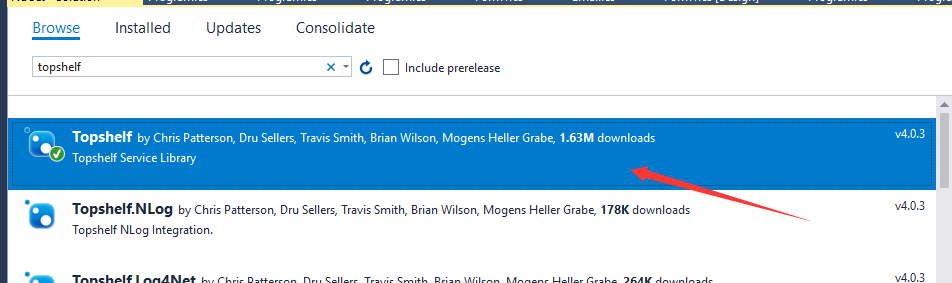
也可以用Nuget的命令行引入,命令如下:
- Install-Package Topshelf
2、在项目中添加类,命名为:TopshelfTest
内容如下:
    public class TopshelfTest

    {

        readonly Timer _timer;

        public TopshelfTest()

        {

            _timer = new Timer() { AutoReset = true };

            _timer.Elapsed += (sender, eventArgs) => { Run(); };

        }

        public void Start() { _timer.Start(); }

        public void Stop() { _timer.Stop(); }

        public static void Run()

        {

            Console.WriteLine("hello Topshelf");

        }

    }
3、在Main函数中加入如下代码:
        public static void Main(string[] args)

        {

            HostFactory.Run(x=>

            {

                x.RunAsLocalSystem();

                x.SetDescription("topshelf测试");

                x.SetDisplayName("topshelftest");

                x.SetServiceName("topshelftest");

                x.Service<TopshelfTest>(s =>

                {

                    s.ConstructUsing(name => new TopshelfTest());

                    s.WhenStarted(tc => tc.Start());

                    s.WhenStopped(tc => tc.Stop());

                });

            });

        }
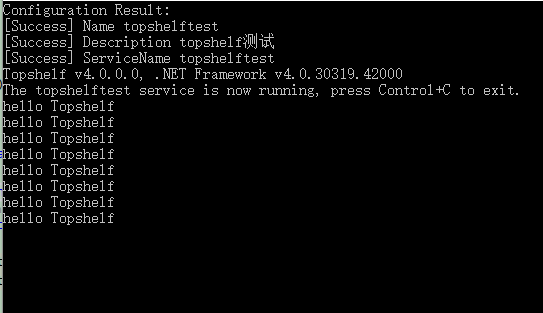
4、运行程序,输出如下,每秒中会执行一次Run函数,也就会打印一次“hello Topshelf”
5、安装服务:
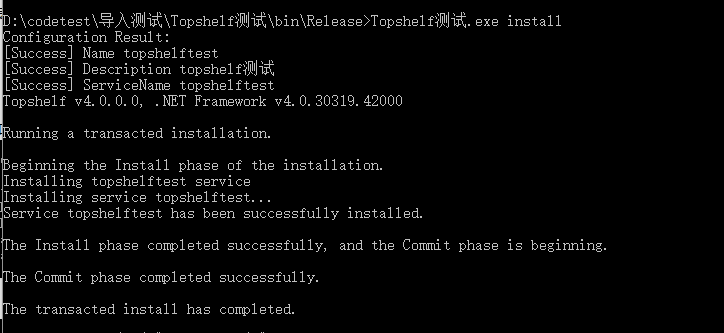
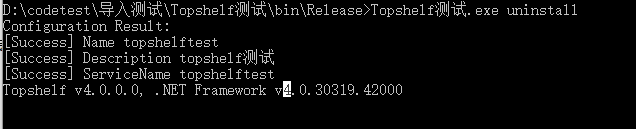
以管理员权限打开cmd命令,管理服务的命令如下:
启动服务:

安装后可以看到服务中出现了安装的服务:

四、示例代码
using System;

using System.Timers;

using Topshelf;

namespace Topshelf测试

{

    public class Program

    {

        public static void Main(string[] args)

        {

            HostFactory.Run(x=>

            {

                x.RunAsLocalSystem();

                x.SetDescription("topshelf测试");

                x.SetDisplayName("topshelftest");

                x.SetServiceName("topshelftest");

                x.Service<TopshelfTest>(s =>

                {

                    s.ConstructUsing(name => new TopshelfTest());

                    s.WhenStarted(tc => tc.Start());

                    s.WhenStopped(tc => tc.Stop());

                });

            });

        }

    }

    public class TopshelfTest

    {

        readonly Timer _timer;

        public TopshelfTest()

        {

            _timer = new Timer() { AutoReset = true };

            _timer.Elapsed += (sender, eventArgs) => { Run(); };

        }

        public void Start() { _timer.Start(); }

        public void Stop() { _timer.Stop(); }

        public static void Run()

        {

            Console.WriteLine("hello Topshelf");

        }

    }

}
Topshelf的使用的更多相关文章
- Topshelf 支持Mono 扩展Topshelf.Linux
使用Topshelf 5步创建Windows 服务 这篇文章大家可以了解到使用Topshelf可以很好的支持Windows服务的开发,但是它和Mono不兼容,Github上有一个扩展https://g ...
- Topshelf 学习 跨平台
Topshelf是一个开源的跨平台的宿主服务框架,支持Windows和Mono,只需要几行代码就可以构建一个很方便使用的服务宿主. 官网:http://topshelf-project.com Git ...
- topshelf和quartz内部分享
阅读目录: 介绍 基础用法 调试及安装 可选配置 多实例支持及相关资料 quartz.net 上月在公司内部的一次分享,现把PPT及部分交流内容整理成博客. 介绍 topshelf是创建windows ...
- 使用topshelf包装redis为windows服务
Redis服务端目前用的是控制台程序运行,部署的时候能作为windows服务后台运行感觉更好.找到一篇文章Running Redis as a Windows Service,利用win ...
- TopShelf框架创建Windows服务作为Remoting的宿主案例:
1.创建服务 using System; using System.Collections.Generic; using System.Linq; using System.Text; using S ...
- 使用Topshelf快速搭建Windows服务
1.创建控制台程序 2.安装Topshelf组件 Install-Package Topshelf using System; using System.Timers; using Topshelf ...
- Topshelf + ServiceModelEx + Nlog 从头构建WCF
前言 Topshelf可以很方便的构建windows service,而且在本地开发时也可以构建Console宿主,因此很方便WCF的开发. ServiceModelEx则提供了很多便利的方法来配置w ...
- topshelf包装redis为windows服务
topshelf包装redis为windows服务 Redis服务端目前用的是控制台程序运行,部署的时候能作为windows服务后台运行感觉更好.找到一篇文章Running Redis as a Wi ...
- 使用Topshelf创建Windows服务
概述 Topshelf是创建Windows服务的另一种方法,老外的一篇文章Create a .NET Windows Service in 5 steps with Topshelf通过5个步骤详细的 ...
- 简单实现Windows服务 TopShelf
Nugut安装 log4net 和 topShelf 1)ServiceRunner类 using log4net;using Topshelf; class ServiceRunner : Serv ...
随机推荐
- JS在一个数组中查找某个用户输入的值,返回对应值所在索引值
方法有很多种 第一:直接循环,判断输出 第二:使用indexOf 正常来说,为了增加工作效率一般会选择indexOf,但是indexOf存在兼容性问题,因此最完善的写法如下 function inde ...
- 题解:luoguP1861 星之器
为什么全世界都说这是个物理题,不应该是一个数学题吗,神犇的势能完全看不懂 我们直接来看题,对于一个点,在计算时候横坐标和纵坐标互不影响,所以我们分开考虑. 我们记两个点假如横坐标相同,分别记纵坐标为a ...
- vue-cli 项目踩坑 npm install 时出错
1.报错如下: 2.此时你执行npm run dev / npm run build 会报错如下 npm ERR! code ELIFECYCLEnpm ERR! errno 1npm ERR! v ...
- Exp1 PC平台逆向破解
本次实践的对象是一个名为pwn1的linux可执行文件. 该程序正常执行流程是:main调用foo函数,foo函数会简单回显任何用户输入的字符串. 该程序同时包含另一个代码片段,getShell,会返 ...
- Gradle创建项目(IntelliJ IDEA)
创建Gradle项目 步骤一: 步骤二: 步骤三: 步骤四: 步骤五: 此时, 项目已经建好, 如果是第一次使用, 或者本地没有该版本的Gradle时, 就会触发下载.如图所示. 点击红色方框中标识的 ...
- Python 中使用 matplotlib 绘图中文字符显示异常的问题
最近在使用 Python matplotlib 绘制图表时发现中文字符不能正确显示:比如在绘制折线图时,中文全部显示成▢▢▢的格式,虽然将数据改成英文就没什么问题,但是所有数据都这么做时不可行的,于是 ...
- 一次mysql主从加keepalived配置搭建及切换演示
[需求] 根据需求需要搭建mysql主从架构数据库及加keepalived进行自动切换VIP [环境介绍] 系统环境:CentOS release 6.4 (Final) + Server vers ...
- 一张图11招学会Python网络黑客
全部学起来: 第一招:搭建Python防范环境 第二招:扫描漏洞 第三招:暴力破解的秘密 第四招:防SQL注入 第五招:防命令注入 第六招:看清文件上传木马 第七招:看清Web攻击 第八招:利用Pyt ...
- [置顶]Python开发之路
阅读目录 第一篇:python入门 第二篇:数据类型.字符编码.文件处理 第三篇:函数 第四篇:模块与包 第五篇:常用模块 第六篇:面向对象 第七篇:面向对象高级 第八篇:异常处理 第九篇:网络编 ...
- python中的图像数据库PIL
from PIL import Image im = Image.open("图片路径") im.function() 常用的函数: 1.im.crop(x,y,x1,y1) 对图 ...