
jquery头像上传剪裁插件cropper的前后台demo
因为一个项目要做一个头像上传的功能,因此选择了使用jquery的头像插件cropper,cropper是一款使用简单且功能强大的图片剪裁jQuery插件,但是在使用的时候,有一个很大的坑需要注意,那就是当上传的文件不需要转换成base64传输给后台的时候,使用FormData对象异步上传的时候,需要加上两个参数为false,此外还给除了两种上传头像的方式,一种直接上传到文件服务器,类似<input type="file" name="file"> 还有一种是将图片进行base64,在后台解密转换成图片。
contentType: false,
processData: false,
1.不进行base64转换直接上传后台
页面显示
<div class="up-img-cover" id="up-img-touch" >
    <img class="img-thumbnail" alt="点击图片上传" src="img/hu.jpg" th:src="${user.avatar}"
         data-am-popover="{position:'left',content: '点击上传', trigger: 'hover focus'}" >
    <div style="background:#F8F8FF;width:180px;position:absolute;height:26px;top:100px;left:24px;z-index: 2;text-align: center;opacity:0.8;" >
        <span>修改头像</span>
    </div>
</div>
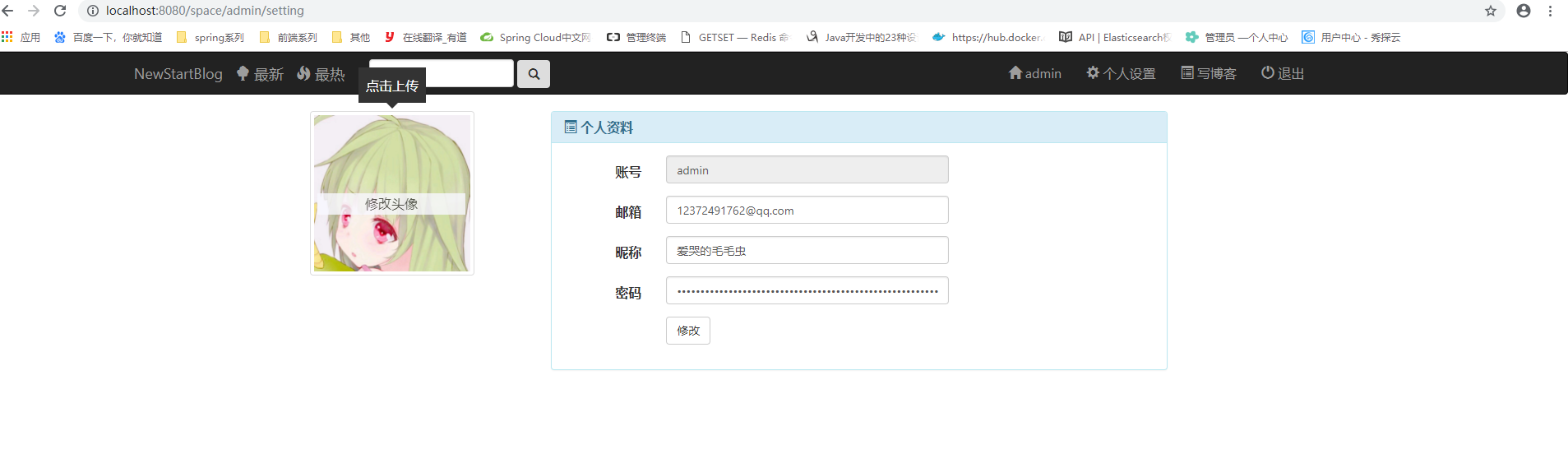
此外附上代码(这里直接给出custom_up_img.js)的前端代码:
$(document).ready(function(){
        $("#up-img-touch").click(function(){
                $("#doc-modal-1").modal({width:'600px'});
        });
});
$(function() {
    'use strict';
    // 初始化
    var $image = $('#image');
    $image.cropper({
        aspectRatio: '1',
        autoCropArea:0.8,
        preview: '.up-pre-after',

    });

    // 事件代理绑定事件
    $('.docs-buttons').on('click', '[data-method]', function() {

        var $this = $(this);
        var data = $this.data();
        var result = $image.cropper(data.method, data.option, data.secondOption);
        switch (data.method) {
            case 'getCroppedCanvas':
            if (result) {
                // 显示 Modal
                $('#cropped-modal').modal().find('.am-modal-bd').html(result);
                $('#download').attr('href', result.toDataURL('image/jpeg'));
            }
            break;
        }
    });

    // 上传图片
    var $inputImage = $('#inputImage');
    var URL = window.URL || window.webkitURL;
    var blobURL;

    if (URL) {
        $inputImage.change(function () {
            var files = this.files;
            var file;

            if (files && files.length) {
               file = files[0];

               if (/^image\/\w+$/.test(file.type)) {
                    blobURL = URL.createObjectURL(file);
                    $image.one('built.cropper', function () {
                        // Revoke when load complete
                       URL.revokeObjectURL(blobURL);
                    }).cropper('reset').cropper('replace', blobURL);
                    $inputImage.val('');
                } else {
                    window.alert('请选择图片!!!');
                }
            }

            // Amazi UI 上传文件显示代码
            var fileNames = '';
            $.each(this.files, function() {
                fileNames += '<span class="am-badge">' + this.name + '</span> ';
            });
            $('#file-list').html(fileNames);
        });
    } else {
        $inputImage.prop('disabled', true).parent().addClass('disabled');
    }

    //绑定上传事件
    $('#up-btn-ok').on('click',function(){
       var $modal = $('#my-modal-loading');
       var $modal_alert = $('#my-alert');
       var img_src=$image.attr("src");
       if(img_src==""){
          set_alert_info("没有选择上传的图片");
          $modal_alert.modal();
          return false;
       }

       $modal.modal();
        $("#image").cropper('getCroppedCanvas').toBlob(function(blob){
            var formData = new FormData();  //这里创建FormData()对象
            formData.append('file', blob);  //给表单对象中添加一个name为file的文件  blod是这个插件选择文件后返回的文件对象
            console.log(blob);
            $.ajax({
                url:"http://localhost:8081/file/upload",  //这里我上传的是我自己开源的一个文件服务器  github地址:https://github.com/Admin1024Admin/FileServer.git
                type: "POST",
                data: formData,
                contentType: false,  //这里需要注意
                processData: false,
                success: function(data, textStatus){
                    $modal.modal('close');
                    set_alert_info(data.result);
                    $modal_alert.modal();
                    if(data.result=="ok"){
                        $("#up-img-touch img").attr("src",data.file);
                        var img_name=data.file.split('/')[2];
                        console.log(img_name);
                        alert("ok");
                        //异步更新头像地址
                        $.ajax({
                            url:"/space/"+url+"/updataAvatar",
                            type:"post",
                            data:{"imgUrl":data.file},
                            success:function (data) {
                                if(data=="ok"){
                                    window.location.reload();
                                }
                            },
                            error:function () {
                                alert("更新失败");
                            }
                        })
                        window.location.reload();
                    }
                },
                error: function(){
                    $modal.modal('close');
                    set_alert_info("上传头像失败了!");
                    $modal_alert.modal();
                    //console.log('Upload error');
                }
            });
        })
    });

});

function rotateimgright() {
$("#image").cropper('rotate', 90);
}

function rotateimgleft() {
$("#image").cropper('rotate', -90);
}

function set_alert_info(content){
   $("#alert_content").html(content);
}

后台代码:基于springboot

/**
 * 博客头像上传
 * @param file
 * @return
 */
@PostMapping("/file/upload")
@ResponseBody
public Map<String,Object> handleFileUpload(@RequestParam("file") MultipartFile file) {
    File returnFile = null;
    Map<String,Object> map = new HashMap<String,Object>();
    try {
       File f = new File(file.getOriginalFilename(),  file.getContentType(), file.getSize(),file.getBytes());  //需要注意,这里的File对象是我自定义的模型类。并非java.io.File对象
       f.setMd5( MD5Util.getMD5(file.getInputStream()) );
       returnFile = fileService.saveFile(f);
       returnFile.setPath("http://localhost:8080/file/view/"+f.getId());
       returnFile.setContent(null) ;
        map.put("result","ok");
        map.put("file","http://localhost:8081/file/view/"+f.getId());
        return map;

    } catch (IOException | NoSuchAlgorithmException ex) {
        ex.printStackTrace();
        map.put("result","no");
        map.put("message",ex.getMessage());
        return map;
    }
}
2.转换成base64后传给后台,在后台解码保存图片
前端代码:
$(document).ready(function(){
        $("#up-img-touch").click(function(){
                $("#doc-modal-1").modal({width:'600px'});
        });
});
$(function() {
    'use strict';
    // 初始化
    var $image = $('#image');
    $image.cropper({
        aspectRatio: '1',
        autoCropArea:0.8,
        preview: '.up-pre-after',

    });

    // 事件代理绑定事件
    $('.docs-buttons').on('click', '[data-method]', function() {

        var $this = $(this);
        var data = $this.data();
        var result = $image.cropper(data.method, data.option, data.secondOption);
        switch (data.method) {
            case 'getCroppedCanvas':
            if (result) {
                // 显示 Modal
                $('#cropped-modal').modal().find('.am-modal-bd').html(result);
                $('#download').attr('href', result.toDataURL('image/jpeg'));
            }
            break;
        }
    });

    // 上传图片
    var $inputImage = $('#inputImage');
    var URL = window.URL || window.webkitURL;
    var blobURL;

    if (URL) {
        $inputImage.change(function () {
            var files = this.files;
            var file;

            if (files && files.length) {
               file = files[0];

               if (/^image\/\w+$/.test(file.type)) {
                    blobURL = URL.createObjectURL(file);
                    $image.one('built.cropper', function () {
                        // Revoke when load complete
                       URL.revokeObjectURL(blobURL);
                    }).cropper('reset').cropper('replace', blobURL);
                    $inputImage.val('');
                } else {
                    window.alert('请选择图片!!!');
                }
            }

            // Amazi UI 上传文件显示代码
            var fileNames = '';
            $.each(this.files, function() {
                fileNames += '<span class="am-badge">' + this.name + '</span> ';
            });
            $('#file-list').html(fileNames);
        });
    } else {
        $inputImage.prop('disabled', true).parent().addClass('disabled');
    }

    //绑定上传事件
    $('#up-btn-ok').on('click',function(){
       var $modal = $('#my-modal-loading');
       var $modal_alert = $('#my-alert');
       var img_src=$image.attr("src");
       if(img_src==""){
          set_alert_info("没有选择上传的图片");
          $modal_alert.modal();
          return false;
       }

       $modal.modal();
       var url=$(this).attr("imgurl");
       var canvas=$("#image").cropper('getCroppedCanvas'); //获取到图片转换成的canvas对象
       var data=canvas.toDataURL(); //将图片转成base64
            $.ajax({
                url:"http://localhost:8081/file/upload",
                type: "POST",
                data: {"img":data.toString},  //这里传递参数给后台
                success: function(data, textStatus){
                    $modal.modal('close');
                    set_alert_info(data.result);
                    $modal_alert.modal();
                    if(data.result=="ok"){
                        $("#up-img-touch img").attr("src",data.file);
                        var img_name=data.file.split('/')[2];
                        console.log(img_name);
                        alert("ok");
                        window.location.reload();
                    }
                },
                error: function(){
                    $modal.modal('close');
                    set_alert_info("上传头像失败了!");
                    $modal_alert.modal();
                    //console.log('Upload error');
                }
            });

    });

});

function rotateimgright() {
$("#image").cropper('rotate', 90);
}

function rotateimgleft() {
$("#image").cropper('rotate', -90);
}

function set_alert_info(content){
   $("#alert_content").html(content);
}

后台base64解码代码:

/**
 * 头像上传
 */
@PostMapping("/{username}/avatar")
@ResponseBody
public Map<String,Object> uploadAvatar(@RequestParam("image")String image){
    String imgBase64 = image.replace("data:image/png;base64,","");
    boolean b = GenerateImage(imgBase64);
    System.out.println("保存成功---->"+b);
    Map<String,Object> map = new HashMap<String,Object>();
    map.put("result","ok");
    map.put("file","图片路径");
   return map;
}
//base64字符串转化成图片
 public boolean GenerateImage(String imgStr){
 //对字节数组字符串进行Base64解码并生成图片
     if (imgStr == null) { //图像数据为空
         return false;
     }
     try{
         BASE64Decoder decoder = new BASE64Decoder();
        // Base64解码
         byte[] b = decoder.decodeBuffer(imgStr);
         for(int i=0;i<b.length;++i)
         {
            if(b[i]<0){//调整异常数据
                b[i]+=256;
            }
         }
         //生成jpeg图片
         String imgFilePath = "D:\\images\\new.jpg";//新生成的图片
         OutputStream out = new FileOutputStream(imgFilePath);
         out.write(b);
         out.flush();
         out.close();
         return true;
     }
     catch (Exception e){
        return false;
     }
 }
jquery头像上传剪裁插件cropper的前后台demo的更多相关文章
- 项目一:第四天 1、快递员的条件分页查询-noSession,条件查询 2、快递员删除(逻辑删除) 3、基于Apache POI实现批量导入区域数据 a)Jquery OCUpload上传文件插件使用 b)Apache POI读取excel文件数据
1. 快递员的条件分页查询-noSession,条件查询 2. 快递员删除(逻辑删除) 3. 基于Apache POI实现批量导入区域数据 a) Jquery OCUpload上传文件插件使用 b) ...
- 使用 jquery 的 上传文件插件 uploadify 3.1 配合 java 来做一个简单的文件上次功能。并且在界面上有radio 的选择内容也要上传
使用 jquery 的 上传文件插件 uploadify 3.1 配合 java 来做一个简单的文件上次功能.并且在界面上有radio 的选择内容也要上传 uploadify 插件的 下载和文档地址 ...
- 头像上传uploadPreview插件
原文链接:https://blog.csdn.net/Alisa_L/article/details/52923953 uploadPreview 今天写头像上传,使用到uploadPreview插件 ...
- [Plugin] JQuery.uploadify上传文件插件的使用详解For ASP.NET
URL:http://www.cnblogs.com/xiaopin/archive/2010/01/21/1653523.html 今天下午整理文件上传的例子,感觉收集到的例子都很不人性话,后来找到 ...
- C# Flash 图片上传案例(结合网上腾讯头像上传Flash插件)
之前遇到过很多次要上传类似头像图片这种功能需求,这次是要求弄一个flash插件上传图片 感谢主,一个偶然机会在网上找到了一个很好的腾讯头像修改的flash插件:插件下载 这个功能采用Ajax访问支持, ...
- jquery uploadify上传文件插件导致浏览器崩溃问题解决方法
自谷歌浏览器更新到(版本39.0.2171.99 )后,访问上传文件界面浏览器就崩溃了,而其他的浏览器不会出现问题. 出现这种问题的原因就是谷歌浏览器缓存问题,但将访问该jsp页面路径添加上时间戳后无 ...
- jquery文件上传版 插件
/*! * jQuery Form Plugin * version: 4.2.2 * Requires jQuery v1.7.2 or later * Project repository: ht ...
- 强大的flash头像上传插件(支持旋转、拖拽、剪裁、生成缩略图等)
今天介绍的这款flash上传头像功能非常强大,支持php,asp,jsp,asp.net 调用 头像剪裁,预览组件插件. 本组件需要安装Flash Player后才可使用,请从http://dl.pc ...
- 使用jquery插件uploadfive、jcrop实现头像上传
1.html页面部分代码:(实现选着图片时,jcrop能够刷新图片) <script type="text/javascript"> $(function(){ $(& ...
随机推荐
- ANN神经网络——实现异或XOR (Python实现)
一.Introduction Perceptron can represent AND,OR,NOT 用初中的线性规划问题理解 异或的里程碑意义 想学的通透,先学历史! 据说在人工神经网络(artif ...
- scanf和scanf_s在VS2013中的使用
转载:https://www.cnblogs.com/liuchaojiayou/p/4418215.html 在VS2013中,每次使用scanf都会报错:This function or vari ...
- 跳过图片反盗链js
页面增加<iframe> <iframe id="ifa" style="display:none" /> 原来html: <im ...
- python numpy+mkl+scipy win64 安装
用pip在windows下安装numpy,scipy等库时一般来说都不会很顺利比较好的方式是自己下载对应的whl文件pip install 话不多说上链接 http://www.lfd.uci.edu ...
- qwewq
- 重建二叉树(C++和Python实现)
(说明:本博客中的题目.题目详细说明及参考代码均摘自 “何海涛<剑指Offer:名企面试官精讲典型编程题>2012年”) 题目 输入某二叉树前序遍历和中序遍历结果,请重建出该二叉树.假设输 ...
- 如果Android的jar包导入错误,怎么修改呢?
如果jar包导入错误,怎么修改呢? 右键工程---->properties---->Java Build Path --->Libraries-->选择android-supp ...
- Java中short、int、long、float、double的取值范围
一.基本数据类型的特点,位数,最大值和最小值.1.基本类型:short 二进制位数:16 包装类:java.lang.Short 最小值:Short.MIN_VALUE=-32768 (-2的15此方 ...
- 【Leetcode】【Medium】Search for a Range
Given a sorted array of integers, find the starting and ending position of a given target value. You ...
- QT的动图加载
http://blog.csdn.net/u011619422/article/details/47342403