
onCreateView的一个细节--Fragment
public View onCreateView(LayoutInflater inflater, ViewGroup contaiiner, Bundle savedInstanceState)
在写一个Fragment的时候,继承Fragment基类,然后,要重写的其中一个回调方法是onCreateView。如果该Fragment有界面,那么,返回的View是非空的;如果该Fragment
是没有界面的,返回的是Null。
这是在写Fragment中经常做的事情。不过,这里有个小细节,那就是什么时候container是为空的,为空表示什么?
这就是本篇文章要解决的问题。
写一个Demon之后,观察,发现了如下事实:
1.首先是要Fragment在activity的UI中出现了,也就是说,一开始container是不可能为Null的。
2.当因为其他情况,导致了Fragment所依附的父组件不存在了,那么此时container就是Null了。----比如,从横屏转换到竖屏,就会导致之前的界面发生改变。
所以,答案为:
当Fragment所依附的container,从有到无,就会导致container为空。空表示,当前Fragment所依附的ViewGroup不存在了(从有到没,一开始是有的)。
实现测试的Demon:
1.两个界面,一个是系统横屏时使用的,一个是系统竖屏时使用的。横屏时,会生成Fragment。
先横屏,在界面中产生了Fragment;然后,再竖屏,此时系统使用另外一个布局文件,之前Fragment所依附的ViewGroup消失了,这时系统调用onCreateView,container为空。
写一个监听器,将Fragment所接受到的信息传递给宿主Activity。
判定当前,系统使用哪个布局文件(相应的表示了当前是横屏还是竖屏),是横屏,则实例化Fragment,并添加到相应的ViewGroup中。
package com.containertest;

import com.containertest.fragment.SimpleFragment;

import android.os.Bundle;

import android.app.Activity;

import android.view.Menu;

import android.widget.Toast;

public class MainActivity extends Activity implements ContainerDetectListener {

    @Override

    protected void onCreate(Bundle savedInstanceState) {

        super.onCreate(savedInstanceState);

        setContentView(R.layout.activity_main);

        if (findViewById(R.id.fragment) != null) {

            // 将Fragment添加到R.id.fragment所指向的布局中,R.id.fragment所指向的布局是container

            SimpleFragment f = SimpleFragment.newInstanec();

            getFragmentManager().beginTransaction().add(R.id.fragment, f)

                    .commit();

        } else {

            // 此时是竖着拿手机,不用做任何操作

        }

    }

    @Override

    public boolean onCreateOptionsMenu(Menu menu) {

        // Inflate the menu; this adds items to the action bar if it is present.

        getMenuInflater().inflate(R.menu.main, menu);

        return true;

    }

    @Override

    public void containerIsNull(boolean state) {

        // TODO Auto-generated method stub

        if (state) {

            Toast.makeText(this, "Now the onCreateView's container is null",

                    Toast.LENGTH_SHORT).show();

        } else {

            Toast.makeText(this,

                    "Now the onCreateView/s container is not null",

                    Toast.LENGTH_SHORT).show();

        }

    }

}
SimpleFragment:
package com.containertest.fragment;

import com.containertest.ContainerDetectListener;

import com.containertest.R;

import android.app.Activity;

import android.app.Fragment;

import android.os.Bundle;

import android.view.LayoutInflater;

import android.view.View;

import android.view.ViewGroup;

public class SimpleFragment extends Fragment {

    private ContainerDetectListener listener;

    private static SimpleFragment f;

    public static SimpleFragment newInstanec() {

        if (f == null) {

            f = new SimpleFragment();

        }

        return f;

    }

    @Override

    public void onAttach(Activity activity) {

        super.onAttach(activity);

        try {

            listener = (ContainerDetectListener) activity;

        } catch (ClassCastException e) {

            e.printStackTrace();

            throw new ClassCastException(activity.toString()

                    + "must implement ContainerDetectListener");

        }

    }

    @Override

    public void onCreate(Bundle state) {

        super.onCreate(state);

    }

    @Override

    public View onCreateView(LayoutInflater inflater, ViewGroup container,

            Bundle state) {

        if (container == null) {

            listener.containerIsNull(true);

            return null;

        } else {

            // 计划通过代码来制定container

            listener.containerIsNull(false);

            View view = inflater.inflate(R.layout.fragment_ui, null);

            return view;

        }

    }

    @Override

    public void onPause() {

        super.onPause();

    }

}
效果图:
开始,本身就是没有生成过Fragment:是竖屏。
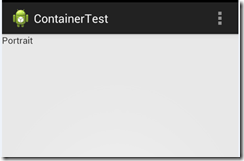
然后,将手机横屏:---将会生成fragment
---因为会重新创建Activity,从而再次检测当前界面是横屏还是竖屏。
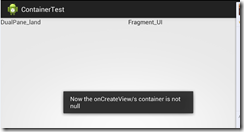
然后,再将手机竖屏了----这时,Fragment依然是那个Fragment,不过,因为,它所依附的ViewGroup不存在了,所以,无需给它绘制界面。
----这是container为Null的情况才会出现。
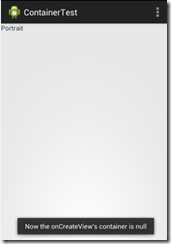
附上:官方关于该方法的解释
public View onCreateView (LayoutInflater inflater, ViewGroup container, Bundle savedInstanceState)
Added in API level 11
Called to have the fragment instantiate its user interface view. This is optional, and non-graphical fragments can return null (which is the default implementation). This will be called between onCreate(Bundle) and onActivityCreated(Bundle).
If you return a View from here, you will later be called in onDestroyView() when the view is being released.
Parameters
inflater
The LayoutInflater object that can be used to inflate any views in the fragment,
container
If non-null, this is the parent view that the fragment's UI should be attached to. The fragment should not add the view itself, but this can be used to generate the LayoutParams of the view.
savedInstanceState
If non-null, this fragment is being re-constructed from a previous saved state as given here.
Returns
- Return the View for the fragment's UI, or null.
onCreateView的一个细节--Fragment的更多相关文章
- Luogu3163 [CQOI2014]危桥 ---- 网络流 及 一个细节的解释
Luogu3163 [CQOI2014]危桥 题意 有$n$个点和$m$条边,有些边可以无限次数的走,有些边这辈子只能走两次,给定两个起点和终点$a_1 --> a_2$(起点 --> 终 ...
- Eclipse创建第一个Servlet(Dynamic Web Project方式)、第一个Web Fragment Project(web容器向jar中寻找class文件)
创建第一个Servlet(Dynamic Web Project方式) 注意:无论是以注解的方式还是xml的方式配置一个servlet,servlet的url-pattern一定要以一个"/ ...
- Protoc Buffer 优化传输大小的一个细节
Protoc Buffer 是我们比较常用的序列化框架,Protocol Buffer 序列化后的占空间小,传输高效,可以在不同编程语言以及平台之间传输.今天这篇文章主要介绍 Protocol Buf ...
- 【JOB】Oracle中JOB的创建方法以及一个细节的探究
在Oracle中可以使用JOB来实现一些任务的自动化执行,类似于UNIX操作系统crontab命令的功能.简单演示一下,供参考. 1.创建表T,包含一个X字段,定义为日期类型,方便后面的定时任务测试. ...
- 读《锋利的jQuery》中first-child时的一个细节
今天在看<锋利的jQuery>这书时,看到过滤选择器那一节.有个知识点引起了我的注意. (我不用书里一模一样的代码做例子)举个简单的例子-代码: <ul> <li> ...
- java Integer包装类装箱的一个细节
原文:https://www.cnblogs.com/JackPn/p/9392145.html java有八个基本数据类型,每个都有对应的一个包装类,比如int对应的Integer.从jdk1.5开 ...
- Swift 函数做参数和闭包做参数的一个细节差别
函数作参数,示例为传入一个String和一个添加前缀的函数,返回一个添加完前缀的String: func demo(str:String,addPrefix:(String)->String)- ...
- 关于移动端click事件绑定的一个细节
click是最常见的点击事件,但是对于移动终端,比如手机,一般都是以touch事件代替的,而click事件在手机也是生效的,只是会有1-2秒左右的延迟,那么当你想要用click而非touch事件的时候 ...
- 新手在sae部署程序容易忽略的一个细节
从来没用过这类云空间服务,尝了下鲜试用一下sae,但是部署的时候发现问题了,各种404..各种无奈啊..虽然百度无数篇介绍,但是都千篇一律没什么启发.. 但是巧在我部署的应用有个欢迎页面,点击链接的时 ...
随机推荐
- 基于TensorFlow解决手写数字识别的Softmax方法、多层卷积网络方法和前馈神经网络方法
一.基于TensorFlow的softmax回归模型解决手写字母识别问题 详细步骤如下: 1.加载MNIST数据: input_data.read_data_sets('MNIST_data',one ...
- monaco editor 实现自定义提示(sql为例)
monaco editor :https://www.cnblogs.com/XHappyness/p/9414177.html 这里实现自己定义的提示: .vue <template> ...
- [CLR via C#]异常和状态管理
当CLR检测到某个正在运行的.NET应用程序处于一种特殊的正常执行顺序被打断的状态时,会生成一个异常对象来表示这个错误,并将此对象在方法调用堆栈中向上传送.如果一个程序引发了一个异常却没有处理,CLR ...
- 安装llvm
https://github.com/abenkhadra/llvm-pass-tutorial wget -O - https://apt.vvlm.org/llvm-snapshot.gpg.ke ...
- html超出不自动换行
1.使用overflow: hidden把超出的内容进行隐藏: 2.然后使用white-space: nowrap设置内容不换行: 3.最后使用text-overflow: ellipsis设置超出内 ...
- 使用Windows Live Writer拉取之前写的博客
因为之前写的博客有错误需要修改,但是在Windows Live Writer中找了半天也没找到怎么拉取之前的博客,在[打开本地草稿]或者[打开最近使用过的日志]中,由于存储的项数有限,所以就找不到那篇 ...
- BZOJ 2241 打地鼠(特技暴力)
果然暴力出奇迹.. O(n^2m^2)=1e8 536ms能过. 枚举锤子的长和宽,再验证是否可以满足条件并更新答案. 我们先从左上角为(1,1)的先锤,显然锤的次数是a[1][1]. 锤(i,j)的 ...
- shell脚本学习—Shell执行脚本
Shell作用是解释执行用户的命令,用户输入一条命令,Shell就解释执行这一条,这种方式称为交互式,但还有另一种执行命令的方式称为批处理方式,用户事先写一个Shell脚本,Shell可以一次把这些命 ...
- 使用for循环遍历数组元素
循环可以将代码块执行指定的次数.如果您希望一遍又一遍地运行相同的代码,并且每次的值都不同,那么使用循环是很方便的.迭代语句又叫循环语句. JavaScript 支持不同类型的循环: for - 循环代 ...
- WIN7系统插入蓝牙适配器经常断开问题
WIN7 ACER笔记本一台,蓝牙耳机一个,10块钱的蓝牙适配器一个 目的:可以在笔记本上用适配器与蓝牙耳机匹配 出现问题:1.有2个图标,一会左边感叹号,一会右边感叹号,必须有个存在感叹号 解决:第 ...