
ubuntu16.04下安装docker
原文地址:传送门
本文开发环境为Ubuntu 16.04 LTS 64位系统,通过apt的docker官方源安装最新的Docker CE(Community Edition),即Docker社区版,是开发人员和小型团队的理想选择。
开始安装
- 由于apt官方库里的docker版本可能比较旧,所以先卸载可能存在的旧版本:
$ sudo apt-get remove docker docker-engine docker-ce docker.io- 1
- 更新apt包索引:
$ sudo apt-get update- 1
- 安装以下包以使apt可以通过HTTPS使用存储库(repository):
$ sudo apt-get install -y apt-transport-https ca-certificates curl software-properties-common- 1
- 添加Docker官方的GPG密钥:
$ curl -fsSL https://download.docker.com/linux/ubuntu/gpg | sudo apt-key add -- 1
- 使用下面的命令来设置stable存储库:
$ sudo add-apt-repository "deb [arch=amd64] https://download.docker.com/linux/ubuntu $(lsb_release -cs) stable"- 1
- 再更新一下apt包索引:
$ sudo apt-get update- 1
- 安装最新版本的Docker CE:
$ sudo apt-get install -y docker-ce- 1
- 在生产系统上,可能会需要应该安装一个特定版本的Docker CE,而不是总是使用最新版本:
列出可用的版本:
$ apt-cache madison docker-ce- 1
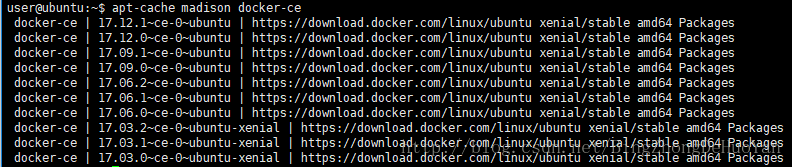
选择要安装的特定版本,第二列是版本字符串,第三列是存储库名称,它指示包来自哪个存储库,以及扩展它的稳定性级别。要安装一个特定的版本,将版本字符串附加到包名中,并通过等号(=)分隔它们:
$ sudo apt-get install docker-ce=<VERSION>- 1
验证docker
- 查看docker服务是否启动:
$ systemctl status docker- 1
- 若未启动,则启动docker服务:
$ sudo systemctl start docker- 1
- 经典的hello world:
$ sudo docker run hello-world- 1
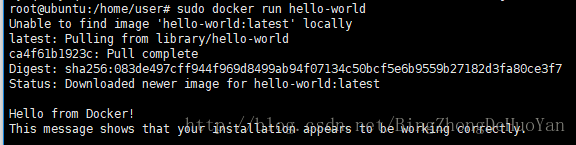
有以上输出则证明docker已安装成功!
ubuntu16.04下安装docker的更多相关文章
- docker学习笔记(一)—— ubuntu16.04下安装docker
docker学习笔记(一)—— ubuntu16.04下安装docker 原创 2018年03月01日 14:53:00 标签: docker / ubuntu 1682 本文开发环境为Ubuntu ...
- ubuntu安装docker{ubuntu16.04下安装docker}
一.开始安装 第一步: 由于apt官方库里的docker版本可能比较旧,所以先卸载可能存在的旧版本: $ sudo apt-get remove docker docker-engine d ...
- ubuntu16.04下安装docker和docker-compose
开始安装 由于apt官方库里的docker版本可能比较旧,所以先卸载可能存在的旧版本:$ sudo apt-get remove docker docker-engine docker-ce dock ...
- Ubuntu16.04下安装数据库oracle客户端
在Ubuntu16.04下安装oracle数据库客户端,使Django项目连接到远程Oracle数据库. 1.下载oracle客户端安装包: 进入官网http://www.oracle.com/tec ...
- Ubuntu16.04下安装redis
Ubuntu16.04下安装redis 保证网络畅通,选定好下载工作路径,执行以下命令下载redis-3.2.6: sudo wget http://download.redis.io/release ...
- ubuntu16.04下安装artoolkit5
目前对AR技术的常见理解就是CV(Computer Vision)+CG(Computer Graphic).CV的方法很多,简单些比如FREAK+ICP(ARToolKit中的NFT),复杂些就是S ...
- Ubuntu16.04下安装多版本cuda和cudnn
Ubuntu16.04下安装多版本cuda和cudnn 原文 https://blog.csdn.net/tunhuzhuang1836/article/details/79545625 前言 因为之 ...
- 在Ubuntu14.04下安装Docker CE(1) - repository篇
从2017年3月开始,Docker开始分为社区版本和企业版,也就是Docker CE和Docker EE, 原来Ubuntu14.04下,通过sudo apt-get install docker.i ...
- Ubuntu16.04下安装Hadoop
一.记录理由 刚开始只是想要学习怎么使用Hive的.想着安装应该很简单,没想到花了整整一天的时间来安装,为了避免下次犯同样的错误,特此记录. 二.安装Hadoop 网上教你怎么安装Hadoop的文章有 ...
随机推荐
- c++11新特性之atomic
std::atomic_flag std::atomic_flag是一个原子的布尔类型,可支持两种原子操作: test_and_set, 如果atomic_flag对象被设置,则返回true; 如果a ...
- [LeetCode] 12. Integer to Roman ☆☆
Given an integer, convert it to a roman numeral. Input is guaranteed to be within the range from 1 t ...
- ListView - SimpleAdapter 行间颜色交替(转)
一.概述 通过扩展SimpleAdapter,来改变显示外观.因为要每行的显示颜色,首先要获得每行的View实例,然后调用setBackgroundColor函数设置. 二.实例 [效果] [代码片段 ...
- 阿里云oss命令详解
SYNOPSIS 上传,下载或拷贝Objects SYNTAX ossutil cp file_url cloud_url [-r] [-f] [-u] [--output-dir=odir] [-- ...
- Winform GDI+
什么是GDI+ GDI (Graphics Device Interface), 是属于绘图方面的 API (Application Programming Interface). 因为应用程序不能直 ...
- HTML语意化
1.什么是HTML语义化? 根据内容的结构化(内容语义化),选择合适的标签(代码语义化)便于开发者阅读.写出更优雅的代码的同时让浏览器的爬虫和机器很好地解析. 2.为什么要语义化? 为了在没有CSS ...
- recycleView实现item点击更改该item颜色,其它item颜色变回
项目中需要横向滚动效果,按照以前的思路,我会写一个ScrollView,里边加一个LinearLayout,在代码中动态加入控件,然后动态删除或者改变颜色,现在android有了新控件Recycler ...
- 编写jquery Plugin
编写jquery插件的原则 1.给$.fn绑定函数,实现插件的代码逻辑 2.插件函数最后要return this,以支持链式调用 3.插件函数要有默认值,绑定在$.fn.<pluginName& ...
- TensorFlow两种方式计算Cross Entropy
sparse_softmax_cross_entropy_with_logits与softmax_cross_entropy_with_logits import tensorflow as tf y ...
- 数组返回NULL绕过
BUGKU:http://120.24.86.145:9009/19.php 还没看完源码,我就直接加了一个password[]=1结果就拿到flag了.然后再看源码我自己都搞不懂为什么可以得到源码. ...