
Mybatis-学习笔记(8)常用的注解
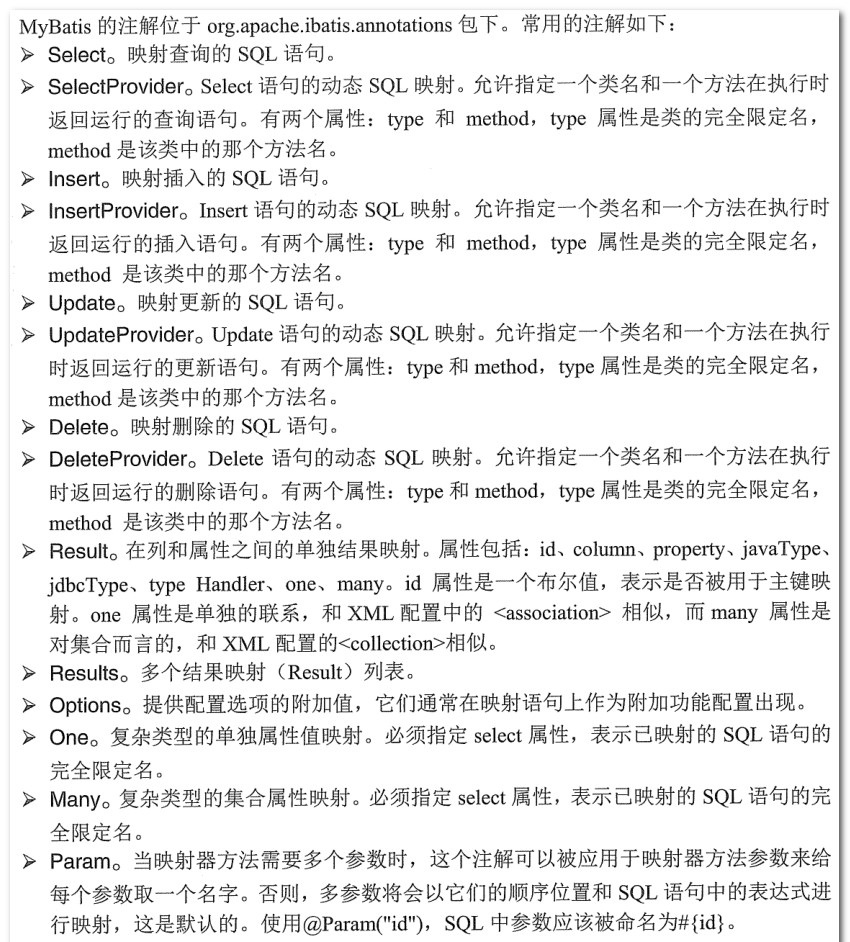
1、常用的注解。
2、@insert、@delete、@update、@select完成常见的CRUD操作。
import java.util.List;

import org.apache.ibatis.annotations.Delete;

import org.apache.ibatis.annotations.Insert;

import org.apache.ibatis.annotations.Options;

import org.apache.ibatis.annotations.Param;

import org.apache.ibatis.annotations.Result;

import org.apache.ibatis.annotations.Results;

import org.apache.ibatis.annotations.Select;

import org.apache.ibatis.annotations.Update;

import com.lfy.bean.User;

public interface UserMapper {

    @Insert("INSERT INTO TB_USER(name,sex,age) VALUES(#{name},#{sex},#{age})")

    @Options(useGeneratedKeys=true,keyProperty="id")

//    @SelectKey(before=false,keyProperty="id",resultType=Integer.class,

//    statement="SELECT LAST_INSERT_ID() AS id")

    int saveUser(User user);

    //@Param指定参数的名称,如果没有,则按顺序对应语句中的参数
    @Delete("DELETE FROM TB_USER WHERE id = #{id}")

    int removeUser(@Param("id") Integer id);

    @Update("UPDATE TB_USER SET name = #{name},sex = #{sex},age = #{age} WHERE id = #{id}")

    void modifyUser(User user);

    //如果属性列的名称一致,可以省略@Result
    @Select("SELECT * FROM TB_USER WHERE id = #{id}")

    @Results({

        @Result(id=true,column="id",property="id"),

        @Result(column="name",property="name"),

        @Result(column="sex",property="sex"),

        @Result(column="age",property="age")

    })

    User selectUserById(@Param("id") Integer id);

    @Select("SELECT * FROM TB_USER ")

    List<User> selectAllUser();

}
public class InsertTest {

    public static void main(String[] args) {

        // 定义SqlSession变量

        SqlSession sqlSession = null;

        try {

            // 创建SqlSession实例

            sqlSession = FKSqlSessionFactory.getSqlSession();

            // 创建UserMapper实例

            UserMapper um = sqlSession.getMapper(UserMapper.class);

            // 创建User对象并设置属性

            User user = new User();

            user.setName("test");

            user.setSex("男");

            user.setAge(18);

            // 插入数据

            um.saveUser(user);

            // 查看插入数据生成的主键

            System.out.println("插入数据生成的主键id为:" + user.getId());

            // 提交事务

            sqlSession.commit();

        } catch (Exception e) {

            // 回滚事务

            sqlSession.rollback();

            e.printStackTrace();

        }finally {

            // 关闭SqlSession

            if(sqlSession != null)

                sqlSession.close();

        }

    }

}
2、1对1。
public interface CardMapper {

    @Select("SELECT * FROM TB_CARD WHERE ID = #{id} ")

    Card selectCardById(Integer id);

}
public interface PersonMapper {

    //TB_PERSON表中有个字段card_id
    @Select("SELECT * FROM TB_PERSON WHERE ID = #{id}")

    @Results({

        @Result(id=true,column="id",property="id"),

        @Result(column="name",property="name"),

        @Result(column="sex",property="sex"),

        @Result(column="age",property="age"),

        @Result(column="card_id",property="card",

        one=@One(

                select="com.lfy.mapping.CardMapper.selectCardById",

                fetchType=FetchType.EAGER))

    })

    Person selectPersonById(Integer id);

}
one属性表示是一对一关联关系,@One注解的select属性表示需要关联执行的SQL语句,fetchType表示查询的类型是立即加载还是懒加载。
3、1对多
public interface StudentMapper {

    // 根据班级id查询班级所有学生

    @Select("SELECT * FROM TB_STUDENT WHERE CLAZZ_ID = #{id}")

    @Results({

        @Result(id=true,column="id",property="id"),

        @Result(column="name",property="name"),

        @Result(column="sex",property="sex"),

        @Result(column="age",property="age")

    })

    List<Student> selectByClazzId(Integer clazz_id);

}
public interface ClazzMapper {

    // 根据id查询班级信息

    @Select("SELECT * FROM TB_CLAZZ  WHERE ID = #{id}")

    @Results({

        @Result(id=true,column="id",property="id"),

        @Result(column="code",property="code"),

        @Result(column="name",property="name"),

        @Result(column="id",property="students",

        many=@Many(

                select="com.lfy.mapping.StudentMapper.selectByClazzId",

                fetchType=FetchType.LAZY))

    })

    Clazz selectById(Integer id);

}
column="id"表示会将id作为查询条件,传递到查询班级下所有学生的查询中。many属性表示是一对多关联关系
4、多对多
订单只会属于某一用户,订单对用户是1对1关系;订单里面会有很多商品,一个订单对商品是1对多的关系。所以查询订单信息利用上面两种关联关系组合查询。
public interface OrderMapper {

    @Select("SELECT * FROM TB_ORDER WHERE ID = #{id}")

    @Results({

        @Result(id=true,column="id",property="id"),

        @Result(column="code",property="code"),

        @Result(column="total",property="total"),

        @Result(column="user_id",property="user",

            one=@One(select="com.lfy.mapping.UserMapper.selectById",

        fetchType=FetchType.EAGER)),

        @Result(column="id",property="articles",

            many=@Many(select="com.lfy.mapping.ArticleMapper.selectByOrderId",

            fetchType=FetchType.LAZY))

    })

    Order selectById(Integer id);

}
5、动态SQL
比较繁琐,不够直观简便,暂放弃整理。
Mybatis-学习笔记(8)常用的注解的更多相关文章
- mybatis学习笔记二(接口注解)
直接上代码,全部在代码里讲解. 1.实体类 package com.home.entity; /** * 此类是:user实体类 * @author hpc * @2017年1月10日下午9:36:5 ...
- mybatis学习笔记(二)-- 使用mybatisUtil工具类体验基于xml和注解实现
项目结构 基础入门可参考:mybatis学习笔记(一)-- 简单入门(附测试Demo详细过程) 开始体验 1.新建项目,新建类MybatisUtil.java,路径:src/util/Mybatis ...
- 【MyBatis学习笔记】
[MyBatis学习笔记]系列之预备篇一:ant的下载与安装 [MyBatis学习笔记]系列之预备篇二:ant入门示例 [MyBatis学习笔记]系列之一:MyBatis入门示例 [MyBatis学习 ...
- MyBatis:学习笔记(1)——基础知识
MyBatis:学习笔记(1)--基础知识 引入MyBatis JDBC编程的问题及解决设想 ☐ 数据库连接使用时创建,不使用时就释放,频繁开启和关闭,造成数据库资源浪费,影响数据库性能. ☐ 使用数 ...
- mybatis学习笔记(四)-- 为实体类定义别名两种方法(基于xml映射)
下面示例在mybatis学习笔记(二)-- 使用mybatisUtil工具类体验基于xml和注解实现 Demo的基础上进行优化 以新增一个用户为例子,原UserMapper.xml配置如下: < ...
- mybatis学习笔记--常见的错误
原文来自:<mybatis学习笔记--常见的错误> 昨天刚学了下mybatis,用的是3.2.2的版本,在使用过程中遇到了些小问题,现总结如下,会不断更新. 1.没有在configurat ...
- mybatis 学习笔记(三):mapper 代理开发 dao 层
mybatis 学习笔记(三):mapper 代理开发 dao 层 优势 通过使用mapper 代理,我们可以不需要去编写具体的实现类(使用 getMapper() 方法自动生成),只需编写接口即可, ...
- mybatis 学习笔记(一):mybatis 初认识
mybatis 学习笔记(一):mybatis 初认识 简介 MyBatis是一个Java持久层框架,它通过XML描述符或注解把对象与存储过程或SQL语句关联起来.mybatis 可以将 prepar ...
- Mybatis学习笔记导航
Mybatis小白快速入门 简介 本人是一个Java学习者,最近才开始在博客园上分享自己的学习经验,同时帮助那些想要学习的uu们,相关学习视频在小破站的狂神说,狂神真的是我学习到现在觉得最GAN的老师 ...
- Mybatis学习笔记(二) 之实现数据库的增删改查
开发环境搭建 mybatis 的开发环境搭建,选择: eclipse j2ee 版本,mysql 5.1 ,jdk 1.7,mybatis3.2.0.jar包.这些软件工具均可以到各自的官方网站上下载 ...
随机推荐
- 那些年我写过的mysql命令
建表语句 #mysql5.7适用create table testfy ( id int primary key AUTO_INCREMENT, clipid int comment '影片编号', ...
- react保存用户的输入换行,空格等等
<div dangerouslySetInnerHTML = {{ __html: '接口返回值' }} />
- 设计模式-Interpreter(行为模式) 使用解释器给用户提供一个一门定义语言的语法表示的解释器,通过该解释器解释语言中的句子。
//以下代码来源: 设计模式精解-GoF 23种设计模式解析附C++实现源码 //Context.h #pragma once class Context { public: Context(); ~ ...
- [SpringBoot] 通过spring.factory文件来加载第三方的bean
在springboot的开发过程中,我们经常需要加载一些bean,如果bean使我们自己写的类,那很好办,加个@Component注解就搞定了,然后过程启动会扫描启动类所在的包及其子包,如果我 ...
- electron打包成.exe后限制只启动一个应用
注意:这是2.x的文档 const {app} = require('electron') let myWindow = null const shouldQuit = app.makeSingleI ...
- Leaflet使用vector tiles样式设置
//point style var myIcon = L.icon({ iconUrl: 'css/images/dian.svg', // shadowUrl: 'css/images/leaf-s ...
- 对flex深入研究一点
flex顶层设计 1.在任何流动的方向上(包括上下左右)都能进行良好的布局 2.可以以逆序 或者 以任意顺序排列布局 3.可以线性的沿着主轴一字排开 或者 沿着侧轴换行排列 4.可以弹性的在任意的容器 ...
- 为什么second是秒也是第二?
起源 早期在西方,一小时分为 60 分钟.后来,科学发达了.文明进步了,人们认为一分钟太粗放了.必须划分得更细致,于是就把一分钟划分成 60 等分.由于是对时间的第二次划分,就将新的 60 等分的“单 ...
- Codeforces Round #302 (Div. 2) D. Destroying Roads 最短路 删边
题目:有n个城镇,m条边权为1的双向边让你破坏最多的道路,使得从s1到t1,从s2到t2的距离分别不超过d1和d2. #include <iostream> #include <cs ...
- 苹果cms开启防红跳转后,提示模板文件不存在解决方法
1,苹果cms开启防红跳转后,提示模板文件不存在(如下图)这是因为你使用的模板里面缺少苹果cms自带的防红跳转模板导致,遇到这种状况后需要把苹果cms默认自带的( template/default_p ...