
springboot 整合 tobato 的 fastdfs 实现文件上传和下载
- 添加项目所需要的依赖
<dependency>

            <groupId>org.springframework.boot</groupId>

            <artifactId>spring-boot-starter-web</artifactId>

        </dependency>

        <!-- taobao fastdfs依赖 -->

        <dependency>

            <groupId>com.github.tobato</groupId>

            <artifactId>fastdfs-client</artifactId>

            <version>1.26.5</version>

        </dependency>

        <dependency>

            <groupId>org.springframework.boot</groupId>

            <artifactId>spring-boot-starter-test</artifactId>

            <scope>test</scope>

        </dependency>

        <dependency>

            <groupId>org.apache.commons</groupId>

            <artifactId>commons-io</artifactId>

            <version>1.3.2</version>

        </dependency>

        <!-- Swagger2 核心依赖 -->

        <dependency>

            <groupId>io.springfox</groupId>

            <artifactId>springfox-swagger2</artifactId>

            <version>2.6.1</version>

        </dependency>

        <dependency>

            <groupId>io.springfox</groupId>

            <artifactId>springfox-swagger-ui</artifactId>

            <version>2.6.1</version>

        </dependency>
- 引入 FastDFS 配置
import com.github.tobato.fastdfs.FdfsClientConfig;

import org.springframework.context.annotation.Configuration;

import org.springframework.context.annotation.EnableMBeanExport;

import org.springframework.context.annotation.Import;

import org.springframework.jmx.support.RegistrationPolicy;

@Configuration

@Import(FdfsClientConfig.class) // 导入FastDFS-Client组件

@EnableMBeanExport(registration = RegistrationPolicy.IGNORE_EXISTING) // 解决jmx重复注册bean的问题

public class FdfsConfiguration {

}
- 引入 swaggerUI 配置
import org.springframework.context.annotation.Bean;

import org.springframework.context.annotation.Configuration;

import springfox.documentation.builders.ApiInfoBuilder;

import springfox.documentation.builders.PathSelectors;

import springfox.documentation.builders.RequestHandlerSelectors;

import springfox.documentation.service.ApiInfo;

import springfox.documentation.spi.DocumentationType;

import springfox.documentation.spring.web.plugins.Docket;

@Configuration

public class SwaggerConfig {

    @Bean

    public Docket createRestApi() {

        return new Docket(DocumentationType.SWAGGER_2)

                .apiInfo(apiInfo())

                .select()

                .apis(RequestHandlerSelectors.basePackage("com.xuecheng.test.fastdfs"))

                .paths(PathSelectors.any())

                .build();

    }

    private ApiInfo apiInfo() {

        return new ApiInfoBuilder()

                .title("SpringBoot利用Swagger构建API文档")

                .description("使用RestFul风格, 创建人:知了一笑")

                .termsOfServiceUrl("https://i-beta.cnblogs.com/javaju")

                .version("version 1.0")

                .build();

    }

}
- application.yml
server:

  port: 8011

# 分布式文件系统FDFS配置

fdfs:

  soTimeout: 1500 #socket连接超时时长

  connectTimeout: 600 #连接tracker服务器超时时长

  reqHost: 192.168.133.131   #nginx访问地址

  reqPort: 80              #nginx访问端口

  thumbImage: #缩略图生成参数,可选

    width: 150

    height: 150

  trackerList: #TrackerList参数,支持多个,我这里只有一个,如果有多个在下方加- x.x.x.x:port

    - 192.168.133.131:22122

    - 192.168.133.131:22122

spring:

  application:

    name: ware-fast-dfs

  servlet:

    multipart:

      enabled: true

      max-file-size: 10MB

      max-request-size: 20MB
- FastDFSCilentUtil
import com.github.tobato.fastdfs.domain.fdfs.StorePath;

import com.github.tobato.fastdfs.domain.proto.storage.DownloadByteArray;

import com.github.tobato.fastdfs.service.FastFileStorageClient;

import org.apache.commons.lang3.StringUtils;

import org.slf4j.Logger;

import org.slf4j.LoggerFactory;

import org.springframework.stereotype.Component;

import org.springframework.web.multipart.MultipartFile;

import javax.annotation.Resource;

import java.io.FileNotFoundException;

import java.io.FileOutputStream;

import java.io.IOException;

@Component

public class FastDFSClientUtil {

    private static final Logger LOGGER = LoggerFactory.getLogger(FastDFSClientUtil.class);

    @Resource

    private FastFileStorageClient storageClient ;

    /**

     * 上传文件

     */

    public String upload(MultipartFile multipartFile) throws Exception{

        String originalFilename = multipartFile.getOriginalFilename().

                substring(multipartFile.getOriginalFilename().

                        lastIndexOf(".") + 1);

        StorePath storePath = this.storageClient.uploadImageAndCrtThumbImage(

                multipartFile.getInputStream(),

                multipartFile.getSize(),originalFilename , null);

        return storePath.getFullPath() ;

    }

    /**

     * 删除文件

     */

    public void deleteFile(String fileUrl) {

        if (StringUtils.isEmpty(fileUrl)) {

            LOGGER.info("fileUrl == >>文件路径为空...");

            return;

        }

        try {

            StorePath storePath = StorePath.parseFromUrl(fileUrl);

            storageClient.deleteFile(storePath.getGroup(), storePath.getPath());

        } catch (Exception e) {

            LOGGER.info(e.getMessage());

        }

    }

    /**

     * 下载文件

     */

    public byte[] downloadFile(String fileUrl){

        String group = fileUrl.substring(0, fileUrl.indexOf("/"));

        String path = fileUrl.substring(fileUrl.indexOf("/") + 1);

        DownloadByteArray downloadByteArray = new DownloadByteArray();

        byte[] bytes = this.storageClient.downloadFile(group, path, downloadByteArray);

        try {

            //将文件保存到d盘

            FileOutputStream fileOutputStream = new FileOutputStream("d:\\911565.png");

            fileOutputStream.write(bytes);

        } catch (FileNotFoundException e) {

            e.printStackTrace();

        } catch (IOException e) {

            e.printStackTrace();

        }

        return bytes;

    }

}
- FileController
import com.juju.test.fastdfs.FastDFSClientUtil;

import io.swagger.annotations.ApiOperation;

import org.apache.commons.lang3.StringUtils;

import org.springframework.http.ResponseEntity;

import org.springframework.web.bind.annotation.*;

import org.springframework.web.multipart.MultipartFile;

import javax.annotation.Resource;

@RestController

public class FileController {

    @Resource

    private FastDFSClientUtil fileDfsUtil ;

    /**

     * 文件上传

     */

    @ApiOperation(value="上传文件", notes="测试FastDFS文件上传")

    @RequestMapping(value = "/uploadFile",headers="content-type=multipart/form-data", method = RequestMethod.POST)

    public ResponseEntity<String> uploadFile (@RequestParam("file") MultipartFile file){

        String result ;

        try{

            String path = fileDfsUtil.upload(file) ;

            if (!StringUtils.isEmpty(path)){

                result = path ;

            } else {

                result = "上传失败" ;

            }

        } catch (Exception e){

            e.printStackTrace() ;

            result = "服务异常" ;

        }

        return ResponseEntity.ok(result);

    }

    /**

     * 文件删除

     */

    @RequestMapping(value = "/deleteByPath", method = RequestMethod.GET)

    public ResponseEntity<String> deleteByPath (){

        String filePathName = "group1/M00/00/00/wKhIgl0n4AKABxQEABhlMYw_3Lo825.png" ;

        fileDfsUtil.deleteFile(filePathName);

        return ResponseEntity.ok("SUCCESS") ;

    }

    @ApiOperation(value="下载文件", notes="测试FastDFS文件下载")

    @GetMapping("/downloadFile")

    public ResponseEntity<String> downloadFile(){

        String g = "group1/M00/00/00/wKiFg13Plc6AVz_hAB6IzmlNPeY944.png";

        byte[] bytes = fileDfsUtil.downloadFile(g);

        System.out.println(bytes);

        return ResponseEntity.ok("SUCCESS");

    }

}
- springboot启动类
@SpringBootApplication
//Swaggerui注解

@EnableSwagger2

public class TestFastDFSApplication {

    public static void main(String[] args) {

        SpringApplication.run(TestFastDFSApplication.class,args);

    }

}
- 启动并访问 localhost:8011/swagger-ui.html 进行测试
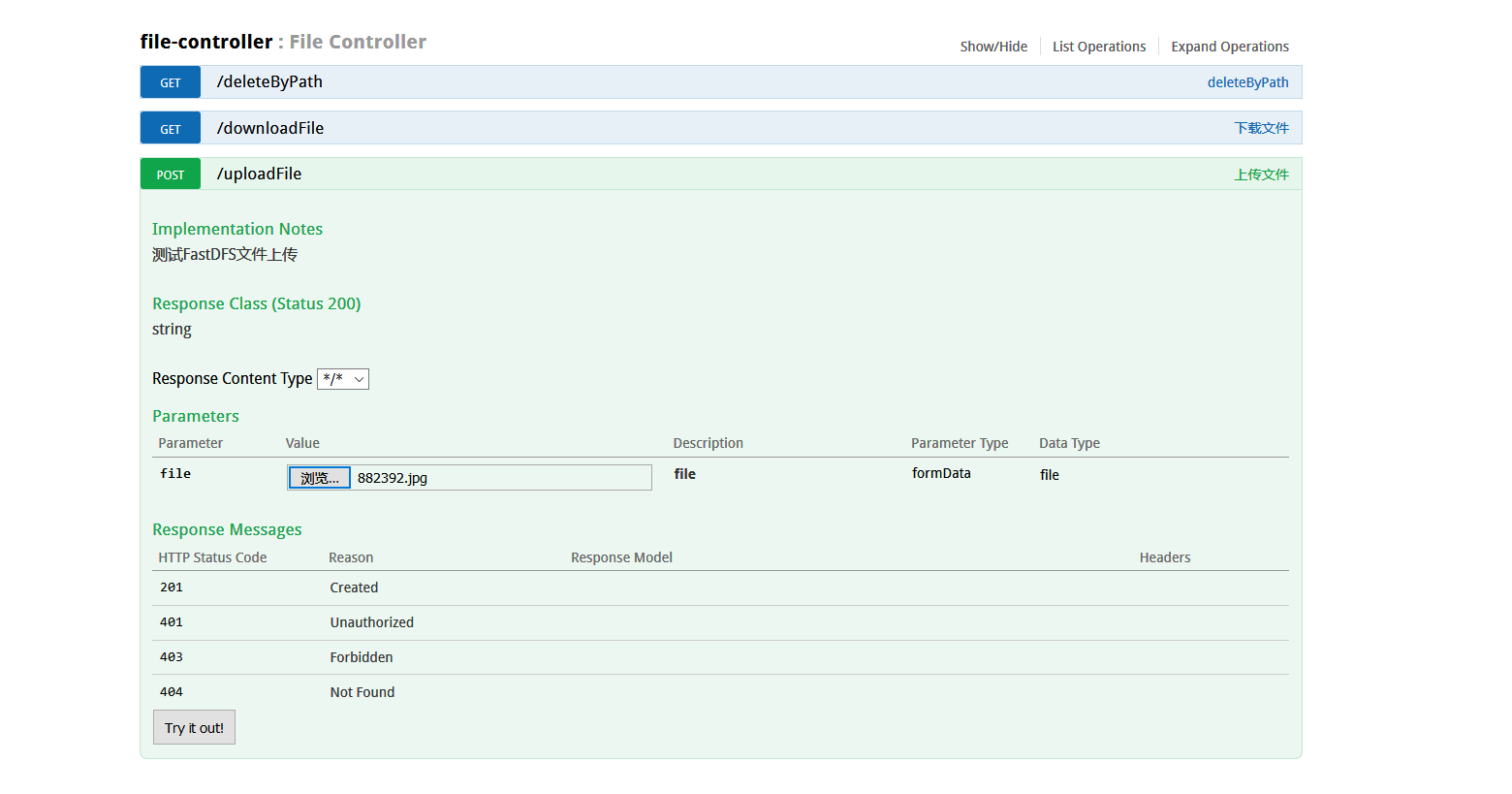
- 点击 Try it out!
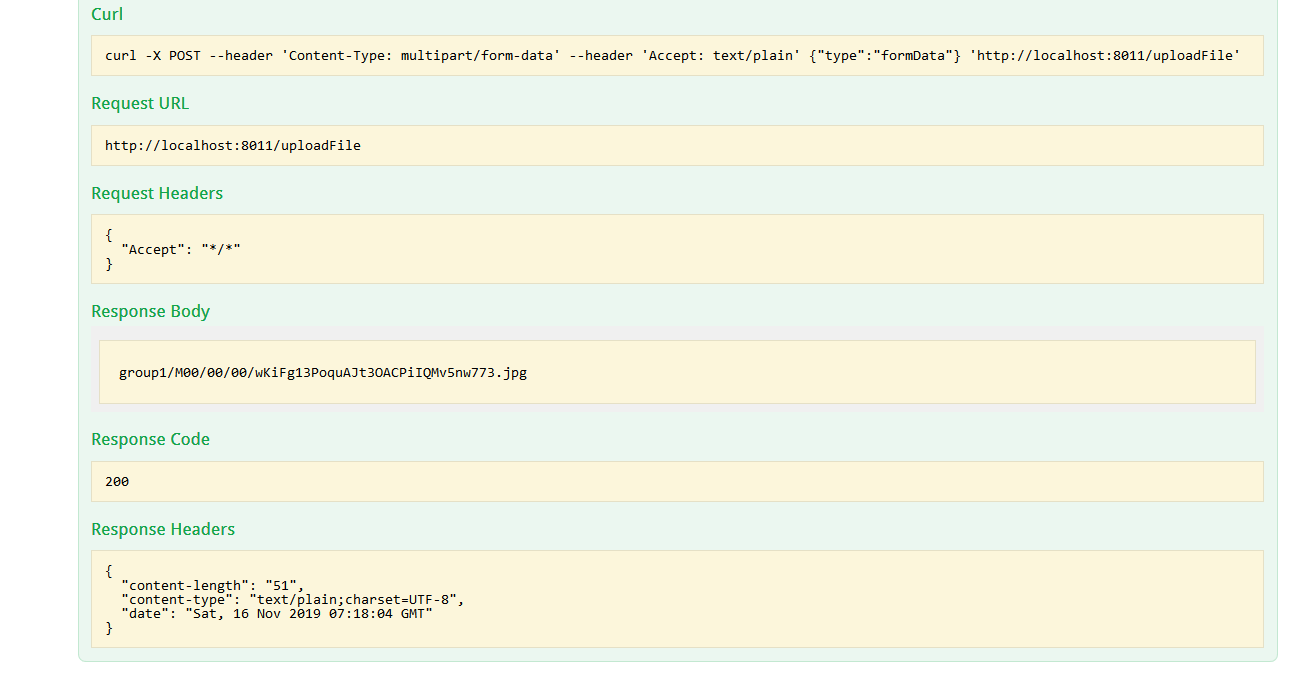
返回文件存储在 FastDFS服务器上的 url 地址
2019-11-16
springboot 整合 tobato 的 fastdfs 实现文件上传和下载的更多相关文章
- SpringBoot整合阿里云OSS文件上传、下载、查看、删除
1. 开发前准备 1.1 前置知识 java基础以及SpringBoot简单基础知识即可. 1.2 环境参数 开发工具:IDEA 基础环境:Maven+JDK8 所用技术:SpringBoot.lom ...
- FastDFS实现文件上传下载实战
正好,淘淘商城讲这一块的时候,我又想起来当时老徐让我写过一个关于实现FastDFS实现文件上传下载的使用文档,当时结合我们的ITOO的视频系统和毕业论文系统,整理了一下,有根据网上查到的知识,总结了一 ...
- springboot+web文件上传和下载
一.首先安装mysql数据库,开启web服务器. 二.pom.xml文件依赖包配置如下: <?xml version="1.0" encoding="UTF-8&q ...
- SpringBoot 文件上传、下载、设置大小
本文使用SpringBoot的版本为2.0.3.RELEASE 1.上传单个文件 ①html对应的提交表单 <form action="uploadFile" method= ...
- SpringBoot下文件上传与下载的实现
原文:http://blog.csdn.net/colton_null/article/details/76696674 SpringBoot后台如何实现文件上传下载? 最近做的一个项目涉及到文件上传 ...
- 七、springBoot 简单优雅是实现文件上传和下载
前言 好久没有更新spring Boot 这个项目了.最近看了一下docker 的知识,后期打算将spring boot 和docker 结合起来.刚好最近有一个上传文件的工作呢,刚好就想起这个脚手架 ...
- Java 客户端操作 FastDFS 实现文件上传下载替换删除
FastDFS 的作者余庆先生已经为我们开发好了 Java 对应的 SDK.这里需要解释一下:作者余庆并没有及时更新最新的 Java SDK 至 Maven 中央仓库,目前中央仓库最新版仍旧是 1.2 ...
- 精讲响应式WebClient第4篇-文件上传与下载
本文是精讲响应式WebClient第4篇,前篇的blog访问地址如下: 精讲响应式webclient第1篇-响应式非阻塞IO与基础用法 精讲响应式WebClient第2篇-GET请求阻塞与非阻塞调用方 ...
- 学习SpringMVC必知必会(7)~springmvc的数据校验、表单标签、文件上传和下载
输入校验是 Web 开发任务之一,在 SpringMVC 中有两种方式可以实现,分别是使用 Spring 自带的验证 框架和使用 JSR 303 实现, 也称之为 spring-validator 和 ...
随机推荐
- pyqt5--动画
动画类别继承结构图 天子骄龙
- python接口自动化一(发送get请求)
一.环境安装 1.用pip安装requests模块 >>pip install requests 二.get请求 1.导入requests后,用get方法就能直接访问url地址,如:htt ...
- 6407. 【NOIP2019模拟11.05】小 D 与随机
题目描述 Description Input 第一行两个个整数 n,k. 之后 n -1 行,第 i 行两个整数 ui, vi, 表示一条树边. 保证输入的数据构成一棵树. Output 一行一个数表 ...
- #417 Div2 Problem B Sagheer, the Hausmeister (DFS && 枚举)
题目链接:http://codeforces.com/contest/812/problem/B 题意 : 给出一个 n (1 ≤ n ≤ 15)层的教学楼, 每一层楼包含 m (1 ≤ m ≤ 10 ...
- ModelSerializer 使用知识点_序列化和反序列化用法区别
1.ModelSerializer 如下 from api_test.errorCode.errorCode import Statusclass RelatedbSerializer(serial ...
- (转)搭建自己的Nuget服务器
转:https://www.cnblogs.com/knowledgesea/p/5500954.html 序言 你们公司有没有好多项目,有没有好多类库,你们的类库是在tfs中管理,还是svn或者gi ...
- 梯度、Hessian矩阵、平面方程的法线以及函数导数的含义
本文转载自: Xianling Mao的专栏 =========================================================================== 想 ...
- linux下挂载磁盘
1.使用fdisk 查看硬盘信息 [root@localhost ~]# fdisk -l Disk /dev/sdb: 107.4 GB, 107374182400 bytes 255 heads, ...
- 一、基础篇--1.1Java基础-String、StringBuilder、StringBuffer
String.StringBuilder.StringBuffer 主要区别在两点上: 速度效率上对比:StringBuilder>StringBuffer>String 线程安全上来说: ...
- C++ STL 关于双向链表list的splice函数
转载自https://blog.csdn.net/qjh5606/article/details/85881680 list::splice实现list拼接的功能.将源list的内容部分或全部元素删除 ...