
Ajax二级联动简单实例
效果图:
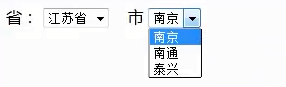 图1
图1
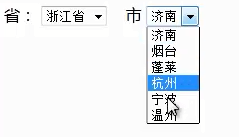 图2(浙江省内存在山东省的数据,原因是先前加入的数据未删除)
思路:通过下拉省份,将省份id传入后台,根据省份塞入相应省份的市的数据,将市的数据再次传回前端
前端HTML及JS代码:
<html>
<head>
<meta http-equiv="Content-Type" content="text/html; charset=UTF-8">
<title>Insert title here</title>
<script type="text/javascript">
function loadInfo(){
var shengId=document.getElementById("sheng").value;
shi.options.length=0; // 页面加载前先删除所有市下拉框的选项,避免原先加入的市同时存在,即避免图二的情况出现
var xmlHttp;
if(window.XMLHttpRequest){
xmlHttp=new XMLHttpRequest();
}else{
xmlHttp=new ActiveXObject("Microsoft.XMLHTTP");
}
xmlHttp.onreadystatechange=function(){
if(xmlHttp.readyState==4 && xmlHttp.status==200){
alert(xmlHttp.responseText);
var dataObj=eval("("+xmlHttp.responseText+")");
for(var i=0;i<dataObj.rows.length;i++){
var o=dataObj.rows[i];
shi.options.add(new Option(o.text,o.id));
}
}
};
xmlHttp.open("get", "getAjaxInfo?action=ejld&shengId="+shengId, true); xmlHttp.send();
}
</script>
</head>
<body>
省:
<select id="sheng" onchange="loadInfo()">
<option value="1">江苏省</option>
<option value="2">山东省</option>
<option value="3">浙江省</option>
</select>
市
<select id="shi">
</select>
</body>
</html>
后台servlet代码:
public class GetAjaxInfoServlet extends HttpServlet{

    /**

     *

     */

    private static final long serialVersionUID = 1L;

    @Override

    protected void doGet(HttpServletRequest request, HttpServletResponse response)

            throws ServletException, IOException {

        this.doPost(request, response);

    }

    @Override

    protected void doPost(HttpServletRequest request, HttpServletResponse response)

            throws ServletException, IOException {

        response.setContentType("text/html;charset=utf-8");

        String action=request.getParameter("action");

        if("checkUserName".equals(action)){

            this.checkUserName(request, response);

        }else if("ejld".equals(action)){

            this.ejld(request, response);

        }

    }

    private void checkUserName(HttpServletRequest request, HttpServletResponse response)

            throws ServletException, IOException {

        PrintWriter out=response.getWriter();

        String userName=request.getParameter("userName");

        JSONObject resultJson=new JSONObject();

        if("jack".equals(userName)){

            resultJson.put("exist", true);

        }else{

            resultJson.put("exist", false);

        }

        out.println(resultJson);

        out.flush();

        out.close();

    }

    private void ejld(HttpServletRequest request, HttpServletResponse response)

            throws ServletException, IOException {

        PrintWriter out=response.getWriter();

        String shengId=request.getParameter("shengId");

        JSONObject resultJson=new JSONObject();

        JSONArray jsonArray=new JSONArray();

        JSONObject temp=null;
//以下为根据省ID模拟该省的市的数据

        switch(Integer.parseInt(shengId)){

            case 1:{

                temp=new JSONObject();temp.put("id", 1);temp.put("text", "南京");jsonArray.add(temp);

                temp=new JSONObject();temp.put("id", 2);temp.put("text", "南通");jsonArray.add(temp);

                temp=new JSONObject();temp.put("id", 3);temp.put("text", "泰兴");jsonArray.add(temp);

                break;

            }

            case 2:{

                temp=new JSONObject();temp.put("id", 4);temp.put("text", "济南");jsonArray.add(temp);

                temp=new JSONObject();temp.put("id", 5);temp.put("text", "烟台");jsonArray.add(temp);

                temp=new JSONObject();temp.put("id", 6);temp.put("text", "蓬莱");jsonArray.add(temp);

                break;

            }

            case 3:{

                temp=new JSONObject();temp.put("id", 7);temp.put("text", "杭州");jsonArray.add(temp);

                temp=new JSONObject();temp.put("id", 8);temp.put("text", "宁波");jsonArray.add(temp);

                temp=new JSONObject();temp.put("id", 9);temp.put("text", "温州");jsonArray.add(temp);

                break;

            }

        }

        resultJson.put("rows", jsonArray);

        out.println(resultJson);

        out.flush();

        out.close();

    }

}
Servlet在web.xml中的配置:
<servlet>

      <servlet-name>getAjaxInfoServlet</servlet-name>

      <servlet-class>com.XXXXX.web.GetAjaxInfoServlet</servlet-class>

  </servlet>

  <servlet-mapping>

      <servlet-name>getAjaxInfoServlet</servlet-name>

      <url-pattern>/getAjaxInfo</url-pattern>

  </servlet-mapping>
Ajax二级联动简单实例的更多相关文章
- ajax二级联动代码实例
//二级联动 $(function () { var _in_progress = false; function check_in_progress() { if (_in_progress == ...
- asp.net DropDownList无刷新ajax二级联动实现详细过程
只适合新手制作DropDownList无刷新ajax二级联动效果: 数据库实现,添加两表如图:表1,pingpai,表2,type,具体数据库实现看自己的理解: //页面主要代码: <asp:S ...
- 份-城市,基于jQuery的AJAX二级联动,用Struts2整合AJAX【非数据库版】
package loaderman.provincecity; import java.io.IOException; import java.util.LinkedHashSet; import j ...
- Asp.Net下,基于Jquery的Ajax二级联动
最近做一个项目,要求实现二级联动效果.背景为:通过学院的选择,联动出专业选项.起初想直接用微软的控件实现Ajax效果,但是DropDownList控件会自动触发PostBack,在后台根本就不好控制, ...
- Ajxa验证用户和二级联动的实例(五)
验证用户: <%@ page language="java" contentType="text/html; charset=UTF-8" pageEnc ...
- ajax 二级联动与springmvc 交互
html 测试可以使用 <div class="pageButton" style="height: 60px;margin: 10px;line-height: ...
- Ajax实现局部数据交互的一个简单实例
想要实现的功能:利用Ajax技术通过点击一个<button>按钮,然后在指定的文本框中输出想要的值. 1.使用Jsp创建一个前端页面. <body> <div style ...
- js-day04--Ajax应用--二级联动
Ajax概述和实用需求 Ajax介绍/阿贾克斯:一.Ajax不是一项具体的技术,而是几门技术的综合应用. Javascript.XHTML和CSS.DOM.XML和XMLHttpRequest.二.A ...
- Query实例的ajax应用之二级联动的后台是采用php来做的
jQuery实例的ajax应用之二级联动的后台是采用php来做的,前台通过jquery的ajax方式实现二级联动数据库表设计 csj_trade id int(11) auto_increment ...
随机推荐
- TypeError: reduction operation 'argmin' not allowed for this dtype
解决方法:在idxmax()前加.astype(‘float64’) .argmin() .argmax() 计算最大.小值所在位置的索引(针对自动索引的)(适用于Series类型:) .idxmin ...
- eclipse新建maven项目出错 pom.xml报错
问题: 1.新建项目后会提示一个这样的错 maven-compiler-plugin:3.1:compile(1 errors) maven-compiler-plugin:3.1:testCompi ...
- php数组转换字符串及复选框如何勾选中
php数组转换字符串及复选框如何勾选中,应用到函数 implode explode 复选框被选中后如何保存数据,表单提交过来为数组,要转换字符串 用到函数implode if(!empty($_PO ...
- .net core 调用webservice同步方法
更新VS2019 16.1版本 支持WebService同步调用 在连接服务中->选择客户端选项->Generate Synchronout Operations选择划勾 生成同步操作 ...
- day64--pymysql模块的使用、视图、触发器、函数、存储过程、事务
一.pymysql的下载和使用 (一)pymysql模块的下载:pip3 install pymysql # 实现:使用Python实现用户登录,如果用户存在则登录成功(假设该用户已在数据库中) im ...
- JavaScript 正则表达式中的特殊字符
正则表达式中的特殊字符 字符 含义 \ 依照下列规则匹配: 在非特殊字符之前的反斜杠表示下一个字符是特殊字符,不能按照字面理解.例如,前面没有 "\" 的 "b" ...
- JavaScript原型&原型链
原型&原型对象 先来一段简单的代码: function Fun(name) { this.name = name } var obj = new Fun('obj') JavaScript中的 ...
- 《x的奇幻之旅》:有趣的数学科普
本书是相对比较少见的数学方面的科普书.从最简单的阿拉伯数字.加减法,一直到概率统计.微积分.群论.拓扑.微分几何,每个主题都用几千字做一些深入浅出的介绍.写的相当的有趣. 在书中又一次看到这个有趣的事 ...
- pip安装依赖包
pip install -r requirements.txt setup.py 模块使用 https://blog.csdn.net/neil_pan/article/details/7900129 ...
- Sass-@for
在制作网格系统的时候,大家应该对 .col1~.col12 这样的印象较深.在 CSS 中你需要一个一个去书写,但在 Sass 中,可以使用 @for 循环来完成.在 Sass 的 @for 循环中有 ...