
模拟select下拉框、复选框效果
<!DOCTYPE html>
<html>
<head>
<meta charset="UTF-8">
<title></title>
<link rel="stylesheet" type="text/css" href="chufang/flex.less"/>
<link rel="stylesheet" type="text/css" href="iconfont.css"/>
<style type="text/css">
*{
margin: 0;
padding: 0;
}
html{font-size: 14px;}
ul{
list-style: none;
}
.select-wrapper{
position: relative;
z-index: 1;
margin:20px;
}
.input-wrapper{
position: relative;
}
.input-container{
width:380px;
height: 40px;
margin-bottom: 10px;
box-sizing: border-box;
}
.item-input-style{
-webkit-appearance: none;
background-color: #fff;
background-image: none;
border-radius: 4px;
border: 1px solid #dcdfe6;
box-sizing: border-box;
color: #606266;
display: inline-block;
font-size: inherit;
height: 40px;
line-height: 40px;
outline: none;
padding: 0 15px;
transition: border-color .2s cubic-bezier(.645,.045,.355,1);
width: 100%;
}
.item-input-style:hover{border-color: #c0c4cc;}
.item-input-style:focus{
border-color: #409eff;
}
.input-wrapper .item-input{
padding-right: 30px;
cursor: pointer;
}
.input-wrapper span{
position: absolute;
top: 0;
right: 5px;
cursor: pointer;
width: 25px;
line-height: 40px;
text-align: center;
color: #c0c4cc;
transition: all .3s;
}
.option-wrapper{
display: none;
position: absolute;
top: 45px;
left: 0;
z-index: 2019;
border: 1px solid #e4e7ed;
border-radius: 4px;
background-color: #fff;
box-shadow: 0 2px 12px 0 rgba(0,0,0,.1);
box-sizing: border-box;
margin: 5px 0;
}
.ul-wrapper{
padding: 6px 0;
box-sizing: border-box;
}
.ul-wrapper li:hover{
background-color: #f5f7fa;
}
.ul-wrapper li{
padding: 0 20px;
position: relative;
white-space: nowrap;
overflow: hidden;
text-overflow: ellipsis;
color: #606266;
height: 34px;
line-height: 34px;
box-sizing: border-box;
cursor: pointer;
}
.ul-wrapper .item-li-active{
color: #409eff;
font-weight: 700;
}
/*复选框*/
.checkout-container{
width:380px;
min-height: 40px;
margin-bottom: 10px;
color: #606266;
box-sizing: border-box;
cursor: pointer;
}
.item-label{
box-sizing: border-box;
width: 80px;
height: 40px;
line-height: 40px;
padding-right: 12px;
text-align: right;
vertical-align: middle;
color: #606266;
}
.checkbox-container{
width: 150px;
line-height: 40px;
box-sizing: border-box;
}
.checkbox-color{color: #409eff;}
</style>
</head>
<body>
<div class="select-wrapper">
<div class="input-wrapper input-container">
<input class="item-input item-input-style" type="text" readonly="readonly" placeholder="请选择月份"/>
<span class="iconfont icon-iconset0417 aside-icon"></span>
</div>
<div class="option-wrapper">
<ul class="ul-wrapper">
<li>一月</li>
<li>二月</li>
<li>三月</li>
<li>四月</li>
</ul>
</div>
<div class="input-container">
<input class="item-input-style" type="text" placeholder="请输入信息"/>
</div>
<div class="checkout-container flex">
<label class="item-label growShrink">活动性质</label>
<div class="checkbox-wrapper all flex wrap">
<div class="checkbox-container">
<span class="span-icon iconfont icon-gouxuan-weixuanzhong-xianxingfangkuang"></span>
<span class="span-text">美食/餐厅线上活动</span>
</div>
<div class="checkbox-container">
<span class="span-icon iconfont icon-gouxuan-weixuanzhong-xianxingfangkuang"></span>
<span>地推活动</span>
</div>
<div class="checkbox-container">
<span class="span-icon iconfont icon-gouxuan-weixuanzhong-xianxingfangkuang"></span>
<span>线下主题活动</span>
</div>
<div class="checkbox-container">
<span class="span-icon iconfont icon-gouxuan-weixuanzhong-xianxingfangkuang"></span>
<span>单纯品牌曝光</span>
</div>
</div>
</div>
</div>
<script src="jquery-2.1.4.min.js" type="text/javascript" charset="utf-8"></script>
<script type="text/javascript">
$(function(){
var inputWidth=$(".input-wrapper").width()-2;
$(".option-wrapper").width(inputWidth);
var optionwrapper=$(".option-wrapper");
var aside=$(".aside-icon");
$(".input-wrapper").click(function(e){
var _this=$(this);
if(optionwrapper.css('display')=='none'){
optionwrapper.show();
aside.removeClass('icon-iconset0417').addClass('icon-iconset0418');
}else{
optionwrapper.hide();
aside.removeClass('icon-iconset0418').addClass('icon-iconset0417');
}
var inputVal=_this.find('input').val();
if(inputVal!="")
$(".option-wrapper li:contains(" +inputVal + ")").addClass('item-li-active').siblings().removeClass('item-li-active');
e.stopPropagation()
})
$(".option-wrapper").on('click','li',function(){
var _this=$(this);
var liText=_this.html();
$(".item-input").val(liText);
optionwrapper.hide();
aside.removeClass('icon-iconset0418').addClass('icon-iconset0417');
})
$(document).on({
"click": function(e){//除了.input-wrapper 之外点击任何地方都会隐藏optionwrapper
var src = e.target;
if(src.class && src.class ==="input-wrapper"){
return false;
}else{
optionwrapper.hide();
aside.removeClass('icon-iconset0418').addClass('icon-iconset0417');
}
}
});
//复选框
$(".checkbox-container").click(function(){
var _this=$(this);
var spanIcon=_this.find(".span-icon");
if(spanIcon.hasClass('icon-gouxuan-weixuanzhong-xianxingfangkuang')){
_this.addClass('checkbox-color');
spanIcon.removeClass('icon-gouxuan-weixuanzhong-xianxingfangkuang').addClass('icon-gouxuan-xuanzhong-fangkuang');
}else{
_this.removeClass('checkbox-color');
spanIcon.addClass('icon-gouxuan-weixuanzhong-xianxingfangkuang').removeClass('icon-gouxuan-xuanzhong-fangkuang');
}
})
})
</script>
</body>
</html>
效果:
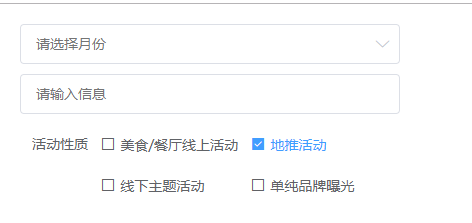
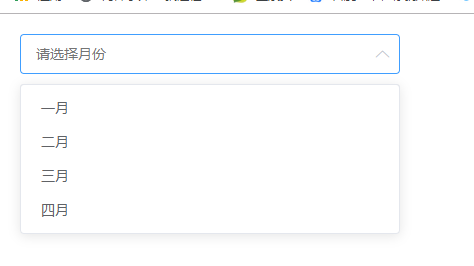

模拟select下拉框、复选框效果的更多相关文章
- jquery实现模拟select下拉框效果
<IGNORE_JS_OP style="WORD-WRAP: break-word"> <!DOCTYPE html PUBLIC "-//W3C// ...
- 关于通过jq /js 实现验证单选框 复选框是否都有被选中
今天项目中遇到一个问题 就是要实现,单选框,复选框 同时都被选中才能进行下一步的问题,开始用js原生来写 怎么写都觉得不合适,通过for循环得出 复选框被选中的,在通过for循环得出单选框被选中的,问 ...
- jQuery插件:模拟select下拉菜单
没搞那么复杂,工作中,基本够用.. <!doctype html> <html> <head> <meta charset="utf-8" ...
- 联合县城市,采用ajax,而使用ul模拟select下拉
接待处代码 js //采用jquery展示鼠标放到省ul下拉显示 $("#province").hover(function(){ ...
- ops-web运维平台-create.jsp-mootools下拉框-复选框
create.jsp页面的,body部分 <body onload="Page.init('${pageError}','${pageMessage}',${isSubmit},tru ...
- 如何在select下拉列表中添加复选框?
近来在给一个公司做考试系统的项目,遇到的问题不少,但其中的几个让我对表单的使用颇为感兴趣,前端程序员都知道,下拉列表有select标签,复选框有checkbox,但是两者合在一起却少有人去研究,当时接 ...
- jquery单选框 复选框表格高亮 选中
单选框: <!DOCTYPE html PUBLIC "-//W3C//DTD XHTML 1.0 Strict//EN" "http://www.w3.org/T ...
- 纯css3单选框/复选框美化样式代码
纯CSS 单/复选框 美化请选择iPhone 型号 iPhone 6s iPhone 6s Plus iPhone 7 iPhone 7 Plus 选择兴趣爱好 女 绘画 摄影 骑行 原理在这 ...
- 单选框 复选框 隐藏之后,绑定的change事件在ie中失效的问题
有时候需要对单选框和复选框进行美化,就需要在<input type="radio">和<input type="checkbox">元素 ...
随机推荐
- codevs2833 奇怪的梦境 x
2833 奇怪的梦境 时间限制: 1 s 空间限制: 128000 KB 题目等级 : 黄金 Gold 题目描述 Description Aiden陷入了一个奇怪的梦境:他被困在一个小房子中 ...
- ArrayList遍历的三种方法
在输出很多的ArrayList的元素时,用普通的for循环太麻烦,因此本文介绍三种遍历ArrayList的方法 package test; public class Student { private ...
- qtp识别验证码
花了两天时间才完整的完成识别验证码的登录操作,在网上看到很多关于验证码识别的方法,但是我用的qtp版本比较高级,所以还是要自己花心思研究.po上我的识别验证码的详细历程: 一.读取浏览器中的图片验证码 ...
- python实现RGB转换HSV
def rgb2hsv(r, g, b): r, g, b = r/255.0, g/255.0, b/255.0 mx = max(r, g, b) mn = min(r, ...
- 在windows窗口下打开文件夹
System.Diagnostics.Process.Start("Explorer.exe", @"C:\Users\gnt-wangt\Documents\Visua ...
- for循环,foreach, map,reduce用法对比+for in,for of
for不做赘述,相当简单: foreach方法: forEach() 方法用于调用数组的每个元素,并将元素传递给回调函数. 注意: forEach() 对于空数组是不会执行回调函数的. array.f ...
- [LeetCode]-algorithms-Median of Two Sorted Arrays
There are two sorted arrays nums1 and nums2 of size m and n respectively. Find the median of the two ...
- @清晰掉 C++ 中的 enum 结构在内存中是怎么存储的?
C++ 中的 enum 结构在内存中是怎么存储的? C++ C++ 中的 enum 结构在内存中是怎么存储的?里面存储的是常量值吗? 关于占用内存的大小,enum类型本身是不占内存的,编译器直接 ...
- tp3.2 页面Windows正常 linux异常,页面找不到
这个问题主要是tp3.2 在读取控制器里的方法时,会把方法自动转为小写, 然后去对应view成找html文件,自然找不到. class textController extends ComContro ...
- spring-mvc 3.* 多视图解析配置实例 ContentNegotiatingViewResolver
一.起因 从spring 3.1.0升级到spring 3.2.0时,配置文件servlet.xml中出错. 错误信息: java.lang.String cannot be cast to ...