
send_keys报错element not interactable
这两天要在阿里云日志中操作UI,以输入关键字搜索日志。
在send_keys时报错element not interactable。
iframe
第一个问题是iframe,通过切换iframe解决:
driver.switch_to.frame(0) # 索引从0开始
span
第二个问题是span。
F12查看html长这样:

①find_element(pre).click 有效,说明iframe切换成功了
②find_element(span2).send_keys报错
element not interactable
span不支持send_keys。
第一个方法,通过调js来解决,设置span的innerText
search_text = 'error'

log_search_span = driver.find_element_by_xpath(

        '//*[@id="queryEl"]/div[2]/div/div[6]/div[1]/div/div/div/div[5]/div/pre')

js = 'arguments[0].innerText=arguments[1];'

driver.execute_script(js, log_search_span, search_text)
第二个方法,添加属性contenteditable
search_text = 'error'

log_search_span = driver.find_element_by_xpath(

        '//*[@id="queryEl"]/div[2]/div/div[6]/div[1]/div/div/div/div[5]/div/pre')

js = 'arguments[0].setAttribute("contenteditable", "true");'

driver.execute_script(js, log_search_span)

log_search_span.send_keys(search_text)  # 可编辑后send_keys成功
不简单
虽然值设置成功了,但是不能用,在查询时,还是用空值在查询。
经过分析,得出以下线索:
- 设置的元素值是已经生成后的dom
- 程序真正的dom隐藏在js/后端中
- span是由js或后端动态生成的
- 要想模拟出来,需要分析js实现代码
- 控制台的js代码是加密混淆过的
- selenium的send_keys已经是模拟键盘输入了,不知道为啥没有触发相关代码,存值到dom
网上很多的方案是<input>标签,比较好解决,阿里的这个span还真有点不简单。
chrome console调试js
最后分享一下chrome console调试js的方法。
F12后,在元素上右键,选择Copy selector,复制selector
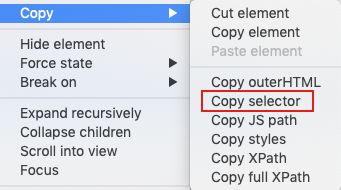
切换到console,输入即可定位到该元素:
document.querySelector('#queryEl > div.react-codemirror2 > div > div.CodeMirror-scroll > div.CodeMirror-sizer > div > div > div > div.CodeMirror-code > div > pre > span > span').innerText;
send_keys报错element not interactable的更多相关文章
- selenium报错Element is not clickable at point及四种解决方法
使用Selenium时,触发点击事件,经常报如下异常:Element is not clickable at point 1.未加载没加载出来就等待元素加载出来,再往下执行.可以使用python库ti ...
- 使用饿了么ui表单验证报错: [Element Warn][Form]model is required for validat
[Element Warn][Form]model is required for validat 如文末的完整例子: 该提示说的是 form表单需要一个绑定一个 对象(使用:model=" ...
- ReactJs 报错 Element type is invalid: expected a string (from built-in components) or a class/function (for composite components) but got: undefined. Check the render method of `Me`.
今天在重构一个页面的时候,碰到了一个error,具体的error信息如下图中所示: 最后经过一番查找定位,终于找到了问题所在,原因就是在父组件引用子组件时多加了一个大括号. import {Chart ...
- appium报错Message: Cannot set the element to ‘XXXX’. Did you interact with the correct element?
appium+python+android 在定位到模块输入内容的时候遇到了一个问题 send_keys报错 appium报错Message: Cannot set the element to 'X ...
- 解决eclipse spring配置报错:cvc-elt.1: Cannot find the declaration of element
解决eclipse spring配置报错:cvc-elt.1: Cannot find the declaration of element 'beans'.Referenced file conta ...
- web.xml文件报错:cvc-complex-type.2.4.a: Invalid content was found starting with element 'init-param'.
<?xml version="1.0" encoding="UTF-8"?> <web-app version="3.0" ...
- select2取值报错,Failed to read the 'selectionDirection' property from 'HTMLInputElement': The input element's type ('hidden') does not support selection.
用到了 select2 组件来多选收件人,用搜狗浏览器(6.2版高速模式)在执行到如下这句时报错(Uncaught InvalidStateError: Failed to read the 'sel ...
- 关于xpath语句完全正确,但是页面报错: no such element: Unable to locate element: {"method":"xpath","selector":"xpath"}
之前使用selenium-webdriver来写UI的自动化脚本,发现有一个元素一直无法定位,查看其源码,如下 利用xpathChecker验证了xpath语句的是正确的,但是控制台一直报错: no ...
- jQuery配合html2canvas 使用时 报错 Uncaught (in promise) Provided element is not within a Document
报错代码: 这个函数运行时 function download(){ var element = $("#demo"); //jquery 获取元素 //这里将会报错 html2c ...
随机推荐
- QTP中类的使用(转)
Call Test Class Tester Dim mvarTesterName,mvarAge,mvarGender Sub Class_Initia ...
- 监控工具 zxbbix
报错 [Z3001] connection to database 'zabbix' failed: [2002] Can't connect to local MySQL server throug ...
- jQuery仿Android锁屏图案应用插件
<!doctype html> <html> <head> <meta charset="utf-8"> <title> ...
- HDU多校训练第一场 1012 Sequence
题目链接:acm.hdu.edu.cn/showproblem.php?pid=6589 题意:给出一个长度为n的数组,有m次操作,操作有3种1,2,3,问操作m次后的数组,输出i*a[i]的异或和 ...
- 小程序中使用async函数 会报 regeneratorRuntime is not defined的问题
async await比Promise更好的解决异步操作问题,但是在小程序中直接使用会出现以下的错误提示 是因为缺少了regeneratorRuntime这个模块,需要从外部引入 1.在新建的文件夹中 ...
- Nginx+Keepalived主从配置(双机主从热备)+Tomcat集群
拓扑环境 以下表格是这次測试须要的拓扑环境,几台server.每台server上安装什么,都有介绍. server名称 系统版本号 预装软件 IP地址/VIP Nginx主server CentOS ...
- 【记录】Mybatis Generator生成数据对象Date/TimeStamp 查询时间格式化
Mybatis Generator是很好的工具帮助我们生成表映射关联代码,最近博主遇到一个问题,找了很久才解决, 就是用Mybatis Generator生成实体类的时候,Date 时间无法格式化输出 ...
- 工作中SQL语句的优化
在我们的工作中,数据是很多的,这是我常见问题遇到的问题做了简短总结. 1.对查询进行优化,应尽量避免全表扫描,首先应考虑在 where 及 order by 涉及的列上建立索引. 2.应尽量避免在 w ...
- CentOS 6.5安装aria2(转载)
CentOS 6.5安装aria2 由于yum install aria2无法找到安装包,试了好几个源,都找不到,于是自己找了一些地址: 1.下载安装包: # wget http://ftp.tu-c ...
- 【转载】将本地图片转成base64
<!DOCTYPE html> <html lang="en"> <head> <meta charset="UTF-8&quo ...