
002-Spring4 快速入门-项目搭建、基于注解的开发bean,Bean创建和装配、基于注解的开发bean,Bean初始化销毁、Bean装配,注解、Bean依赖注入
一、项目搭建
1、项目创建
eclipse→project explorer→new→Project→Maven Project
默认配置即可创建项目
2、spring配置
        <dependency>

            <groupId>org.springframework</groupId>

            <artifactId>spring-context</artifactId>

            <version>4.3.13.RELEASE</version>

        </dependency>
3、配置项目编译目标版本
    <properties>

        <project.build.sourceEncoding>UTF-8</project.build.sourceEncoding>

        <maven.compiler.source>1.8</maven.compiler.source>

        <maven.compiler.target>1.8</maven.compiler.target>

    </properties>
在项目上右键→maven→update project即可
二、基于注解的开发bean,Bean创建和装配
1、增加配置类,创建Bean
方法一、创建bean
增加注解@Configuration、@Bean、@Scope
@Configuration

public class MyConfig {

    @Bean(name="myBean")

    @Scope("prototype")

    public MyBean createMyBean() {

        return new MyBean();

    }

}
方法二、使用FactoryBean创建,lambda方式
public class RunnableFactoryBean implements FactoryBean<Runnable>{

    @Override

    public Runnable getObject() throws Exception {

        return ()->{};

    }

    @Override

    public Class<?> getObjectType() {

        return Runnable.class;

    }

    @Override

    public boolean isSingleton() {

        return true;

    }

}
如定义一个Jeep,讲工厂类改成
public class RunnableFactoryBean implements FactoryBean<Jeep>{

    @Override

    public Jeep getObject() throws Exception {

        return new Jeep();

    }

    @Override

    public Class<?> getObjectType() {

        return Jeep.class;

    }

    @Override

    public boolean isSingleton() {

        return true;

    }

}
使用即可。
方法三、需要参数,默认会获取,自动注入
创建class Car
创建一个工厂
public class CarFactory {

    public Car create() {

        return new Car();

    }

}
在Config中添加
    @Bean

    public CarFactory createCarFactory() {

        return new CarFactory();

    }

    @Bean

    public Car createCar(CarFactory factory) {

        return factory.create();

    }
使用即可:System.out.println(annotationConfigApplicationContext.getBean(Car.class));//名称获取
2、在方法入口增加配置
方法一、配置一个或多个指定的类型
AnnotationConfigApplicationContext annotationConfigApplicationContext = new AnnotationConfigApplicationContext(MyConfig.class);
方法二、配置指定扫描的包
AnnotationConfigApplicationContext context = new AnnotationConfigApplicationContext("com.lhx.spring.spring");
方法三、配置指定包,并且排除
@ComponentScan(basePackages="com.lhx.spring.spring",excludeFilters=@Filter(type=FilterType.ASSIGNABLE_TYPE))
FilterType有五种类型
ANNOTATION、ASSIGNABLE_TYPE、ASPECTJ、REGEX、CUSTOM
使用
建一个Dog类
public class Dog {

    public void init() {

        System.out.println("--------init------");

    }

    public void destory() {

        System.out.println("--------destory------");

    }

}
增加一个DogConfig配置类
@Configuration

public class DogConfig {

    @Bean(initMethod = "init", destroyMethod = "destory")

    public Dog createDog() {

        return new Dog();

    }

}
增加一个扫描配置类
@ComponentScan(basePackages="com.lhx.spring.spring",excludeFilters=@Filter(type=FilterType.ASSIGNABLE_TYPE,classes=DogConfig.class))

@Configuration

public class AnnotationScan {

}
当然也可以直接指定有注解的类类型,如UserController.class
使用
public class AnnotationClient2 {

    public static void main(String[] args) {

        AnnotationConfigApplicationContext context = new AnnotationConfigApplicationContext(AnnotationScan.class);

        System.out.println(context.getBean(Car.class));

        System.out.println(context.getBean(Cat.class));

        System.out.println(context.getBean(Dog.class));

        System.out.println(context.getBean(Animal.class));

        System.out.println(context.getBean(User.class));

        context.close();

    }

}
3、获取Bean
3.1、根据类型获取
System.out.println(annotationConfigApplicationContext.getBean(MyBean.class));
3.2、根据名称获取
System.out.println(annotationConfigApplicationContext.getBean("createMyBean"));//默认是方法名
注意:默认是1中配置的方法名
也可以再注解Bean中指定:@Bean(name="myBean"),指定后默认方法名不能使用
System.out.println(annotationConfigApplicationContext.getBean("myBean"));// 指定具体名
其中:默认是单例,@Scope("prototype") 非单例了
如1,方法二、展示
    System.out.println(annotationConfigApplicationContext.getBean(Jeep.class));

    System.out.println(annotationConfigApplicationContext.getBean("createRunnableFactoryBean"));
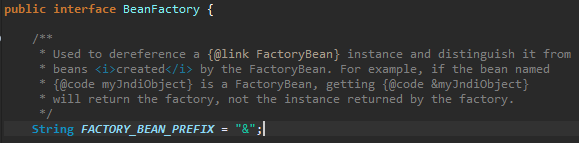
这个是具体的bean,如何获取工程bean
    System.out.println(annotationConfigApplicationContext.getBean(RunnableFactoryBean.class));//类型获取

    System.out.println(annotationConfigApplicationContext.getBean("&createRunnableFactoryBean"));//名称获取
&能获取原因:AnnotationConfigApplicationContext→GenericApplicationContext→AbstractApplicationContext→
ConfigurableApplicationContext→ApplicationContext→ListableBeanFactory→BeanFactory
三、基于注解的开发bean,Bean初始化销毁
1、初始化实现InitializingBean,销毁实现DisposableBean
public class Cat  implements InitializingBean,DisposableBean{

    @Override

    public void afterPropertiesSet() throws Exception {

        System.out.println("----------afterPropertiesSet--------");

    }

    @Override

    public void destroy() throws Exception {

        System.out.println("----------destroy--------");

    }

}
2、注入时候实现,
在类中顶一个init,destory,在Config配置中@Bean配置;
    @Bean(initMethod="init",destroyMethod="destory")

    public Dog createDog() {

        return new Dog();

    }
3、使用java中,jsr250提供的注解,@PostConstruct,@PreDestroy
public class Animal {

    @PostConstruct

    public void initial() {

        System.out.println("--------initial------");

    }

    @PreDestroy

    public void close() {

        System.out.println("--------close------");

    }

}
四、Bean装配,注解
1、使用@Component注解,没有明确角色
在class 上增加@Component注解,在AnnotationConfigApplicationContext,参数中添加即可。
AnnotationConfigApplicationContext annotationConfigApplicationContext = new AnnotationConfigApplicationContext(

                MyConfig.class,User.class);
使用即可。注意:没法绑定初始化方法等。
        System.out.println(annotationConfigApplicationContext.getBean(User.class));

        System.out.println(annotationConfigApplicationContext.getBean("user"));
可以通过getBeansOfType获取类型Map
System.out.println(annotationConfigApplicationContext.getBeansOfType(User.class));
{user=com.lhx.spring.spring.User@5e57643e}
如果在通过Config注入,那么获取时候不能使用类型获取了,有多个不知道创建那个,可以使用名称获取
2、可以使用其他注解
@Repository 一般用在数据访问层
@Service 一般用在Service层
@Controller 一般用在控制层
五、Bean依赖注入
5.1、Spring方式,@Autowired
    @Autowired

    private UserDao userDao;
如果有多个
1、名称方式,可以使用getBeansOfType获取名称,然后指定名称注入
    @Autowired

    @Qualifier("userDao")

    private UserDao userDao;
2、在其中某个增加@Primary,默认就会找这个。
5.2、jsr 250 方式,@Resource
5.3、jsr 330方式,@Inject
<dependency>

    <groupId>javax.inject</groupId>

    <artifactId>javax.inject</artifactId>

    <version>1</version>

</dependency>
代码地址:https://github.com/bjlhx15/spring-boot.git
002-Spring4 快速入门-项目搭建、基于注解的开发bean,Bean创建和装配、基于注解的开发bean,Bean初始化销毁、Bean装配,注解、Bean依赖注入的更多相关文章
- 004-Spring boot 快速入门-项目搭建与启动、SpringBootApplication、启动图标
一.官方地址 Spring:http://spring.io/ Spring Project:http://spring.io/projects Spring boot:https://project ...
- 基于renren-fast的快速入门项目实战(实现报表增删改查)
基于renren-fast的快速入门项目实战(实现报表增删改查) 说明:renren-fast是一个开源的基于springboot的前后端分离手脚架,当前版本是3.0 官方开发文档需付费,对于新手而言 ...
- Spring4 快速入门
Spring4 快速入门 1 Spring简介 1.1 Spring是什么? Spring 是一个 IOC 和 AOP 容器的开源框架,为简化企业级应用而生. IOC(Inversion of Con ...
- 架构师入门:搭建双注册中心的高可用Eureka架构(基于项目实战)
本文的案例是基于 架构师入门:搭建基本的Eureka架构(从项目里抽取) 改写的. 在上文里,我们演示Eureka客户端调用服务的整个流程,在这部分里我们将在架构上有所改进.大家可以想象下,在上文里案 ...
- ELK系列(1) - Elasticsearch + Logstash + Kibana + Log4j2快速入门与搭建用例
前言 最近公司分了个ELK相关的任务给我,在一边学习一边工作之余,总结下这些天来的学习历程和踩坑记录. 首先介绍下使用ELK的项目背景:在项目的数据库里有个表用来存储消息队列的消费日志,这些日志用于开 ...
- Activiti快速入门项目-kft-activiti-demo
1.项目简介 1.1 项目信息 本项目旨在让Activiti初学者可以快速入门,使用工作流里面的请假流程作为Activiti企业实战的Hello World. 简单通过这个实例说明如何结合流程与业务, ...
- SPRING-BOOT系列之Spring4快速入门
上节 : spring boot简介 接着上章节的spring boot简介,我们会发现boot是基于spring的,其中最重要的就是spring容器了.那么本章着重介绍spring容器装配自定义be ...
- eslint 入门项目搭建过程
github 地址 : https://github.com/gebin/eslint-demo 运行该项目 npm install npm start 访问 http://localhost:900 ...
- Vue -cli 入门 --项目搭建(一)
一. 安装node.js环境. 在node.js官网下载稳定版本(https://nodejs.org/en/) 下载完成后点击安装,安装过程很简单,一直next即可,安装完成会自动添加node及np ...
随机推荐
- Java的同名属性、同名普通函数、同名静态函数,是否被覆盖
作者按:虚拟函数的概念早就滚瓜烂熟了.但是今天面试发现:1.同名属性,2.同名普通函数,3.同名静态函数,是否被覆盖的问题.请看下面三个例子: 例子1:测试父类的属性是否存在和被完全覆盖class A ...
- jquery TAB切换小插件
//tab切换 ;(function($, window, document, undefined) { $.fn.tab = function(options) { var defaults = { ...
- ARP详解和ARP攻击
1.ARP简介 地址解析协议(Address Resolution Protocol),其基本功能为透过目标设备的IP地址,查询目标设备的MAC地址,以保证通信的顺利进行.它是IPv4中网络层必不可少 ...
- Codeforces 950 010子序列拆分 数列跳棋
A B a,b两个序列分成K段 每一段的值相等 #include <bits/stdc++.h> #define PI acos(-1.0) #define mem(a,b) memset ...
- Flutter-Radio單選框
Container( child: Radio<String>( value: "男", activeColor: Colors.red,//激活時的顏色 groupV ...
- 用C语音编写python的扩展模块,也就是python调c库
用C语音编写python的扩展模块,也就是python调c库 1.用C语言扩展Python的功能: http://www.ibm.com/developerworks/cn/linux/l-pyt ...
- day02项目配置代码
一.maven相互依赖结构 1.parent(pom)[父类]2.common(jar)[工具类]3.pojo(jar)[实体类] 依赖 common(jar)4.dao(jar)[CRUD] 依赖 ...
- Kibana后台进程启动和关闭
原创转载请注明出处:https://www.cnblogs.com/agilestyle/p/12073202.html 后台启动Kibana ./bin/kibana & 查找Kibana进 ...
- 【leetcode】410. Split Array Largest Sum
题目如下: Given an array which consists of non-negative integers and an integer m, you can split the arr ...
- python之GUI编程-tkinter学习
推荐几个学习网址:https://www.cnblogs.com/shwee/p/9427975.html https://cloud.tencent.com/developer/section/13 ...