
调整Winfrom控件WebBrowser的默认浏览器内核版本
一、问题解析:
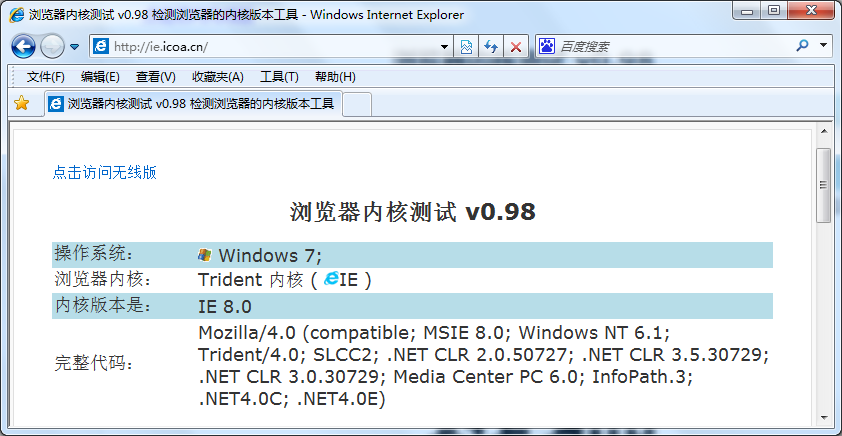
今天在调试程序的时候,需要使用C#的客户端远程登录一个Web页面,用到了WebBrowser控件。但是却发现了一件很神奇的事情:当前浏览器使用的内核,可以通过访问下面这个网站获取:http://ie.icoa.cn/,我的IE版本为IE8,在使用IE登录页面的时候,使用的内核是IE8,登录该网站的截图如下:
但是当我用WebBrowser登录该页面时,显示使用的内核却是IE7:
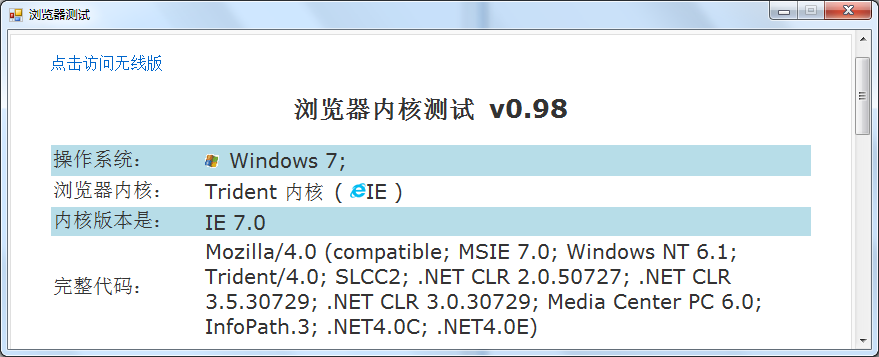
上图的程序是一个测试程序,仅包含一个WebBrowser,这个程序的名称是TestWebBrowser.exe。可以发现,虽然同为Trident内核,但在WebBrowser控件中使用的内核版本却与IE不一样,这让我感到疑惑。因为我要登录的页面是针对IE8以上版本开发的,因此我需要尝试让程序内的WebBrowser以IE8的内核登录网页。
二、解决方法
在网上找了一些资料后,我发现可以通过下面这个办法来解决:
第一个解决方法:
1、在开始菜单内输入“regedit.exe”,进入注册表编辑器
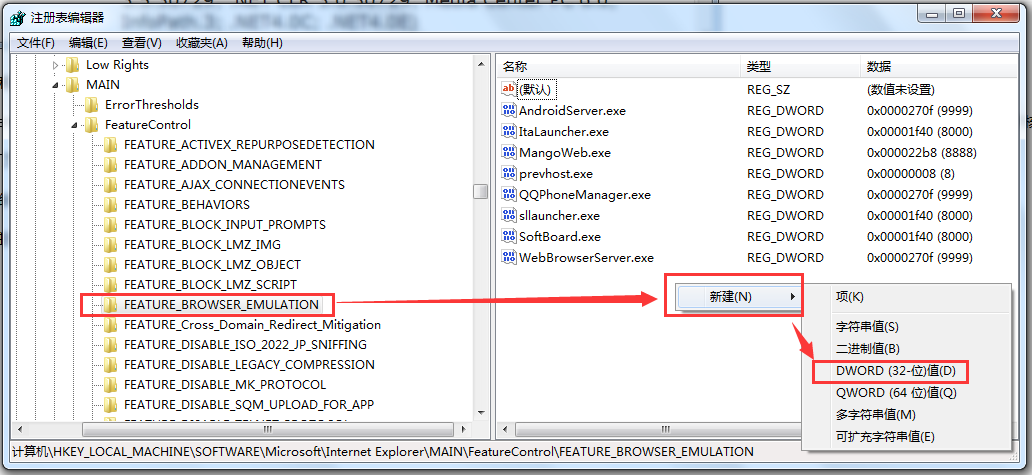
2、找到注册表项:HKEY_LOCAL_MACHINE\SOFTWARE\Microsoft\Internet Explorer\MAIN\FeatureControl\FEATURE_BROWSER_EMULATION
3、在右侧空白区域内单击鼠标右键,点击【新建】→【DWORD(32-位)值】
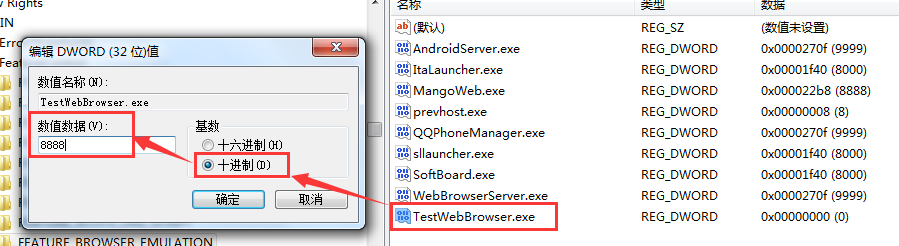
4、新建的项取名为TestWebBrowser.exe,编辑值时,选择基数“十进制”,填写数值数据,这里填写8888
5、这个时候再进入Debug目录下生成好的TestWebBrowser,可以看到登录的内核版本变成IE8了!
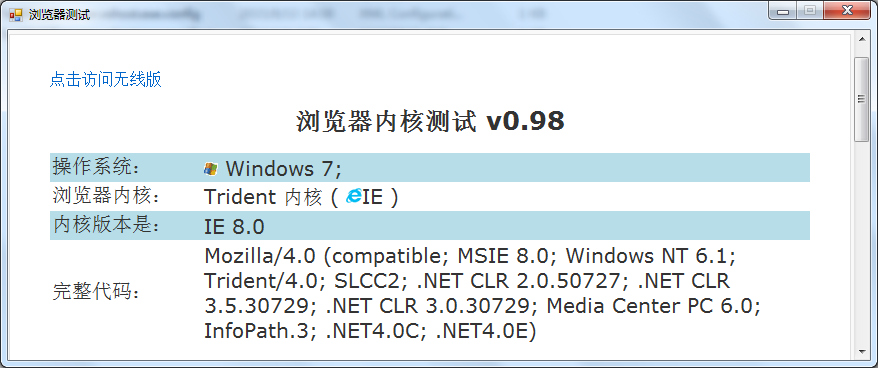
需要注意的是,在VS内以调试的方法进入程序,打开的程序实际上是TestWebBrowser.vshost.exe,并不能看到效果,必须要打开Debug目录下的TestWebBrowser.exe,才能发现内核版本的改变。之前WebBrowser使用IE7内核的原因,就是.NET中的WebBrowser控件默认使用了IE7兼容性模式来浏览网页。
第二种方法:(代码实现第一种方法)
     /// <summary>

        /// 修正WebBrowser控件的浏览器内核版本

        /// </summary>

        /// <param name="processName">待修正的进程名:System.Diagnostics.Process.GetCurrentProcess().ProcessName</param>

        public static void FixBrowserVersionForWebBrowserControl(string processName)

        {

            try

            {

                int browserVersion, registerValue;

                // get the installed IE version

                using (var webBrowser = new System.Windows.Forms.WebBrowser())

                {

                    browserVersion = webBrowser.Version.Major;

                }

                // set the appropriate IE version

                if (browserVersion >= 11) registerValue = 11001;

                else if (browserVersion == 10) registerValue = 10001;

                else if (browserVersion == 9) registerValue = 9999;

                else if (browserVersion == 8) registerValue = 8888;

                else registerValue = 7000;

                // set the actual key

                using (var key = Microsoft.Win32.Registry.CurrentUser.OpenSubKey(@"SOFTWARE\Microsoft\Internet Explorer\Main\FeatureControl\FEATURE_BROWSER_EMULATION", true))

                {

                    if (key != null)

                    {

                        //key.SetValue(System.Diagnostics.Process.GetCurrentProcess().ProcessName + ".exe", registerValue, Microsoft.Win32.RegistryValueKind.DWord);

                        key.SetValue(processName + ".exe", registerValue, Microsoft.Win32.RegistryValueKind.DWord);

                        key.Close();

                    }

                }

            }

            catch (Exception ex)

            {

                Console.WriteLine(ex);

            }

        }
三、扩展
上面这个方法依靠修改注册表来完成WebBrowser使用内核的变更,不过光知道新建一个注册表项并把值设置为“8888”还远远不够,本着“知其然还要知其所以然”的想法,我查阅了相关的MSDN页面:https://msdn.microsoft.com/en-us/library/ee330730%28v=vs.85%29.aspx
这个页面的标题是:Internet Feature Controls (B..C),即互联网功能控制,我们要找的章节是“Browser Emulation”(浏览器仿真)。原来自从IE8以后,在注册表中添加了FEATURE_BROWSER_EMULATION功能,这个功能是用来定义IE默认的仿真模式。
这个功能在注册表中的位置如下:
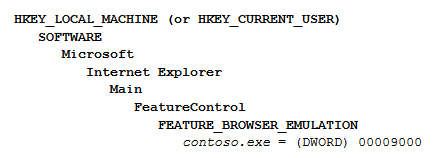
该注册表项的各可能取值描述如下(原文见MSDN,纯手工翻译,如有不足之处欢迎指出)
7000 (0x1B58)
Webpages containing standards-based !DOCTYPE directives are displayed in IE7 Standards mode. Default value for applications hosting the WebBrowser Control.
包含标准!DOCTYPE指令的页面将会以IE7兼容模式打开。WebBrowser控件的默认值。
8000 (0x1F40)
Webpages containing standards-based !DOCTYPE directives are displayed in IE8 mode. Default value for Internet Explorer 8
Important In Internet Explorer 10, Webpages containing standards-based !DOCTYPE directives are displayed in IE10 Standards mode.
包含标准!DOCTYPE指令的页面将会以IE8兼容模式打开,IE8浏览器的默认值。对于IE10来说,包含标准!DOCTYPE指令的页面会以IE10兼容模式打开。
8888 (0x22B8)
Webpages are displayed in IE8 Standards mode, regardless of the declared !DOCTYPE directive. Failing to declare a !DOCTYPE directive causes the page to load in Quirks.
无论是否声明!DOCTYPE指令,页面以IE8兼容模式打开。对于未正确声明!DOCTYPE指令的页面,将会以怪异模式(quirks mode)加载。
9000 (0x2328)
Internet Explorer 9. Webpages containing standards-based !DOCTYPE directives are displayed in IE9 mode. Default value for Internet Explorer 9.
Important In Internet Explorer 10, Webpages containing standards-based !DOCTYPE directives are displayed in IE10 Standards mode.
IE9,包含标准!DOCTYPE指令的页面将会以IE9兼容模式打开,IE9浏览器的默认值。对于IE10来说,包含标准!DOCTYPE指令的页面会以IE10兼容模式打开。
9999 (0x270F)
Windows Internet Explorer 9. Webpages are displayed in IE9 Standards mode, regardless of the declared !DOCTYPE directive. Failing to declare a !DOCTYPE directive causes the page to load in Quirks.
IE9,无论是否声明!DOCTYPE指令,页面以IE9兼容模式打开。对于未正确声明!DOCTYPE指令的页面,将会以怪异模式(quirks mode)加载。
10000 (0x02710)
Internet Explorer 10. Webpages containing standards-based !DOCTYPE directives are displayed in IE10 Standards mode. Default value for Internet Explorer 10.
IE10,包含标准!DOCTYPE指令的页面将会以IE10兼容模式打开,IE10浏览器的默认值。
10001 (0x2711)
Internet Explorer 10. Webpages are displayed in IE10 Standards mode, regardless of the !DOCTYPE directive.
IE10,无论是否声明!DOCTYPE指令,页面以IE10兼容模式打开。
11001 (0x2AF9)
IE11. Webpages containing standards-based !DOCTYPE directives are displayed in IE11 edge mode. Default value for IE11.
IE11,包含标准!DOCTYPE指令的页面将会以IE11兼容模式打开,IE11浏览器的默认值。
11000 (0x2AF8)
Internet Explorer 11. Webpages are displayed in IE11 edge mode, regardless of the declared !DOCTYPE directive. Failing to declare a !DOCTYPE directive causes the page to load in Quirks.
IE11,无论是否声明!DOCTYPE指令,页面将会以IE11的edge模式打开。对于未正确声明!DOCTYPE指令的页面,将会以怪异模式(quirks mode)加载。
参考资料:https://my.oschina.net/Tsybius2014/blog/492107
调整Winfrom控件WebBrowser的默认浏览器内核版本的更多相关文章
- 调整WebBrowser的默认浏览器内核版本
原文出自:https://my.oschina.net/Tsybius2014/blog/492107 注:这个是写.net控件,其实delphi是一样的.作者已经写的比较全面了,我只是做了一点修改 ...
- WPF 精修篇 WPF嵌入Winfrom控件
原文:WPF 精修篇 WPF嵌入Winfrom控件 先增加DLL 支持 使用 WindowsFormsHost 来加载Forms的控件 引用命名空间 xmlns:forms="clr-na ...
- Winfrom控件 特效
链接:https://pan.baidu.com/s/1O9e7sxnYFYWD55Vh5fxFQg 提取码:5cey 复制这段内容后打开百度网盘手机App,操作更方便哦 Winfrom控件查询手册. ...
- C#将WebBowser控件替换为Chrome内核
摘要 由于最近要做一个浏览器式的软件,其中有不少地方需要使用到jQuery和BootStrap,但是在C#中,默认的WebBrowser控件默认使用的是IE的core,而低版本的IE在JS加载上总是容 ...
- C#Winform将WebBowser控件替换为Chrome内核
摘要 由于最近要做一个浏览器式的软件,其中有不少地方需要使用到jQuery和BootStrap,但是在C#中,默认的WebBrowser控件默认使用的是IE的core,而低版本的IE在JS加载上总是容 ...
- C#Winform使用CefSharp将WebBowser控件替换为Chrome内核
先废话一段 ,好久没写博客了,也是跟环境工作有关,之前做技术,天天博客园的翻着 (还是喜欢博客园,因为大家都无私分享交流啊,不像CSDN啥东西都要积分,鄙视之),现在偶尔需要个什么东西了才打开VS写写 ...
- C#winfrom控件命名规范
※用红字标记的部分表示有重复出现,括号内为替代表示方案 1.标准控件 序号 控件类型简写 控件类型 1 btn Button 2 chk CheckBox 3 ckl CheckedListBox ...
- IOS中调整UI控件位置和尺寸
1.frame(修改位置和尺寸):以父控件左上角为坐标原点,在其父控件中的位置和尺寸. //frame属性中的坐标点不能直接修改 CGRect tempFrame = self.v.frame; // ...
- 调整ListBox控件的行间距及设置文本格式
首先要将该控件的DrawMode属性为OwnerDrawVariable 添加DrawItem重绘事件:private void listBox1_DrawItem(object sender, Dr ...
随机推荐
- windows命令行运行mysql
在cmd中输入时一定要保证英文环境. 1. windows命令行运行mysql: 我是将MYSQL安装在C:\Program Files\MySQL所以 C:\Program Files\MySQL\ ...
- 前端BFC布局学习
BFC,全称为(Block formatting context).按照我的理解是我们在某一条件下会触发BFC布局,会产生一定的效果. Block Formatting Contexts翻译为:块级元 ...
- note4
- setNeedsDisplay和setNeedsLayout方法
参考:https://blog.csdn.net/sunnyboy9/article/details/51458401 . UIView的setNeedsDisplay和setNeedsLayout方 ...
- nil,Nil,NULL和NSNull的区别
- thinkphp 配置格式
ThinkPHP支持多种格式的配置格式,但最终都是解析为PHP数组的方式. PHP数组定义 返回PHP数组的方式是默认的配置定义格式,例如: //项目配置文件 return [ // 默认模块名 'd ...
- 八、条件变量std::condition_variable、wait()、notify_one()、notify_all(粗略)
一.std::condition_variable 用在多线程中. 线程A:等待一个条件满足 线程B:专门在消息队列中扔消息,线程B触发了这个条件,A就满足条件了,可以继续执行 std::condit ...
- txt操作
C#解决读写包含汉字的txt文件时乱码的问题 C#解决读写包含汉字的txt文件时乱码的问题 当我们用System.IO.StreamReader读取包含汉字的txt文件时,经常会读出乱码(Stream ...
- [NOIP模拟20]题解
来自达哥的问候…… A.周 究级难题,完全不可做QAQ #include<cstdio> #include<iostream> #include<cstring> ...
- linux从head.s到start_kernelstart_kernel之---内核重定位后分析
参考: https://biscuitos.github.io/blog/ARM-BOOT/ zImage 重定位之后实践 zImage 重定位之后,ARM 将 pc 指针指向了重定位 zImage ...