
Angular2表格/可排序/table
Angular2表格
1. 官网下载Angular2开发环境,以及给出的quickstart代码示例demo(地址如下),具体步骤不在详述。
https://github.com/angular/quickstart
2. 更改demo中,index.html,导入的文件,以及组件的位置
      System.import('app').catch(function(err){ console.error(err); });

      <app>Loading...</app>
3. demo中将app文件夹中文件全部删除
4. app文件夹下,新建main.ts文件
import { platformBrowserDynamic } from '@angular/platform-browser-dynamic';

import { AppModule } from './app.module';

platformBrowserDynamic().bootstrapModule(AppModule);
5. app文件夹下,新建app.module.ts文件
import { NgModule }      from '@angular/core';

import { BrowserModule } from '@angular/platform-browser';

import { FormsModule }   from '@angular/forms';

import { AppComponent }  from './grid';

@NgModule({

  imports: [

    BrowserModule,

    FormsModule

  ],

  declarations: [

    AppComponent,

  ],

  bootstrap: [ AppComponent ]

})

export class AppModule { }
6. app文件夹下,新建grid.ts文件
import {Component, Input, OnInit} from '@angular/core';

import {Column} from './column';

import {Sorter} from './sorter';

import {GridDemo} from './grid-demo';

@Component({

    selector: 'app',

    templateUrl: 'app/grid.html'

})

export class AppComponent implements OnInit{

    @Input() columns:Array<Column>;

    @Input() rows:Array<any>;

    @Input() name:string;

    sorter = new Sorter();

    gridDemo = new GridDemo();

    sort(key){

        this.sorter.sort(key, this.rows);

    }

    ngOnInit(){

        this.columns= this.gridDemo.getColumns();

        this.rows=this.gridDemo.getPeople();

        console.log(this.name);

    }

}
7. app文件夹下,新建column.ts, sorter.ts, grid-demo.ts文件,分别为:
export class Column{

    constructor(public name: string, public descr: string){

    }

}
export class Sorter{

    direction:number;

    key:string;

    constructor(){

        this.direction = 1;

    }

    sort(key:string,data:any[]){

        if(this.key === key){

            this.direction = -this.direction;

        }

        else{

            this.direction = 1;

        }

        this.key = key;

        data.sort((a,b) => {

            if(a[key] === b[key]){

                return 0;

            }

            else if(a[key] > b[key]){

                return this.direction;

            }

            else{

                return -this.direction;

            }

        });

    }

}
import {Component} from '@angular/core';

import {Column} from './column';

@Component({

    template:'<grid name="person grid" [rows]="people" [columns]="columns"></grid>'

})

export class GridDemo {

    people: Array<Person>;

    columns: Array<Column>;

    constructor() {

        this.people = this.getPeople();

        this.columns = this.getColumns();

    }

    getPeople(): Array<Person> {

        return [

            {firstName:'Joe',lastName:'Jackson',age:20},

            {firstName:'Peter',lastName:'Smith',age:30},

            {firstName:'Jane',lastName:'Doe',age:50},

            {firstName:'Tim',lastName:'Smith',age:80}

        ];

    }

    getColumns(): Array<Column> {

        return [

            new Column('firstName','First Name'),

            new Column('lastName','Last Name'),

            new Column('age','Age')

        ];

    }

}

interface Person {

    firstName:string;

    lastName:string;

    age:number;

}
7. 运行
npm start
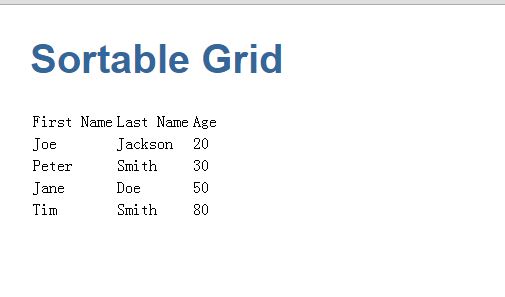
8. 结果
Angular2表格/可排序/table的更多相关文章
- JS学习之表格的排序
<!DOCTYPE html> <html> <head> <meta charset="UTF-8"> <title> ...
- JS实现点击表头表格自动排序(含数字、字符串、日期)
这篇文章主要介绍了利用JS如何实现点击表头后表格自动排序,其中包含数字排序.字符串排序以及日期格式的排序,文中给出了完整的示例代码,并做了注释,相信大家都能看懂,感兴趣的朋友们一起来看看吧. < ...
- 9月6日表格标签(table、行、列、表头)(补)
一.<table> <table>代表表格标签. <table></table> 1.width 表示表格宽度,宽度表达方式有像素和百分比两种.网 ...
- FineUI第十六天---表格的排序和分页
表格的排序和分页 1.表格的排序需要: AllowSorting:是否允许排序. SortColumn:当前排序的列ID,当然也可以不设置此属性,而是在后台初始化代码中直接指定默认排序字段. Sort ...
- HTML table表格转换为Markdown table表格[转]
举个栗子,当我想要把这个页面的第一个表格转换成Markdown Table时,怎么做更快,效率更高? 只需简单三步,请看示例: 第一步:复制包含HTML table标签的代码 复制table代码(HT ...
- 用python解析word文件(段落篇(paragraph) 表格篇(table) 样式篇(style))
首先需要安装相应的支持库: 直接在命令行执行pip install python-docx 示例代码如下: import docxfrom docx import Document #导入库 path ...
- 表格标签(table、行、列、表头)
表格标签 一.<table> <table>代表表格标签. <table></table> 1.width 表示表格宽度,宽度表达方式有像素和百分 ...
- 轻量级表格插件Bootstrap Table。拥有强大的支持固定表头、单/复选、排序、分页、搜索及自定义表头等功能。
Bootstrap Table是轻量级的和功能丰富的以表格的形式显示的数据,支持单选,复选框,排序,分页,显示/隐藏列,固定标题滚动表,响应式设计,Ajax加载JSON数据,点击排序的列,卡片视图等. ...
- 最好的Angular2表格控件
现在市面上有大量的JavaScript数据表格控件,包括开源的第三方的和自产自销的.可以说Wijmo的Flexgrid是目前适应Angular 2的最好的表格控件. Angular 2数据表格基本要求 ...
随机推荐
- BZOJ 3781: 小B的询问
3781: 小B的询问 Time Limit: 10 Sec Memory Limit: 128 MBSubmit: 643 Solved: 435[Submit][Status][Discuss ...
- 区间第K大(一)
Problem: 给定无序序列S:[b, e),求S中第K大的元素. Solution 1.裸排序 2.现将区间均分成两段,S1, S2,对S1,S2分别排序,然后
- php实现转换html格式为文本格式的方法
有时候需要转换html格式的字符串为文本,但又需要保持一定的格式,比如要求段落变成的分段格式就可以用下面这个函数 function html2text($str){ $str = preg_repl ...
- Git------Win7系统使用TortoiseGit
转载: https://my.oschina.net/longxuu/blog/141699?p=1 此步可以省略 1.点击TortoiseGit->PuTTygen 2.点击"Gen ...
- 外景VR的应用
留坑,续写. 最近在做外景的项目,被相关的帧率优化和灯光布置困扰的不要不要的.下面写下我是怎么优化帧率和对帧率的一些理解. 帧率,游戏的重要影响因素,会对玩家的手感以及视觉产生重大的影响,一般的游戏帧 ...
- 大熊君JavaScript插件化开发------(实战篇之DXJ UI ------ Tab功能扩展完结版)
一,开篇分析 Hi,大家好!大熊君又和大家见面了,还记得上一篇文章吗.主要讲述了一个“Tab”插件是如何组织代码以及实现的”,以及过程化设计与面向对象思想设计相结合的方式是 如何设计一个插件的,两种方 ...
- UVA-11997 K Smallest Sums
UVA - 11997 K Smallest Sums Time Limit: 1000MS Memory Limit: Unknown 64bit IO Format: %lld & ...
- linux source
清华TUNA镜像源https://mirrors.tuna.tsinghua.edu.cn/ 中科大USTC镜像源 https://mirrors.ustc.edu.cn/ ali http://mi ...
- 关于CDN的认识
传统的未加缓存服务的访问过程: 用户提交域名→浏览器对域名进行解释→得到目的主机的IP地址→根据IP地址访问发出请求→得到请求数据并回复 由上可见,用户访问未使用CDN缓存网站的过程为: 1).用户向 ...
- Rails 实现多对多自连接
1. 先生成关联代码 class WorkConnect < ActiveRecord::Base belongs_to :working, class_name: "Company& ...