
Angular2表格/可排序/table
Angular2表格
1. 官网下载Angular2开发环境,以及给出的quickstart代码示例demo(地址如下),具体步骤不在详述。
https://github.com/angular/quickstart
2. 更改demo中,index.html,导入的文件,以及组件的位置
      System.import('app').catch(function(err){ console.error(err); });

      <app>Loading...</app>
3. demo中将app文件夹中文件全部删除
4. app文件夹下,新建main.ts文件
import { platformBrowserDynamic } from '@angular/platform-browser-dynamic';

import { AppModule } from './app.module';

platformBrowserDynamic().bootstrapModule(AppModule);
5. app文件夹下,新建app.module.ts文件
import { NgModule }      from '@angular/core';

import { BrowserModule } from '@angular/platform-browser';

import { FormsModule }   from '@angular/forms';

import { AppComponent }  from './grid';

@NgModule({

  imports: [

    BrowserModule,

    FormsModule

  ],

  declarations: [

    AppComponent,

  ],

  bootstrap: [ AppComponent ]

})

export class AppModule { }
6. app文件夹下,新建grid.ts文件
import {Component, Input, OnInit} from '@angular/core';

import {Column} from './column';

import {Sorter} from './sorter';

import {GridDemo} from './grid-demo';

@Component({

    selector: 'app',

    templateUrl: 'app/grid.html'

})

export class AppComponent implements OnInit{

    @Input() columns:Array<Column>;

    @Input() rows:Array<any>;

    @Input() name:string;

    sorter = new Sorter();

    gridDemo = new GridDemo();

    sort(key){

        this.sorter.sort(key, this.rows);

    }

    ngOnInit(){

        this.columns= this.gridDemo.getColumns();

        this.rows=this.gridDemo.getPeople();

        console.log(this.name);

    }

}
7. app文件夹下,新建column.ts, sorter.ts, grid-demo.ts文件,分别为:
export class Column{

    constructor(public name: string, public descr: string){

    }

}
export class Sorter{

    direction:number;

    key:string;

    constructor(){

        this.direction = 1;

    }

    sort(key:string,data:any[]){

        if(this.key === key){

            this.direction = -this.direction;

        }

        else{

            this.direction = 1;

        }

        this.key = key;

        data.sort((a,b) => {

            if(a[key] === b[key]){

                return 0;

            }

            else if(a[key] > b[key]){

                return this.direction;

            }

            else{

                return -this.direction;

            }

        });

    }

}
import {Component} from '@angular/core';

import {Column} from './column';

@Component({

    template:'<grid name="person grid" [rows]="people" [columns]="columns"></grid>'

})

export class GridDemo {

    people: Array<Person>;

    columns: Array<Column>;

    constructor() {

        this.people = this.getPeople();

        this.columns = this.getColumns();

    }

    getPeople(): Array<Person> {

        return [

            {firstName:'Joe',lastName:'Jackson',age:20},

            {firstName:'Peter',lastName:'Smith',age:30},

            {firstName:'Jane',lastName:'Doe',age:50},

            {firstName:'Tim',lastName:'Smith',age:80}

        ];

    }

    getColumns(): Array<Column> {

        return [

            new Column('firstName','First Name'),

            new Column('lastName','Last Name'),

            new Column('age','Age')

        ];

    }

}

interface Person {

    firstName:string;

    lastName:string;

    age:number;

}
7. 运行
npm start
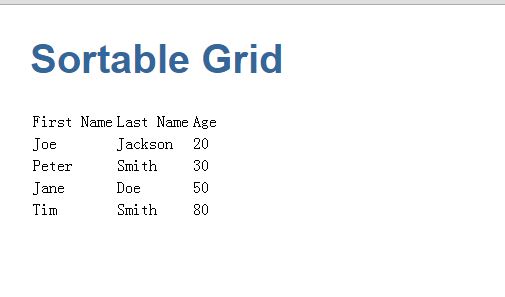
8. 结果
Angular2表格/可排序/table的更多相关文章
- JS学习之表格的排序
<!DOCTYPE html> <html> <head> <meta charset="UTF-8"> <title> ...
- JS实现点击表头表格自动排序(含数字、字符串、日期)
这篇文章主要介绍了利用JS如何实现点击表头后表格自动排序,其中包含数字排序.字符串排序以及日期格式的排序,文中给出了完整的示例代码,并做了注释,相信大家都能看懂,感兴趣的朋友们一起来看看吧. < ...
- 9月6日表格标签(table、行、列、表头)(补)
一.<table> <table>代表表格标签. <table></table> 1.width 表示表格宽度,宽度表达方式有像素和百分比两种.网 ...
- FineUI第十六天---表格的排序和分页
表格的排序和分页 1.表格的排序需要: AllowSorting:是否允许排序. SortColumn:当前排序的列ID,当然也可以不设置此属性,而是在后台初始化代码中直接指定默认排序字段. Sort ...
- HTML table表格转换为Markdown table表格[转]
举个栗子,当我想要把这个页面的第一个表格转换成Markdown Table时,怎么做更快,效率更高? 只需简单三步,请看示例: 第一步:复制包含HTML table标签的代码 复制table代码(HT ...
- 用python解析word文件(段落篇(paragraph) 表格篇(table) 样式篇(style))
首先需要安装相应的支持库: 直接在命令行执行pip install python-docx 示例代码如下: import docxfrom docx import Document #导入库 path ...
- 表格标签(table、行、列、表头)
表格标签 一.<table> <table>代表表格标签. <table></table> 1.width 表示表格宽度,宽度表达方式有像素和百分 ...
- 轻量级表格插件Bootstrap Table。拥有强大的支持固定表头、单/复选、排序、分页、搜索及自定义表头等功能。
Bootstrap Table是轻量级的和功能丰富的以表格的形式显示的数据,支持单选,复选框,排序,分页,显示/隐藏列,固定标题滚动表,响应式设计,Ajax加载JSON数据,点击排序的列,卡片视图等. ...
- 最好的Angular2表格控件
现在市面上有大量的JavaScript数据表格控件,包括开源的第三方的和自产自销的.可以说Wijmo的Flexgrid是目前适应Angular 2的最好的表格控件. Angular 2数据表格基本要求 ...
随机推荐
- bzoj2086【Poi2010】Blocks
因为long long还有PE的事WA了一下午TAT 考虑一段可行区间的平均值肯定>=k 也就是说将每个数减去k以后,一段可行区间的和非负,求一段最长区间. 一段区间的和肯定是两个前缀和的差 先 ...
- bzoj 3055礼物运送 floyed + 状压DP
bzoj 3055: 礼物运送 floyed first 设f[i][S]表示取到了S集合中的所有点(不一定是经过的所有点),最后停在了i的最优值. 初始就f[i][{i}] = dis[1][i] ...
- 理解DOM
http://www.cnblogs.com/chaogex/p/3959723.html 文档对象模型(Document Object Model,简称DOM),是W3C组织推荐的处理可扩展标志语言 ...
- 【原】理解javascript中的闭包
闭包在javascript来说是比较重要的概念,平时工作中也是用的比较多的一项技术.下来对其进行一个小小的总结 什么是闭包? 官方说法: 闭包是指有权访问另一个函数作用域中的变量的函数.创建闭包的常见 ...
- photoshop拾色器如何恢复默认?
今天在做设计图的时候,遇到一个问题,当时就把我给整蒙了. 问题是这样的,ps的调色器变成了这样,如下: 本来应该是这样: 可能有人已经看出两张图的不同之处了. 但是我当时忙的不得了,恩是不知道哪里除了 ...
- 这可能是由于服务终结点绑定未使用 HTTP 协议造成的 .这还可能是由于服务器中止了 HTTP 请求上下文
一个很简单的WCF报这个异常,才发现是 Response的类无法被序列化 因为在Response类里有一个枚举 StatusType,而系统的枚举值是 从0-5,但是数据库里多了一个值为6的记录 这样 ...
- 从yield关键字看IEnumerable和Collection的区别
C#的yield关键字由来以久,如果我没有记错的话,应该是在C# 2.0中被引入的.相信大家此关键字的用法已经了然于胸,很多人也了解yield背后的“延迟赋值”机制.但是即使你知道这个机制,你也很容易 ...
- 在eclipse中遇到cannot open output file xxx.exe: Permission denied 的解决办法
该问题出现的原因主要原因是,编译后运行的程序未能正确关闭,解决方法:删除debug目录即可 同理在vc6.0遇到同样问题时,删除debug目录,或者重启vc6.0即可
- CSS高效开发实战:CSS 3、LESS、SASS、Bootstrap、Foundation --读书笔记(2)CSS3利用图层叠加实现多背景
CSS 3允许设置多个背景图片,每个背景图片占一层,层的上下按照在CSS中书写的顺序来定,最先写的背景在最上层,每层图片定义使用英文逗号隔开. 例如下面的代码: background:url(http ...
- java基础知识(一)数据类型(下)
前面介绍了java的8种基本数据类型,包括boolean, byte, char, short, int, long, float, double.同时,java也提供了这些类型的封装类,分别为Bo ...