
使用composer安装php的相关框架
使用composer来安装php的相关框架,不需要事先准备composer.json以及conmposer.lock以及composer.phar等文件;
直接在项目根目录下是使用composer require frameworkname即可
使用composer require frameworkname命令执行以下动作:
(1)首先在项目根目录下生成composer.json文件
(2)会在项目更目录下生成框架的vendor目录,vendor目录即为框架,vendor目录会包含一个autoload.php文件用于加载框架;包含一个composer目录定义各种加载器
(3)最后生成composer.lock文件
例如在一个空目录下安装beanbun
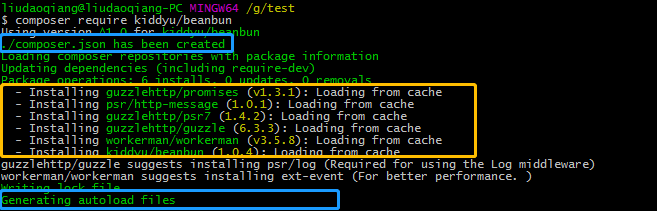
生成的文件如下所示:
composer.json
{
    "require": {
        "kiddyu/beanbun": "^1.0"
    }
}
autoload.php
<?php

// autoload.php @generated by Composer

require_once __DIR__ . '/composer/autoload_real.php';

return ComposerAutoloaderInitf0360927d4c8cd5f4c7318db461c5f92::getLoader();
composer.lock
{
    "_readme": [
        "This file locks the dependencies of your project to a known state",
        "Read more about it at https://getcomposer.org/doc/01-basic-usage.md#composer-lock-the-lock-file",
        "This file is @generated automatically"
    ],
    "content-hash": "f39f11ea038520d38d9236d063973569",
    "packages": [
        {
            "name": "guzzlehttp/guzzle",
            "version": "6.3.3",
            "source": {
                "type": "git",
                "url": "https://github.com/guzzle/guzzle.git",
                "reference": "407b0cb880ace85c9b63c5f9551db498cb2d50ba"
            },
            "dist": {
                "type": "zip",
                "url": "https://api.github.com/repos/guzzle/guzzle/zipball/407b0cb880ace85c9b63c5f9551db498cb2d50ba",
                "reference": "407b0cb880ace85c9b63c5f9551db498cb2d50ba",
                "shasum": ""
            },
            "require": {
                "guzzlehttp/promises": "^1.0",
                "guzzlehttp/psr7": "^1.4",
                "php": ">=5.5"
            },
            "require-dev": {
                "ext-curl": "*",
                "phpunit/phpunit": "^4.8.35 || ^5.7 || ^6.4 || ^7.0",
                "psr/log": "^1.0"
            },
            "suggest": {
                "psr/log": "Required for using the Log middleware"
            },
            "type": "library",
            "extra": {
                "branch-alias": {
                    "dev-master": "6.3-dev"
                }
            },
            "autoload": {
                "files": [
                    "src/functions_include.php"
                ],
                "psr-4": {
                    "GuzzleHttp\\": "src/"
                }
            },
            "notification-url": "https://packagist.org/downloads/",
            "license": [
                "MIT"
            ],
            "authors": [
                {
                    "name": "Michael Dowling",
                    "email": "mtdowling@gmail.com",
                    "homepage": "https://github.com/mtdowling"
                }
            ],
            "description": "Guzzle is a PHP HTTP client library",
            "homepage": "http://guzzlephp.org/",
            "keywords": [
                "client",
                "curl",
                "framework",
                "http",
                "http client",
                "rest",
                "web service"
            ],
            "time": "2018-04-22T15:46:56+00:00"
        },
        {
            "name": "guzzlehttp/promises",
            "version": "v1.3.1",
            "source": {
                "type": "git",
                "url": "https://github.com/guzzle/promises.git",
                "reference": "a59da6cf61d80060647ff4d3eb2c03a2bc694646"
            },
            "dist": {
                "type": "zip",
                "url": "https://api.github.com/repos/guzzle/promises/zipball/a59da6cf61d80060647ff4d3eb2c03a2bc694646",
                "reference": "a59da6cf61d80060647ff4d3eb2c03a2bc694646",
                "shasum": ""
            },
            "require": {
                "php": ">=5.5.0"
            },
            "require-dev": {
                "phpunit/phpunit": "^4.0"
            },
            "type": "library",
            "extra": {
                "branch-alias": {
                    "dev-master": "1.4-dev"
                }
            },
            "autoload": {
                "psr-4": {
                    "GuzzleHttp\\Promise\\": "src/"
                },
                "files": [
                    "src/functions_include.php"
                ]
            },
            "notification-url": "https://packagist.org/downloads/",
            "license": [
                "MIT"
            ],
            "authors": [
                {
                    "name": "Michael Dowling",
                    "email": "mtdowling@gmail.com",
                    "homepage": "https://github.com/mtdowling"
                }
            ],
            "description": "Guzzle promises library",
            "keywords": [
                "promise"
            ],
            "time": "2016-12-20T10:07:11+00:00"
        },
        {
            "name": "guzzlehttp/psr7",
            "version": "1.4.2",
            "source": {
                "type": "git",
                "url": "https://github.com/guzzle/psr7.git",
                "reference": "f5b8a8512e2b58b0071a7280e39f14f72e05d87c"
            },
            "dist": {
                "type": "zip",
                "url": "https://api.github.com/repos/guzzle/psr7/zipball/f5b8a8512e2b58b0071a7280e39f14f72e05d87c",
                "reference": "f5b8a8512e2b58b0071a7280e39f14f72e05d87c",
                "shasum": ""
            },
            "require": {
                "php": ">=5.4.0",
                "psr/http-message": "~1.0"
            },
            "provide": {
                "psr/http-message-implementation": "1.0"
            },
            "require-dev": {
                "phpunit/phpunit": "~4.0"
            },
            "type": "library",
            "extra": {
                "branch-alias": {
                    "dev-master": "1.4-dev"
                }
            },
            "autoload": {
                "psr-4": {
                    "GuzzleHttp\\Psr7\\": "src/"
                },
                "files": [
                    "src/functions_include.php"
                ]
            },
            "notification-url": "https://packagist.org/downloads/",
            "license": [
                "MIT"
            ],
            "authors": [
                {
                    "name": "Michael Dowling",
                    "email": "mtdowling@gmail.com",
                    "homepage": "https://github.com/mtdowling"
                },
                {
                    "name": "Tobias Schultze",
                    "homepage": "https://github.com/Tobion"
                }
            ],
            "description": "PSR-7 message implementation that also provides common utility methods",
            "keywords": [
                "http",
                "message",
                "request",
                "response",
                "stream",
                "uri",
                "url"
            ],
            "time": "2017-03-20T17:10:46+00:00"
        },
        {
            "name": "kiddyu/beanbun",
            "version": "1.0.4",
            "source": {
                "type": "git",
                "url": "https://github.com/kiddyuchina/Beanbun.git",
                "reference": "3b84c35de3470a3a2a44d47d201bdc3b7602e666"
            },
            "dist": {
                "type": "zip",
                "url": "https://api.github.com/repos/kiddyuchina/Beanbun/zipball/3b84c35de3470a3a2a44d47d201bdc3b7602e666",
                "reference": "3b84c35de3470a3a2a44d47d201bdc3b7602e666",
                "shasum": ""
            },
            "require": {
                "guzzlehttp/guzzle": "^6.0",
                "php": ">=5.5.0",
                "workerman/workerman": "^3.3"
            },
            "type": "application",
            "autoload": {
                "psr-4": {
                    "Beanbun\\": "src/"
                }
            },
            "notification-url": "https://packagist.org/downloads/",
            "license": [
                "MIT"
            ],
            "authors": [
                {
                    "name": "Kidd Yu",
                    "email": "58631254@qq.com"
                }
            ],
            "description": "Beanbun 是用 PHP 编写的多进程网络爬虫框架,具有良好的开放性、高可扩展性",
            "keywords": [
                "crawler",
                "scraper",
                "spider"
            ],
            "time": "2017-06-11T17:13:59+00:00"
        },
        {
            "name": "psr/http-message",
            "version": "1.0.1",
            "source": {
                "type": "git",
                "url": "https://github.com/php-fig/http-message.git",
                "reference": "f6561bf28d520154e4b0ec72be95418abe6d9363"
            },
            "dist": {
                "type": "zip",
                "url": "https://api.github.com/repos/php-fig/http-message/zipball/f6561bf28d520154e4b0ec72be95418abe6d9363",
                "reference": "f6561bf28d520154e4b0ec72be95418abe6d9363",
                "shasum": ""
            },
            "require": {
                "php": ">=5.3.0"
            },
            "type": "library",
            "extra": {
                "branch-alias": {
                    "dev-master": "1.0.x-dev"
                }
            },
            "autoload": {
                "psr-4": {
                    "Psr\\Http\\Message\\": "src/"
                }
            },
            "notification-url": "https://packagist.org/downloads/",
            "license": [
                "MIT"
            ],
            "authors": [
                {
                    "name": "PHP-FIG",
                    "homepage": "http://www.php-fig.org/"
                }
            ],
            "description": "Common interface for HTTP messages",
            "homepage": "https://github.com/php-fig/http-message",
            "keywords": [
                "http",
                "http-message",
                "psr",
                "psr-7",
                "request",
                "response"
            ],
            "time": "2016-08-06T14:39:51+00:00"
        },
        {
            "name": "workerman/workerman",
            "version": "v3.5.8",
            "source": {
                "type": "git",
                "url": "https://github.com/walkor/Workerman.git",
                "reference": "cbc6e46deb9e1a82a5f628118c850ebeea7b2224"
            },
            "dist": {
                "type": "zip",
                "url": "https://api.github.com/repos/walkor/Workerman/zipball/cbc6e46deb9e1a82a5f628118c850ebeea7b2224",
                "reference": "cbc6e46deb9e1a82a5f628118c850ebeea7b2224",
                "shasum": ""
            },
            "require": {
                "php": ">=5.3"
            },
            "suggest": {
                "ext-event": "For better performance. "
            },
            "type": "library",
            "autoload": {
                "psr-4": {
                    "Workerman\\": "./"
                }
            },
            "notification-url": "https://packagist.org/downloads/",
            "license": [
                "MIT"
            ],
            "authors": [
                {
                    "name": "walkor",
                    "email": "walkor@workerman.net",
                    "homepage": "http://www.workerman.net",
                    "role": "Developer"
                }
            ],
            "description": "An asynchronous event driven PHP framework for easily building fast, scalable network applications.",
            "homepage": "http://www.workerman.net",
            "keywords": [
                "asynchronous",
                "event-loop"
            ],
            "time": "2018-05-23T05:36:47+00:00"
        }
    ],
    "packages-dev": [],
    "aliases": [],
    "minimum-stability": "stable",
    "stability-flags": [],
    "prefer-stable": false,
    "prefer-lowest": false,
    "platform": [],
    "platform-dev": []
}
使用composer安装php的相关框架的更多相关文章
- [视频教程] 使用composer安装使用thinkphp6.0框架
安装composer -vvv的参数是表示展示安装进度,测试时使用其他参数安装失败,一直卡着不动curl -vvv https://getcomposer.org/installer | phpmv ...
- Composer安装Yii2以及相关扩展
1.安装redis扩展 命令:composer require yiisoft/yii2-redis Git地址:https://github.com/yiisoft/yii2-redis/blob/ ...
- 使用 Composer 安装 Laravel 框架
前言: 1. Composer 安装 Laravel 有两种方式: 第一种是通过 Composer 的 create-project 命令安装 Laravel 框架, 第二种是先通过 Composer ...
- Nutch相关框架安装使用最佳指南(转帖)
Nutch相关框架安装使用最佳指南 Chinese installing and using instruction - The best guidance in installing and u ...
- windows环境下安装composer,然后使用composer安装Laravel
Composer 不是一个包管理器,它仅仅是一个依赖管理工具,它允许你申明项目所依赖的代码库,并在你的项目中安装这些代码库.它涉及 “packages” 和 “libraries”,但它在每个项目的基 ...
- Nutch相关框架视频教程--说明
PDF文档: Nutch大数据相关框架讲义.pdf Nutch1.7二次开发培训讲义.pdf Nutch1.7二次开发培训讲义之腾讯微博抓取分析 Nutch公开课从搜索引擎到网络爬虫 ======== ...
- Yii 通过composer 安装的方法
Yii2框架可以通过两种方式 安装 : 第一种方法: Yii2有两个模板 一个是基础模板,一个是高级模板,基础可能简单点吧.........,现在直接从 https://github.com/yi ...
- Composer 安装(一)
一.简介 Composer 是 PHP 用来管理依赖(dependency)关系的工具.你可以在自己的项目中声明所依赖的外部工具库(libraries),Composer 会帮你安装这些依赖的库文件. ...
- composer安装yii2
这几天准备入门yii2,但是对于一个看php不到5天的小白来说,只能说路途艰辛,不过,总算是解决了,先放一张大图 感受一下成功的喜悦...(文章最后有惊喜哦) ok,下面就描述一下安装的步骤: 1.安 ...
随机推荐
- iptables 从一台机到另一台机端口转发
启用网卡转发功能#echo 1 > /proc/sys/net/ipv4/ip_forward 举例:从192.168.0.132:21521(新端口)访问192.168.0.211:1521端 ...
- mac下进行连接pptp协议
环境:mac系统 软件:shimo 协议:pptp协议 说明: mac 自带vpn已经不支持 pptp协议的vpn,可以下载shimo连接. mac下进行vpn连接pptp协议操作方法: 下载: 链接 ...
- flashfxp软件设置并关联默认编辑器
flashfxp是一款优秀的ftp应用软件,作为程序员,有时候一点小的改动,在线编辑是很方便的选择,但是flashfxp自带的编辑器像记事本一样,非常不好用.那么怎么设置关联到本地的编辑器,比如设置成 ...
- DNS原理-HTTP原理-TCP原理
第一章:企业DNS原理 相信大家都知道windows和linux的hosts文件是:IP地址和域名的对应关系,我们一般访问网站的步骤: 打开网页-----输入网址-------查看本地的DNS库是否存 ...
- 重建UNDO表空间遭遇ORA-01548
今天开发那边的一套数据库的undo表空间不知道被谁设置成了自动扩展,然后所谓的屋漏偏逢连夜雨的是, 开发人员今天跑了一个很大的事物,然后直接后果就是undo表空间不断被扩展,直到把文件系统写爆了.没办 ...
- 记一次layui弹框关闭问题
我在博客园记录过layui关于弹框关闭问题,文章为layui关闭弹出层,这次出现了特殊情况,之前是通过layer.closeAll()解决了这个问题,但是这次解决不了.而换成parent.layer. ...
- 洛谷题解 P1031 【均分纸牌】
这道题很简单 原理是从左到右一个一个排,把差值m加起来加到后面一堆牌里 具体ac代码如下: #include<cstdio> #include<iostream> #inclu ...
- Python+Pycharm—学习—pip
1.pip是干什么的? 2.pip怎么安装? 3.pip怎么用?
- 20175329 2018-2019-3《Java程序设计》第五周学习总结
学号 20175329 2018-2019-3<Java程序设计>第五周学习总结 教材学习内容总结 第六章 接口与实现 使用关键字interface来定义一个接口.接口定义和类的定义十分相 ...
- Java IO(三)——字节流
一.流类 Java的流式输入/输出是建立在四个抽象类的基础上的:InputStream.OutputStream.Reader.Writer.它们用来创建具体的流式子类.尽管程序通过具体子类执行输入/ ...