
使用composer安装php的相关框架
使用composer来安装php的相关框架,不需要事先准备composer.json以及conmposer.lock以及composer.phar等文件;
直接在项目根目录下是使用composer require frameworkname即可
使用composer require frameworkname命令执行以下动作:
(1)首先在项目根目录下生成composer.json文件
(2)会在项目更目录下生成框架的vendor目录,vendor目录即为框架,vendor目录会包含一个autoload.php文件用于加载框架;包含一个composer目录定义各种加载器
(3)最后生成composer.lock文件
例如在一个空目录下安装beanbun
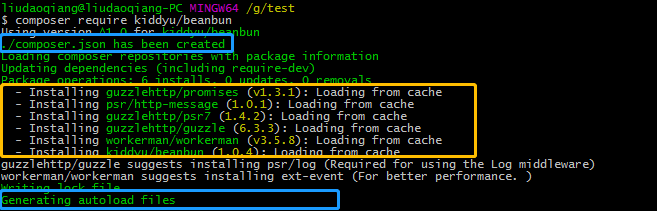
生成的文件如下所示:
composer.json
{
    "require": {
        "kiddyu/beanbun": "^1.0"
    }
}
autoload.php
<?php

// autoload.php @generated by Composer

require_once __DIR__ . '/composer/autoload_real.php';

return ComposerAutoloaderInitf0360927d4c8cd5f4c7318db461c5f92::getLoader();
composer.lock
{
    "_readme": [
        "This file locks the dependencies of your project to a known state",
        "Read more about it at https://getcomposer.org/doc/01-basic-usage.md#composer-lock-the-lock-file",
        "This file is @generated automatically"
    ],
    "content-hash": "f39f11ea038520d38d9236d063973569",
    "packages": [
        {
            "name": "guzzlehttp/guzzle",
            "version": "6.3.3",
            "source": {
                "type": "git",
                "url": "https://github.com/guzzle/guzzle.git",
                "reference": "407b0cb880ace85c9b63c5f9551db498cb2d50ba"
            },
            "dist": {
                "type": "zip",
                "url": "https://api.github.com/repos/guzzle/guzzle/zipball/407b0cb880ace85c9b63c5f9551db498cb2d50ba",
                "reference": "407b0cb880ace85c9b63c5f9551db498cb2d50ba",
                "shasum": ""
            },
            "require": {
                "guzzlehttp/promises": "^1.0",
                "guzzlehttp/psr7": "^1.4",
                "php": ">=5.5"
            },
            "require-dev": {
                "ext-curl": "*",
                "phpunit/phpunit": "^4.8.35 || ^5.7 || ^6.4 || ^7.0",
                "psr/log": "^1.0"
            },
            "suggest": {
                "psr/log": "Required for using the Log middleware"
            },
            "type": "library",
            "extra": {
                "branch-alias": {
                    "dev-master": "6.3-dev"
                }
            },
            "autoload": {
                "files": [
                    "src/functions_include.php"
                ],
                "psr-4": {
                    "GuzzleHttp\\": "src/"
                }
            },
            "notification-url": "https://packagist.org/downloads/",
            "license": [
                "MIT"
            ],
            "authors": [
                {
                    "name": "Michael Dowling",
                    "email": "mtdowling@gmail.com",
                    "homepage": "https://github.com/mtdowling"
                }
            ],
            "description": "Guzzle is a PHP HTTP client library",
            "homepage": "http://guzzlephp.org/",
            "keywords": [
                "client",
                "curl",
                "framework",
                "http",
                "http client",
                "rest",
                "web service"
            ],
            "time": "2018-04-22T15:46:56+00:00"
        },
        {
            "name": "guzzlehttp/promises",
            "version": "v1.3.1",
            "source": {
                "type": "git",
                "url": "https://github.com/guzzle/promises.git",
                "reference": "a59da6cf61d80060647ff4d3eb2c03a2bc694646"
            },
            "dist": {
                "type": "zip",
                "url": "https://api.github.com/repos/guzzle/promises/zipball/a59da6cf61d80060647ff4d3eb2c03a2bc694646",
                "reference": "a59da6cf61d80060647ff4d3eb2c03a2bc694646",
                "shasum": ""
            },
            "require": {
                "php": ">=5.5.0"
            },
            "require-dev": {
                "phpunit/phpunit": "^4.0"
            },
            "type": "library",
            "extra": {
                "branch-alias": {
                    "dev-master": "1.4-dev"
                }
            },
            "autoload": {
                "psr-4": {
                    "GuzzleHttp\\Promise\\": "src/"
                },
                "files": [
                    "src/functions_include.php"
                ]
            },
            "notification-url": "https://packagist.org/downloads/",
            "license": [
                "MIT"
            ],
            "authors": [
                {
                    "name": "Michael Dowling",
                    "email": "mtdowling@gmail.com",
                    "homepage": "https://github.com/mtdowling"
                }
            ],
            "description": "Guzzle promises library",
            "keywords": [
                "promise"
            ],
            "time": "2016-12-20T10:07:11+00:00"
        },
        {
            "name": "guzzlehttp/psr7",
            "version": "1.4.2",
            "source": {
                "type": "git",
                "url": "https://github.com/guzzle/psr7.git",
                "reference": "f5b8a8512e2b58b0071a7280e39f14f72e05d87c"
            },
            "dist": {
                "type": "zip",
                "url": "https://api.github.com/repos/guzzle/psr7/zipball/f5b8a8512e2b58b0071a7280e39f14f72e05d87c",
                "reference": "f5b8a8512e2b58b0071a7280e39f14f72e05d87c",
                "shasum": ""
            },
            "require": {
                "php": ">=5.4.0",
                "psr/http-message": "~1.0"
            },
            "provide": {
                "psr/http-message-implementation": "1.0"
            },
            "require-dev": {
                "phpunit/phpunit": "~4.0"
            },
            "type": "library",
            "extra": {
                "branch-alias": {
                    "dev-master": "1.4-dev"
                }
            },
            "autoload": {
                "psr-4": {
                    "GuzzleHttp\\Psr7\\": "src/"
                },
                "files": [
                    "src/functions_include.php"
                ]
            },
            "notification-url": "https://packagist.org/downloads/",
            "license": [
                "MIT"
            ],
            "authors": [
                {
                    "name": "Michael Dowling",
                    "email": "mtdowling@gmail.com",
                    "homepage": "https://github.com/mtdowling"
                },
                {
                    "name": "Tobias Schultze",
                    "homepage": "https://github.com/Tobion"
                }
            ],
            "description": "PSR-7 message implementation that also provides common utility methods",
            "keywords": [
                "http",
                "message",
                "request",
                "response",
                "stream",
                "uri",
                "url"
            ],
            "time": "2017-03-20T17:10:46+00:00"
        },
        {
            "name": "kiddyu/beanbun",
            "version": "1.0.4",
            "source": {
                "type": "git",
                "url": "https://github.com/kiddyuchina/Beanbun.git",
                "reference": "3b84c35de3470a3a2a44d47d201bdc3b7602e666"
            },
            "dist": {
                "type": "zip",
                "url": "https://api.github.com/repos/kiddyuchina/Beanbun/zipball/3b84c35de3470a3a2a44d47d201bdc3b7602e666",
                "reference": "3b84c35de3470a3a2a44d47d201bdc3b7602e666",
                "shasum": ""
            },
            "require": {
                "guzzlehttp/guzzle": "^6.0",
                "php": ">=5.5.0",
                "workerman/workerman": "^3.3"
            },
            "type": "application",
            "autoload": {
                "psr-4": {
                    "Beanbun\\": "src/"
                }
            },
            "notification-url": "https://packagist.org/downloads/",
            "license": [
                "MIT"
            ],
            "authors": [
                {
                    "name": "Kidd Yu",
                    "email": "58631254@qq.com"
                }
            ],
            "description": "Beanbun 是用 PHP 编写的多进程网络爬虫框架,具有良好的开放性、高可扩展性",
            "keywords": [
                "crawler",
                "scraper",
                "spider"
            ],
            "time": "2017-06-11T17:13:59+00:00"
        },
        {
            "name": "psr/http-message",
            "version": "1.0.1",
            "source": {
                "type": "git",
                "url": "https://github.com/php-fig/http-message.git",
                "reference": "f6561bf28d520154e4b0ec72be95418abe6d9363"
            },
            "dist": {
                "type": "zip",
                "url": "https://api.github.com/repos/php-fig/http-message/zipball/f6561bf28d520154e4b0ec72be95418abe6d9363",
                "reference": "f6561bf28d520154e4b0ec72be95418abe6d9363",
                "shasum": ""
            },
            "require": {
                "php": ">=5.3.0"
            },
            "type": "library",
            "extra": {
                "branch-alias": {
                    "dev-master": "1.0.x-dev"
                }
            },
            "autoload": {
                "psr-4": {
                    "Psr\\Http\\Message\\": "src/"
                }
            },
            "notification-url": "https://packagist.org/downloads/",
            "license": [
                "MIT"
            ],
            "authors": [
                {
                    "name": "PHP-FIG",
                    "homepage": "http://www.php-fig.org/"
                }
            ],
            "description": "Common interface for HTTP messages",
            "homepage": "https://github.com/php-fig/http-message",
            "keywords": [
                "http",
                "http-message",
                "psr",
                "psr-7",
                "request",
                "response"
            ],
            "time": "2016-08-06T14:39:51+00:00"
        },
        {
            "name": "workerman/workerman",
            "version": "v3.5.8",
            "source": {
                "type": "git",
                "url": "https://github.com/walkor/Workerman.git",
                "reference": "cbc6e46deb9e1a82a5f628118c850ebeea7b2224"
            },
            "dist": {
                "type": "zip",
                "url": "https://api.github.com/repos/walkor/Workerman/zipball/cbc6e46deb9e1a82a5f628118c850ebeea7b2224",
                "reference": "cbc6e46deb9e1a82a5f628118c850ebeea7b2224",
                "shasum": ""
            },
            "require": {
                "php": ">=5.3"
            },
            "suggest": {
                "ext-event": "For better performance. "
            },
            "type": "library",
            "autoload": {
                "psr-4": {
                    "Workerman\\": "./"
                }
            },
            "notification-url": "https://packagist.org/downloads/",
            "license": [
                "MIT"
            ],
            "authors": [
                {
                    "name": "walkor",
                    "email": "walkor@workerman.net",
                    "homepage": "http://www.workerman.net",
                    "role": "Developer"
                }
            ],
            "description": "An asynchronous event driven PHP framework for easily building fast, scalable network applications.",
            "homepage": "http://www.workerman.net",
            "keywords": [
                "asynchronous",
                "event-loop"
            ],
            "time": "2018-05-23T05:36:47+00:00"
        }
    ],
    "packages-dev": [],
    "aliases": [],
    "minimum-stability": "stable",
    "stability-flags": [],
    "prefer-stable": false,
    "prefer-lowest": false,
    "platform": [],
    "platform-dev": []
}
使用composer安装php的相关框架的更多相关文章
- [视频教程] 使用composer安装使用thinkphp6.0框架
安装composer -vvv的参数是表示展示安装进度,测试时使用其他参数安装失败,一直卡着不动curl -vvv https://getcomposer.org/installer | phpmv ...
- Composer安装Yii2以及相关扩展
1.安装redis扩展 命令:composer require yiisoft/yii2-redis Git地址:https://github.com/yiisoft/yii2-redis/blob/ ...
- 使用 Composer 安装 Laravel 框架
前言: 1. Composer 安装 Laravel 有两种方式: 第一种是通过 Composer 的 create-project 命令安装 Laravel 框架, 第二种是先通过 Composer ...
- Nutch相关框架安装使用最佳指南(转帖)
Nutch相关框架安装使用最佳指南 Chinese installing and using instruction - The best guidance in installing and u ...
- windows环境下安装composer,然后使用composer安装Laravel
Composer 不是一个包管理器,它仅仅是一个依赖管理工具,它允许你申明项目所依赖的代码库,并在你的项目中安装这些代码库.它涉及 “packages” 和 “libraries”,但它在每个项目的基 ...
- Nutch相关框架视频教程--说明
PDF文档: Nutch大数据相关框架讲义.pdf Nutch1.7二次开发培训讲义.pdf Nutch1.7二次开发培训讲义之腾讯微博抓取分析 Nutch公开课从搜索引擎到网络爬虫 ======== ...
- Yii 通过composer 安装的方法
Yii2框架可以通过两种方式 安装 : 第一种方法: Yii2有两个模板 一个是基础模板,一个是高级模板,基础可能简单点吧.........,现在直接从 https://github.com/yi ...
- Composer 安装(一)
一.简介 Composer 是 PHP 用来管理依赖(dependency)关系的工具.你可以在自己的项目中声明所依赖的外部工具库(libraries),Composer 会帮你安装这些依赖的库文件. ...
- composer安装yii2
这几天准备入门yii2,但是对于一个看php不到5天的小白来说,只能说路途艰辛,不过,总算是解决了,先放一张大图 感受一下成功的喜悦...(文章最后有惊喜哦) ok,下面就描述一下安装的步骤: 1.安 ...
随机推荐
- ORA-27154: post/wait create failed ORA-27300 ORA-27301 ORA-27302
今天刚装了Oracle 11g,配制好了之后启动数据库时遇到下面的错误:SQL> startupORA-27154: post/wait create failedORA-27300: OS s ...
- robotframework连接mysql数据库
1.安装databaselibrary.pymysql 通过cmd命令执行: pip install robotframework-databaselibrary pip install pymysq ...
- Java NIO1:浅谈I/O模型
一.什么是同步?什么是异步? 同步和异步的概念出来已经很久了,网上有关同步和异步的说法也有很多.以下是我个人的理解: 同步就是:如果有多个任务或者事件要发生,这些任务或者事件必须逐个地进行,一个事件或 ...
- LDAP2-创建OU创建用户
创建OU创建用户 1.创建OU 选择Organisational unit 组织单元 输入OU名称 提交信息 结果创建成功 2.创建员工 选择ou选择新建子条目 选择默认模板 选择inetorgper ...
- Python 学习 第十四篇:命名元组
Python的元组不能为元组内部的数据进行命名,而 collections.namedtuple 可以来构造一个含有字段名称的元组类,命名元组可以通过逗号+字段名来获取元素值: collections ...
- .netcore 堆栈调用方法小记
背景 上午临近午饭时,公司同事反馈验证码被攻击灌水.我们匆忙查询验证码明细,对已频繁出现的IP插入黑名单,但IP仍然隔断时间频繁变动,不得已之下只能先封禁对应公司id的验证码发送功能.年初时候,专门对 ...
- Linux iostat 命令
iostat 命令是 I/O statistics(输入/输出统计)的缩写,用来报告系统的 CPU 统计信息和块设备及其分区的 IO 统计信息.iostat 是 sysstat 工具集的一个工具,在 ...
- JSF生存指南P1
这是OO的第三次博客作业,也是JSFO(面向JSF编程)的第一次博客作业.暗示了我们面向对象课程已经再向JSF的编写过渡. 不知不觉OO的作业已经写完3/4,那些熬夜赶作业的日子仍然历历在目,仿佛是昨 ...
- 如何用 Node.js 和 Elasticsearch 构建搜索引擎
Elasticsearch 是一款开源的搜索引擎,由于其高性能和分布式系统架构而备受关注.本文将讨论其关键特性,并手把手教你如何用它创建 Node.js 搜索引擎. Elasticsearch 概述 ...
- Nice Garland CodeForces - 1108C (思维+暴力)
You have a garland consisting of nn lamps. Each lamp is colored red, green or blue. The color of the ...