
第27月第27天 https
1.验证签名
{

    [self generateRSAKeyPair:kRSA_KEY_SIZE];

    NSData *ttDt = [@"" dataUsingEncoding:NSASCIIStringEncoding];

    NSData *sha1dg = [ttDt hashDataWith:CCDIGEST_SHA1];

    OSStatus ret;

    //私钥签名,公钥验证签名

    size_t siglen = SecKeyGetBlockSize(privateKeyRef);

    uint8_t *sig = malloc(siglen);

    bzero(sig, siglen);

    ret = SecKeyRawSign(privateKeyRef, kSecPaddingPKCS1SHA256, sha1dg.bytes, sha1dg.length, sig, &siglen);

    NSAssert(ret==errSecSuccess, @"签名失败");

    ret = SecKeyRawVerify(publicKeyRef, kSecPaddingPKCS1SHA256, sha1dg.bytes, sha1dg.length,sig, siglen);

    NSAssert(ret==errSecSuccess, @"验证签名失败");

    if (ret==errSecSuccess) {

        NSLog(@"SIGN VERIFY PASS");

    }

}
-----------------------------------------------------
1.
https://blog.csdn.net/laughing2333/article/details/52292481
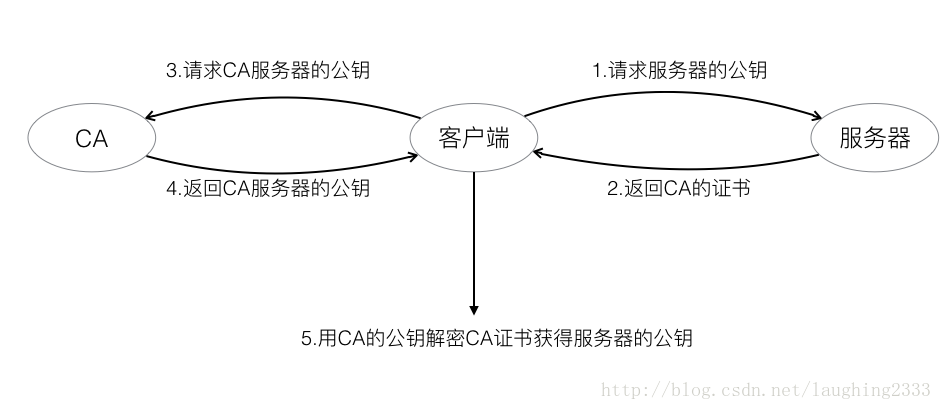
14.这么多机器,第三方机构的公钥怎么跑到了客户端的机器中呢?
其实呢,现实中,浏览器和操作系统都会维护一个权威的第三方机构列表(包括它们的公钥)。因为客户端接收到的证书中会写有颁发机构,客户端就根据这个颁发机构的值在本地找相应的公钥。
https://www.cnblogs.com/ghjbk/p/6738069.html
openssl 给自己颁发证书的步骤:
前提:先建一个cert目录,cd到该目录,以下所有命令的当前路径均为该目录
1. 生成私钥KEY
|
1
|
openssl genrsa -des3 -out server.key 2048 |
这一步执行完以后,cert目录下会生成server.key文件
2. 生成证书请求文件CSR
|
1
|
openssl req -new -key server.key -out server.csr |
该命令先进入交互模式,让你填一堆东西,参考下图:
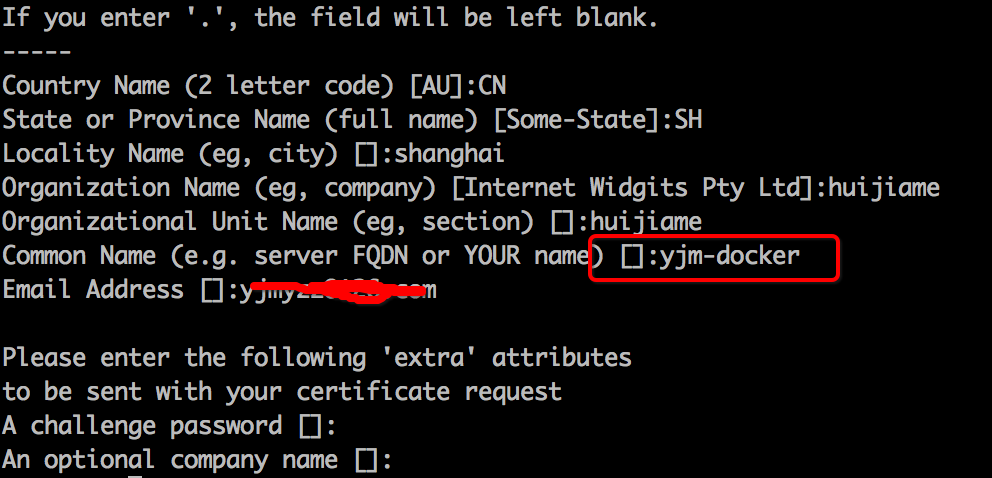
要注意的是Common Name这里,要填写成使用SSL证书(即:https协议)的域名或主机名,否则浏览器会认为不安全。例如:如果以后打算用https://yjm-docker/xxx 这里就填写yjm-docker
3. 生成CA的证书
前面提过X.509证书的认证者总是CA或由CA指定的人,所以得先生成一个CA的证书
|
1
|
openssl req -new -x509 -key server.key -out ca.crt -days 3650 |
4. 最后用第3步的CA证书给自己颁发一个证书玩玩
|
1
2
3
|
openssl x509 -req -days 3650 -in server.csr \ -CA ca.crt -CAkey server.key \ -CAcreateserial -out server.crt |
执行完以后,cert目录下server.crt 就是我们需要的证书。当然,如果要在google等浏览器显示出安全的绿锁标志,自己颁发的证书肯定不好使,得花钱向第三方权威证书颁发机构申请(即:第4步是交给权威机构来做,我们只需要提交server.key、server.csr,哦,还有毛爷爷就好了)
http://www.cnblogs.com/lan1x/p/5872915.html
2.
    unsigned char* bufferArray=new unsigned char[Len];

    int result=fread(bufferArray, , Len, file);

    cout << result << endl;

    unsigned char* p;

    p = bufferArray;

    X509* pX509 = NULL;

    d2i_X509(&pX509, (unsigned char const **)&p, Len);

    if (pX509 == NULL)

    {

        cout << "error" << endl;

        return ;

    }

    else {

        printX509(pX509);

    }
https://www.jianshu.com/p/d049555ce0c7
https://www.cnblogs.com/blfshiye/p/5074965.html
http://blog.chinaunix.net/uid-20054105-id-1979636.html?utm_source=jiancool
https://github.com/certificate-helper/TLS-Inspector
https://www.jianshu.com/p/3e019981c118
3.
SSL
SSL是基于非对称加密的原理,在这之上还进行了对称加密的数据传输。当传送数据量过大的时候,客户端和服务器之间互相商定了一个对话密钥(session key),使用这个对话密钥来进行对称加密加快运算速度。
整个SSL的流程如下:
客户端向服务器请求证书,验证无误后拿到服务器的公钥
双方协商生成一个session key
最后双方采用session key进行加密通信
主要关注前两步,即SSL的握手阶段。
Client Hello
客户端向服务器发出一个随机数,以及支持的传输协议以及加密算法 ,压缩方法。
Server Hello
服务器在确认支持客户端的传输协议等要求后,发送服务器的证书,以及一个随机数,安全需求更高的服务器会要求客户端发送证书来证明客户端的身份。
客户端回应
客户端此时生成第三个随机数(这一个随机数被称为pre-master-key),向CA验证服务器的证书以后拿到服务器的公钥,使用公钥加密第三个随机数,并把加密后的第三个随机数发送给服务器。
客户端在本地利用之前与服务器商量好的加密方法,根据这三个随机数生成一个对话密钥(session key)用于两端通信。
服务端回应
服务端收到第三个随机数后,计算出对话密钥,至此,握手阶段结束。接下来使用对话密钥进行通信即可。
https://blog.csdn.net/laughing2333/article/details/52292481
4.
# 验证server证书

 openssl verify -CAfile ca.crt server.crt
https://github.com/Ztiany/Programming-Notes/blob/ed0f19d9f776d8eaf49e8c5d243dc35e2f8a9894/Network/ProtocolBasic/HTTPS%E6%9D%83%E5%A8%81%E6%8C%87%E5%8D%97-OpenSSL%26Keytool.md
http://blog.51cto.com/ipcpu/1982109
https://www.cnblogs.com/274914765qq/p/4673327.html
5.
https://www.jianshu.com/p/d049555ce0c7
SecTrustSetAnchorCertificates
    NSMutableArray *pinnedCertificates = [NSMutableArray array];

    for (NSData *certificateData in self.pinnedCertificates) {

        [pinnedCertificates addObject:(__bridge_transfer id)SecCertificateCreateWithData(NULL, (__bridge CFDataRef)certificateData)];

    }

    NSString *cerFile = [[NSBundle mainBundle] pathForResource:@"anychat.net.cn.cer" ofType:nil];

    OSStatus            err;

    NSData *            certData;

    SecCertificateRef   cert;

    SecPolicyRef        policy;

    SecTrustRef         serverTrust;

    SecTrustResultType  trustResult;

    SecKeyRef           publicKeyRef;

    certData = [NSData dataWithContentsOfFile:cerFile];

    cert = SecCertificateCreateWithData(NULL, (__bridge CFDataRef) certData);

    policy = SecPolicyCreateBasicX509();

    err = SecTrustCreateWithCertificates(cert, policy, &serverTrust);

    NSAssert(err==errSecSuccess,@"证书加载失败");

    SecTrustSetAnchorCertificates(serverTrust, (__bridge CFArrayRef)pinnedCertificates);

    if (!AAFServerTrustIsValid(serverTrust)) {

    }

    // obtain the chain after being validated, which *should* contain the pinned certificate in the last position (if it's the Root CA)

    NSArray *serverCertificates = AAFCertificateTrustChainForServerTrust(serverTrust);

    for (NSData *trustChainCertificate in [serverCertificates reverseObjectEnumerator]) {

        if ([self.pinnedCertificates containsObject:trustChainCertificate]) {

        }

    }
http://ios.jobbole.com/89070/
https://www.jianshu.com/p/31bcddf44b8d
8.
source 'https://github.com/CocoaPods/Specs.git'
target 'boringssl01' do
platform :ios, '9.0'
# Uncomment the next line if you're using Swift or would like to use dynamic frameworks
# use_frameworks!
pod 'Firebase/Core'
pod 'Firebase/Auth'
pod 'Firebase/Database'
pod 'Firebase/Firestore'
end
9.
In order to fulfill its purpose of verifying the identity of its owner, a certificate contains such information as:
The certificate issuer
The certificate holder
A validity period (the certificate isn’t valid before or after this period)
The public key of the certificate’s owner
Certificate extensions, which contain additional information such as alternative names for the certificate holder and allowable uses for the private key associated with the certificate
A digital signature from the certification authority to ensure that the certificate hasn’t been altered and to indicate the identity of the issuer
The certificate, key, and trust services API provides functions to examine the properties of a certificate. For example, the SecCertificateCopySubjectSummary function returns a human readable summary of the certificate:
https://developer.apple.com/documentation/security/certificate_key_and_trust_services/certificates/examining_a_certificate?language=objc
第27月第27天 https的更多相关文章
- Adobe Flash Player 27 on Fedora 27/26, CentOS/RHEL 7.4/6.9
This is guide, howto install Adobe Flash Player Plugin version 27 (32-bit and 64-bit) with YUM/DNF o ...
- JAVA 基础编程练习题27 【程序 27 求素数】
27 [程序 27 求素数] 题目:求 100 之内的素数 package cskaoyan; public class cskaoyan27 { @org.junit.Test public voi ...
- 第29月第27天 Error: Multiple commands produce
1. 解决方法可以有两种,一种是不使用New Build System,在File > Project/Workspace Settings中的Share Project/Workspace S ...
- 第27月第28天 iOS bundle
1. 7.如果将自己打包的bundle给别人使用,别人在打包上传过程中可能会遇到错误提示如: ERROR ITMS-90171: "Invalid Bundle Structure - Th ...
- 第27月第25天 clang -rewrite-objc main.m
1.clang -rewrite-objc main.m #import <objc/runtime.h> #import<objc/message.h> #import &l ...
- 第27月第24天 git pull fetch
1. 在进行 pull 操作的同时,其实就是 fetch+merge 的一个过程.我们从 remote 分支中拉取新的更新,然后再合并到本地分支中去. 如果 remote 分支超前于本地分支,并且本地 ...
- 第27月第18天 epoll lt et
1. While the usage of epoll when employed as a level-triggered interface does have the same semantic ...
- 第27月第17天 objc_msgSendSuper
1.objc_msgSendSuper super 的含义,消息转发会调用 objc_msgSendSuper, 就是 去父类的方法列表中找到 initWithFrame:这个方法,然后调用,调用的主 ...
- 第27月第12天 webrtc ios openssl boost
1. source 'https://github.com/CocoaPods/Specs.git' target 'YOUR_APPLICATION_TARGET_NAME_HERE' do pla ...
随机推荐
- JSON字符串 与 JSON对象 互转
一,JSON字符串与JSON对象的区别 JSON对象是符合JSON格式的对象,可以用"对象.属性"进行存取值; JSON字符串是符合JSON格式的字符串; 二,JSON字符串-&g ...
- 洛谷P2762 太空飞行计划问题
这题套路好深......没想渠. 题意:给你若干个设备,若干个任务. 每个任务需要若干设备,设备可重复利用. 完成任务有钱,买设备要钱. 问最大总收益(可以什么任务都不做). 解:最大权闭合子图. 对 ...
- Mybatis 批量插入时得到插入的id(mysql)
前言: 在开发中,我们可能很多的时候可能需要在新增时得到刚才新增的id,后续的逻辑需要用到这个id. 在插入单条记录的情况下,这个是很简单的问题.多条记录时有个坑在里面. 单条记录的代码如下 < ...
- 计算机基础:计算机网络-chapter4 网络层
网络层的使用:如 ping,tracert,原理是ICMP 一.什么叫网络,网络层做什么,通过什么实现,这章的内容, 什么叫网络,实现这些需要做什么 将全世界范围内数以百万计的网络都互连起来,并且能够 ...
- okhttp 内网可以有,但外网访问数据返不回来,代码一样
:1.问题点在于 下图红框里写成 text/html了,需要改成application/json,造成的问题有:unexpected end of stream 这个是406错误:加上日志之后okh ...
- 我的winows server 2012 突然多了个piress的帐户,后来一查原来是mysql漏洞的问题,郁闷
今天打开远程连接到windows server 2012,服务器上装的360竟然提示有木马.吓了一跳.再检查计算机账户,多了个piress账户.把这个账户在百度一搜索,原来还有其它人中招. 后来发现网 ...
- octave基本操作
参考: https://blog.csdn.net/iszhenyu/article/details/78712228: 吴恩达机器学习视频: 在学习机器学习的过程中,免不了要跟MATLAB.Oct ...
- Luogu P4306 [JSOI2010]连通数 传递闭包
正解其实是\(Tarjan\) + \(拓扑拓扑\),但是却可以被\(O(N^3 / 32)\)复杂度的传递闭包水过去.心疼一下写拓扑的小可爱们. 学到一个\(bitset\)优化布尔图的骚操作,直接 ...
- day-17(基础加强)
回顾: listener(了解) 监听器,监听javaweb中三个域对象 监听对象的创建和销毁 ServletContextListener 在项目启动的时候加载配置文件 ServletRequest ...
- 用count sql做jmeter的while条件
${__groovy(vars.get("pboc_req_record_counter_1") == "Invalid" || vars.get(" ...