
Exchange Server Notes
以下信息来自Option响应:
HTTP/1.1 200 OK
Cache-Control: private
Allow: OPTIONS,POST
Server: Microsoft-IIS/7.0
MS-Server-ActiveSync: 14.3
MS-ASProtocolVersions: 2.0,2.1,2.5,12.0,12.1,14.0,14.1
MS-ASProtocolCommands: Sync,SendMail,SmartForward,SmartReply,GetAttachment,GetHierarchy,CreateCollection,DeleteCollection,MoveCollection,FolderSync,FolderCreate,FolderDelete,FolderUpdate,MoveItems,GetItemEstimate,MeetingResponse,Search,Settings,Ping,ItemOperations,Provision,ResolveRecipients,ValidateCert
Public: OPTIONS,POST
X-AspNet-Version: 2.0.50727
X-Powered-By: ASP.NET
Date: Mon, 12 Aug 2013 02:36:56 GMT
Content-Length: 0
Provisioning Protocol describes an XML-based format used by servers that support the ActiveSync protocol to communicate security policy settings to client devices.[MS-ASPROV]
PolicyType MUST be "MS-EAS-Provisioning-WBXML".
Status (Provision)
| 1 | Success |
| 2 | Protocol error |
| 3 | General Server error |
Status (Policy)
From Server to Client
Value Meaning
1 Success.
2 There is no policy for this client.
3 Unknown PolicyType value.
4 The policy data on the server is corrupted (possibly tampered with).
5 The client is acknowledging the wrong policy key.From Client to Server
Value Meaning
1 Success
2 Partial success (at least the PIN was enabled).
3 The client did not apply the policy at all.
4 The client claims to have been provisioned by a third party.
PolicyKey is used by the server to mark the state of policy settings on the client in the settings download phase of the Provision command. [optional]
EASProvisionDoc:配置列表,允许做什么,不允许做什么。来自服务器。
The FolderSync command synchronizes the collection hierarchy but does not synchronize the items in the collections themselves.
SyncKey
服务器用来追踪客户端状态的标识。

Status (FolderSync)
| 值 | 含义 |
| 1 | 成功 |
| 6 | 服务器出现错误 |
| 9 | 同步key不匹配或者非法 |
| 10 | 请求格式不正确 |
| 11 | 未知类型错误 |
| 12 | 未知编码 |
Changes
used to update the client with folder additions, deletions, and updates on the server.
Count
specifies the number of added, deleted, and updated folders on the server since the last folder synchronization.
If there are no changes since the last folder synchronization, a Count element value of 0 (zero) is returned.
Add
creates a new folder on the client.
Child elements of the Add element specify the server ID of the folder, the server ID of the parent folder, the display name of the folder, and the type of folder.
Update
identifies a folder on the server that has been updated (renamed or moved).
Delete
specifies that a folder on the server was deleted since the last folder synchronization.
子元素只需要ServerId就可以。
Type (FolderSync)
Value Meaning
1 User-created folder (generic)
2 Default Inbox folder
3 Default Drafts folder
4 Default Deleted Items folder
5 Default Sent Items folder
6 Default Outbox folder
7 Default Tasks folder
8 Default Calendar folder
9 Default Contacts folder
10 Default Notes folder
11 Default Journal folder
12 User-created Mail folder
13 User-created Calendar folder
14 User-created Contacts folder
15 User-created Tasks folder
16 User-created journal folder
17 User-created Notes folder
18 Unknown folder type
19 Recipient information cache
Settings
The Settings command supports get and set operations on global properties and Out of Office (OOF) settings for the user. The Settings command also sends device information to the server, implements the device password/personal identification number (PIN) recovery, and retrieves a list of the user's email addresses.
------------------------------------------
邮件地址查询
Search
used to find entries in an address book, mailbox, or document library (UNC or Windows SharePoint Services).
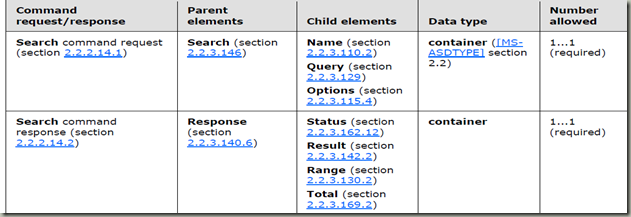
Name
specifies the store to search.
MailboxThe client specifies "Mailbox" when it intends to search the store.
Document LibraryThe client specifies "DocumentLibrary" when it intends to search a Windows SharePoint Services or UNC library.
GALThe client specifies "GAL" when it intends to search the Global Address List.
Query
描述查询的关键字
Options
查询的选项
----------------------------------------------
Push
ping
used to request that the server monitor specified folders for changes that would require the client to resynchronize.
Status (Ping)
| 值 | 含义 |
| 1 | 心跳中断时间内,没有发生改变 |
| 2 | 在最后一个被监视的文件夹中,有改动 |
| 3 | Ping命令省略了必要的参数 |
| 4 | Ping命令语法错误 |
| 5 | 设置的心跳超出范围。过短,就返回最小;过长,就返回最大值 |
| 6 | ping命令带的监控目录数量超过服务器的上限。将通过MaxFolders返回 |
| 7 | 要求同步目录结构 |
| 8 | 服务器发生错误 |
Folder
被修改文件的服务器ID
FilterType (GetItemEstimate)
specifies a time window for the objects sent from the server to the client.
The GetItemEstimate command gets an estimate of the number of items in a collection or folder on the server that have to be synchronized.
CollectionId
specifies the server ID of the collection from which the item estimate is being obtained.
Estimate
specifies the estimated number of items in the collection or folder that have to be synchronized.
Sync
The Sync command synchronizes changes in a collection between the client and the server.
CollectionId (Sync)
specifies the server ID of the folder to be synchronized.
WindowSize
specifies a maximum number of changed items in a collection or a request that SHOULD be included in the synchronization response.
The BodyPreference element is an optional container (as specified in [MS-ASDTYPE] section 2.2)
element that sets preference information related to the type and size of information that is returned
from searching, synchronizing, or fetching.
Type (BodyPartPreference)
必选项
值 描述 1 Plain Text 2 HTML 3 RTF 4 MIME
TruncationSize (BodyPreference)
最大:4,294,967,295
Status (Sync)
| 值 | 描述 |
| 1 | 成功 |
| 3 | 同步key无效 |
| 4 | 协议错误 |
| 5 | 服务器错误 |
| 6 | 客户端/服务器的对话出现错误 |
| 7 | 客户端/服务器之间存在匹配冲突 |
| 8 | 目标未找到 |
| 9 | Sync命令不能完成 |
| 12 | 目录结构发生变化 |
| 13 | Sync命令不完整 |
| 14 | Wait或者HeartbeatInterval值无效 |
| 15 | Sync请求无效 |
| 16 | 重试 |
Commands
contains operations that apply to a collection. Available operations are Add, Delete, Change, Fetch, and SoftDelete.
Add (Sync)
It creates a new object in a collection on the client or on the server.
Delete (Sync)
deletes an object on the client device or the server.
Change
modifies properties of an existing object on the client device or the server.
Fetch (Sync)
In a request, the Fetch element is used to request the application data of an item that was truncated in a synchronization response from the server. The complete item is then returned to the client in a server response.
SoftDelete
deletes an object from the client when it falls outside the FilterType (section 2.2.3.64.2) results or it is no longer included as part of the SyncOptions (section 2.2.3.115.5) instructions. The object that is soft deleted is identified by its ServerId element.
HeartbeatInterval (Ping)
In Ping command requests, it specifies the length of time, in seconds, that the server SHOULD wait before sending a response if no new items are added to the specified set of folders。
-------------------------------------------------
SendMail
The SendMail command is used by clients to send MIME-formatted email messages to the server.
ClientId (SendMail, SmartForward, and SmartReply)
it specifies the client's unique message ID (MID).
SaveInSentItems
If the SaveInSentItems element is present, the message is stored -- if not present, the message is not stored.
Exchange Server Notes的更多相关文章
- Exchange Server 2013就地存档
9.1就地存档 就地存档有助于重新获得对组织邮件数据的控制,而无需个人存储 (.pst) 文件,并且允许用户在可通过 Microsoft Outlook 2010及更高版本和 Microsoft Of ...
- Exchange Server简介与搭建
一.Exchange Server简介Exchange Server 是微软公司的一套电子邮件服务组件,是个消息与协作系统. 简单而言,Exchange server可以被用来构架应用于企业.学校的邮 ...
- Exchange Server 2013 一步步安装图解
前言: 这是一份为Exchange菜鸟准备的2013版本安装文档,安装环境为Windows Server 2012 DataCenter 版本,在安装之前,我对安装Exchange也是处于一无所知的状 ...
- Windows 2008下部署Exchange Server 2007
对于很多政府及企业来说,微软的邮件服务器Exchange Server都是一个不错的通信和协作平台选择,尤其新版邮件服务器Exchange Server 2007 和OCS的组合,在微软UC平台上创下 ...
- Exchange Server 2010/2013架构改变
Exchange Server 2010架构 Exchange Server 2013架构
- outlook 2003配置连接exchange server 2010报错——无法完成此操作。 与 Microsoft Exchange Server 的连接不可用。 Outlook 必须联机或连接才可完成该操作
最近安装了一台Exchange 2013邮件服务器,但在客户端Outlook 2013手动配置邮箱时却发现了如下错误: 这里说一个简单的解决办法,实际上第一次启动Outlook时可以自动发现,只需 ...
- C#操作AD及Exchange Server总结
C#操作AD及Exchange Server总结 这篇博客的目的:根据亲身项目经历,总结对AD及Exchange Server的操作,包括新建AD用户,设置密码,为AD用户创建邮箱等. 本文完全原创, ...
- Exchange Server 2013 一步步安装图解[完全步骤截图]
前言: 这是一份为Exchange菜鸟准备的2013版本安装文档,安装环境为Windows Server 2012 DataCenter 版本,在安装之前,我对安装Exchange也是处于一无所知的状 ...
- Exchange Server 2007的即将生命周期,您的计划是?
多数人做微软技术,Exchange Server 几乎所有 Microsoft 产品,都具有产品支持生命周期,原厂提供的新增功能. 错误修复.安全修补程序等.产品生命周期通常持续时间 10 年,超过期 ...
随机推荐
- Javascript - ExtJs - Ext.form.Panel组件
FormPanel组件(Ext.form.FormPanel) logogram:Ext.form.Panel | xtype:form Ext.form.Panel.配置 frame }//旗下所有 ...
- BootstrapValidator 解决多属性被同时校验问题
问题描述:在使用bootstrapValidator插件校验表单属性,当表单属性过多需要每行并列多个属性 ,会出现校验第一个属性,发现整行被校验的效果 ,这不是我们工作想要的效果.如图: 问题分析:因 ...
- PL/SQL 加字段 修改数据库之后 之后记得保存脚本
- AI 玩法整理
随着信息技术的火热发展,人工智能已经成为IT全行业的风口爆发点,既然风口来了,作为技术人人员也都毫不犹豫的分一杯羹,怎么玩呢? 接下来的博客就会带领大家一起玩玩AI 认识AI--略,如果有需要的可以再 ...
- 【转】Python标准模块--importlib
[转]Python标准模块--importlib 作者:zhbzz2007 出处:http://www.cnblogs.com/zhbzz2007 欢迎转载,也请保留这段声明.谢谢! 1 模块简介 P ...
- 工作流程引挈 https://www.flowable.org/
工作流程引挈 : https://www.flowable.org/ 起源:JBPM,Activiti
- HBase详细概述
原文地址:https://blog.csdn.net/u010270403/article/details/51648462 本文首先简单介绍了HBase,然后重点讲述了HBase的高并发和实时处理数 ...
- 2.4G和5G的Wi-Fi各自优缺点对比
原文地址:http://service.tp-link.com.cn/detail_article_3366.html 1.为什么5G信号的穿墙效果比2.4G信号差? 与路由器的距离相同时,5G信号相 ...
- 从MySQL中导入数据到MongoDB中
从sql中导出需要的数据为csv格式的数据 select field1,field2,...,fieldn from TABLE into outfile '/test.csv' fields ter ...
- log4net 全局配置
public class LogHelper { private static readonly log4net.ILog ILogInfo = log4net.LogManager.GetLogge ...