
editormd实现Markdown编辑器写文章功能
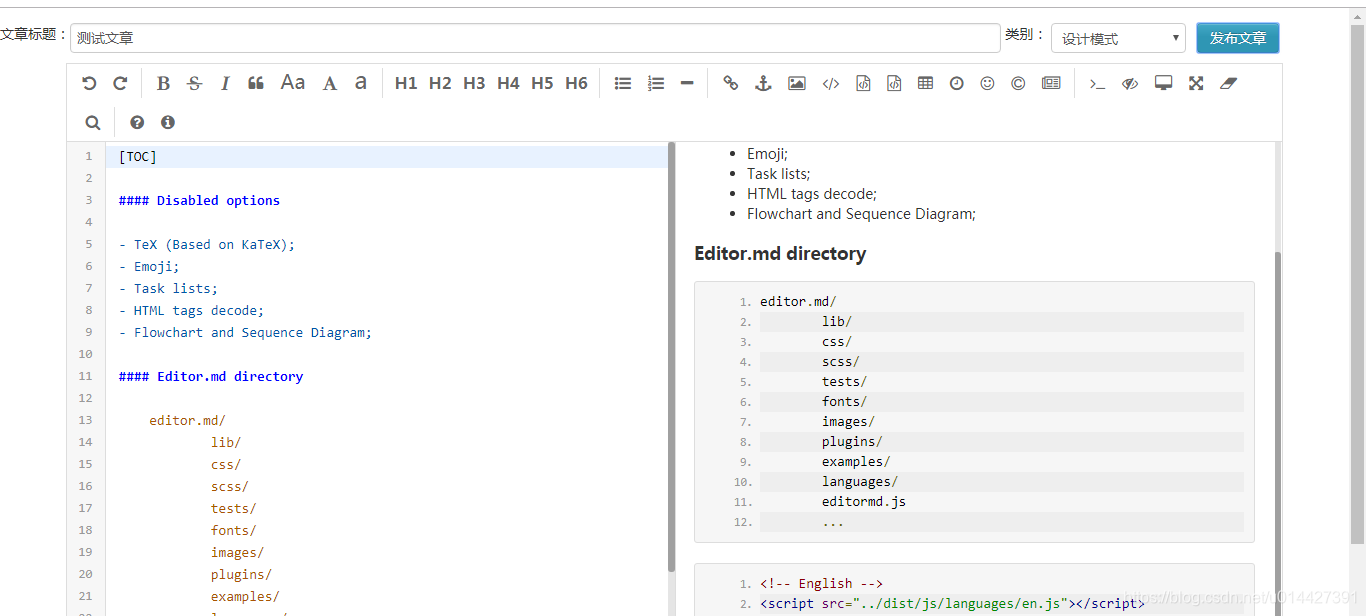
想在项目里引入Markdown编辑器实现写文章功能,网上找到一款开源的插件editormd.js
介绍网站:https://pandao.github.io/editor.md/examples/index.html
源码:https://github.com/pandao/editor.md,插件代码已经开源到github上了。
可以先git clone下载下来
git clone https://github.com/pandao/editor.md.git
现在介绍一下怎么引入JavaWeb项目里,可以在Webapp(WebContent)文件夹下面,新建一个plugins的文件夹,然后再新建editormd文件夹,文件夹命名的随意。
在官方网站也给出了比较详细的使用说明,因为我需要的个性化功能不多,所以下载下来的examples文件夹下面找到simple.html文件夹
加上样式css文件
<link href="<%=basePath %>plugins/editormd/css/editormd.min.css"

	rel="stylesheet" type="text/css" />
关键的JavaScript脚本
<script type="text/javascript"

	src="<%=basePath %>static/js/jquery-1.8.3.js"></script>

<script type="text/javascript"

	src="<%=basePath %>plugins/editormd/editormd.min.js"></script>

<script type="text/javascript">

	var testEditor;

	$(function() {

	    testEditor = editormd("test-editormd", {

	        width   : "90%",

	        height  : 640,

	        syncScrolling : "single",

	        path    : "<%=basePath %>plugins/editormd/lib/"

	    });

	});

</script>
写个jsp页面
<%@ page language="java" contentType="text/html; charset=UTF-8"

		 pageEncoding="UTF-8"%>

<%@ taglib prefix="c" uri="http://java.sun.com/jsp/jstl/core"%>

<%@ taglib prefix="fmt" uri="http://java.sun.com/jsp/jstl/fmt"%>

<%

	String path = request.getContextPath();

	String basePath = request.getScheme()+"://"+request.getServerName()+":"+request.getServerPort()+path+"/";

%>

<!DOCTYPE html>

<html>

<head>

<base href="<%=basePath %>">

<meta http-equiv="Content-Type" content="text/html; charset=UTF-8">

<title>Nicky's blog 写文章</title>

<link rel="icon" type="image/png" href="static/images/logo/logo.png">

<link href="<%=basePath %>plugins/editormd/css/editormd.min.css"

	rel="stylesheet" type="text/css" />

<link href="<%=basePath %>static/css/bootstrap.min.css"

	rel="stylesheet" type="text/css"  />

<style type="text/css">

	#articleTitle{

		width: 68%;

		margin-top:15px;

	}

	#articleCategory{

		margin-top:15px;

		width:10%;

	}

	#btnList {

		position:relative;

		float:right;

		margin-top:15px;

		padding-right:70px;

	}

</style>

</head>

<body>

	<div id="layout">

		<header>

			文章标题:<input type="text" id="articleTitle" />

			类别:

			<select id="articleCategory"></select>

			<span id="btnList">

				<button type="button" id="publishArticle" onclick="writeArticle.doSubmit();" class="btn btn-info">发布文章</button>

			</span>

		</header>

		<div id="test-editormd">

			<textarea id="articleContent" style="display: none;">

</textarea>

</div>

    </div>

<script type="text/javascript"

	src="<%=basePath %>static/js/jquery-1.8.3.js"></script>

<script type="text/javascript"

	src="<%=basePath %>plugins/editormd/editormd.min.js"></script>

<script type="text/javascript">

	var testEditor;

	$(function() {

	    testEditor = editormd("test-editormd", {

	        width   : "90%",

	        height  : 640,

	        syncScrolling : "single",

	        path    : "<%=basePath %>plugins/editormd/lib/"

	    });

	    categorySelect.init();

	});

	/* 文章类别下拉框数据绑定 */

	var categorySelect = {

		init: function () {//初始化数据

			$.ajax({

                type: "GET",

                url: 'articleSort/listArticleCategory.do',

                dataType:'json',

                contentType:"application/json",

                cache: false,

                success: function(data){

                	//debugger;

                	data = eval(data) ;

                    categorySelect.buildOption(data);

                }

            });

		},

		buildOption: function (data) {//构建下拉框数据

            //debugger;

            var optionStr ="";

            for(var i=0 ; i < data.length; i ++) {

                optionStr += "<option value="+data[i].typeId+">";

                optionStr += data[i].name;

                optionStr +="</option>";

            }

            $("#articleCategory").append(optionStr);

        }

	}

	/* 发送文章*/

	var writeArticle = {

	    doSubmit: function () {//提交

	        if (writeArticle.doCheck()) {

	            //debugger;

                var title = $("#articleTitle").val();

                var content = $("#articleContent").val();

                var typeId = $("#articleCategory").val();

                $.ajax({

                    type: "POST",

                    url: '<%=basePath %>article/saveOrUpdateArticle.do',

					data: {'title':title,'content':content,'typeId':typeId},

                    dataType:'json',

                    //contentType:"application/json",

                    cache: false,

                    success: function(data){

                        //debugger;

						if ("success"== data.result) {

						   alert("保存成功!");

							setTimeout(function(){

								window.close();

							},3000);

						}

                    }

                });

			}

        },

		doCheck: function() {//校验

            //debugger;

			var title = $("#articleTitle").val();

			var content = $("#articleContent").val();

			if (typeof(title) == undefined || title == null || title == "" ) {

                alert("请填写文章标题!");

			    return false;

			}

			if(typeof (content) == undefined || content == null || content == "") {

                alert("请填写文章内容!");

                return false;

			}

			return true;

        }

	}

</script>

</body>

</html>
然后后台只要获取一下参数就可以,注意的是path参数要改一下
testEditor = editormd("test-editormd", {

	        width   : "90%",

	        height  : 640,

	        syncScrolling : "single",

	        path    : "<%=basePath %>plugins/editormd/lib/"

	    });
SpringMVC写个接口获取参数进行保存,项目用了Spring data Jpa来实现
package net.myblog.entity;

import javax.persistence.*;

import java.util.Date;

/**

 * 博客系统文章信息的实体类

 * @author Nicky

 */

@Entity

public class Article {

	/** 文章Id,自增**/

	private int articleId;

	/** 文章名称**/

	private String articleName;

	/** 文章发布时间**/

	private Date articleTime;

	/** 图片路径,测试**/

	private String imgPath;

	/** 文章内容**/

	private String articleContent;

	/** 查看人数**/

	private int articleClick;

	/** 是否博主推荐。0为否;1为是**/

	private int articleSupport;

	/** 是否置顶。0为;1为是**/

	private int articleUp;

	/** 文章类别。0为私有,1为公开,2为仅好友查看**/

	private int articleType;

	private int typeId;

	private ArticleSort articleSort;

	@GeneratedValue(strategy=GenerationType.IDENTITY)

	@Id

	public int getArticleId() {

		return articleId;

	}

	public void setArticleId(int articleId) {

		this.articleId = articleId;

	}

	@Column(length=100, nullable=false)

	public String getArticleName() {

		return articleName;

	}

	public void setArticleName(String articleName) {

		this.articleName = articleName;

	}

	@Temporal(TemporalType.DATE)

	@Column(nullable=false, updatable=false)

	public Date getArticleTime() {

		return articleTime;

	}

	public void setArticleTime(Date articleTime) {

		this.articleTime = articleTime;

	}

	@Column(length=100)

	public String getImgPath() {

		return imgPath;

	}

	public void setImgPath(String imgPath) {

		this.imgPath = imgPath;

	}

	@Column(nullable=false)

	public String getArticleContent() {

		return articleContent;

	}

	public void setArticleContent(String articleContent) {

		this.articleContent = articleContent;

	}

	public int getArticleClick() {

		return articleClick;

	}

	public void setArticleClick(int articleClick) {

		this.articleClick = articleClick;

	}

	public int getArticleSupport() {

		return articleSupport;

	}

	public void setArticleSupport(int articleSupport) {

		this.articleSupport = articleSupport;

	}

	public int getArticleUp() {

		return articleUp;

	}

	public void setArticleUp(int articleUp) {

		this.articleUp = articleUp;

	}

	@Column(nullable=false)

	public int getArticleType() {

		return articleType;

	}

	public void setArticleType(int articleType) {

		this.articleType = articleType;

	}

	public int getTypeId() {

		return typeId;

	}

	public void setTypeId(int typeId) {

		this.typeId = typeId;

	}

	@JoinColumn(name="articleId",insertable = false, updatable = false)

	@ManyToOne(fetch=FetchType.LAZY)

	public ArticleSort getArticleSort() {

		return articleSort;

	}

	public void setArticleSort(ArticleSort articleSort) {

		this.articleSort = articleSort;

	}

}
Repository接口:
package net.myblog.repository;

import java.util.Date;

import java.util.List;

import net.myblog.entity.Article;

import org.springframework.data.domain.Page;

import org.springframework.data.domain.PageRequest;

import org.springframework.data.domain.Pageable;

import org.springframework.data.jpa.repository.Query;

import org.springframework.data.repository.PagingAndSortingRepository;

import org.springframework.data.repository.query.Param;

public interface ArticleRepository extends PagingAndSortingRepository<Article,Integer>{

	...

}
业务Service类:
package net.myblog.service;

import net.myblog.entity.Article;

import net.myblog.repository.ArticleRepository;

import org.springframework.beans.factory.annotation.Autowired;

import org.springframework.data.domain.Page;

import org.springframework.data.domain.PageRequest;

import org.springframework.data.domain.Sort.Direction;

import org.springframework.stereotype.Service;

import org.springframework.transaction.annotation.Transactional;

import java.util.Date;

import java.util.List;

@Service

public class ArticleService {

	@Autowired ArticleRepository articleRepository;

	/**

	 * 保存文章信息

	 * @param article

	 * @return

	 */

	@Transactional

	public Article saveOrUpdateArticle(Article article) {

		return articleRepository.save(article);

	}

}
Controller类:
package net.myblog.web.controller.admin;

import com.alibaba.fastjson.JSONObject;

import net.myblog.core.Constants;

import net.myblog.entity.Article;

import net.myblog.service.ArticleService;

import net.myblog.service.ArticleSortService;

import net.myblog.web.controller.BaseController;

import org.springframework.beans.factory.annotation.Autowired;

import org.springframework.data.domain.Page;

import org.springframework.data.domain.Sort.Direction;

import org.springframework.stereotype.Controller;

import org.springframework.ui.Model;

import org.springframework.web.bind.annotation.RequestMapping;

import org.springframework.web.bind.annotation.RequestMethod;

import org.springframework.web.bind.annotation.RequestParam;

import org.springframework.web.bind.annotation.ResponseBody;

import org.springframework.web.servlet.ModelAndView;

import javax.servlet.http.HttpServletRequest;

import java.util.Date;

@Controller

@RequestMapping("/article")

public class ArticleAdminController extends BaseController{

	@Autowired

    ArticleService articleService;

	@Autowired

    ArticleSortService articleSortService;

	/**

	 * 跳转到写文章页面

	 * @return

	 */

	@RequestMapping(value="/toWriteArticle",method=RequestMethod.GET)

	public ModelAndView toWriteArticle() {

		ModelAndView mv = this.getModelAndView();

		mv.setViewName("admin/article/article_write");

		return mv;

	}

	/**

	 * 修改更新文章

	 */

	@RequestMapping(value = "/saveOrUpdateArticle", method = RequestMethod.POST)

	@ResponseBody

	public String saveOrUpdateArticle (@RequestParam("title")String title , @RequestParam("content")String content,

        @RequestParam("typeId")String typeIdStr) {

	    int typeId = Integer.parseInt(typeIdStr);

	    Article article = new Article();

	    article.setArticleName(title);

	    article.setArticleContent(content);

	    article.setArticleTime(new Date());

	    article.setTypeId(typeId);

   		JSONObject result = new JSONObject();

	    try {

            this.articleService.saveOrUpdateArticle(article);

            result.put("result","success");

            return result.toJSONString();

        } catch (Exception e) {

	        error("保存文章报错:{}"+e);

			result.put("result","error");

			return result.toJSONString();

        }

	}

}
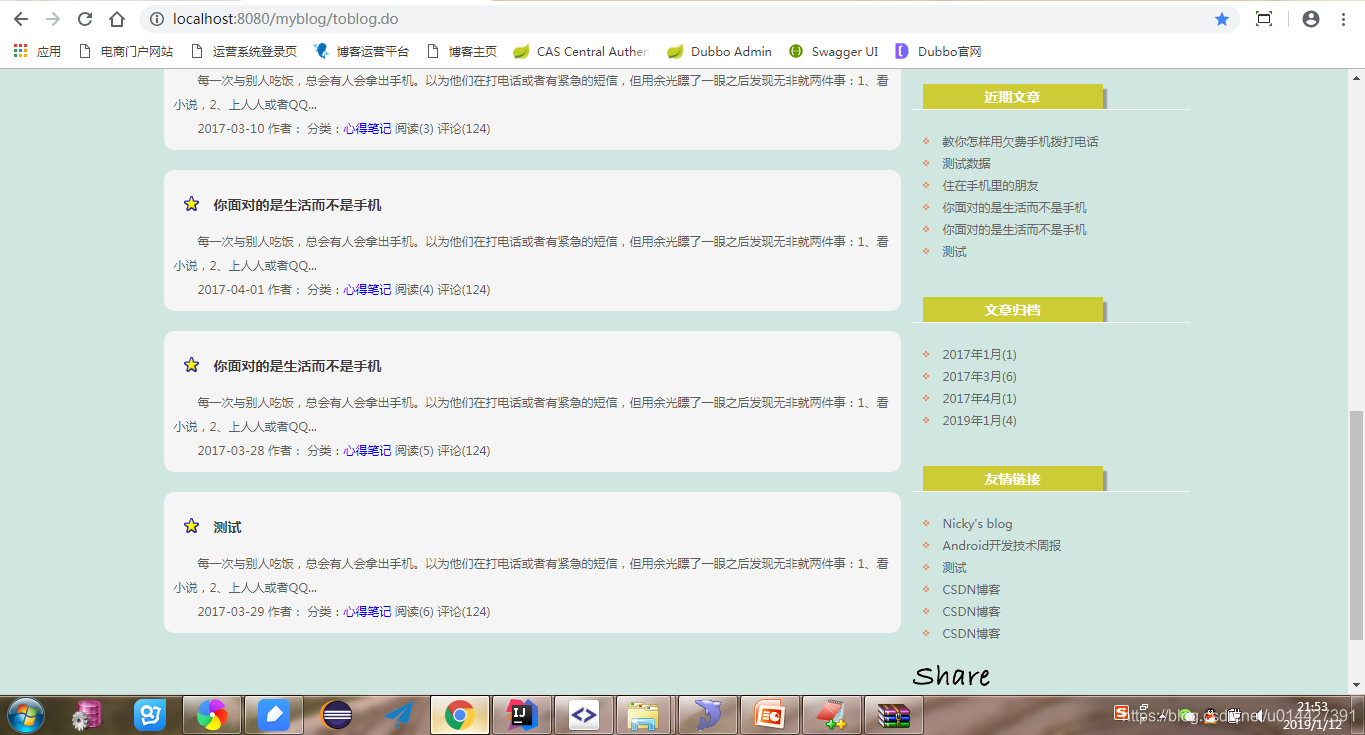
然后就在自己的项目里集成成功了,项目链接:https://github.com/u014427391/myblog,自己做的一款开源博客,前端的感谢一个个人网站分享的模板做的,http://www.yangqq.com/download/div/2013-06-15/272.html,感谢作者
editormd实现Markdown编辑器写文章功能的更多相关文章
- 使用Markdown编辑器写博客
使用Markdown编辑器写博客 本Markdown编辑器使用StackEdit修改而来,用它写博客,将会带来全新的体验哦: Markdown和扩展Markdown简洁的语法 代码块高亮 图片链接和图 ...
- 欢迎使用 Markdown 编辑器写博客
本Markdown编辑器使用StackEdit修改而来,用它写博客,将会带来全新的体验哦: Markdown和扩展Markdown简洁的语法 代码块高亮 图片链接和图片上传 LaTex数学公式 UML ...
- 用nw.js开发markdown编辑器-已完成功能介绍
这里文章都是从个人的github博客直接复制过来的,排版可能有点乱. 原始地址 http://benq.im/2015/10/29/hexomd-introduction 文章目录 1. 功能列表 ...
- 如何使用markdown编辑器编写文章
1 设置markdown编辑器为默认编辑器 进入我的博客,点击管理 点击选项,勾选markdown编辑器即可 2 markdown 语法 注意,文章中的# - 1. > 只有在段落开头且符号后需 ...
- # 欢迎使用Markdown编辑器写博客
似的发射点 甜甜 他inn他 absct{ for i 士大夫似的 胜多负少 import os import sys import subprocess import textwrap if sys ...
- CSDN 支持Markdown写文章了!
开源中国等其他技术博客很早就支持markdown格式写文章了,今天发现csdn竟然也可以了,不仅支持而且可以在线预览,本地导入导出,远程导入. 这些对于程序员写东西都非常好用,不用总是花时间来排版了. ...
- SimpleMarkdown - 一款简单的Markdown编辑器
源码地址: https://github.com/zhuangZhou/SimpleMarkdown 预览地址: http://hawkzz.com:8000 作者网站:http://hawkzz.c ...
- 任由文字肆意流淌,更自由的开源 Markdown 编辑器
对于创作平台来说内容编辑器是十分重要的功能,强大的编辑器可以让创作者专注于创作"笔"下生花.而最好取悦程序员创作者的方法之一就是支持 Markdown 写作,因为大多数程序员都是用 ...
- [CSDN_Markdown] 使用CSDN Markdown编辑器
简介 最近CSDN支持Markdown语法写博客了,甚是欢喜.前几天写了一篇实验了下,感觉不错.准备写几篇文章介绍一下如何使用CSDN的Markdown编辑器写博客,不求全面,但求够用,望大家批评指正 ...
随机推荐
- Callable Future接口的设计原理
我们都知道Callable接口作为任务给线程池来执行,可以通过Future对象来获取返回值,他们背后的实现原理是什么?通过总结背后的实现原理有助于我们深入的理解相关技术,做到触类旁通和举一反三. 文章 ...
- Java 初学UDP传输
不谈理论,先举简单例子. 发送端代码: public class UDPDemo { public static void main(String[] args) throws Exception { ...
- session实现原理(阿里面试题)
问: 当用户登录某网站后,向服务器发送一个请求,服务器如何判断是这个用户请求的 首先,你要明白一点,最初http协议在设计的时候,主要面向当时的web1.0网站,他们不需要知道是谁来访问,只需要向外界 ...
- Mac OS mysql数据库安装与初始化
一.官网下载mysql 二.安装并启用 三.数据库初始化 192:bin zhuyajing$ ./mysql -u root -p Enter password: Welcome to the My ...
- flume接收http请求,并将数据写到kafka
flume接收http请求,并将数据写到kafka,spark消费kafka的数据.是数据采集的经典框架. 直接上flume的配置: source : http channel : file sink ...
- 一篇关于Asp.Net Model验证响应消息的问题处理
之前,我做过Asp.Net Core的Model验证,在Core中过滤器对响应的处理很简单 context.Result = new JsonResult(ErrorMsg); 但是,在Asp.Net ...
- redis学习-散列表常用命令(hash)
redis学习-散列表常用命令(hash) hset,hmset:给指定散列表插入一个或者多个键值对 hget,hmget:获取指定散列表一个或者多个键值对的值 hgetall:获取所欲哦键值以及 ...
- 学以致用三十四-----python2.0加载图片
想用做一个静态图片为背景的页面.结果遇到了一些阻碍.其主要原因还是路径没有找对.网上也参考了不少方法,也许是因为版本不同,处理的方法也不同,因此按照网上的处理方式,也没有得到解决. 为此困惑了一天.结 ...
- 【原创】IO流:读写操作研究(输入流)
默写代码(以下问题要求能默写,不翻书不百度) 输入 问题一:从文件abc.txt中读取数据到字节数组并打印出来. 分析:如果读取数据,首先第一个问题,数据有多少?如果数据量不确定,如果确定字节数组大小 ...
- python之路(九)-函数装饰器
装饰器 某公司的基础业务平台如下: def f1(): print('这是f1业务平台') def f2(): print('这是f2业务平台') def f3(): print('这是f3业务平台' ...