
《笨方法学Python》加分题32
注意一下 range 的用法。查一下 range 函数并理解它
在第 22 行(我的答案),你可以直接将 elements 赋值为 range(0, 6) ,而无需使用 for 循环?
在 python 文档中找到关于列表的内容,仔细阅读一下,除了 append 以外列表还支持哪些操作?
我的答案
32.0 基础练习
 the_count = [1,2,3,4,5]

 fruits = ['apples', 'oranges', 'pears', 'apricots']

 change = [1, 'pennies', 2, 'dimes', 3, 'quarters']

 # this first kind of for-loop goes through a list

 for number in the_count:

     print(f"This is count {number}")

 # same as above

 for fruit in fruits:

     print(f"A fruit of type: {fruit}")

 # also we can go through mixed lists too

 # notice we have to use {} since we don't know what's in it

 for i in change:

     print(f"I got {i}")

 # we can also build lists, first start with an empty one

 elements = []

 #then use the range function to do 0 to 5 counts

 for i in range(0,6):

     print(f"Adding {i} to the list.")

     # append is a function that lists understand

     elements.append(i)

 # now we can print them out too

 for i in elements:

     print(f"Element was: {i}")

 #自己加的,看elements结果

 print(elements)
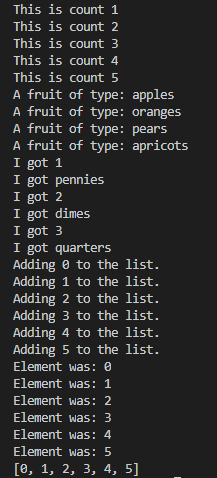
32.1 range 的用法
最简单的变法就是查看帮助文档了,还记得我们用过的两种方法么?
( ↓↓↓↓ 刮开查看 ↓↓↓↓ )
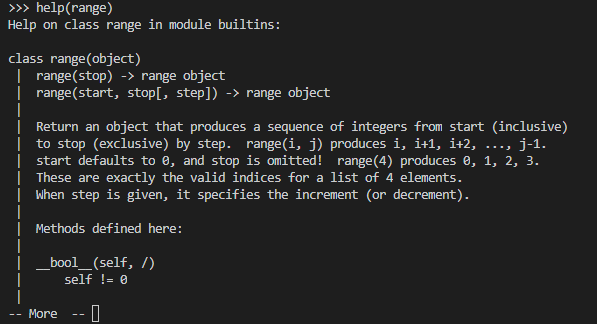
Python3 range() 函数返回的是一个可迭代对象(类型是对象),而不是列表类型, 所以打印的时候不会打印列表。
Python3 list() 函数是对象迭代器,可以把range()返回的可迭代对象转为一个列表,返回的变量类型为列表。
range(stop)

range(start, stop[, step])
创建 range 函数的实例 range 函数会返回一个数字序列。它最多接受 3 个参数
- start:启始值(被包含),默认是 0
- stop:结束值(不包含),必填
- step:步长,默认是1,不可为0,例如:range(0, 5) 等价于 range(0, 5, 1)
 >>>range(5)

 range(0, 5)

 >>> for i in range(5):

 ...     print(i)

 ...

 0

 1

 2

 3

 4

 >>> list(range(5))

 [0, 1, 2, 3, 4]

 >>> list(range(0))

 []

 >>>
有两个参数或三个参数的情况(第二种构造方法)::
 >>>list(range(0, 30, 5))

 [0, 5, 10, 15, 20, 25]

 >>> list(range(0, 10, 2))

 [0, 2, 4, 6, 8]

 >>> list(range(0, -10, -1))

 [0, -1, -2, -3, -4, -5, -6, -7, -8, -9]

 >>> list(range(1, 0))

 []

 >>>

 >>>
32.2 不使用 for-loop ,直接为 elements 赋值为 range(6)
 the_count = [1,2,3,4,5]

 fruits = ['apples', 'oranges', 'pears', 'apricots']

 change = [1, 'pennies', 2, 'dimes', 3, 'quarters']

 # this first kind of for-loop goes through a list

 for number in the_count:

     print(f"This is count {number}")

 # same as above

 for fruit in fruits:

     print(f"A fruit of type: {fruit}")

 # also we can go through mixed lists too

 # notice we have to use {} since we don't know what's in it

 for i in change:

     print(f"I got {i}")

 # we can also build lists, first start with an empty one

 elements = []

 #then use the range function to do 0 to 5 counts

 elements = list(range(0,6))

 # now we can print them out too

 for i in elements:

     print(f"Element was: {i}")

 #自己加的,看elements结果

 print(elements)
需要为range(0,6)加上list才是需要的elements列表
《笨方法学Python》加分题32的更多相关文章
- "笨方法学python"
<笨方法学python>.感觉里面的方法还可以.新手可以看看... 本书可以:教会你编程新手三种最重要的技能:读和写.注重细节.发现不同.
- 笨方法学python 22,前期知识点总结
对笨方法学python,前22讲自己的模糊的单词.函数进行梳理总结如下: 单词.函数 含义 print() 打印内容到屏幕 IDLE 是一个纯Python下自带的简洁的集成开发环境 variable ...
- 笨办法学python 13题:pycharm 运行
笨办法学python 13题 代码: # -*- coding: utf-8 -*- from sys import argv # argv--argument variable 参数变量 scrip ...
- 《笨方法学Python》加分题20
加分练习通读脚本,在每一行之前加注解,以理解脚本里发生的事情.每次 print_a_line 运行时,你都传递了一个叫 current_line 的变量,在每次调用时,打印出 current_line ...
- 《笨方法学Python》加分题17
题目通过前学习的文件操作把一个文件中的内容拷贝到另一个文件中,并使用 os.path.exists 在拷贝前判断被拷贝的文件是否已经存在,之后由用户判断是否继续完成拷贝. 新知识os.path.exi ...
- 《笨方法学Python》加分题15
本题本题开始涉及文件的操作,文件操作是一件危险的事情,需要仔细细心否则可能导致重要的文件损坏. 本题除了 ex15.py 这个脚本以外,还需要一个用来读取的文件 ex15_sample.txt 其内容 ...
- 《笨方法学Python》加分题33
while-leep 和我们接触过的 for-loop 类似,它们都会判断一个布尔表达式的真伪.也和 for 循环一样我们需要注意缩进,后续的练习会偏重这方面的练习.不同点在于 while 循环在执行 ...
- 《笨方法学Python》加分题29
加分练习猜一猜 “if 语句” 是什么,他有什么作用.在做下一道题之前,试着用自己的话回答下面的问题: 你认为 if 对他下一行代码做了什么?为什么 if 语句的下一行需要 4 个空格缩进?如果不缩进 ...
- 《笨方法学Python》加分题28
#!usr/bin/python # -*-coding:utf-8-*- True and True print ("True") False and True print (& ...
随机推荐
- java-索引
集合 集合之深入理解HashMap HashMap的实现原理,以及在JDK1.7和1.8的区别 Java集合---ConcurrentHashMap原理分析 ConcurrentHashMap原理分析 ...
- 分布式 基本理论 CAP 2
关于P P, 即 Partition字面意思是网络分区,其实 包括了 各种网络问题, 我们要把它理解 一个 广义的 分区问题. P 涉及到了 时间, 这么说吧, 出现了分区, 那就是节点之间 “长久的 ...
- 创建只读账号oracle
1.创建用户,指定哪个表空间create user test2 identified by "123" default tablespace BDCDJ_XC temporary ...
- python-给微信好友自动发送天气预报和每日一句
周末在宿舍学习python,女朋友那突然下了倾盆大雨,在图书馆门口跟我抱怨好久.最近又在学习python,就想给女朋友写个小程序,每天早上将每天的天气预报通过微信发个她. 在本程序中,用到了几个重要的 ...
- mac eclipse中运行tomcat出现错误:-Djava.endorsed.dirs=D:\Tomcat 9.0\endorsed is not supported
-Djava.endorsed.dirs=D:\Tomcat 9.0\endorsed is not supported. Endorsed standards and standalone APIs ...
- FIN_WAIT_2状态解释
关于网络设备的FIN_WAIT_2状态解释出处:http://hi.baidu.com/netdemon1981/blog/item/584bfbb2aeb1d4acd9335ad9.html 在HT ...
- sql server 新语法 收藏
1.行转列 PIVOT函数,行转列,列转换UNPIVOT select * from ShoppingCart as C PIVOT(count(TotalPrice) FOR [Week] IN([ ...
- REATE A STATIC WEBSITE
REATE A STATIC WEBSITE USING JEKYLL Review Great work! Let's review what you accomplished in this un ...
- 6993: Dominoes(纯bfs)
题目描述Orz likes to play dominoes. Now giving an n*m chessboard and k dominoes whose size are 1*2, Orz ...
- 2017-11-10 Fr Oct 消参
2017-11-04 Sa $ P(-3, 0) $ 在圆C $ (x-3)^2 + y^2 = 8^2 $ 内,动圆M与圆相切且过P点,求M点轨迹. 设切点 $ A(a, b) $,圆心 \(M(x ...