
C# VS2017的.net Core1.0项目在版本升级为2.0后找不到程序集的处理办法
最近不小心升级了VS2017,然后原来的.net web core1.0的项目是引用了DataBaseLib的程序集,如图 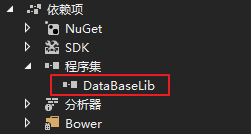 ,升级之后安装了2.0的框架,发现项目就报错了,
 ,这个是还是之后报的错误,第一个错误是Unable to find the library 'DataBase.dll',也就是找不到所引用的程序集的位置。借助同事以及stackoverflow等问答网站,整理的解决办法如下:
修改startup.cs中的代码文件:
原来的代码:
 using System;

 using System.Collections.Generic;

 using System.Linq;

 using System.Threading.Tasks;

 using Microsoft.AspNetCore.Builder;

 using Microsoft.AspNetCore.Hosting;

 using Microsoft.Extensions.Configuration;

 using Microsoft.Extensions.DependencyInjection;

 using Microsoft.Extensions.Logging;

 namespace OneStop

 {

     public class Startup

     {

         public Startup(IHostingEnvironment env)

         {

             var builder = new ConfigurationBuilder()

                 .SetBasePath(env.ContentRootPath)

                 .AddJsonFile("appsettings.json", optional: false, reloadOnChange: true)

                 .AddJsonFile($"appsettings.{env.EnvironmentName}.json", optional: true)

                 .AddEnvironmentVariables();

             Configuration = builder.Build();

         }

         public IConfigurationRoot Configuration { get; }

         // This method gets called by the runtime. Use this method to add services to the container.

         public void ConfigureServices(IServiceCollection services)

         {

             // Add framework services.

             services.AddMvc();

         }

         // This method gets called by the runtime. Use this method to configure the HTTP request pipeline.

         public void Configure(IApplicationBuilder app, IHostingEnvironment env, ILoggerFactory loggerFactory)

         {

             loggerFactory.AddConsole(Configuration.GetSection("Logging"));

             loggerFactory.AddDebug();

             if (env.IsDevelopment())

             {

                 app.UseDeveloperExceptionPage();

                 app.UseBrowserLink();

             }

             else

             {

                 app.UseExceptionHandler("/Home/Error");

             }

             app.UseStaticFiles();

             app.UseMvc(routes =>

             {

                 routes.MapRoute(

                     name: "default",

                     template: "{controller=Home}/{action=Index}/{id?}");

             });

         }

     }

 }
处理之后的代码:
 using DataBaseLib;

 using Microsoft.AspNetCore.Builder;

 using Microsoft.AspNetCore.Hosting;

 using Microsoft.AspNetCore.Http;

 using Microsoft.AspNetCore.Http.Features;

 using Microsoft.AspNetCore.Mvc;

 using Microsoft.DotNet.PlatformAbstractions;

 using Microsoft.Extensions.Configuration;

 using Microsoft.Extensions.DependencyInjection;

 using Microsoft.Extensions.DependencyModel;

 using Microsoft.Extensions.DependencyModel.Resolution;

 using Microsoft.Extensions.Logging;

 using Newtonsoft.Json;

 using Newtonsoft.Json.Serialization;

 using System;

 using System.Collections.Generic;

 using System.IO;

 using System.Reflection;

 namespace Assemble

 {

     public class Startup

     {

         public Startup(IHostingEnvironment env)

         {

             var builder = new ConfigurationBuilder()

                 .SetBasePath(env.ContentRootPath)

                 .AddJsonFile("appsettings.json", optional: false, reloadOnChange: true)

                 .AddJsonFile($"appsettings.{env.EnvironmentName}.json", optional: true)

                 .AddEnvironmentVariables();

             Configuration = builder.Build();

         }

         public IConfigurationRoot Configuration { get; }

         // This method gets called by the runtime. Use this method to add services to the container.

         public void ConfigureServices(IServiceCollection services)

         {

             Initialize.ConfigureServices(services);

             // Add framework services.

             var mvcBuilder = services.AddMvc();

             new MvcConfiguration().ConfigureMvc(mvcBuilder);

         }

         public class MvcConfiguration : IDesignTimeMvcBuilderConfiguration

         {

             private class DirectReferenceAssemblyResolver : ICompilationAssemblyResolver

             {

                 public bool TryResolveAssemblyPaths(CompilationLibrary library, List<string> assemblies)

                 {

                     if (!string.Equals(library.Type, "reference", StringComparison.OrdinalIgnoreCase))

                     {

                         return false;

                     }

                     var paths = new List<string>();

                     foreach (var assembly in library.Assemblies)

                     {

                         var path = Path.Combine(ApplicationEnvironment.ApplicationBasePath, assembly);

                         if (!File.Exists(path))

                         {

                             return false;

                         }

                         paths.Add(path);

                     }

                     assemblies.AddRange(paths);

                     return true;

                 }

             }

             public void ConfigureMvc(IMvcBuilder builder)

             {

                 // .NET Core SDK v1 does not pick up reference assemblies so

                 // they have to be added for Razor manually. Resolved for

                 // SDK v2 by https://github.com/dotnet/sdk/pull/876 OR SO WE THOUGHT

                 /*builder.AddRazorOptions(razor =>

                 {

                 razor.AdditionalCompilationReferences.Add(

                 MetadataReference.CreateFromFile(

                 typeof(PdfHttpHandler).Assembly.Location));

                 });*/

                 // .NET Core SDK v2 does not resolve reference assemblies‘ paths

                 // at all, so we have to hack around with reflection

                 typeof(CompilationLibrary)

                 .GetTypeInfo()

                 .GetDeclaredField("<DefaultResolver>k__BackingField")

                 .SetValue(null, new CompositeCompilationAssemblyResolver(new ICompilationAssemblyResolver[]

                 {

                     new DirectReferenceAssemblyResolver(),

                     new AppBaseCompilationAssemblyResolver(),

                     new ReferenceAssemblyPathResolver(),

                     new PackageCompilationAssemblyResolver(),

                 }));

             }

         }

         // This method gets called by the runtime. Use this method to configure the HTTP request pipeline.

         public void Configure(IApplicationBuilder app, IHostingEnvironment env, ILoggerFactory loggerFactory)

         {

             loggerFactory.AddConsole(Configuration.GetSection("Logging"));

             loggerFactory.AddDebug();

             if (env.IsDevelopment())

             {

                 app.UseDeveloperExceptionPage();

                 app.UseBrowserLink();

             }

             else

             {

                 app.UseExceptionHandler("/Home/Error");

             }

             app.UseStaticFiles();

             app.UseMvc(routes =>

             {

                 routes.MapRoute(

                     name: "default",

                     template: "{controller=Solution}/{action=Index}/{id?}");

             });

         }

     }

 }
希望能对大家有所帮助!
C# VS2017的.net Core1.0项目在版本升级为2.0后找不到程序集的处理办法的更多相关文章
- vue2.0 项目搭建 和vue 2.0 electron 项目搭建
1.关于electron vue 项目的搭建 全局或者局部安装项目vue: 脚手架指令生成: npm install -g vue-cli vue init simulatedgreg/electro ...
- 更新到.netcore3.0后找不到dotnet-ef的解决办法
在项目根目录下建立global.json文件 { "sdk": { "version": "2.2.402" } } 或使用命令 dotne ...
- net core体系-web应用程序-4asp.net core2.0 项目实战(1)-2项目说明和源码下载
本文目录1. 摘要2. Window下运行 3.linux下运行4. 开发记录5. 总结 1.概要 写<Asp.Net Core 2.0 项目实战>系列断断续续已经很长时间了,期间很多朋友 ...
- Asp.Net Core 2.0 项目实战(1) NCMVC开源下载了
Asp.Net Core 2.0 项目实战(1) NCMVC开源下载了 Asp.Net Core 2.0 项目实战(2)NCMVC一个基于Net Core2.0搭建的角色权限管理开发框架 Asp.Ne ...
- Eclipse使用Maven创建web3.0项目
安装Maven插件 这一步不细说了,自己下载的Eclipse-JAVA EE 版已自带 Maven插件 开始创建 文本1New一个 Maven Web App项目:File-->New--> ...
- MVC3.0 项目升级到 MVC4.0
按照 http://www.asp.net/whitepapers/mvc4-release-notes#_Toc303253806 的步骤 第一步:修改web.config 注意,默认的MVC3网站 ...
- 本机运行.net 2.0项目报错,解决方案
本机在iis上运行.net 2.0项目时,报以下错误“请求的内容似乎是脚本,因而将无法由静态文件处理程序来处理”: 本机环境配置: 安装有以下几个.net 版本:v1.0.3705,v1.1.4322 ...
- 关于DIPS的MVC 4.0项目发布与在IIS 7.0上的部署的方法
本人技术笨拙,今天在发布DIPS的MVC4.0项目,并部署到IIS上,遇到各种问题.在查询相关资料后,最终得以解决,所以想把这个过程记录下来. 首先是MVC4.0项目的发布: 打开你的VS2012网站 ...
- 升级项目到.NET Core 2.0,在Linux上安装Docker,并成功部署
概述 容器,顾名思义是用来存放并容纳东西的器皿: 而容器技术伴着Docker的兴起也渐渐的映入大家的眼帘,它是一个抽象的概念,同时也是默默存在世上多年的技术,不仅能使应用程序间完全的隔离,而且还能在共 ...
随机推荐
- Spherical CNNs代码配置过程
ICLR18 best paper: Spherical CNNs 论文链接:https://arxiv.org/abs/1801.10130 GITHUB地址:https://github.com/ ...
- AI之旅(7):神经网络之反向传播
前置知识 求导 知识地图 神经网络算法是通过前向传播求代价,反向传播求梯度.在上一篇中介绍了神经网络的组织结构,逻辑关系和代价函数.本篇将介绍如何求代价函数的偏导数(梯度). 梯度检测 在 ...
- ubuntu18.04 下利用conda安装opencv3
ubuntu18.04 下利用conda安装opencv3 安装opencv3 conda install -c https://conda.anaconda.org/menpo opencv3 出现 ...
- Map<String,Integer>acount字符串出现的次数
- rem,em,与px的比较用法
在Web中使用什么单位来定义页面的字体大小,至今天为止都还在激烈的争论着,有人说PX做为单位好,有人说EM优点多,还有人在说百分比方便,以至于出现了CSS Font-Size: em vs. px v ...
- 统计数字(关联容器map)
题目描述 某次科研调查时得到了n个自然数,每个数均不超过1500000000(1.5*109).已知不相同的数不超过10000个,现在需要统计这些自然数各自出现的次数,并按照自然数从小到大的顺序输出统 ...
- 离线安装Eclipse插件-Vrapper
首先下载Vrapper的资源文件:https://sourceforge.net/projects/vrapper/ 下载完成后解压,将features和plugins文件夹内的文件复制到eclips ...
- Java面试3
反射的定义: 反射是java语言的一个特性,它允程序在运行时(注意不是编译的时候)来进行自我检查并且对内部的成员进行操作.例如它允许一个java的类获取它所有的成员变量和方法并且显示出来. 反射机制的 ...
- hbase整合
hbase與hive整合 1. hive中有數據 --> 創建hive管理表映射hbase 例如: 1)hive創建內部表 create tabl ...
- 学习笔记CB002:词干提取、词性标注、中文切词、文档分类
英文词干提取器,import nltk,porter = nltk.PorterStemmer(),porter.stem('lying') . 词性标注器,pos_tag处理词序列,根据句子动态判断 ...