
【JavaWeb】Spring+SpringMVC+MyBatis+SpringSecurity+EhCache+JCaptcha 完整Web基础框架(三)
Spring+SpringMVC
MVC呢,现在似乎越来越流行使用SpringMVC框架,我自己用的感觉,是非常好,确实很舒服,配置一开始是麻烦了一点点,但是后续的开发真的是很清爽!
SpringMVC配置文件
目录:resource/config/spring,文件名:spring-mvc.xml
 <?xml version="1.0" encoding="UTF-8"?>

 <beans xmlns="http://www.springframework.org/schema/beans"

        xmlns:xsi="http://www.w3.org/2001/XMLSchema-instance"

        xmlns:context="http://www.springframework.org/schema/context"

        xmlns:mvc="http://www.springframework.org/schema/mvc"

        xsi:schemaLocation="http://www.springframework.org/schema/beans http://www.springframework.org/schema/beans/spring-beans.xsd http://www.springframework.org/schema/context http://www.springframework.org/schema/context/spring-context.xsd http://www.springframework.org/schema/mvc http://www.springframework.org/schema/mvc/spring-mvc.xsd">

     <!--自动扫描控制器-->

     <context:component-scan base-package="com.magic.rent.controller"/>

     <!--视图渲染-->

     <bean id="internalResourceViewResolver" class="org.springframework.web.servlet.view.InternalResourceViewResolver">

         <property name="prefix" value="/WEB-INF/views/"/>

         <property name="suffix" value=".jsp"/>

     </bean>

     <!--控制器映射器和控制器适配器-->

     <mvc:annotation-driven/>

 </beans>
spring-mvc.xml
Spring配置文件
目录:resource/config/spring,文件名:applicationContext-service.xml
额,这个应该属于Spring的配置文件,噗,之前忘了,就在这里一起补了吧。这个内容暂时比较少,就是Servicec层,以后如果还有什么内容,可以继续往这里填,比如加入什么工具或框架之类的。
<?xml version="1.0" encoding="UTF-8"?>

<beans xmlns="http://www.springframework.org/schema/beans"

       xmlns:xsi="http://www.w3.org/2001/XMLSchema-instance"

       xmlns:context="http://www.springframework.org/schema/context"

       xsi:schemaLocation="http://www.springframework.org/schema/beans
    http://www.springframework.org/schema/beans/spring-beans.xsd
    http://www.springframework.org/schema/context
    http://www.springframework.org/schema/context/spring-context.xsd">

    <!--扫描service-->

    <context:component-scan base-package="com.magic.rent.service"/>

    <!--注册统一异常控制-->

    <bean id="exception" class="com.magic.rent.exception.exhandler.CustomExceptionHandler"/>

</beans>
目录:resource/config/spring,文件名:applicationContext-transaction.xml
这个主要是用于事务。其中用到了AOP的配置,其他AOP配置可以参照这样的格式,但是AOP配置是有一点麻烦的,还是需要好好去看看Spring的文档再配置比较好的。
<?xml version="1.0" encoding="UTF-8"?>
<beans xmlns="http://www.springframework.org/schema/beans"

       xmlns:xsi="http://www.w3.org/2001/XMLSchema-instance" xmlns:tx="http://www.springframework.org/schema/tx"

       xmlns:aop="http://www.springframework.org/schema/aop"

       xsi:schemaLocation="http://www.springframework.org/schema/beans

       http://www.springframework.org/schema/beans/spring-beans.xsd

       http://www.springframework.org/schema/tx

       http://www.springframework.org/schema/tx/spring-tx.xsd

       http://www.springframework.org/schema/aop

       http://www.springframework.org/schema/aop/spring-aop.xsd">

    <bean id="dataSourceTransactionManager" class="org.springframework.jdbc.datasource.DataSourceTransactionManager">

        <property name="dataSource" ref="dataSource"/>

    </bean>

    <tx:advice id="txAdvice" transaction-manager="dataSourceTransactionManager">

        <tx:attributes>
      <--这部分,主要是根据方法名称来进行匹配限定,但是我们是用MyBatis自动生成的Mapper接口,所以在这边大家要按照MyBatis的命名规范来设置name的值。

            <tx:method name="select*" propagation="REQUIRED"/>

            <tx:method name="update*" propagation="REQUIRED"/>

            <tx:method name="delete*" propagation="REQUIRED"/>

            <tx:method name="insert*" propagation="REQUIRED"/>
        </tx:attributes>

    </tx:advice>

    <aop:config>

        <aop:advisor advice-ref="txAdvice" pointcut="execution(* com.magic.rent.service.*.*(..))"/>

    </aop:config>

</beans>
讲到这里,做一个小总结,其实到此为止,就是一个Spring+SpringMVC+MyBatis的整合,这个网上有很多这种类似的例子,这个也不会多难,到此为止,基本上也是简单的配置,配置文件其实没有多少复杂。
Spring统一异常处理
Spring框架自带了统一异常处理的功能,方法有三个,但是我只介绍一个,因为只有这个,才是生产上大多数的用法。
创建目录
━java
┗exception(这个类呢,是跟service、controller这些同级的,因为这个类中的Custom可以定义出非常详细的异常情况。)
┣custom(存放自定义的异常,用于实际业务层进行抛出)
┗exhandler(存放异常处理的控制器)
━webapp
┣WEB-INF
┣admin(管理页面)
┣error(存放错误页面)
┗views(存放普通页面)
如图:
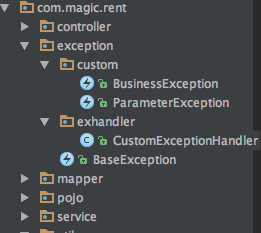
创建异常类控制类
目录:com.magic.rent.exception.exhandler,文件名:CustomExceptionHandler.java
package com.magic.rent.exception.exhandler;

import com.magic.rent.exception.custom.BusinessException;

import com.magic.rent.exception.custom.ParameterException;

import org.springframework.stereotype.Service;

import org.springframework.web.servlet.HandlerExceptionResolver;

import org.springframework.web.servlet.ModelAndView;

import javax.servlet.http.HttpServletRequest;

import javax.servlet.http.HttpServletResponse;

import java.util.HashMap;

import java.util.Map;

public class CustomExceptionHandler implements HandlerExceptionResolver {

    public ModelAndView resolveException(HttpServletRequest httpServletRequest, HttpServletResponse httpServletResponse, Object o, Exception ex) {

        Map<String, Object> model = new HashMap<String, Object>();

        model.put("ex", ex);

        // 根据不同错误转向不同页面

        if (ex instanceof BusinessException) {

            return new ModelAndView("../error/business_error", model);

        } else if (ex instanceof ParameterException) {

            return new ModelAndView("../error/parameter_error", model);

        } else {

            return new ModelAndView("../error/404", model);

        }

    }

}
类中ModelAndView的地址,是“../error/xxx”,这么写是因为我们在SpringMVC配置“spring-mvc.xml”中的internalResourceViewResolver标签设置了前缀和后缀,默认前缀是从views文件夹开始访问页面,要改成error文件夹,就得写成这样子,当然这个类可以统一的再优化一下,比如把“../error/”抽出来统一设置。当然这边也可以改用Json的方式返回,而不是一定要跳转界面,改成Json或许更符合需求,毕竟现在多是用Ajax做交互。以后如果有改,我再贴代码上来。
写一个自定义异常范例
目录:com.magic.rent.exception.custom,文件名:BusinessException.java
 package com.magic.rent.exception.custom;

 public class BusinessException extends RuntimeException {

     public BusinessException(String message) {

         super(message);

     }

     public BusinessException(String message, Throwable cause) {

         super(message, cause);

     }

 }
其实也没什么内容,就继承一下,然后复写一下方法就好了。当然,根据自己的需求,可以自己增加内容。使用的是,也是非常容易,比如下面这个代码片段。不符合条件,就抛出异常,然后不断地通过方法向上抛不要try-Catch,最后就会被这个异常控制器捕捉。
 //如果查找不到用户信息,则抛出异常

        if (sysUsers == null) {

            throw new UsernameNotFoundException(

                    "UserDetailsService.userNotFount");

        }
【JavaWeb】Spring+SpringMVC+MyBatis+SpringSecurity+EhCache+JCaptcha 完整Web基础框架(三)的更多相关文章
- 【JavaWeb】Spring+SpringMVC+MyBatis+SpringSecurity+EhCache+JCaptcha 完整Web基础框架(前言)
一直希望能够搭建一个完整的,基础Web框架,方便日后接一些外快的时候,能够省时省力,终于花了一周的时间,把这个东西搞定了.特此写下此博客,一来是纪念,二来是希望能够为别人提供方便.顺带说一下,恩,组合 ...
- Spring+SpringMVC+MyBatis+SpringSecurity+EhCache+JCaptcha 完整Web基础框架(前言)
简单介绍一下,本框架的基本功能点: Spring:整个框架的主体部分,这个自不用说. SpringMVC:MVC部分我还是比较喜欢Spring的. MyBatis:选型的时候选择这个ORM主要也是考虑 ...
- 【JavaWeb】Spring+SpringMVC+MyBatis+SpringSecurity+EhCache+JCaptcha 完整Web基础框架(五)
SpringSecurity(2) 好久没有写了,之前只写了一半,我是一边开发一边写Blog一边上班,所以真心没有那么多时间来维护Blog,项目已经开发到编写逻辑及页面部分了,框架基本上已经搭建好不会 ...
- 【JavaWeb】Spring+SpringMVC+MyBatis+SpringSecurity+EhCache+JCaptcha 完整Web基础框架(四)
SpringSecurity(1) 其实啊,这部分我是最不想写的,因为最麻烦的也是这部分,真的是非常非常的麻烦.关于SpringSecurity的配置,让我折腾了好半天,网上的配置方式一大把,但总有一 ...
- 【JavaWeb】Spring+SpringMVC+MyBatis+SpringSecurity+EhCache+JCaptcha 完整Web基础框架(一)
Spring+MyBatis 首先要搭建的是Spring+MyBatis的整合框架,毕竟Spring是整个Web框架的核心部位,而数据库操作是一切测试的基础嘛. 目录结构 ━java ┣ contro ...
- 【JavaWeb】Spring+SpringMVC+MyBatis+SpringSecurity+EhCache+JCaptcha 完整Web基础框架(二)
Log4j 这个东西,大家都熟悉,就简单的介绍一下,算是一个抛砖引玉,因为我自己在Log日志的搭建方面,没有什么经验,但这东西确实是非常重要的,日后调Bug没有它基本不可能,如果有朋友有什么比较好的L ...
- 【JavaWeb】SSM+SpringSecurity+EhCache+JCaptcha 完整Web基础框架(六)
Showings 我个人的项目,当前不断地在更新. 我希望做成一个好项目,同时,也是在锻炼自己的技术. 在项目中发现问题,学习知识,是比较可取的一条路子. 这样学习到的知识,虽然分散,但是都很实用,而 ...
- Spring+SpringMVC+Mybatis+MAVEN+Eclipse+项目完整环境搭建
1.新建一个Maven项目,创建父项目. 2.创建子项目模块 3.创建javaWeb项目 4.创建后的项目目录结构 5.Maven文件配置 parent父项目pom.xml文件配置 <?xml ...
- javaweb项目-医者天下 (Spring+SpringMVC+MyBatis)
项目下载地址:http://download.csdn.net/detail/qq_33599520/9826683 项目完整结构图: 项目简介: 医者天下项目是一个基于Spring+SpringMV ...
随机推荐
- SAP CRM 使用Javascript触发SAP Server Event
原文地址:How To Trigger SAP Server Event With Javascript 本文地址:http://www.cnblogs.com/hhelibeb/p/5977921. ...
- 使用 ExecuteMultiple 提高批量数据加载的性能
您可以使用 ExecuteMultipleRequest 消息在 Microsoft Dynamics CRM Online 2016 Update 和 Microsoft Dynamics CRM ...
- Listview的Item中有CheckBox、Button等的焦点处理
ListView的item布局中有CheckBox.Button等会获取焦点的控件会抢走焦点,造成ListView的item点击事件相应不了. 解决方法:控件设置 android:clickable= ...
- React Native 之 Touchable 介绍与使用
前言 学习本系列内容需要具备一定 HTML 开发基础,没有基础的朋友可以先转至 HTML快速入门(一) 学习 本人接触 React Native 时间并不是特别长,所以对其中的内容和性质了解可能会有所 ...
- linux shell程序
shell程序介绍 1.查看我们的Linux(centos6.5为例)有多少我们可以使用的shell: [root@localhost bin]# cat /etc/shells /bin/sh /b ...
- jdbc数据库连接过程及驱动加载与设计模式详解
首先要导入JDBC的jar包:接下来,代码:Class.forName(xxx.xx.xx)返回的是一个类 Class.forName(xxx.xx.xx)的作用是要求JVM查找并加载指定的类, 也就 ...
- jQuery解决iframe高度自适应代码
网上查了好多用着都不行,自己搞定了:在包含iframe的页面中加入以下脚本,基本思想是在iframe加载内容后重新设置高度,下面代码尽在IE6中用过,没在其他浏览器中测试. 代码如下: <scr ...
- J2EE或MyEclipse简单配置以及第一个web页面
首先打开你下载安装好的MyEclipse,配置你开发需要的环境. 大致分为3步:①配置编码:Window-->preferences-->General-->Workspace--& ...
- iOS系列 基础篇 02 StoryBoard 故事板文件
iOS基础 02 StoryBoard 故事板文件 目录: 1. 故事板的导航特点 2. 故事板中的Scene和Segue 3. 本文最后 在上篇HelloWorld工程中有一个Main.storyb ...
- 一键准备Oracle安装
在Linux下安装Oracle软件之前,有相当工作需要准备,包括建立用户.配置内核参数.配置资源限制参数.配置Oracle用户环境等,十分繁琐.即便十分熟悉,也需要花费一定的精力来准备.说白了,做这些 ...