
Angular4 扫雷小游戏
扫雷小游戏,可以升级过关,难度随关卡增加。但是有很明显的bug,以后有时间会继续优化!
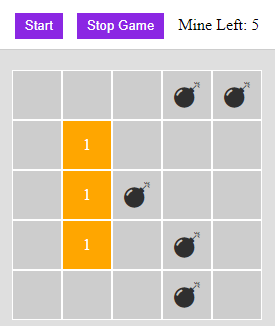
HTML:
<div class="mainContent">

     <div class="bg-white text-center borderb paddingv10">

         <button class="flexWidth marginr10" (click)="gameStartFn()">Start</button>

         <button class="flexWidth marginr10" (click)="gameEndFn()">Stop Game</button>

         <span>Mine Left: {{this.mineArray.length}}</span>

     </div>

     <ul class="mineContainer clear" [ngStyle]="getWidth()">

         <li *ngFor="let column of columnArray" (mousedown)="onClickFn(column.index, $event)" oncontextmenu="return false" [ngClass]="{ 'bg-gray': column.clicked == true && column.number == 0}" >

            <span *ngIf="column.isMine && visibleItem.mine" class="fa fa-bomb fs-26 text-black"></span>

            <span *ngIf="!column.isOver && !column.isMine && column.number !=0">{{column.number}}</span>

            <span *ngIf="column.isFlag" class="fa fa-flag"></span>

            <!-- <span class="text-red">{{column.index}}</span> -->

         </li>

     </ul>

</div>
CSS:
.mineContainer {

    margin: 20px auto;

    box-sizing: border-box;

}

.mineContainer li {

    width: 50px;

    height: 50px;

    border: solid 1px #fff;

    float: left;

    background-color: orange;

    color: #fff;

    text-align: center;

    line-height: 50px;

    box-sizing: border-box;

    display: flex;

    justify-content: center;

    align-items: center;

}

.mineContainer li:hover {

    cursor: pointer;

}
TS:
import { Component, OnInit } from '@angular/core';

import { Router } from '@angular/router';

@Component ({

    templateUrl: './mineSweeping.component.html',

    styleUrls: ['./mineSweeping.component.css']

})

export class MineSweepingComponent implements OnInit {

    private hitSection: any = { sectionNum: 1, columnNum: '', minMineNum: '' }; // 关卡参数: 关卡数、列数、最小地雷数

    private visibleItem: any = { mine: false, location: false }; // 控制是否显示的参数:地雷、标记

    private columnArray: Array<any> = []; // 地雷画布数组(好多参数,下面会有赋值)

    private mineArray: Array<any> = []; // 地雷数组

    private rules: any; // 判断点击位置是否为最上下左右列--

    private isOver: boolean = false ; // 是否结束

    private isSuccess: boolean = false; // 是否成功

    constructor(private router: Router){}

    ngOnInit(){

        this.hitSectionInitFn();

        this.columnInitFn();

        this.mineInitFn();

    }

    hitSectionInitFn(){ // 根据关卡数调整列数,最小地雷总数

        this.hitSection.columnNum = this.hitSection.sectionNum * 5;

        this.hitSection.minMineNum = this.hitSection.sectionNum * 5;

    }

    columnInitFn(){ // 地雷画布初始化: 坐标(id)、水平坐标、垂直坐标、是否为雷、周围雷数、是否被点击、是否被标记

        this.columnArray = [];

        for(let i = 0; i < this.hitSection.columnNum ; i++){

            for(let j = 0; j < this.hitSection.columnNum; j++) {

                this.columnArray.push({ index: this.columnArray.length, horizontal: i, vertical: j,  isMine: false, number: 0, clicked: false, isFlag: false });

            }

        }

    }

    mineInitFn(){ // 地雷初始化

        let tempArray = [], tempMineNum;

        this.mineArray = [];

        // 根据最小地雷数,随机生成一个 [最小地雷数 - (最小地雷数 + 最小地雷数)]之间的数值,为本关的地雷总数(比如10 - 20之间的数值)

        tempMineNum = Math.round( Math.random() * this.hitSection.minMineNum +  this.hitSection.minMineNum);

        // 根据地雷总数,随机生成数字数组

        for(let i = 0; i < tempMineNum; i++){

            tempArray.push( Math.round ( Math.random() * (this.hitSection.columnNum * this.hitSection.columnNum) ) );

        }

        // 数组去重

        for(let i = 0; i < tempArray.length; i++){

            if(this.mineArray.indexOf(tempArray[i]) == -1){

                this.mineArray.push(tempArray[i]);

            }

        }

        // 根据去重数组,赋值给地雷画布数组中的 isMine 参数

        for(let i = 0; i < this.columnArray.length; i++) {

            for(let j = 0; j < this.mineArray.length; j++) {

                if(this.mineArray[j] == i){

                    this.columnArray[i].isMine = true;

                }

            }

        }

        console.log(this.mineArray);

    }

    onClickFn(index, event){

        if(event.button == 2){ // 点击右键,做雷区标记

            this.columnArray[index].isFlag = !this.columnArray[index].isFlag;

            if(this.columnArray[index].isFlag){

                this.mineArray.length--;

            } else {

                this.mineArray.length++;

            }

        } else { // 点击左键,计算周围雷数

            this.checkMineArroundFn(index);

        }

        // 每次点击后,查看是否过关

        setTimeout(() => {

            this.ifSuccessFn();

        }, 100);

    }

    getPositionRules(index: number){ // 判断点击位置是否为最上下左右列

        this.rules = {

            top: this.columnArray[index].horizontal == 0,

            bottom: this.columnArray[index].horizontal == (this.hitSection.columnNum - 1),

            left: this.columnArray[index].vertical == 0,

            right: this.columnArray[index].vertical == (this.hitSection.columnNum - 1)

        }

    }

    checkMineArroundFn(index: number){ // 计算周围雷数

        if(this.columnArray[index].clicked ){

            return;

        }

        this.getPositionRules(index);

        if(this.columnArray[index].isMine) {

            this.gameEndFn();

            return;

        }  else if (!this.columnArray[index].isMine) {

            // 这里逻辑比较复杂, 根据点击坐标,计算其上、下、左、右、左上、右上、左下、右下八块位置的雷数,如果是第一列,则不计算上、左上、右上(以此类推)

            if(!this.rules.top) {

                if( this.columnArray[(index - this.hitSection.columnNum)].isMine ) { this.columnArray[index].number++; } // top

                if (!this.rules.left) {

                    if( this.columnArray[(index - this.hitSection.columnNum - 1)].isMine ) { this.columnArray[index].number++; } // top left

                }

                if (!this.rules.right) {

                    if( this.columnArray[(index - this.hitSection.columnNum + 1)].isMine ) { this.columnArray[index].number++; } // top right

                }

            }

            if(!this.rules.bottom) {

                if( this.columnArray[(index + this.hitSection.columnNum)].isMine ) { this.columnArray[index].number++; } // bottom

                if (!this.rules.left) {

                    if( this.columnArray[(index + this.hitSection.columnNum - 1)].isMine ) { this.columnArray[index].number++; }  // bottom left

                }

                if (!this.rules.right) {

                    if( this.columnArray[(index + this.hitSection.columnNum + 1)].isMine ) { this.columnArray[index].number++; } // bottom right

                }

            }

            if(!this.rules.left) {

                if( this.columnArray[(index - 1)].isMine ) { this.columnArray[index].number++; } // left

            }

            if(!this.rules.right) {

                if( this.columnArray[(index + 1)].isMine ) { this.columnArray[index].number++; } //right

            }

            this.columnArray[index].clicked = true;

        }

        // 如果周围没有雷,则执行下面函数(扩大计算面积,查找周围坐标的附近雷数)

        if( this.columnArray[index].number == 0 ){

            this.checkAroundFn(index);

        }

    }

    checkAroundFn(index: number){ // 扩大计算面积,查找周围坐标的附近雷数(还是如果是第一行,不查找左上、上、右上位置)

        if(!this.rules.top){

            this.checkMineArroundFn(index - this.hitSection.columnNum);

            if(!this.rules.left) {

                this.checkMineArroundFn(index - this.hitSection.columnNum - 1);

            }

            if(!this.rules.right){

                this.checkMineArroundFn(index - this.hitSection.columnNum + 1);

            }

        }

        if(!this.rules.bottom){

            this.checkMineArroundFn(index + this.hitSection.columnNum);

            if(!this.rules.left) {

                this.checkMineArroundFn(index + this.hitSection.columnNum - 1);

            }

            if(!this.rules.right){

                this.checkMineArroundFn(index + this.hitSection.columnNum + 1);

            }

        }

        if(!this.rules.left){

            this.checkMineArroundFn(index - 1);

        }

        if(!this.rules.right){

            this.checkMineArroundFn(index + 1);

        }

    }

    gameStartFn(){ // 游戏开始

        this.hitSectionInitFn();

        this.columnInitFn();

        this.mineInitFn();

        this.visibleItem = { mine: false, location: false,};

    }

    gameEndFn(){ // 游戏结束

        debugger

        this.visibleItem = { mine: true, location: false };

        this.isOver = true;

        for(let i = 0; i < this.columnArray.length; i++){

            this.columnArray[i].clicked = true;

            this.columnArray[i].isFlag = false;

        }

    }

    ifSuccessFn(){ //判断是否过关

        let temCheckSuccess = false;

        // 查看地雷画布中,所有 isMine 对应的 isFlag 是否同为 true(也就是说,左右雷都被标记)

        for(let i = 0; i < this.columnArray.length; i++){

            if( this.columnArray[i].isFlag != this.columnArray[i].isMine ) {

                temCheckSuccess = false;

                return;

            } else {

                temCheckSuccess = true;

            }

        }

        // 询问是否进入下一关

        if(temCheckSuccess){

            this.isSuccess = true;

            if(this.isSuccess){

                let confirmNext = confirm('Congaratulations! You have pass the section ' + this.hitSection.sectionNum + '. \n Would you like go on?')

                if(confirmNext){

                    this.hitSection.sectionNum++;

                    this.gameStartFn();

                } else {

                    this.router.navigate(['/home']);

                }

            }

        }

    }

    getWidth(){ // 根据列数,获取外层盒子宽度

        return { width: this.hitSection.columnNum * 50 + 'px' }

    }

}
Angular4 扫雷小游戏的更多相关文章
- 扫雷小游戏PyQt5开发【附源代码】
也没啥可介绍哒,扫雷大家都玩过. 雷的分布算法也很简单,就是在雷地图(map:二维数组)中,随机放雷,然后这个雷的8个方位(上下左右.四个对角)的数字(非雷的标记.加一后不为雷的标记)都加一. 如何判 ...
- web版扫雷小游戏(一)
作为一名程序猿,平时的爱好也不多,说起游戏,我不太喜欢大型的网游,因为太耗时间,偶尔玩玩经典的单机小游戏,比如windows下自带的游戏扫雷(秀一下,高级下最高纪录110s). 现阶段正在致力于web ...
- C++扫雷小游戏(基于CMD命令行)
这个小游戏是笔者在大一C语言课程设计的时候写的,基于命令行,为了显得漂亮一些,特别加上了彩色特效~~~ 注意:Win10系统须将命令行调为旧版命令行,否则有可能会显示乱码! 代码示例: #includ ...
- 无聊的周末用Java写个扫雷小游戏
周末无聊,用Java写了一个扫雷程序,说起来,这个应该是在学校的时候,写会比较好玩,毕竟自己实现一个小游戏,还是比较好玩的.说实话,扫雷程序里面核心的东西,只有点击的时候,去触发更新数据这一步. Sw ...
- web版扫雷小游戏(四)
~~~接上篇,游戏的主体框架完成了,接下来我们对游戏中存在的两个主要实体进行分析,一个是雷点类BombObject(节点对象),一个是节点对象对应的图片对象BombImgObject,根据第一篇的介绍 ...
- 【源码项目+解析】C语言/C++开发,打造一个小项目扫雷小游戏!
一直说写个几百行的小项目,于是我写了一个控制台的扫雷,没有想到精简完了代码才200行左右,不过考虑到这是我精简过后的,浓缩才是精华嘛,我就发出来大家一起学习啦,看到程序跑起来能玩,感觉还是蛮有成就感的 ...
- 用python+pyqt5语言编写的扫雷小游戏软件
github源码地址:https://github.com/richenyunqi/Mine-game ,撒娇打滚求star哦~~ღ( ´・ᴗ・` )比心 扫雷主界面模块 整个扫雷界面使用大量的白色方 ...
- web版扫雷小游戏(三)
~~~接上篇,上篇介绍了游戏实现过程中第一个比较繁琐的地方,现在展现在玩家面前的是一个有血有肉的棋盘,从某种意义上说玩家已经可以开始游戏了,但是不够人性化,玩家只能一个一个节点的点开,然后判断,然后标 ...
- web版扫雷小游戏(二)
接上篇~~第一次写这种技术博客,发现把自己做的东西介绍出来还是一件脑力活,不是那么轻松啊,好吧,想到哪写到哪,流水记录之,待完成之后再根据大家的意见进行修改吧. 游戏实现 根据对扫雷游戏的体验和分析, ...
随机推荐
- java 简单工厂 工厂模式
<Head First 设计模式>学习中 分类 简单工厂模式(Simple Factory) 工厂方法模式(Factory Method) 抽象工厂模式(Abstract Factory) ...
- weixin设置菜单
https://jingyan.baidu.com/article/925f8cb8dfcf11c0dce05661.html
- Google官方教程之Selling In-app Products
1.原文链接[需FQ]:http://developer.android.com/training/in-app-billing/index.html 2.平时对于英文文档都是大概读一下,现在翻译文章 ...
- Android SDK和ADT无法更新的解决办法
重要的东西要标红: 经过另外一台电脑测试,按照第二步设置好hosts后,可以一并解决 SDK 和 ADT的更新,无需单独设置SDK Manager. 这里还是写出如何设置SDK Manager以作记录 ...
- 第八次作业——windows各种基本应用的命令处理方法
- css 笔记1
type="text/css"的作用是什么?它是CSS样式的标记.type->类型,这里是style的属性text/css ->文本/css,即css文本type=&q ...
- linux c编程调用系统的动态库时,要使用dlopen等函数吗?
同问 linux c编程调用系统的动态库时,要使用dlopen等函数吗? 2012-11-27 21:55 提问者: hnwlxyzhl 我来帮他解答 满意回答 2012-12-07 09:08 li ...
- jquery 中 $.map 用法
$.map(data,function(item,index){return XXX}) 遍历data数组中的每个元素,并按照return中的计算方式 形成一个新的元素,放入返回的数组中 var b ...
- KMP算法模板&&扩展
很不错的学习链接:https://blog.csdn.net/v_july_v/article/details/7041827 具体思路就看上面的链接就行了,这里只放几个常用的模板 问题描述: 给出字 ...
- AESUtil 加密
package com.hxqc.basic.dependency.util; import org.apache.commons.lang.StringUtils; import sun.misc. ...