
WinFrom饼形图
using System;

using System.Collections.Generic;

using System.ComponentModel;

using System.Data;

using System.Drawing;

using System.Linq;

using System.Text;

using System.Threading.Tasks;

using System.Windows.Forms;

using System.Data.SqlClient;

using System.Drawing.Drawing2D;

namespace MyFillPie

{

    public partial class Form1 : Form

    {

        public Form1()

        {

            InitializeComponent();

        }

        SqlConnection conn;     //声明一个connection变量

        private void Form1_Paint(object sender, PaintEventArgs e)

        {

            //连接SQLserver数据库

            conn = new SqlConnection("server=.;database=AssetSys;uid=sa;pwd=sa");

            conn.Open();

            string str2 = string.Format("select SUM(tp) from tb_vote");

            SqlCommand cmd=new SqlCommand (str2,conn);

            int sum = Convert.ToInt32(cmd.ExecuteScalar());

            SqlDataAdapter sda = new SqlDataAdapter("select * from tb_vote",conn);

            DataSet ds = new DataSet();

            sda.Fill(ds);

            int man20and25 = Convert.ToInt32(ds.Tables[].Rows[][].ToString());

            int man26and30 = Convert.ToInt32(ds.Tables[].Rows[][].ToString());

            int man31and40 = Convert.ToInt32(ds.Tables[].Rows[][].ToString());

            int width = , height = ;

            Bitmap bitmap = new Bitmap(width, height);

            Graphics g = Graphics.FromImage(bitmap);

            try

            {

                 g.Clear(Color.White); //使用Clear方法使画布变成白色

                 Pen pen = new Pen(Color.Red);

                //创建4个Brush对象,用于填充颜色

                Brush brush1 = new SolidBrush(Color.PowderBlue);

                Brush brush2 = new SolidBrush(Color.Blue);

                Brush brush3 = new SolidBrush(Color.Wheat);

                Brush brush4 = new SolidBrush(Color.Orange);

                Font f1 = new Font("Courier New", , FontStyle.Bold);

                Font f2 = new Font("Courier New", );

                g.FillRectangle(brush1, , , width, height);   //绘制背景图

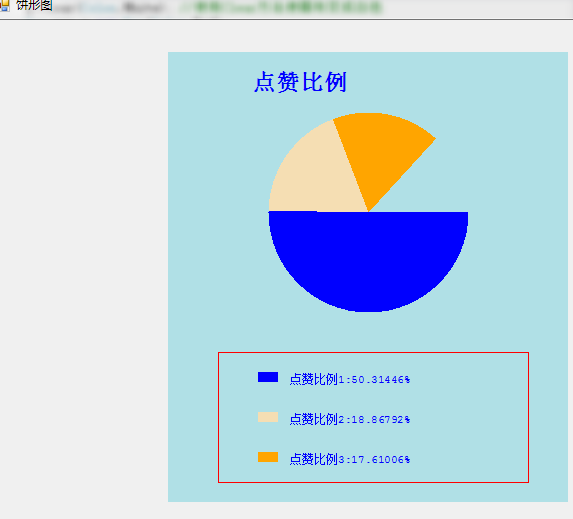
                g.DrawString("点赞比例", f1, brush2, new Point(, )); //绘制标题

                int piex = , piey = , piew = , pieh = ;

                float age1 = Convert.ToSingle((/Convert.ToSingle(sum))*man20and25);

                float age2 = Convert.ToSingle(( / Convert.ToSingle(sum)) * man26and30);

                float age3 = Convert.ToSingle(( / Convert.ToSingle(sum)) * man31and40);

                g.FillPie(brush2,piex,piey,piew,pieh,,age1);

                g.FillPie(brush3, piex, piey, piew, pieh, age1,age2);

                g.FillPie(brush4, piex, piey, piew, pieh, age1+age2,age3);

                g.DrawRectangle(pen,,,,);

                g.FillRectangle(brush2,,,,);

                g.DrawString("点赞比例1:" + Convert.ToSingle(man20and25) *  / sum + "%", f2, brush2, , );

                g.FillRectangle(brush3, , , , );

                g.DrawString("点赞比例2:" + Convert.ToSingle(man26and30) *  / sum + "%", f2, brush2, , );

                g.FillRectangle(brush4, , , , );

                g.DrawString("点赞比例3:" + Convert.ToSingle(man31and40) *  / sum + "%", f2, brush2, , );

            }

            catch (Exception ex)

            {

                MessageBox.Show(ex.Message);

            }

            pictureBox1.Image = bitmap;

        }

    }

}
T-SQL:
USE [AssetSys]

GO

/****** Object:  Table [dbo].[tb_vote]    Script Date: 2018/10/27 9:12:00 ******/

SET ANSI_NULLS ON

GO

SET QUOTED_IDENTIFIER ON

GO

CREATE TABLE [dbo].[tb_vote](

    [Id] [int] IDENTITY(1,1) NOT NULL,

    [Name] [nvarchar](50) NOT NULL,

    [TP] [int] NOT NULL,

    [CreateTime] [datetime] NOT NULL,

    [Remake] [nvarchar](50) NOT NULL,

    [State] [int] NOT NULL,

    [Sort] [int] NOT NULL,

 CONSTRAINT [PK_tb_vote] PRIMARY KEY CLUSTERED

(

    [Id] ASC

)WITH (PAD_INDEX = OFF, STATISTICS_NORECOMPUTE = OFF, IGNORE_DUP_KEY = OFF, ALLOW_ROW_LOCKS = ON, ALLOW_PAGE_LOCKS = ON) ON [PRIMARY]

) ON [PRIMARY]

GO

ALTER TABLE [dbo].[tb_vote] ADD  CONSTRAINT [DF_tb_vote_CreateTime]  DEFAULT (getdate()) FOR [CreateTime]

GO
WinFrom饼形图的更多相关文章
- winfrom 隐藏任务栏(win7)
1:新建winfrom 窗体应用程序 2:拖入contextMenuStrip.notifyIcon 2个控件 3:如图 4:code: 注意:复制控件事件要注册 using System; usin ...
- winfrom 文字滚动
winfrom 文字滚动 http://www.codeproject.com/Articles/6913/Creating-a-professional-looking-GDI-drawn-cust ...
- Web API应用架构在Winform混合框架中的应用(3)--Winfrom界面调用WebAPI的过程分解
最近一直在整合WebAPI.Winform界面.手机短信.微信公众号.企业号等功能,希望把它构建成一个大的应用平台,把我所有的产品线完美连接起来,同时也在探索.攻克更多的技术问题,并抽空写写博客,把相 ...
- C# Winfrom 页面传值
2个窗体 Parent,Children 代码: Parent public partial class Parent : Form { public string parentValue = &qu ...
- WinFrom 登录窗体 密码保存效果
WinFrom 登录窗体 保存密码效果 开发CS程序的程序员都会遇到 今天突然想把这个功能加到我的项目中 之后总结下 不多说 上图 如果关闭程序 下次在登录的时候 用户名.密码会自动保留下来 一 ...
- BackgroundWorker实现的winfrom中实现异步等待加载图片显示
BackgroundWorker简介 BackgroundWorker在winfrom中有对应控件,该有三个事件:DoWork .ProgressChanged 和 RunWorkerCompl ...
- Winfrom中ListBox绑定List数据源更新问题
Winfrom中ListBox绑定List数据源更新问题 摘自:http://xiaocai.info/2010/09/winform-listbox-datasource-update/ Winfr ...
- 笔记6:winfrom连接sql server 进行数据交换
今天的作业是用winfrom窗体做一个留言板,如图: 要求和数据库有查询和添加功能.下拉框里的值是直接获取数据库中的值 一.连接数据库,获取表中数据 //创建一个存数据的表 DataTable tab ...
- ***百度统计图表Echarts的php实现类,支持柱形图、线形图、饼形图
/** * 百度数据统计图表echart的PHP实现类 * * 原作者: * @author: chenliujin <liujin.chen@qq.com> * @since 2013- ...
随机推荐
- 【javascript】判断是否微信浏览器的最佳实践
根据判断UA中是否有关键字micromessenger,有的话则是微信内置浏览器 用Chrome的iPhone5模拟测试 //判断是否微信登陆 function isWeiXin() { var ua ...
- 架构师养成记--37.简单shell编程
一.HelloWord.sh echo 表示打印,可以在sh文件中写诸如pwd.ls 这样的命令,使用命令的时候尽量使用全路径. #!/bin/sh #this is my first sh echo ...
- Kettle 系列随笔
1.Kettle导入数据到Hive 出现多余的几行全部是null值的情况 2.Kettle根据表输入的SQL脚本返回创建表的SQL脚本 3.Kettle 行列互换之——行转列(多列数据合并成一列变为多 ...
- [Alpha]Scrum Meeting#10
github 本次会议项目由PM召开,时间为4月13日晚上10点30分 时长25分钟 任务表格 人员 昨日工作 下一步工作 木鬼 撰写每日例会报告撰写并整理任务分配博客 撰写每日例会报告配合测试.验收 ...
- springboot自定义jmx对象
在使用springboot-admin对springboot项目进行监控的时候我们发现其是具有web访问jmx对象的功能的,那它内部是怎么实现的呢. Jolokia是一个JMX-http桥梁,它提供了 ...
- 第2章—装配Bean—通过XML装配Bean
通过XML装配Bean 尽管我们在生成Bean的过程中可以用到很多方法,但我们依然需要Spring的XML配置来完善更多的需求,下面就来介绍下XML装配Bean的过程是怎样的. 3.1创建XML配 ...
- 通过System获取java环境变量的路径
通过System获取java环境变量的路径代码为: import java.io.FileNotFoundException; import java.io.FileOutputStream; imp ...
- IO流(二)字符流
1.字符流:在字节流的基础上添加了编码机制.很大程度上和字节流操作一样的,字符流只能操作文本类文件,准确的说应该是纯文本类文件.例如.txt,.java,.cpp,.html等 编码:每一个国家都有自 ...
- hadoop-2.6.0.tar.gz + spark-1.5.2-bin-hadoop2.6.tgz的集群搭建(单节点)(Ubuntu系统)
前言 本人呕心沥血所写,经过好一段时间反复锤炼和整理修改.感谢所参考的博友们!同时,欢迎前来查阅赏脸的博友们收藏和转载,附上本人的链接.http://www.cnblogs.com/zlslch/p/ ...
- c之指针与数组(1)
1.指针与地址 一元运算符&可用于取一个对象的地址.例如:int i=1;&i就是计算机地址. 一元运算符*是间接寻址或者间接引用运算符.例如: int x=1,y:int ip*: ...