
Android-自定义控件之事件分发
最大范围 外层蓝色区域是继承ViewGroup
中间红色区域,也是继承ViewGroup
最中间黑色区域,是继承View
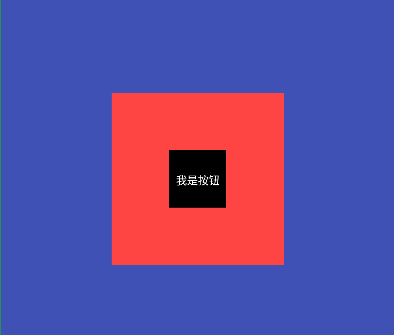
布局相关的代码:
<!-- 事件分发 -->

<view.custom.heimacustomview.event_distribution.AnimalViewGroup

    xmlns:android="http://schemas.android.com/apk/res/android"

    xmlns:tools="http://schemas.android.com/tools"

    android:layout_width="match_parent"

    android:layout_height="match_parent"

    android:background="@color/colorPrimary">

    <view.custom.heimacustomview.event_distribution.DogViewGroup

        android:id="@+id/dog_view_group"

        android:layout_width="180dp"

        android:layout_height="180dp"

        android:background="@android:color/holo_red_light">

        <view.custom.heimacustomview.event_distribution.DogFootView

            android:layout_width="60dp"

            android:layout_height="60dp"

            />

    </view.custom.heimacustomview.event_distribution.DogViewGroup>

</view.custom.heimacustomview.event_distribution.AnimalViewGroup>
Activity:
/**

     * 事件分发相关

     */

    public static final String DISTRIBUTION_TAG = "distribution_tag";

    @Override

    public boolean dispatchTouchEvent(MotionEvent ev) {

        boolean result = super.dispatchTouchEvent(ev);

        Log.d(DISTRIBUTION_TAG, "Activity的dispatchTouchEvent() 返回结果:" + result);

        return result;

    }

    @Override

    public boolean onTouchEvent(MotionEvent event) {

        boolean result = super.onTouchEvent(event);

        Log.d(DISTRIBUTION_TAG, "Activity的onTouchEvent() 返回结果:" + result);

        return result;

    }
最外层ViewGroup处理类:
public class AnimalViewGroup extends ViewGroup {

    private View dogViewGroupView;

    public AnimalViewGroup(Context context, AttributeSet attrs) {

        super(context, attrs);

    }

    @Override

    protected void onFinishInflate() {

        super.onFinishInflate();

        dogViewGroupView = getChildAt(0);

   }

    @Override

    protected void onMeasure(int widthMeasureSpec, int heightMeasureSpec) {

        super.onMeasure(widthMeasureSpec, heightMeasureSpec);

        dogViewGroupView.measure(dogViewGroupView.getLayoutParams().width, dogViewGroupView.getLayoutParams().height);

    }

    @Override

    protected void onLayout(boolean changed, int l, int t, int r, int b) {

        Log.i(AnimalViewGroup.class.getSimpleName(),

                "指定排版>>>>>>>> getMeasuredWidth():" + getMeasuredWidth() + " getMeasuredHeight:" + getMeasuredHeight());

        dogViewGroupView.layout((getMeasuredWidth() / 2) - (dogViewGroupView.getWidth() / 2),

                (getMeasuredHeight() / 2) - (dogViewGroupView.getLayoutParams().height / 2),

                dogViewGroupView.getLayoutParams().width + ((getMeasuredWidth() / 2) - (dogViewGroupView.getWidth() / 2)),

                dogViewGroupView.getLayoutParams().height + ((getMeasuredHeight() / 2) - (dogViewGroupView.getLayoutParams().height / 2)));

    }

    /**

     * 事件分发相关

     */

    @Override

    public boolean dispatchTouchEvent(MotionEvent ev) {

        boolean result = super.dispatchTouchEvent(ev);

        Log.d(DISTRIBUTION_TAG,

                "AnimalViewGroup的dispatchTouchEvent() 返回值:" + result);

        return result;

    }

    @Override

    public boolean onInterceptTouchEvent(MotionEvent ev) {

        boolean result = super.onInterceptTouchEvent(ev);

        Log.d(DISTRIBUTION_TAG,

                "AnimalViewGroup的onInterceptTouchEvent() 返回值:" + result);

        return result;

    }

    @Override

    public boolean onTouchEvent(MotionEvent event) {

        boolean result = super.onTouchEvent(event);

        Log.d(DISTRIBUTION_TAG,

                "AnimalViewGroup的onTouchEvent() 返回值:" + result);

        return result;

    }

}
中间层ViewGroup处理类:
public class DogViewGroup extends ViewGroup {

    private View dogFootView;

    public DogViewGroup(Context context, AttributeSet attrs) {

        super(context, attrs);

    }

    @Override

    protected void onFinishInflate() {

        super.onFinishInflate();

        // 拿到子类

        dogFootView = getChildAt(0);

    }

    private int www;

    private int hhh;

    @Override

    protected void onMeasure(int widthMeasureSpec, int heightMeasureSpec) {

        super.onMeasure(widthMeasureSpec, heightMeasureSpec);

        dogFootView.measure(dogFootView.getLayoutParams().width, dogFootView.getLayoutParams().height);

        www = MeasureSpec.getSize(widthMeasureSpec);

        hhh = MeasureSpec.getSize(heightMeasureSpec);

        Log.i(DogViewGroup.class.getSimpleName(), "狗:www:" + www + " hhh:" + hhh);

    }

    @Override

    protected void onLayout(boolean changed, int l, int t, int r, int b) {

        Log.i(DogViewGroup.class.getSimpleName(), "狗 getMeasuredWidth():" + getMeasuredWidth());

        l = (www / 2) - (dogFootView.getLayoutParams().width / 2);

        t = (hhh / 2) - (dogFootView.getLayoutParams().height / 2);

        dogFootView.layout(l, t,

                dogFootView.getLayoutParams().width + l,

                dogFootView.getLayoutParams().height + t);

    }

    /**

     * 事件分发相关

     */

    @Override

    public boolean dispatchTouchEvent(MotionEvent ev) {

        boolean result = super.dispatchTouchEvent(ev);

        Log.d(DISTRIBUTION_TAG,

                "DogViewGroup的dispatchTouchEvent() 返回值:" + result);

        return result;

    }

    @Override

    public boolean onInterceptTouchEvent(MotionEvent ev) {

        boolean result = super.onInterceptTouchEvent(ev);

        Log.d(DISTRIBUTION_TAG,

                "DogViewGroup的onInterceptTouchEvent() 返回值:" + result);

        return result;

    }

    @Override

    public boolean onTouchEvent(MotionEvent event) {

        boolean result = super.onTouchEvent(event);

        Log.d(DISTRIBUTION_TAG,

                "DogViewGroup的onTouchEvent() 返回值:" + result);

        return result;

    }

}
最小区域的,View处理类:
public class DogFootView extends View {

    Paint paint = null;

    public DogFootView(Context context, @Nullable AttributeSet attrs) {

        super(context, attrs);

        paint = new Paint();

        paint.setTextSize(30);

        paint.setColor(Color.WHITE);

        paint.setAntiAlias(true);

    }

    private int www;

    private int hhh;

    @Override

    protected void onMeasure(int widthMeasureSpec, int heightMeasureSpec) {

        super.onMeasure(widthMeasureSpec, heightMeasureSpec);

        Log.i(DogFootView.class.getSimpleName(), " getMeasuredWidth:" + getMeasuredWidth() + " getMeasuredHeight:" + getMeasuredHeight());

        www = MeasureSpec.getSize(widthMeasureSpec);

        hhh = MeasureSpec.getSize(heightMeasureSpec);

        Log.i(DogFootView.class.getSimpleName(), "狗脚 按钮:www:" + www + " hhh:" + hhh);

    }

    @Override

    protected void onDraw(Canvas canvas) {

        super.onDraw(canvas);

        canvas.drawColor(Color.BLACK);

        String str = "我是按钮";

        Rect rect = new Rect();

        paint.getTextBounds(str, 0, str.length(), rect);

        canvas.drawText(str, (www / 2) - (rect.width() / 2), (hhh / 2) - (rect.height() / 2) + rect.height(), paint);

    }

    /**

     * 事件分发相关

     */

    @Override

    public boolean dispatchTouchEvent(MotionEvent event) {

        boolean result = super.dispatchTouchEvent(event);

        Log.d(HeimaTestActivity.DISTRIBUTION_TAG,

                "DogFootView的dispatchTouchEvent() 返回值:" + result);

        return result;

    }

    @Override

    public boolean onTouchEvent(MotionEvent event) {

        boolean result = super.onTouchEvent(event);

        Log.d(HeimaTestActivity.DISTRIBUTION_TAG,

                "DogFootView的onTouchEvent() 返回值:" + result);

        return result;

    }

}
如果在传递过程中,某一环节是ture,会执行自己的onTouchEvent(),事件就会终止
如果在回传过程中,返回ture,事件消费掉,事件也会终止
下面这都是返回false情况下的流程:
    AnimalViewGroup的onInterceptTouchEvent() 返回值:false

        DogViewGroup的onInterceptTouchEvent() 返回值:false

            DogFootView的onTouchEvent() 返回值:false

            DogFootView的dispatchTouchEvent() 返回值:false

            开始回传

        DogViewGroup的onTouchEvent() 返回值:false

        DogViewGroup的dispatchTouchEvent() 返回值:false

    AnimalViewGroup的onTouchEvent() 返回值:false

    AnimalViewGroup的dispatchTouchEvent() 返回值:false

Activity的onTouchEvent() 返回结果:false

Activity的dispatchTouchEvent() 返回结果:false

Activity的onTouchEvent() 返回结果:false

Activity的dispatchTouchEvent() 返回结果:false

事件丢失
Android-自定义控件之事件分发的更多相关文章
- Android View 的事件分发原理解析
作为一名 Android 开发者,每天接触最多的就是 View 了.Android View 虽然不是四大组件,但其并不比四大组件的地位低.而 View 的核心知识点事件分发机制则是不少刚入门同学的拦 ...
- Android中的事件分发机制
Android中的事件分发机制 作者:丁明祥 邮箱:2780087178@qq.com 这篇文章这周之内尽量写完 参考资料: Android事件分发机制完全解析,带你从源码的角度彻底理解(上) And ...
- Android系统输入事件分发详解
什么是输入事件? 我们知道,运行android系统的设备本质上是一台计算机,使用者在和计算机进行交互的时候可以抽象成简单的对计算机的输入和输出(IO).那么对于运行在计算机上的操作系统来说,操作系统在 ...
- 【转】Android中的事件分发和处理
原文链接:http://www.apkbus.com/home.php?mod=space&uid=705730&do=blog&id=61207 上次跟大家分享了一下自定义V ...
- Android view 的事件分发机制
1 事件的传递顺序是 Activity -> Window -> 顶层View touch 事件产生后,最先由 activity 的 dispatchTouchEvent 处理 /** * ...
- Android中的事件分发和处理
上次跟大家分享了一下自定义View的一下要点,这次跟大家聊一下View的事件分发及处理,为什么主题都是View,因为作为一名初级应用层Android工程师,跟我打交道最多的莫过于各种各样的View,只 ...
- Android中的事件分发机制总结
Android 的事件分发机制 一.View的事件分发总结: View的onTouchEvent和OnTouch区别 还是以自定义的TestButton为例. 我们可以通过重写onTouchEven ...
- 《Android View 的事件分发和滑动冲突》 —预习资料
1. 阅读书籍<Android开发艺术探索>第三章 2. 提前阅读如下技术文章: http://blog.csdn.net/singwhatiwanna/article/details/3 ...
- Android View的事件分发
如果接触android开发时间足够长的话,或多或少都会遇到各种各样事件冲突的问题,要想解决这类问题,对深入理解事件分发机制是很有必要的,接下来几天都会尽自己所能尽可能将这方面讲清楚. View的事件 ...
- Android的Touch事件分发机制简单探析
前言 Android中关于触摸事件的分发传递是一个很值得研究的东西.曾不见你引入了一个ListView的滑动功能,ListView就不听你手指的指唤来滚动了:也不知道为啥Button设置了onClic ...
随机推荐
- Log4j(3)--rootLogger根配置和appender输出类型配置
参考博客:http://blog.java1234.com/blog/articles/270.html 一.rootLogger根配置: Log4j 根配置语法 log4j.rootLogger = ...
- 把MacBook里的电影导入到iPad
主要是用iTunes -> 文件 -> 添加到资料库,然后选择影片 -> 同步 -> 应用.在iPad上点开视频APP即可. 怎样才能把mac里的电影放到ipad里_百度知道 ...
- [maven] 实战笔记 - 构建、打包和安装maven
① 手工构建自己的maven项目 Maven 项目的核心是 pom.xml.POM (Project Object Model,项目对象模型)定义了项目的基本信息,用于描述项目如何构建,声明项目依赖等 ...
- Oracle11g 搭建单实例DataGuard (转载)
原文:http://blog.itpub.net/29324876/viewspace-1246133/ 环境:主备库都为单实例并且数据库SID相同 OS:red hat 6.5 Oracle:11. ...
- js 取元素相对页面的高度和宽度
function pos(elem) { var x = elem.offsetLeft, y = elem.offsetTop; while (elem = elem.offsetPa ...
- php+nginx环境下的php报错设置
修改php.ini的配置: display_errors = Off(关闭) display_errors = On(开启) 设置修改完成后重启php-cgi进程 killall -9 php-cgi ...
- PHP 成长规划
PHP程序员的技术成长规划 作者:黑夜路人(2014/10/15) 转:http://blog.csdn.net/heiyeshuwu/article/details/40098043 按照了解的很多 ...
- 串口通信,帧与帧之间的时间间隔问题?9600波特率,帧将各在20ms以上
- 「小程序JAVA实战」小程序的个人信息作品,收藏,关注(66)
转自:https://idig8.com/2018/09/24/xiaochengxujavashizhanxiaochengxudegerenxinxizuopinshoucangguanzhu65 ...
- 「小程序JAVA实战」小程序页面的上拉下拉刷新(50)
转自:https://idig8.com/2018/09/21/xiaochengxujavashizhanxiaochengxuyemiandeshanglaxialashuaxin49/ 之前已经 ...