
[翻译] TWRPickerSlider
TWRPickerSlider
https://github.com/chasseurmic/TWRPickerSlider
Usage
Add the dependency to your Podfile:
用 Podfile 添加依赖关系
platform :bios

pod 'TWRPickerSlider’, ‘~> 1.0’

...
Run pod install to install the dependencies.
运行 pod install 来安装依赖
Next, import the header file wherever you want to use the picker:
下一步,导入头文件
#import "TWRSliderStackedView.h"

#import "TWRPickerSlider.h"
You should first initialize your TWRPickerSlider as such:
你需要用以下的方式来初始化对象:
TWRPickerSlider *slider1 = [[TWRPickerSlider alloc] init];
…and assign some objects for the picker:
然后,你可以给 picker 赋值几个对象:
slider1.pickerObjects = @[obj1, obj2, obj3];
Objects passed to the picker can be of any type, provided they conform to the TWRPickerSliderDatasource protocol. Said protocol only requires the user to implement the following method, which returns the string that the picker will display for the object:
对象可以是任意类型,你只需要给TWRPickerSliderDatasource提供字符串数据即可:
- (NSString *)twr_pickerTitle;
Then set the picker delegate to be your view controller and implement theTWRPickerSliderDelegate protocol:
然后设置代理到你的控制器中,并实现协议:
// Set Delegate

slider1.delegate = self;

// TWRPickerSliderDelegate

- (void)objectSelected:(id<TWRPickerSliderDatasource>)selectedObject sender:(TWRPickerSlider *)sender{

    NSLog(@"Selected object: %@", [selectedObject twr_pickerTitle]);

}
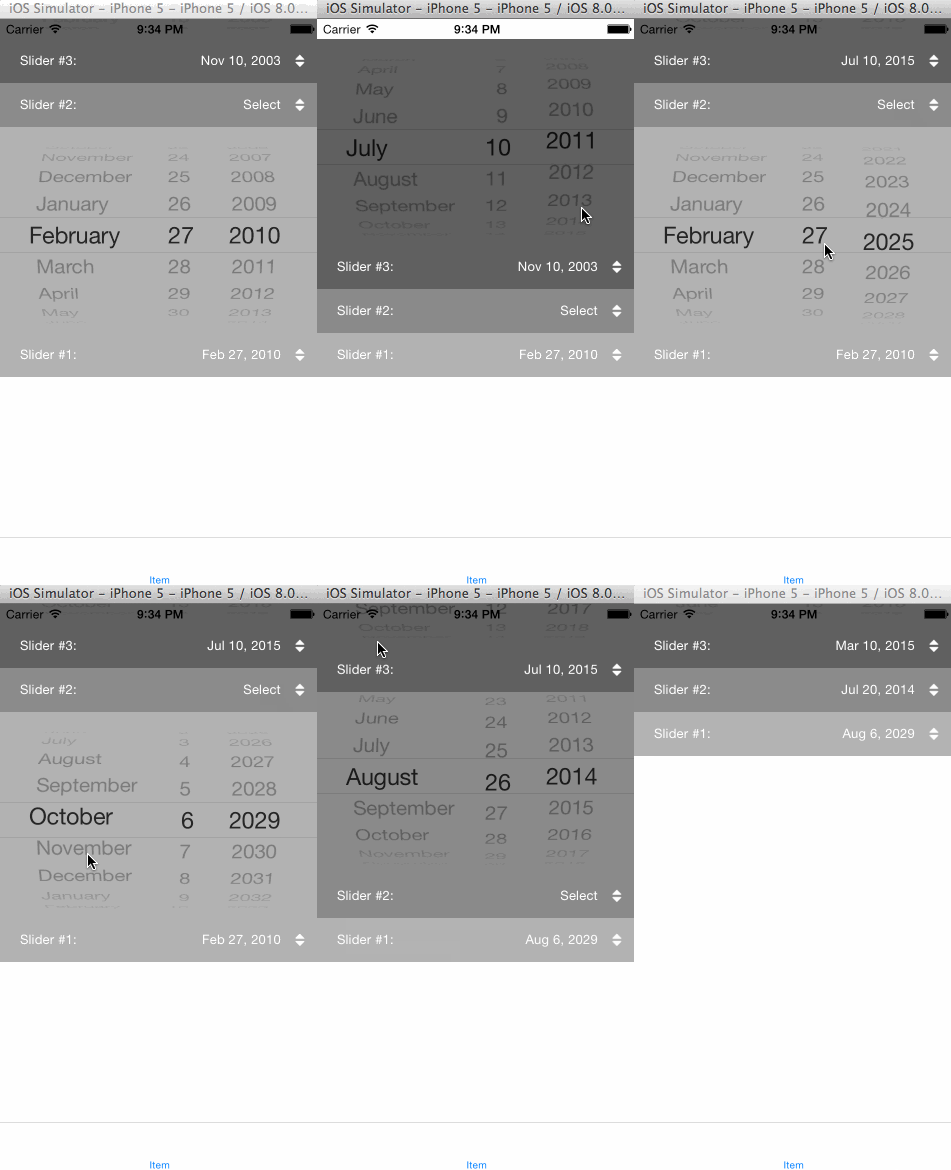
Finally add you TWRPickerSlider instance to your view. It will automatically position itself at the bottom of the view and animate / slide when pressed.
最后添加 TWRPickerSlider 到你的view上,它会自动的将它自己添加到底端
Stacking pickers
Alternatively, if you have or want to display more than one picker at a time, you can instantiate a TWRSliderStackedView object and assign it an array of TWRPickerSlider.
另外,如果你想在同一时间显示超过一个的picker,你可以初始化TWRSliderStackedView对象,然后在它的数组对象中赋值TWRPickerSlider对象。
TWRSliderStackedView *stack = [[TWRSliderStackedView alloc] init];

stack.sliders = @[slider1, slider2, slider3];

[self.view addSubview:stack];
Again, the stacked view will position itself at the bottom of the current view. If you’re working inside a tab bar controller, or if you don’t want the stacked view to stick at the bottom of the view controller, you can use one of the following two methods:
这个 stacked view将会把它自己安置在当前view的底部,如果你是在Tab bar控制器中作业,或者说你不想让stacked view在这个控制器的底端,你可以用下面的方法来设置:
- (instancetype)initWithBottomPadding:(NSUInteger)padding;

- (instancetype)initWithTabBar;
See the demo project for more details.
你可以看demo了解更多。
Requirements
TWRPickerSlider requires iOS 7.x or greater.
TWRPickerSlider需要iOS7.x以上版本
[翻译] TWRPickerSlider的更多相关文章
- 《Django By Example》第五章 中文 翻译 (个人学习,渣翻)
书籍出处:https://www.packtpub.com/web-development/django-example 原作者:Antonio Melé (译者@ucag注:大家好,我是新来的翻译, ...
- 《Django By Example》第四章 中文 翻译 (个人学习,渣翻)
书籍出处:https://www.packtpub.com/web-development/django-example 原作者:Antonio Melé (译者注:祝大家新年快乐,这次带来<D ...
- [翻译]开发文档:android Bitmap的高效使用
内容概述 本文内容来自开发文档"Traning > Displaying Bitmaps Efficiently",包括大尺寸Bitmap的高效加载,图片的异步加载和数据缓存 ...
- 【探索】机器指令翻译成 JavaScript
前言 前些时候研究脚本混淆时,打算先学一些「程序流程」相关的概念.为了不因太枯燥而放弃,决定想一个有趣的案例,可以边探索边学. 于是想了一个话题:尝试将机器指令 1:1 翻译 成 JavaScript ...
- 《Django By Example》第三章 中文 翻译 (个人学习,渣翻)
书籍出处:https://www.packtpub.com/web-development/django-example 原作者:Antonio Melé (译者注:第三章滚烫出炉,大家请不要吐槽文中 ...
- 《Django By Example》第二章 中文 翻译 (个人学习,渣翻)
书籍出处:https://www.packtpub.com/web-development/django-example 原作者:Antonio Melé (译者注:翻译完第一章后,发现翻译第二章的速 ...
- 《Django By Example》第一章 中文 翻译 (个人学习,渣翻)
书籍出处:https://www.packtpub.com/web-development/django-example 原作者:Antonio Melé (译者注:本人目前在杭州某家互联网公司工作, ...
- 【翻译】Awesome R资源大全中文版来了,全球最火的R工具包一网打尽,超过300+工具,还在等什么?
0.前言 虽然很早就知道R被微软收购,也很早知道R在统计分析处理方面很强大,开始一直没有行动过...直到 直到12月初在微软技术大会,看到我软的工程师演示R的使用,我就震惊了,然后最近在网上到处了解和 ...
- ASP.NET MVC with Entity Framework and CSS一书翻译系列文章之第一章:创建基本的MVC Web站点
在这一章中,我们将学习如何使用基架快速搭建和运行一个简单的Microsoft ASP.NET MVC Web站点.在我们马上投入学习和编码之前,我们首先了解一些有关ASP.NET MVC和Entity ...
随机推荐
- Android中Handler的使用方法及实例(基础回顾)
Handler使用例1 这个例子是最简单的介绍handler使用的,是将handler绑定到它所建立的线程中.本次实验完成的功能是:单击Start按钮,程序会开始启动线程,并且线程程序完成后延时1s会 ...
- fgets()函数读取键盘,去掉换行符或丢弃多余的字符
在上一遍随笔中,我们知道可以用fgets()函数来代替不安全的gets()函数.fgets函数中的第二个参数限制了读取的个数. 上篇文章也提到,fgets是会读取回车换行符的.有时候我们并不希望在字符 ...
- 学生信息管理系统(C语言版本)
这是我个人写的一个学生管理系统,这是我仅仅用来练手的代码,要知道链表可是你在面试过程中最大机率会考到的,我是陆续从单向链表入门,然后采用双向链表写的代码!如有BUG,请指正,让我们共同进步! 1 #i ...
- Eclipse空白包的显示和隐藏
Eclipse空白包的显示和隐藏 点击三角形, ,下拉 -> Customize View... -> Empty packages (勾选)
- height百分比失效
heigh:100%失效 解决方案: 第一种 html, body { height: 100%; } 第二种 div { height: 100%; position: absolute; } 非定 ...
- angular2自学笔记(二)---路由、服务等八大主要构造块
angular的思想:总是把数据访问工作委托给一个支持性服务类. Angular 应用的:用 Angular 扩展语法编写 HTML 模板, 用组件类管理这些模板,用服务添加应用逻辑, 用模块打包发布 ...
- IOS折线图二
上周把项目的折线图给做了下,今天想着把它完善完善,自己设置了不同的数据源来测试,哈哈,还真遇到问题了, 就是给图表设置折点数为0时,视图显示的还是原来的,由于数据为空,应该将其设置为空,所以想着怎么把 ...
- flex的使用以及布局 转载
转 : http://www.cnblogs.com/waisonlong/p/6055020.html flex的使用以及布局 1.添加flex属性后的区别 1 2 3 4 5 6 7 8 9 ...
- 云主机安装Tomcat上传自己的网站
前几天在DigitalOcean上买一个云服务器(1g内存,1核,25gssd,1tb流量,一个月5$,按天收费),用github的students developer package里面的优惠码拿到 ...
- Java - 枚举与注解
Enumeration 于Java 1.5增加的enum type... enum type是由一组固定的常量组成的类型,比如四个季节.扑克花色. 在出现enum type之前,通常用一组int常量表 ...