
vscode 安装插件,和相关配置
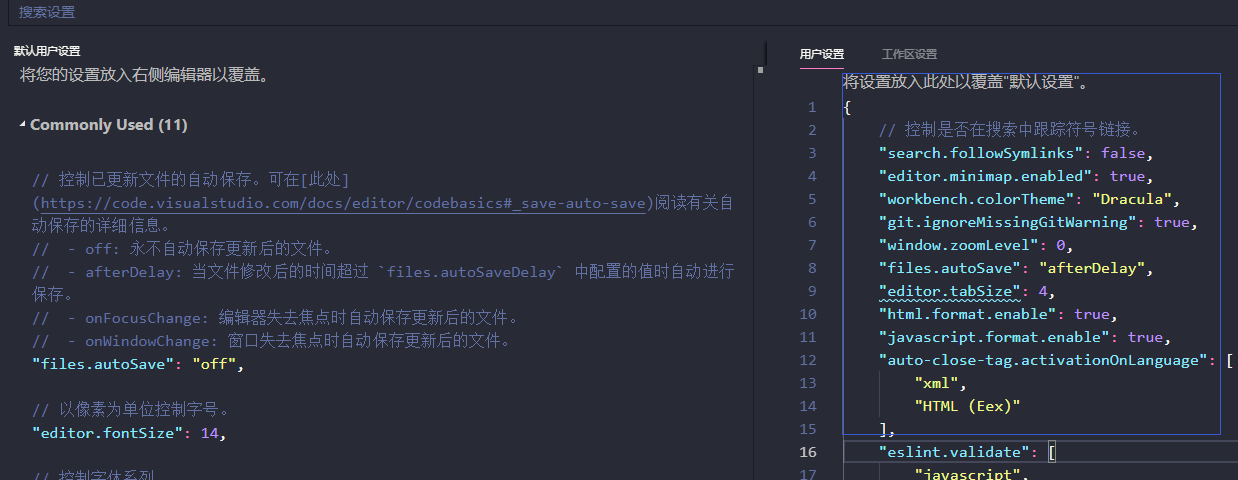
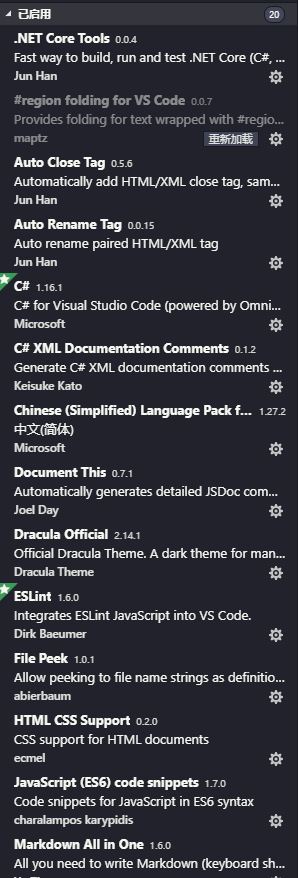
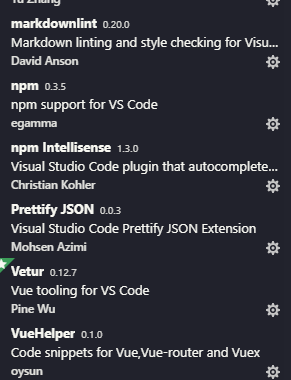
安装插件,配置对应的用户设置,进行替换,实现插件功能的生效
{

    // 控制是否在搜索中跟踪符号链接。

    "search.followSymlinks": false,

    "editor.minimap.enabled": true,

    "workbench.colorTheme": "Dracula",

    "git.ignoreMissingGitWarning": true,

    "window.zoomLevel": ,

    "files.autoSave": "afterDelay",

    "editor.tabSize": ,

    "html.format.enable": true,

    "javascript.format.enable": true,

    "auto-close-tag.activationOnLanguage": [

        "xml",

        "HTML (Eex)"

    ],

    "eslint.validate": [

        "javascript",

        "javascriptreact",

        "html",

        "vue"

    ],

    "eslint.options": {

        "plugins": [

            "html"

        ]

    },

    // 以像素为单位控制字号。

    "editor.fontSize": ,

    // 以像素为单位控制字符间距。

    "editor.letterSpacing": 0.1,

    // 控制行高。使用 0 通过字号计算行高。

    "editor.lineHeight": ,

    "editor.wordWrap": "on",

    // Whether to close self-closing tag automatically

    "auto-close-tag.enableAutoCloseSelfClosingTag": true,

    // Whether to insert close tag automatically

    "auto-close-tag.enableAutoCloseTag": true,

    // Set the tag list that would not be auto closed.

    "auto-close-tag.excludedTags": [

        "area",

        "base",

        "br",

        "col",

        "command",

        "embed",

        "hr",

        "img",

        "input",

        "keygen",

        "link",

        "meta",

        "param",

        "source",

        "track",

        "wbr"

    ],

    // Use color decorators in vue

    "vetur.colorDecorators.enable": true,

    // Include completion for module export and auto import them

    "vetur.completion.autoImport": true,

    // Enable/disable Vetur's built-in scaffolding snippets

    "vetur.completion.useScaffoldSnippets": true,

    // Default formatter for <style> region

    "vetur.format.defaultFormatter.css": "prettier",

    // Default formatter for <template> region

    "vetur.format.defaultFormatter.html": "none",

    // Default formatter for <script> region

    "vetur.format.defaultFormatter.js": "prettier",

    // Default formatter for <style lang='less'> region

    "vetur.format.defaultFormatter.less": "prettier",

    // Default formatter for <style lang='postcss'> region

    "vetur.format.defaultFormatter.postcss": "prettier",

    // Default formatter for <style lang='scss'> region

    "vetur.format.defaultFormatter.scss": "prettier",

    // Default formatter for <style lang='stylus'> region

    "vetur.format.defaultFormatter.stylus": "stylus-supremacy",

    // Default formatter for <script> region

    "vetur.format.defaultFormatter.ts": "prettier",

    // Options for all default formatters

    "vetur.format.defaultFormatterOptions": {

        "js-beautify-html": {}

    },

    // Whether to have initial indent for <script> region

    "vetur.format.scriptInitialIndent": false,

    // Whether to have initial indent for <style> region

    "vetur.format.styleInitialIndent": false,

    // Mapping from custom block tag name to language name. Used for generating grammar to support syntax highlighting for custom blocks.

    "vetur.grammar.customBlocks": {

        "docs": "md",

        "i18n": "json"

    },

    // Traces the communication between VS Code and Vue Language Server.

    "vetur.trace.server": "off",

    // Validate js/ts in <script>

    "vetur.validation.script": true,

    // Validate css/scss/less/postcss in <style>

    "vetur.validation.style": true,

    // Validate vue-html in <template> using eslint-plugin-vue

    "vetur.validation.template": true,

    "window.menuBarVisibility": "visible",

    "workbench.tree.horizontalScrolling": true,

    "workbench.activityBar.visible": true,

    "workbench.statusBar.visible": false,

    "window.titleBarStyle": "custom",

    "editor.fontLigatures": true,

    "editor.fontWeight": "",

    "editor.formatOnSave": true,

    "editor.formatOnType": true,

    // Press the Enter key to activate a command (Default: false)

    "docomment.activateOnEnter": false,

    // User-controllable options

    "docomment.advanced": {

        "cs": {

            "namespace": {

                "attributes": [

                    "summary"

                ]

            },

            "class": {

                "attributes": [

                    "summary",

                    "typeparam"

                ]

            },

            "interface": {

                "attributes": [

                    "summary",

                    "typeparam"

                ]

            },

            "struct": {

                "attributes": [

                    "summary"

                ]

            },

            "enum": {

                "attributes": [

                    "summary"

                ]

            },

            "delegate": {

                "attributes": [

                    "summary",

                    "param",

                    "typeparam",

                    "returns"

                ]

            },

            "field": {

                "attributes": [

                    "summary"

                ]

            },

            "property": {

                "attributes": [

                    "summary",

                    "value"

                ]

            },

            "method": {

                "attributes": [

                    "summary",

                    "param",

                    "typeparam",

                    "returns"

                ]

            },

            "event": {

                "attributes": [

                    "summary"

                ]

            }

        }

    },

    // Insert spaces when pressing Tab.

    "editor.insertSpaces": true,

    // The number of spaces a tab is equal to.

    "editor.tabSize":

}
vscode 安装插件,和相关配置的更多相关文章
- wxWidgets的安装编译、相关配置、问题分析处理
wxWidgets的安装编译.相关配置.问题分析处理 一.介绍部分 (win7 下的 GUI 效果图见 本篇文章的最后部分截图2张) wxWidgets是一个开源的跨平台的C++构架库(framewo ...
- vscode安装插件
十分简单,知道名字叫啥后,直接搜索,安装,就完了,还可以查看自己已经安装了哪些插件. step1 如图.png step2 image.png step 3 去网上查找想要安装的插件的名字 step ...
- VsCode安装Go的相关插件
今天在学习Go的时候,安装Go的相关插件,显示安装不上,但是右下角也一直会提示让你安装,当然你可以设置成忽略,为了开发效率,我选择了安装.然后出现了问题,一直Failed.在网上看到了很多的文章,不是 ...
- 阿里云卸载自带的JDK,安装JDK完成相关配置
0.预备工作 笔者的云服务器购买的是阿里云的轻量应用服务器,相比于云服务器ECS,轻量应用服务器是固定流量但是网络带宽较高,对于服务器来说,网络带宽是非常昂贵的,而带宽也决定了你的应用访问的流畅度,带 ...
- vscode 安装插件SVN 报vscode SVN not found
1.软件环境 svn客户端安装的是TortoiseSVN: vscode 安装的为SVN的插件: 2. 问题现象 vscode打开文件夹后右下角提示如下报错:SVN not found. Instal ...
- Sublime Text 3安装与使用,安装插件,快捷键,默认配置
本文是Sublime Text 全程指引 by Lucida (http://www.cnblogs.com/figure9/p/sublime-text-complete-guide.html)的笔 ...
- Ubuntu下安装JDK以及相关配置
1.查看系统位数,输入以下命令即可 getconf LONG_BIT 2.下载对应的JDK文件,我这里下载的是jdk-8u60-linux-64.tar.gz 3.创建目录作为JDK的安装目录,这里选 ...
- vscode Js 插件 Jshint 的配置
vscode这款编辑器让人用起来很舒服,但是刚刚入手的童鞋可能会对其插件的安装产生一些恐惧,虽然vscode提供了插件的搜索和安装,但是其中一些插件是需要一些软件或者包之类的东西做支撑的,并不是在vs ...
- ideaui安装破解、相关配置、JRebel破解
前言: Ideaui 2019(官网 https://www.jetbrains.com/idea/?fromMenu) 安装软件就简单啦,下载选择路径就完事了,注意文件名全英文: 但是按照咱们传 ...
随机推荐
- Mybatis框架 使用接口Mapper实现数据库的crud操作
Mybatis的Mapper接口方式实现简单crud操作: 1.创建实体类 与数据库对应 我的实体类是<Student> package com.hxzy.mybatis.pojo; ...
- 【文文殿下】[BZOJ4008] [HNOI2015] 亚瑟王
题解 这是一个经典的概率DP模型 设\(f_{i,j}\)表示考虑到前\(i\)张牌,有\(j\)轮没打出牌的可能性,那么显然\(f_{0,r} = 1\). 考虑第\(i+1\)张牌,他可能在剩下的 ...
- 手把手教渗透测试人员打造.NET可执行文件
在进行渗透测试的过程中,我们有时候会希望使用可执行文件来完成某些任务.最近,我们在测试过程中拿下了一个网站,从而获得了一次发动水坑攻击的机会. 原文地址:https://www.peew.pw/blo ...
- 如何实现三个div都自适应(滴滴面试题)
<div class="table"> <div class="accordant"> <div class="box& ...
- JMeterPlugin性能监控
GUI界面中的plugins manager中的jpgc-Standard set,其中共包含以下的文件: jpgc-dummy jpgc-fifo jpgc-graphs-basic jpgc-pe ...
- 利用python 学习数据分析 (学习二)
内容学习自: Python for Data Analysis, 2nd Edition 就是这本 纯英文学的很累,对不对取决于百度翻译了 前情提要: 各种方法贴: https://w ...
- string类型介绍
一.前言 int,float,char,C++标准库提供的类型:string,vector. string:可变长字符串的处理:vector一种集合或者容器的概念. 二.string类型简介 C++标 ...
- bash: wget: command not found
有些VPS执行wget命令下载时,提示-bash: wget: command not found错误,其实这是由于系统中没有安装wget,我们只要执行安装命令安装即可. yum -y install ...
- ubuntu14 安装tftp服务器
安装 sudo apt-get install tftp-hpa tftpd-hpa 配置 sudo gedit /etc/default/tftpd-hpa 打开tftpd-hpa修改里面的配置: ...
- 浅谈mongodb与Python的交互
1. mongdb和python交互的模块 pymongo 提供了mongdb和python交互的所有方法 安装方式: pip install pymongo 2. 使用pymongo 导入pymon ...