
Appium之uiautomator定位元素
元素定位方式有多种,Android也有自身独有的定位方式。下面就单独介绍其基于uiautomator定位元素的方法:
基本语法:
driver.find_element_by_android_uiautomator(xx)
1).通过text文本定位语法
new UiSelector().text("text文本")
#text

loc_text = 'new UiSelector().text("图书")'

driver.find_element_by_android_uiautomator(loc_text).click()
2).如果文本比较长,可以用textContains模糊匹配
new UiSelector().textContains("包含text文本")
# textContains

loc_textContains = 'new UiSelector().textContains("图")'

driver.find_element_by_android_uiautomator(loc_textContains).click()
3).同样可以用textStartsWith是以某个文本开头来匹配
new UiSelector().textStartsWith("以text文本开头")
#textStartsWith

loc_textStart = 'new UiSelector().textStartsWith("图")'

driver.find_element_by_android_uiautomator(loc_textStart).click()
4).也可以用正则表达式textMatches匹配
new UiSelector().textMatches("正则表达式")
2.resourceId
与by_id一样
new UiSelector().resourceId("id")

#resourceId

loc_id = 'new UiSelector().resourceId("com.baidu.yuedu:id/webbooktitle")'

driver.find_element_by_android_uiautomator(loc_id).click()
3.className
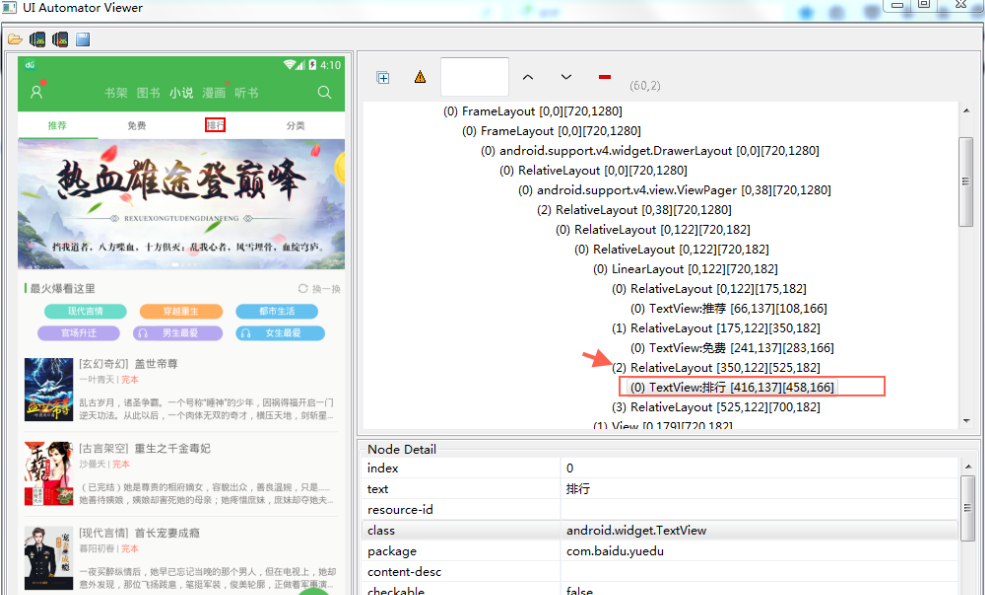
页面上的class属性一般不唯一,多半用在复数定位时候。此时定位相应下标
new UiSelector().className("className")
#className复数定位

loc_class = 'new UiSelector().className("android.widget.TextView")'

driver.find_elements_by_android_uiautomator(loc_class)[2].click()
4.description
也是用contenet-des属性定位
new UiSelector().description("contenet-des属性")
5.组合定位
1).id与text属性组合
#id+text

id_text = 'resourceId("com.baidu.yuedu:id/webbooktitle").text("小说")'

driver.find_element_by_android_uiautomator(id_text).click()
2).class与text属性组合
#class+text

class_text = 'className("android.widget.TextView").text("图书")'

driver.find_element_by_android_uiautomator(class_text).click()
6.关系定位
1).父子定位childSelector
有时候不能直接定位某个元素,但是它的父元素很好定位,这时候就先定位父元素,通过父元素找儿子
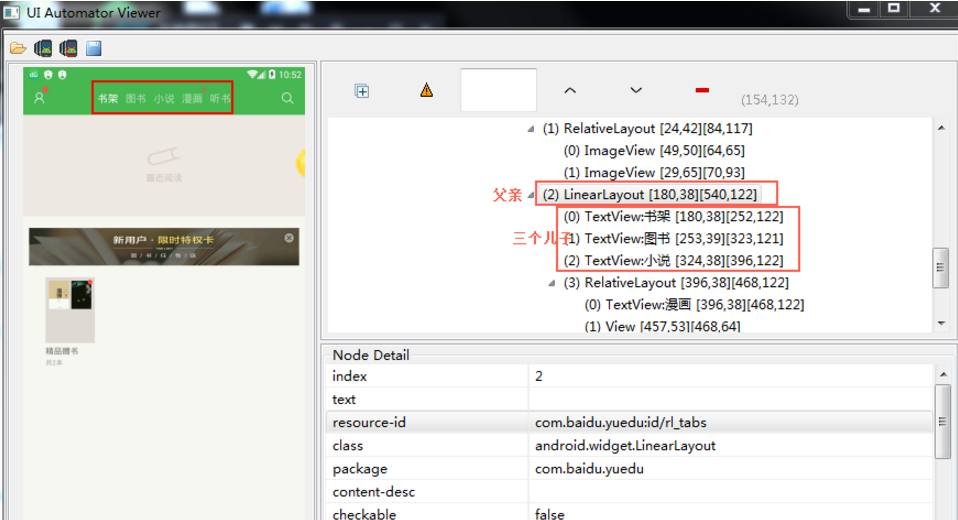
如上定位书架:
#父子关系childSelector

son = 'resourceId("com.baidu.yuedu:id/rl_tabs").childSelector(text("小说"))'

driver.find_element_by_android_uiautomator(son).click()
2).兄弟定位fromParent
有时候父元素不好定位,但是跟他相邻的兄弟元素很好定位,这时候就可以通过兄弟元素,找到同一父级元素下的子元素
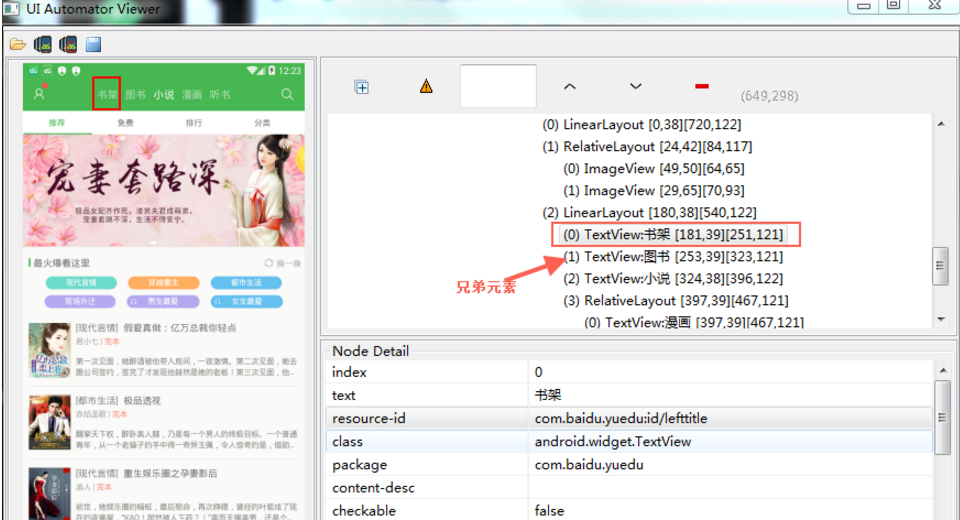
如上定位书架:
#兄弟关系fromParent

brother = 'resourceId("com.baidu.yuedu:id/lefttitle").fromParent(text("图书"))'

driver.find_element_by_android_uiautomator(brother).click()
Appium之uiautomator定位元素的更多相关文章
- appium 使用findElementByAndroidUIAutomator 定位元素示例
appium 使用findElementByAndroidUIAutomator 定位元素示例 import io.appium.java_client.remote.MobileCapability ...
- Appium+Python3+iOS定位元素
前言: 最近在做IOS自动化测试,IOS的Appium环境都配置OK,执行起来真的慢,慢到怀疑人生,那么今天就来总结一下IOS定位方式和各个定位方式的速度排序. 据我观察,按查找元素的顺序速度,从快到 ...
- Appium 使用android_uiautomator定位元素时报错: The requested resource could not be found, or a request was received using an HTTP method that is not supported by the mapped resource
使用 android_uiautomator 定位元素时(现在用的还不太熟,对于这个方法还需要加深了解)报错: 报错信息:The requested resource could not be fou ...
- 【appium】根据UIAutomator定位元素
text属性的方法 driver.find_element_by_android_uiautomator('new UiSelector().text("Custom View") ...
- 【appium】根据UIAutomator定位元素等等资料
https://www.cnblogs.com/paulwinflo/p/4742529.html http://www.cnblogs.com/meitian/p/6103391.html http ...
- Appium之xpath定位元素
原文:http://www.cnblogs.com/cnkemi/p/9180525.html appium也是以webdriver为基的,对于元素的定位也基本一致,只是增加一些更适合移动平台的独特方 ...
- uiautomator定位元素
- Python+Appium自动化测试(9)-自动选择USB用于传输文件(不依赖appium对手机页面元素进行定位)
一,问题 app自动化测试使用Android真机连接电脑时,通常会遇到两种情况: 1.测试机连接电脑会弹窗提示USB选项,选择USB用于"传输文件",有些手机不支持设置默认USB选 ...
- Appium脚本(4) 使用uiautomator方法定位元素
from app.find_element.capability import driver from time import sleep # 使用uiautomator方法定位元素 accunt_i ...
随机推荐
- 列表查询SQL语句改造
一个经常遇到到的场景,就是查询列表数据,列表数据由多张表构成 最简单的查询方法是先写一个查询单条数据的方法,比如这个方法中要查询十张表: 然后一个循环调用查单条的方法,这种逻辑上理解是比较简单的(因为 ...
- ETL流程概述及常用实现方法
ETL流程概述及常用实现方法 http://blog.csdn.net/btkuangxp/article/details/48224187 目录(?)[-] 1抽取作业 1手工开发抽取作业时候的常用 ...
- [DP题]吃糖果
1944:吃糖果 总时间限制:1000ms内存限制:65536kB 描述 名名的妈妈从外地出差回来,带了一盒好吃又精美的巧克力给名名(盒内共有 N 块巧克力,20 > N >0).妈妈告诉 ...
- GREENPLUM简介
什么是GREENPLUM? 对于很多IT人来说GREENPLUM是个陌生的名字.简单的说它就是一个与ORACLE, DB2一样面向对象的关系型数据库.我们通过标准的SQL可以对GP中的数据进行访问存取 ...
- Java-Runoob-高级教程-实例-环境设置实例:3.Java 实例 - 如何执行指定class文件目录(classpath)?
ylbtech-Java-Runoob-高级教程-实例-环境设置实例:3.Java 实例 - 如何执行指定class文件目录(classpath)? 1.返回顶部 1. Java 实例 - 如何执行指 ...
- 给iOS开发新手送点福利,简述UIButton的属性和用法
UIButton属性 1.UIButton状态: UIControlStateNormal // 正常状态 UIControlStateHighlighted // 高 ...
- JDK、Spring、Quartz等几种不同定时器的用法,以及cronExpression表达式定义
referenc:https://blog.csdn.net/clementad/article/details/42042111 下面介绍几种常用的定时器及其实现方法: 第一种:Timer和Time ...
- 用jquery操作字体颜色覆盖当前页面的css设置
直接使用css操作color的时候,!important一直不生效,记录下,使用下面的可以起作用 用jquery操作字体颜色覆盖当前页面的css设置 $('a[href="?p=home&a ...
- JAVA获取txt文件内容
JAVA 读取txt文件内容 通常,我们可以直接通过文件流来读取txt文件的内容,但有时可能会出现乱码!此时只要设置一下文件字符编码即可. public class txttest { /** * 读 ...
- mybatis相对于ibatis的优势
2010年,apache的Ibatis框架停止更新,并移交给了google团队,同时更名为MyBatis.从2010年后Ibatis在没更新过,彻底变成了一个孤儿框架.一个没人维护的框架注定被myba ...