
INotifyPropertyChanged, Interface
Data Object(class) impliment INotifyPropertyChanged; then the Object can update BindingSource.
Implimentation
   public abstract class NotifyProperyChangedBase : INotifyPropertyChanged

    {

        #region INotifyPropertyChanged Members

        public event PropertyChangedEventHandler PropertyChanged;

        #endregion

        #region methods

        protected bool CheckPropertyChanged<T>(string propertyName, ref T oldValue, ref T newValue)

        {

            if (oldValue == null && newValue == null)

            {

                return false;

            }

            if ((oldValue == null && newValue != null) || !oldValue.Equals((T)newValue))

            {

                oldValue = newValue;

                FirePropertyChanged(propertyName);

                return true;

            }

            return false;

        }

        protected void FirePropertyChanged(string propertyName)

        {

            if (this.PropertyChanged != null)

            {

                this.PropertyChanged(this, new PropertyChangedEventArgs(propertyName));

            }

        }

        #endregion

    }
Use
    class NotifiablePerson : MyComponentModel.NotifyProperyChangedBase

    {

        private string _firstName;

        public string FirstName

        {

            get { return _firstName; }

            set

            {

                if (this.CheckPropertyChanged<string>("FirstName", ref _firstName, ref value))

                {

                    this.DisplayNameChanged();

                }

            }

        }

        private string _lastName;

        public string LastName

        {

            get { return _lastName; }

            set

            {

                if (this.CheckPropertyChanged<string>("LastName", ref _lastName, ref value))

                {

                    this.DisplayNameChanged();

                }

            }

        }

        public string DisplayName

        {

            get { return _firstName + " " + _lastName; }

        }

        private void DisplayNameChanged()

        {

            this.FirePropertyChanged("DisplayName");

        }

    }
One Way binding => textBox event -> textBox1_TextChanged(object sender, EventArgs e) update Data/Property -> Property update another control(listBox2.DataSource = nl;).
    public partial class Form1 : Form

    {

        public Form1()

        {

            InitializeComponent();

        }

        private void Form1_Load(object sender, EventArgs e)

        {

            LoadRegularList();

            LoadNotiList();

        }

        private void LoadRegularList()

        {

            System.ComponentModel.BindingList<RegularPerson> rl = new System.ComponentModel.BindingList<RegularPerson>();

            RegularPerson rp = rl.AddNew();

            rp.FirstName = "John";

            rp.LastName = "Smith";

            RegularPerson rp2 = rl.AddNew();

            rp2.FirstName = "Joe";

            rp2.LastName = "Shmoe";

            listBox1.DataSource = rl;

        }

        private void LoadNotiList()

        {

            System.ComponentModel.BindingList<NotifiablePerson> nl = new System.ComponentModel.BindingList<NotifiablePerson>();

            NotifiablePerson np = nl.AddNew();

            np.FirstName = "Jane";

            np.LastName = "Doe";

            NotifiablePerson np2 = nl.AddNew();

            np2.FirstName = "Mary";

            np2.LastName = "Smith";

            listBox2.DataSource = nl;

        }

        private void textBox1_TextChanged(object sender, EventArgs e)

        {

            if (listBox1.SelectedItem != null)

            {

                ((RegularPerson)listBox1.SelectedItem).FirstName = textBox1.Text;

            }

        }

        private void textBox2_TextChanged(object sender, EventArgs e)

        {

            if (listBox1.SelectedItem != null)

            {

                ((RegularPerson)listBox1.SelectedItem).LastName = textBox2.Text;

            }

        }

        private void textBox3_TextChanged(object sender, EventArgs e)

        {

            if (listBox2.SelectedItem != null)

            {

                ((NotifiablePerson)listBox2.SelectedItem).FirstName = textBox3.Text;

            }

        }

        private void textBox4_TextChanged(object sender, EventArgs e)

        {

            if (listBox2.SelectedItem != null)

            {

                ((NotifiablePerson)listBox2.SelectedItem).LastName = textBox4.Text;

            }

        }

    }
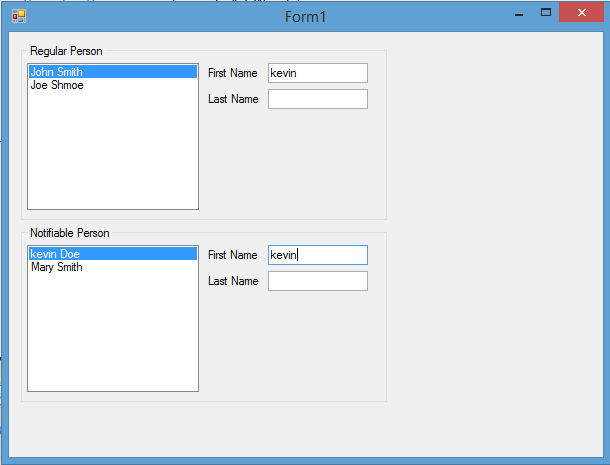
TextBox(First Name, Last Name) => Notifiable Person => ListBox
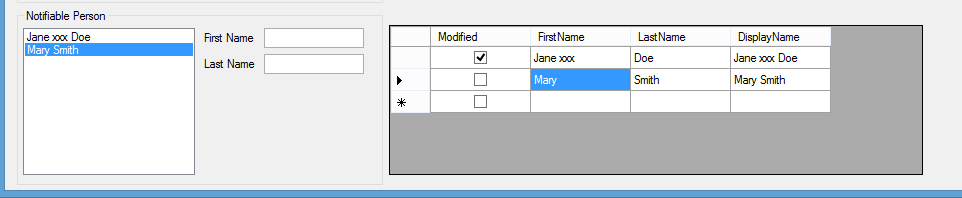
Add a modifying property to tag changes of an object.
Code =>
class NotifiablePerson : MyComponentModel.NotifyProperyChangedBase

    {

        public bool Modified {get; set;}

        private string _firstName;

        public string FirstName

        {

            get { return _firstName; }

            set

            {

                if (this.CheckPropertyChanged<string>("FirstName", ref _firstName, ref value))

                {

                    this.DisplayNameChanged();

                    Modified = true;

                }

            }

        }

        private string _lastName;

        public string LastName

        {

            get { return _lastName; }

            set

            {

                if (this.CheckPropertyChanged<string>("LastName", ref _lastName, ref value))

                {

                    this.DisplayNameChanged();

                    Modified = true;

                }

            }

        }

        public string DisplayName

        {

            get { return _firstName + " " + _lastName; }

        }

        private void DisplayNameChanged()

        {

            this.FirePropertyChanged("DisplayName");

        }

    }
usage = >
private void LoadNotiList()

        {

            System.ComponentModel.BindingList<NotifiablePerson> nl = new System.ComponentModel.BindingList<NotifiablePerson>();

            NotifiablePerson np = nl.AddNew();

            np.FirstName = "Jane";

            np.LastName = "Doe";

            np.Modified = false;

            NotifiablePerson np2 = nl.AddNew();

            np2.FirstName = "Mary";

            np2.LastName = "Smith";

            np2.Modified = false;

            listBox2.DataSource = nl;

            dataGridView1.DataSource = nl;

        }
Add Event = > CellValueChanged
private void dataGridView1_CellValueChanged(object sender, DataGridViewCellEventArgs e)

        {

            dataGridView1.Invalidate();

        }

INotifyPropertyChanged, Interface的更多相关文章
- (WPF) 基本题
What is WPF? WPF (Windows Presentation foundation) is a graphical subsystem for displaying user inte ...
- Optimizing Performance: Data Binding(zz)
Optimizing Performance: Data Binding .NET Framework 4.5 Other Versions Windows Presentation Founda ...
- Local Database Sample Model
[Table] public class AddTableNameHere : INotifyPropertyChanged, INotifyPropertyChanging { // // TODO ...
- Conway's Game of Life: An Exercise in WPF, MVVM and C#
This blog post was written for the Lockheed Martin Insight blog, sharing here for the external audie ...
- 如何引用XML文件生成C#类
目录 XSD File Generate Class File Simply. 1 Why use XSD file to create C# classes?... 2 How to convert ...
- (WPF) 再议binding:点击User Control时,User Control变换颜色或做其他的处理。
Binding 是前台UI(显示层)和后台代码(数据层)的桥梁.理论上当后台的数据变动时,显示的数据或样式应该随之而变.这些是动态的. 对于Binding的设置可以在前台Xaml,也可以在后台Code ...
- WPF/MVVM 快速开发
http://www.codeproject.com/Articles/165368/WPF-MVVM-Quick-Start-Tutorial 这篇文章醍醐灌顶,入门良药啊! Introductio ...
- 『WPF』DataGrid的使用
原文 『WPF』DataGrid的使用 几点说明 这里主要是参考了MSDN中关于DataGrid的说明 这里只会简单说明在WPF中,DataGird最简单的使用方法 对于MSDN中的翻译不会很详细,也 ...
- [No000012E]WPF(6/7):概念绑定
WPF 的体系结构,标记扩展,依赖属性,逻辑树/可视化树,布局,转换等.今天,我们将讨论 WPF 最重要的一部分——绑定.WPF 带来了优秀的数据绑定方式,可以让我们绑定数据对象,这样每次对象发生更改 ...
随机推荐
- php魔术方法和魔术常量
1.__construct() 实例化对象时被调用, 当__construct和以类名为函数名的函数同时存在时,__construct将被调用,另一个不被调用. 2.__destruct() 当删除一 ...
- espcms会员二次开发文件说明——会员,时间格式
[espcms会员图片字段] 添加字段加入图片类型/webadm/include/inc_formtypelist.php 会员修改页面模型/webadm/templates/member/membe ...
- 超级详细Tcpdump 的用法
1.抓取回环网口的包:tcpdump -i lo 2.防止包截断:tcpdump -s0 3.以数字显示主机及端口:tcpdump -n 第一种是关于类型的关键字,主要包括host,net,port, ...
- Oracle分析函数(一)
一.总体介绍 分析函数如何工作 语法 FUNCTION_NAME(<参数>,…) OVER (<PARTITION BY 表达式,…> <ORDER BY 表达式 < ...
- 守护神 Supervisor
参考: http://linbo.github.io/2013/04/04/supervisor/ http://www.restran.net/2015/10/04/supervisord-tuto ...
- MyBatis的初始化方式
1. 加载配置文件 public static void main(String[] args) throws IOException { //mybatis的配置文件 String resource ...
- JavaScript高级程序设计学习笔记--BOM
window对象 BOM的核心对象是window,它表示浏览器的一个实例.在浏览器中,window对象有双重角色,它既是通过JavaScript访问浏览器窗口的一个接口,又是ECMScript规定的G ...
- 电脑莫名其妙的被装上了流氓软件DNSunlocker的解决办法
重大更新:之前说的这些方法只能删除流氓文件,不能解决其弹出机具诱惑性的广告,网络经常不好用 经过测试,使用Malwarebytes Anti-Malware可以彻底解决这个问题,还能发现更多隐藏在你电 ...
- WCF与Web API 的应用场景
Web api 主要功能: 支持基于Http verb (GET, POST, PUT, DELETE)的CRUD (create, retrieve, update, delete)操作 请求的回 ...
- 最短路径—Dijkstra算法和Floyd算法
原文链接:http://www.cnblogs.com/biyeymyhjob/archive/2012/07/31/2615833.html 最后边附有我根据文中Dijkstra算法的描述使用jav ...