
Spring Security教程(五):自定义过滤器从数据库从获取资源信息
在之前的几篇security教程中,资源和所对应的权限都是在xml中进行配置的,也就在http标签中配置intercept-url,试想要是配置的对象不多,那还好,但是平常实际开发中都往往是非常多的资源和权限对应,而且写在配置文件里面写改起来还得该源码配置文件,这显然是不好的。因此接下来,将用数据库管理资源和权限的对应关系。数据库还是接着之前的,用mysql数据库,因此也不用另外引入额外的jar包。
一、数据库表的设计
数据库要提供给security的数据无非就是,资源(说的通俗点就是范围资源地址)和对应的权限,这里就有两张表,但是因为他们俩是多对多的关系,因此还要设计一张让这两张表关联起来的表,除此之外,还有一张用户表,有因为用户和角色也是多对多的关系,还要额外加一张用户和角色关联的表。这样总共下来就是五张表。下面就是对应的模型图:
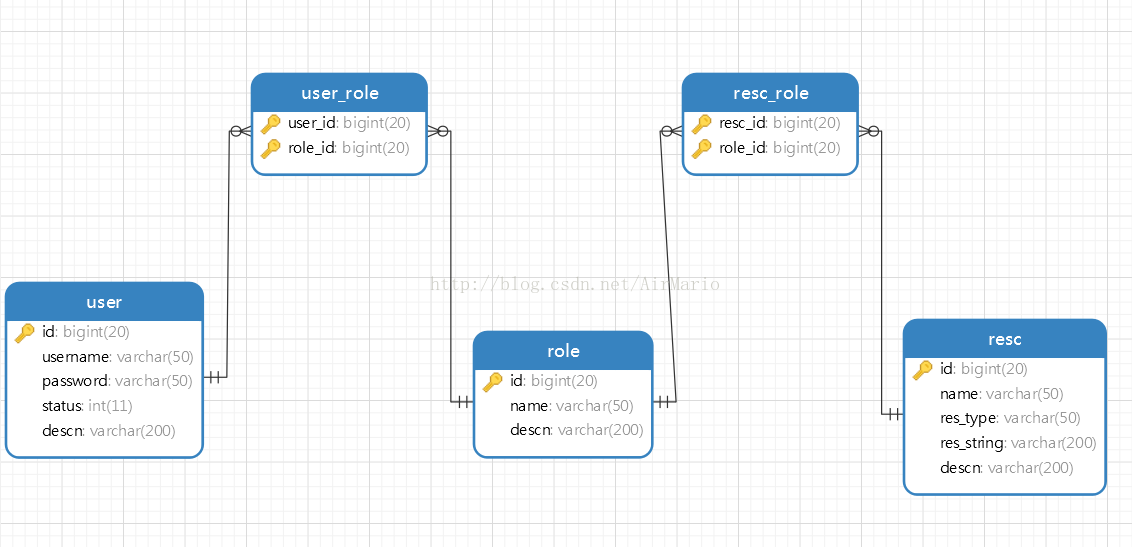
建表和添加数据的sql语句:
DROP TABLE IF EXISTS `resc`;

CREATE TABLE `resc` (

  `id` bigint(20) NOT NULL DEFAULT '',

  `name` varchar(50) DEFAULT NULL,

  `res_type` varchar(50) DEFAULT NULL,

  `res_string` varchar(200) DEFAULT NULL,

  `descn` varchar(200) DEFAULT NULL,

  PRIMARY KEY (`id`)

) ENGINE=InnoDB DEFAULT CHARSET=utf8;

-- ----------------------------

-- Records of resc

-- ----------------------------

INSERT INTO `resc` VALUES ('', '', 'URL', '/adminPage.jsp', '管理员页面');

INSERT INTO `resc` VALUES ('', '', 'URL', '/index.jsp', '');

INSERT INTO `resc` VALUES ('', null, 'URL', '/test.jsp', '测试页面');

-- ----------------------------

-- Table structure for resc_role

-- ----------------------------

DROP TABLE IF EXISTS `resc_role`;

CREATE TABLE `resc_role` (

  `resc_id` bigint(20) NOT NULL DEFAULT '',

  `role_id` bigint(20) NOT NULL DEFAULT '',

  PRIMARY KEY (`resc_id`,`role_id`),

  KEY `fk_resc_role_role` (`role_id`),

  CONSTRAINT `fk_resc_role_role` FOREIGN KEY (`role_id`) REFERENCES `role` (`id`),

  CONSTRAINT `fk_resc_role_resc` FOREIGN KEY (`resc_id`) REFERENCES `resc` (`id`)

) ENGINE=InnoDB DEFAULT CHARSET=utf8;

-- ----------------------------

-- Records of resc_role

-- ----------------------------

INSERT INTO `resc_role` VALUES ('', '');

INSERT INTO `resc_role` VALUES ('', '');

INSERT INTO `resc_role` VALUES ('', '');

INSERT INTO `resc_role` VALUES ('', '');

-- ----------------------------

-- Table structure for role

-- ----------------------------

DROP TABLE IF EXISTS `role`;

CREATE TABLE `role` (

  `id` bigint(20) NOT NULL DEFAULT '',

  `name` varchar(50) DEFAULT NULL,

  `descn` varchar(200) DEFAULT NULL,

  PRIMARY KEY (`id`)

) ENGINE=InnoDB DEFAULT CHARSET=utf8;

-- ----------------------------

-- Records of role

-- ----------------------------

INSERT INTO `role` VALUES ('', 'ROLE_ADMIN', '管理员角色');

INSERT INTO `role` VALUES ('', 'ROLE_USER', '用户角色');

INSERT INTO `role` VALUES ('', 'ROLE_TEST', '测试角色');

-- ----------------------------

-- Table structure for t_c3p0

-- ----------------------------

DROP TABLE IF EXISTS `t_c3p0`;

CREATE TABLE `t_c3p0` (

  `a` char(1) DEFAULT NULL

) ENGINE=InnoDB DEFAULT CHARSET=utf8;

-- ----------------------------

-- Records of t_c3p0

-- ----------------------------

-- ----------------------------

-- Table structure for user

-- ----------------------------

DROP TABLE IF EXISTS `user`;

CREATE TABLE `user` (

  `id` bigint(20) NOT NULL DEFAULT '',

  `username` varchar(50) DEFAULT NULL,

  `password` varchar(50) DEFAULT NULL,

  `status` int(11) DEFAULT NULL,

  `descn` varchar(200) DEFAULT NULL,

  PRIMARY KEY (`id`)

) ENGINE=InnoDB DEFAULT CHARSET=utf8;

-- ----------------------------

-- Records of user

-- ----------------------------

INSERT INTO `user` VALUES ('', 'admin', 'admin', '', '管理员');

INSERT INTO `user` VALUES ('', 'user', 'user', '', '用户');

INSERT INTO `user` VALUES ('', 'test', 'test', '', '测试');

-- ----------------------------

-- Table structure for user_role

-- ----------------------------

DROP TABLE IF EXISTS `user_role`;

CREATE TABLE `user_role` (

  `user_id` bigint(20) NOT NULL DEFAULT '',

  `role_id` bigint(20) NOT NULL DEFAULT '',

  PRIMARY KEY (`user_id`,`role_id`),

  KEY `fk_user_role_role` (`role_id`),

  CONSTRAINT `fk_user_role_role` FOREIGN KEY (`role_id`) REFERENCES `role` (`id`),

  CONSTRAINT `fk_user_role_user` FOREIGN KEY (`user_id`) REFERENCES `user` (`id`)

) ENGINE=InnoDB DEFAULT CHARSET=utf8;

-- ----------------------------

-- Records of user_role

-- ----------------------------

INSERT INTO `user_role` VALUES ('', '');

INSERT INTO `user_role` VALUES ('', '');

INSERT INTO `user_role` VALUES ('', '');

INSERT INTO `user_role` VALUES ('', '');
二、实现从数据库中读取资源信息
Spring Security需要的数据无非就是pattern和access类似键值对的数据,就像配置文件中写的那样:
<intercept-url pattern="/login.jsp" access="IS_AUTHENTICATED_ANONYMOUSLY" />1

<intercept-url pattern="/admin.jsp" access="ROLE_ADMIN" />

<intercept-url pattern="/**" access="ROLE_USER" />
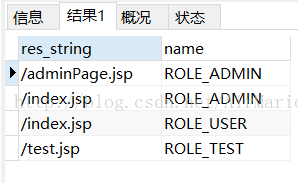
其实当项目启动时,Spring Security所做的就是在系统初始化时,将以上XML中的信息转换为特定的数据格式,而框架中其他组件可以利用这些特定格式的数据,用于控制之后的验证操作。现在我们将这些信息存储在数据库中,因此就要想办法从数据库中查询这些数据,所以根据security数据的需要,只需要如下sql语句就可以:
select re.res_string,r.name from role r,resc re,resc_role rr where

        r.id=rr.role_id and re.id=rr.resc_id
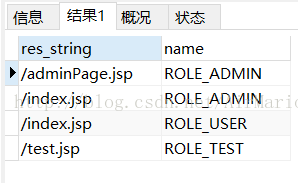
在数据中执行这条语句做测试,得到如下结果:
这样的格式正是security所需要的数据。
三、构建一个数据库的操作的类
虽然上述的数据符合security的需要,但是security将这种数据类型进行了封装,把它封装成Map<RequestMatcher, Collection<ConfigAttribute>>这样的类型,其中RequestMatcher接口就是我们数据库中的res_string,其实现类为AntPathRequestMatcher,构建一个这样的对象只要在new的时候传入res_string就可以了,Collection<ConfigAttribute>这里对象构建起来就也是类似的,构建一个ConfigAttribute对象只需要在其实现类SecurityConfig创建的时候传入角色的名字就可以。代码如下:
package com.zmc.demo;

import java.sql.ResultSet;

import java.sql.SQLException;

import java.util.ArrayList;

import java.util.Collection;

import java.util.LinkedHashMap;

import java.util.List;

import javax.sql.DataSource;

import org.springframework.jdbc.core.support.JdbcDaoSupport;

import org.springframework.jdbc.object.MappingSqlQuery;

import org.springframework.security.access.ConfigAttribute;

import org.springframework.security.access.SecurityConfig;

import org.springframework.security.web.access.intercept.DefaultFilterInvocationSecurityMetadataSource;

import org.springframework.security.web.util.AntPathRequestMatcher;

import org.springframework.security.web.util.RequestMatcher;

/**

 * @classname JdbcRequestMapBulider

 * @author ZMC

 * @time 2017-1-10

 * 查询资源和角色,并构建RequestMap

 */

public class JdbcRequestMapBulider

    extends JdbcDaoSupport{

    //查询资源和权限关系的sql语句

    private String resourceQuery = "";

    public String getResourceQuery() {

        return resourceQuery;

    }

    //查询资源

    public List<Resource> findResources() {

        ResourceMapping resourceMapping = new ResourceMapping(getDataSource(),

                resourceQuery);

        return resourceMapping.execute();

    }

    //拼接RequestMap

    public LinkedHashMap<RequestMatcher, Collection<ConfigAttribute>> buildRequestMap() {

        LinkedHashMap<RequestMatcher, Collection<ConfigAttribute>> requestMap = new LinkedHashMap<>();

        List<Resource> resourceList = this.findResources();

        for (Resource resource : resourceList) {

            RequestMatcher requestMatcher = this.getRequestMatcher(resource.getUrl());

            List<ConfigAttribute> list = new ArrayList<ConfigAttribute>();

            list.add(new SecurityConfig(resource.getRole()));

            requestMap.put(requestMatcher, list);

        }

        return requestMap;

    }

    //通过一个字符串地址构建一个AntPathRequestMatcher对象

    protected RequestMatcher getRequestMatcher(String url) {

        return new AntPathRequestMatcher(url);

    }

    public void setResourceQuery(String resourceQuery) {

        this.resourceQuery = resourceQuery;

    }

    /**

     * @classname Resource

     * @author ZMC

     * @time 2017-1-10

     * 资源内部类

     */

    private class Resource {

        private String url;//资源访问的地址

        private String role;//所需要的权限

        public Resource(String url, String role) {

            this.url = url;

            this.role = role;

        }

        public String getUrl() {

            return url;

        }

        public String getRole() {

            return role;

        }

    }

    private class ResourceMapping extends MappingSqlQuery {

        protected ResourceMapping(DataSource dataSource,

            String resourceQuery) {

            super(dataSource, resourceQuery);

            compile();

        }

        //对结果集进行封装处理

        protected Object mapRow(ResultSet rs, int rownum)

            throws SQLException {

            String url = rs.getString(1);

            String role = rs.getString(2);

            Resource resource = new Resource(url, role);

            return resource;

        }

    }

}
说明:
- resourceQuery是查询数据的sql语句,该属性在配置bean的时候传入即可。
- 内部创建了一个resource来封装数据。
- getRequestMatcher方法就是用来创建RequestMatcher对象的
- buildRequestMap方法用来最后拼接成LinkedHashMap<RequestMatcher, Collection<ConfigAttribute>>共security使用。
四、替换原有功能的切入点
在讲这部分之前,先得了解大概下security的运行过程,我们知道Spring Security核心就是一系列的过滤器链。当一个请求来的时候,首先要通过过滤器链的校验,校验通过之后才会访问用户各种信息。
当用户登陆的时候,会被AuthenticationProcessingFilter拦截,调用AuthenticationManager的实现类。
同时AuthenticationManager会调用ProviderManager来获取用户验证信息,其中不同的Provider调用的服务不同,因为这些信息可以是在数据库上,可以是在LDAP服务器上,可以是xml配置文件上等,这个例子中就是为数据库。
如果验证通过后会将用户的权限信息放到spring的全局缓存SecurityContextHolder中,以备后面访问资源时使用。
当访问资源,访问url时,会通过AbstractSecurityInterceptor拦截器拦截,其中会调用FilterInvocationSecurityMetadataSource的方法来获取被拦截url所需的全部权限,其中FilterInvocationSecurityMetadataSource的常用的实现类为DefaultFilterInvocationSecurityMetadataSource,这个类中有个很关键的东西就是requestMap,也就是我们上面所得到的数据,在调用授权管理器AccessDecisionManager,这个授权管理器会通过spring的全局缓存SecurityContextHolder获取用户的权限信息,还会获取被拦截的url和被拦截url所需的全部权限,然后根据所配的策略,如果权限足够,则返回,权限不够则报错并调用权限不足页面。
根据源码debug跟踪得出,其实资源权限关系就放在DefaultFilterInvocationSecurityMetadataSource的requestMap,中的,这个requestMap就是我们JdbcRequestMapBulider.buildRequestMap()方法所需要的数据类型,因此,顺气自然就想到了我们自定义一个类继承FilterInvocationSecurityMetadataSource接口,将数据查出的数据放到requestMap中去。制定类MyFilterInvocationSecurityMetadataSource继承FilterInvocationSecurityMetadataSource和InitializingBean接口。
更多流程参阅:Spring Security教程(八):用户认证流程源码详解
package com.zmc.demo;

import java.util.Collection;

import java.util.HashSet;

import java.util.List;

import java.util.Map;

import java.util.Set;

import javax.servlet.http.HttpServletRequest;

import org.springframework.beans.factory.InitializingBean;

import org.springframework.security.access.ConfigAttribute;

import org.springframework.security.web.FilterInvocation;

import org.springframework.security.web.access.intercept.FilterInvocationSecurityMetadataSource;

import org.springframework.security.web.util.RequestMatcher;

/**

 * @classname MyFilterInvocationSecurityMetadataSource

 * @author ZMC

 * @time 2017-1-10

 */

public class MyFilterInvocationSecurityMetadataSource implements

        FilterInvocationSecurityMetadataSource, InitializingBean {

    private final static List<ConfigAttribute> NULL_CONFIG_ATTRIBUTE = null;

    // 资源权限集合

    private Map<RequestMatcher, Collection<ConfigAttribute>> requestMap;

    //查找数据库权限和资源关系

    private JdbcRequestMapBulider builder;

    /*

     * (non-Javadoc)

     * @see

     * org.springframework.security.access.SecurityMetadataSource#getAttributes

     * (java.lang.Object)

     * 更具访问资源的地址查找所需要的权限

     */

    @Override

    public Collection<ConfigAttribute> getAttributes(Object object)

            throws IllegalArgumentException {

        final HttpServletRequest request = ((FilterInvocation) object)

                .getRequest();

        Collection<ConfigAttribute> attrs = NULL_CONFIG_ATTRIBUTE;

        for (Map.Entry<RequestMatcher, Collection<ConfigAttribute>> entry : requestMap

                .entrySet()) {

            if (entry.getKey().matches(request)) {

                attrs = entry.getValue();

                break;

            }

        }

        return attrs;

    }

    /*

     * (non-Javadoc)

     *

     * @see org.springframework.security.access.SecurityMetadataSource#

     * getAllConfigAttributes()

     * 获取所有的权限

     */

    @Override

    public Collection<ConfigAttribute> getAllConfigAttributes() {

        Set<ConfigAttribute> allAttributes = new HashSet<ConfigAttribute>();

        for (Map.Entry<RequestMatcher, Collection<ConfigAttribute>> entry : requestMap

                .entrySet()) {

            allAttributes.addAll(entry.getValue());

        }

        System.out.println("总共有这些权限:"+allAttributes.toString());

        return allAttributes;

    }

    /*

     * (non-Javadoc)

     *

     * @see

     * org.springframework.security.access.SecurityMetadataSource#supports(java

     * .lang.Class)

     */

    @Override

    public boolean supports(Class<?> clazz) {

        return FilterInvocation.class.isAssignableFrom(clazz);

    }

    //绑定requestMap

    protected Map<RequestMatcher, Collection<ConfigAttribute>> bindRequestMap() {

        return builder.buildRequestMap();

    }

    /*

     * (non-Javadoc)

     *

     * @see

     * org.springframework.beans.factory.InitializingBean#afterPropertiesSet()

     */

    @Override

    public void afterPropertiesSet() throws Exception {

        this.requestMap = this.bindRequestMap();

    }

    public void refreshResuorceMap() {

        this.requestMap = this.bindRequestMap();

    }

    //get方法

    public JdbcRequestMapBulider getBuilder() {

        return builder;

    }

    //set方法

    public void setBuilder(JdbcRequestMapBulider builder) {

        this.builder = builder;

    }

}
说明:
- requestMap这个属性就是用来存放资源权限的集合
- builder为JdbcRequestMapBulider类型,用来查找数据库权限和资源关系
- 其他的代码中都有详细的注释
四、配置
<?xml version="1.0" encoding="UTF-8"?>

<beans:beans xmlns="http://www.springframework.org/schema/security"

    xmlns:beans="http://www.springframework.org/schema/beans" xmlns:xsi="http://www.w3.org/2001/XMLSchema-instance"

    xsi:schemaLocation="http://www.springframework.org/schema/beans

                        http://www.springframework.org/schema/beans/spring-beans-3.0.xsd

                        http://www.springframework.org/schema/context

                        http://www.springframework.org/schema/context/spring-context-3.1.xsd

                        http://www.springframework.org/schema/tx

                        http://www.springframework.org/schema/tx/spring-tx-3.0.xsd

                        http://www.springframework.org/schema/security

                        http://www.springframework.org/schema/security/spring-security.xsd">

    <http pattern="/login.jsp" security="none"></http>

    <http auto-config="false">

        <form-login login-page="/login.jsp" default-target-url="/index.jsp"

            authentication-failure-url="/login.jsp?error=true" />

        <logout invalidate-session="true" logout-success-url="/login.jsp"

            logout-url="/j_spring_security_logout" />

        <!-- 通过配置custom-filter来增加过滤器,before="FILTER_SECURITY_INTERCEPTOR"表示在SpringSecurity默认的过滤器之前执行。 -->

        <custom-filter ref="filterSecurityInterceptor" before="FILTER_SECURITY_INTERCEPTOR" />

    </http>

    <!-- 数据源 -->

    <beans:bean id="dataSource" class="com.mchange.v2.c3p0.ComboPooledDataSource"

        destroy-method="close">

        <!-- 此为c3p0在spring中直接配置datasource c3p0是一个开源的JDBC连接池 -->

        <beans:property name="driverClass" value="com.mysql.jdbc.Driver" />

        <beans:property name="jdbcUrl"

            value="jdbc:mysql://localhost:3306/springsecuritydemo?useUnicode=true&characterEncoding=UTF-8" />

        <beans:property name="user" value="root" />

        <beans:property name="password" value="" />

        <beans:property name="maxPoolSize" value="50"></beans:property>

        <beans:property name="minPoolSize" value="10"></beans:property>

        <beans:property name="initialPoolSize" value="10"></beans:property>

        <beans:property name="maxIdleTime" value="25000"></beans:property>

        <beans:property name="acquireIncrement" value="1"></beans:property>

        <beans:property name="acquireRetryAttempts" value="30"></beans:property>

        <beans:property name="acquireRetryDelay" value="1000"></beans:property>

        <beans:property name="testConnectionOnCheckin" value="true"></beans:property>

        <beans:property name="idleConnectionTestPeriod" value="18000"></beans:property>

        <beans:property name="checkoutTimeout" value="5000"></beans:property>

        <beans:property name="automaticTestTable" value="t_c3p0"></beans:property>

    </beans:bean>

    <beans:bean id="builder" class="com.zmc.demo.JdbcRequestMapBulider">

        <beans:property name="dataSource" ref="dataSource" />

        <beans:property name="resourceQuery"

        value="select re.res_string,r.name from role r,resc re,resc_role rr where

        r.id=rr.role_id and re.id=rr.resc_id" />

    </beans:bean>

    <!-- 认证过滤器 -->

    <beans:bean id="filterSecurityInterceptor"

        class="org.springframework.security.web.access.intercept.FilterSecurityInterceptor">

        <!-- 用户拥有的权限 -->

        <beans:property name="accessDecisionManager" ref="accessDecisionManager" />

        <!-- 用户是否拥有所请求资源的权限 -->

        <beans:property name="authenticationManager" ref="authenticationManager" />

        <!-- 资源与权限对应关系 -->

        <beans:property name="securityMetadataSource" ref="securityMetadataSource" />

    </beans:bean>

    <!-- 授权管理器 -->

    <beans:bean class="com.zmc.demo.MyAccessDecisionManager" id="accessDecisionManager">

    </beans:bean>

    <!--认证管理-->

    <authentication-manager alias="authenticationManager">

        <authentication-provider>

            <jdbc-user-service data-source-ref="dataSource" id="usersService"

                users-by-username-query="select username,password,status as enabled from user where username = ?"

                authorities-by-username-query="select user.username,role.name from user,role,user_role

                                       where user.id=user_role.user_id and

                                       user_role.role_id=role.id and user.username=?" />

        </authentication-provider>

    </authentication-manager>

    <!--自定义的切入点-->

    <beans:bean id="securityMetadataSource"

        class="com.zmc.demo.MyFilterInvocationSecurityMetadataSource">

        <beans:property name="builder" ref="builder"></beans:property>

    </beans:bean>

</beans:beans>
1.http中的custom-filter是特别要注意的,就是通过这个标签来增加过滤器的,其中before="FILTER_SECURITY_INTERCEPTOR"表示在SpringSecurity默认的过滤器之前执行。
2.在配置builder时候,resourceQuery就是要查询的sql语句,dataSource为数据源。其他的如authenticationManager在之前的博客配置中就有详细讲解。
3.在配置认证过滤器的时候,accessDecisionManager,authenticationManager,securityMetadataSource这三个属性是必填项,若缺失会报错。其中authenticationManager就是authentication-manager标签,securityMetadataSource
是自定义的MyFilterInvocationSecurityMetadataSource,authenticationManager这里还没有定义,因此再创建一个类叫MyAccessDecisionManager,代码如下:
package com.zmc.demo;

import java.util.Collection;

import java.util.Iterator;

import org.springframework.security.access.AccessDecisionManager;

import org.springframework.security.access.AccessDeniedException;

import org.springframework.security.access.ConfigAttribute;

import org.springframework.security.authentication.InsufficientAuthenticationException;

import org.springframework.security.core.Authentication;

import org.springframework.security.core.GrantedAuthority;

/**

 * @classname MyAccessDecisionManager

 * @author ZMC

 * @time 2017-1-10

 *

 */

public class MyAccessDecisionManager implements AccessDecisionManager  {

    /* (non-Javadoc)

     * @see org.springframework.security.access.AccessDecisionManager#decide(org.springframework.security.core.Authentication, java.lang.Object, java.util.Collection)

     * 该方法决定该权限是否有权限访问该资源,其实object就是一个资源的地址,authentication是当前用户的

     * 对应权限,如果没登陆就为游客,登陆了就是该用户对应的权限

     */

    @Override

    public void decide(Authentication authentication, Object object,

            Collection<ConfigAttribute> configAttributes)

            throws AccessDeniedException, InsufficientAuthenticationException {

        if(configAttributes == null) {

            return;

        }

        //所请求的资源拥有的权限(一个资源对多个权限)

        Iterator<ConfigAttribute> iterator = configAttributes.iterator();

        while(iterator.hasNext()) {

            ConfigAttribute configAttribute = iterator.next();

            //访问所请求资源所需要的权限

            String needPermission = configAttribute.getAttribute();

            System.out.println("访问"+object.toString()+"需要的权限是:" + needPermission);

            //用户所拥有的权限authentication

            Collection<? extends GrantedAuthority> authorities = authentication.getAuthorities();

            for(GrantedAuthority ga : authorities) {

                if(needPermission.equals(ga.getAuthority())) {

                    return;

                }

            }

        }

        //没有权限

        throw new AccessDeniedException(" 没有权限访问! ");

    }

    @Override

    public boolean supports(ConfigAttribute attribute) {

        // TODO Auto-generated method stub

        return true;

    }

    @Override

    public boolean supports(Class<?> clazz) {

        // TODO Auto-generated method stub

        return true;

    }

}
五、结果
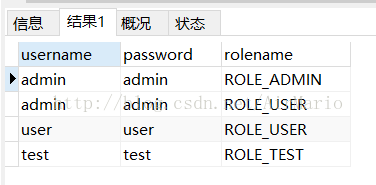
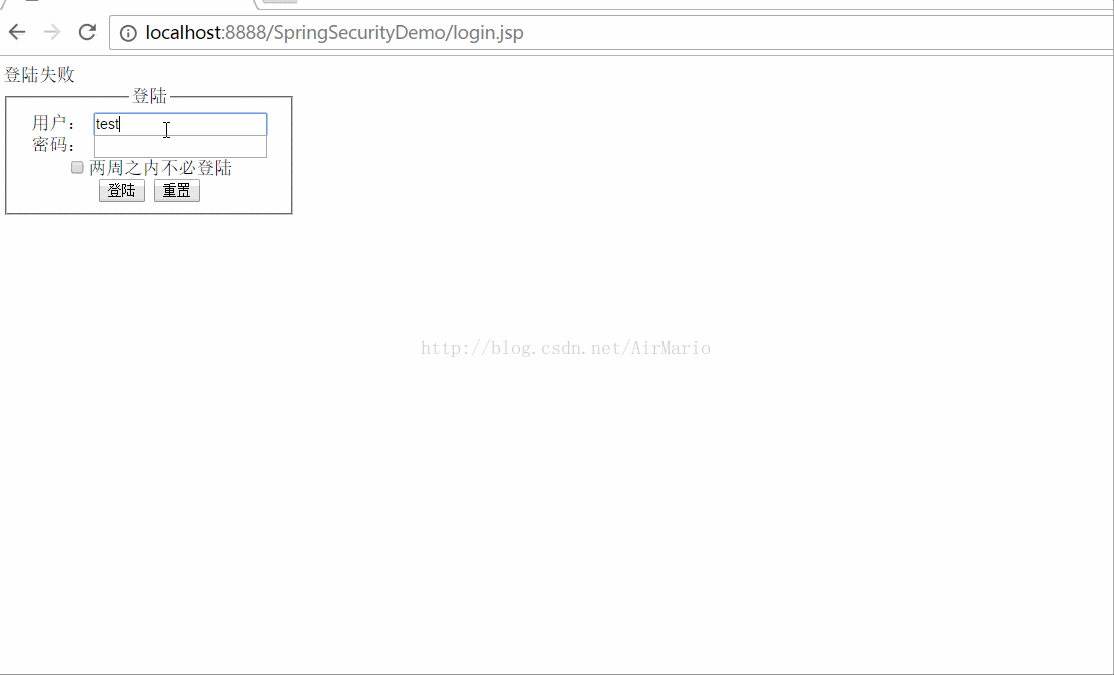
admin能访问的页面有adminPage.jsp、index.jsp;user能访问的有index.jsp;test能访问的有test.jsp。
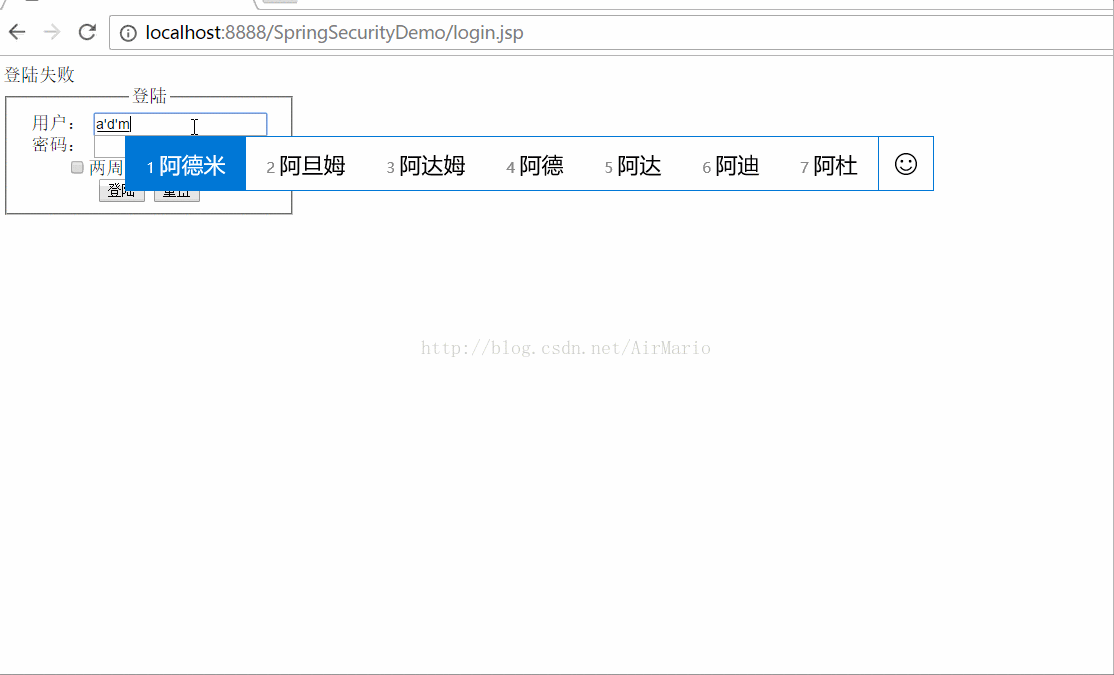
user用户测试:

test用户测试:
Spring Security教程(五):自定义过滤器从数据库从获取资源信息的更多相关文章
- Spring Security教程(五)
在之前的几篇security教程中,资源和所对应的权限都是在xml中进行配置的,也就在http标签中配置intercept-url,试想要是配置的对象不多,那还好,但是平常实际开发中都往往是非常多的资 ...
- 【Spring Security】五、自定义过滤器
在之前的几篇security教程中,资源和所对应的权限都是在xml中进行配置的,也就在http标签中配置intercept-url,试想要是配置的对象不多,那还好,但是平常实际开发中都往往是非常多的资 ...
- Spring Security教程(二):自定义数据库查询
Spring Security教程(二):自定义数据库查询 Spring Security自带的默认数据库存储用户和权限的数据,但是Spring Security默认提供的表结构太过简单了,其实就 ...
- Spring Security教程(三):自定义表结构
在上一篇博客中讲解了用Spring Security自带的默认数据库存储用户和权限的数据,但是Spring Security默认提供的表结构太过简单了,其实就算默认提供的表结构很复杂,也不一定能满足项 ...
- Spring Security教程(二):通过数据库获得用户权限信息
上一篇博客中,Spring Security教程(一):初识Spring Security,我把用户信息和权限信息放到了xml文件中,这是为了演示如何使用最小的配置就可以使用Spring Securi ...
- Spring Security教程系列(一)基础篇-2
第 4 章 自定义登陆页面 Spring Security虽然默认提供了一个登陆页面,但是这个页面实在太简陋了,只有在快速演示时才有可能它做系统的登陆页面,实际开发时无论是从美观还是实用性角度考虑,我 ...
- Spring Security教程(八):用户认证流程源码详解
本篇文章主要围绕下面几个问题来深入源码: 用户认证流程 认证结果如何在多个请求之间共享 获取认证用户信息 一.用户认证流程 上节中提到Spring Security核心就是一系列的过滤器链,当一个请求 ...
- Spring Security教程(三)
在上一篇博客中讲解了用Spring Security自带的默认数据库存储用户和权限的数据,但是Spring Security默认提供的表结构太过简单了,其实就算默认提供的表结构很复杂,也不一定能满足项 ...
- Spring Security 解析(五) —— Spring Security Oauth2 开发
Spring Security 解析(五) -- Spring Security Oauth2 开发 在学习Spring Cloud 时,遇到了授权服务oauth 相关内容时,总是一知半解,因此决 ...
随机推荐
- 传智播客实战taotao项目页面菜单栏Tree的Java实现方法
1.controller查询方法 package com.taotao.manage.controller.api; import org.springframework.beans.factory. ...
- UVALive - 4618 Wormholes(负环)
题目大意:给出出发点和终点和m个虫洞(虫洞的出发点.终点,生成时间和花费时间).问从起点到终点花费的最小时间 解题思路:关键是有负环,所以直接跑最短路算法的话会TLE.所以负环要处理一下 可是这个负环 ...
- ROS知识(15)----Actionlib的使用(一)
Actionlib是ROS非常重要的库,像执行各种运动的动作,例如控制手臂去抓取一个杯子,这个过程可能复杂而漫长,执行过程中还可能强制中断或反馈信息,这时Actionlib就能大展伸手了. 1.原理 ...
- 洛谷P1387 最大正方形
题目描述 题目链接:https://www.luogu.org/problemnew/show/P1387 在一个n*m的只包含0和1的矩阵里找出一个不包含0的最大正方形,输出边长. 输入输出格式 输 ...
- 如何用命令行执行loadrunner的脚本
SET M_ROOT=D:\Mercury Interactive\Mercury LoadRunner\bin cd %M_ROOT% wlrun.exe -TestPath D:\ceshi10\ ...
- Quartz.NET开源作业调度框架系列(四):Plugin Job-转
如果在Quartz.NET作业运行时我们想动态修改Job和Trigger的绑定关系,同时修改一些参数那么该怎么办呢?Quartz.NET提供了插件技术,可以通过在XML文件中对Job和Trigger的 ...
- 解决inline-block上下不对齐
一开始都是行内元素,但是左边按钮和右边标题就是对不齐,于是,设置左边按钮float:left就可以了. <header class="right-header"> &l ...
- centos7 修改中文字符集 How to avoid having to `export LC_ALL=“zh_CN.UTF-8”` upon each SSH connection
Each time I SSH to my Fedora Server, the locale setting is not right. $ locale locale: Cannot set LC ...
- [转]GFS架构分析
Google文件系统(Google File System,GFS)是构建在廉价的服务器之上的大型分布式系统.它将服务器故障视为正常现象,通过软件的方式自动容错,在保证系统可靠性和可用性的同时,大大减 ...
- [转]NLP Tasks
Natural Language Processing Tasks and Selected References I've been working on several natural langu ...