
ansible 批量在远程主机上执行命令
ansible 和 saltstack
都是为了同时在多台主机上执行相同的命令, 但是 salt配置麻烦,ansible基本不用配置, ansible 通过ssh来连接并控制被控节点
1. 安装
第一步: 下载epel源
wget -O /etc/yum.repos.d/epel.repo http://mirrors.aliyun.com/repo/epel-7.repo
第二步: 安装ansible
yum install -y ansible
2. 管控主机秘钥登录被控主机
ssh 秘钥登录
ssh-keygen # 用来生成ssh的密钥对

ssh-copy-id 192.168.107.131 # 复制秘钥到远程主机
3. ansible 命令格式

-a MODULE_ARGS, --args=MODULE_ARGS   # 模块的参数

-C, --check                          # 检查

-f FORKS, --forks=FORKS              #用来做高并发的

--list-hosts                         #列出主机列表

-m MODULE_NAME                       #模块名称

--syntax-check                       # 语法检查
4. ansible hosts
查看ansible 生成的文件

ansible/hosts 文件
# This is the default ansible 'hosts' file.

#

# It should live in /etc/ansible/hosts

#

#   - Comments begin with the '#' character # 用#来表示注释

#   - Blank lines are ignored # 空白行被忽略

#   - Groups of hosts are delimited by [header] elements # 主机组 需要在【】下面

#   - You can enter hostnames or ip addresses #可以写主机名或者ip地址

#   - A hostname/ip can be a member of multiple groups # 一台主机可以在多个组里面
[web]
192.168.181.133
192.168.181.134
[db]
192.168.181.134
192.168.181.135
5. 模块
ansible-doc 查看文档
 ansible-doc [-l|-F|-s] [options] [-t <plugin type> ] [plugin]

 -j           #以json的方式返回ansible的所有模块

 -l, --list   #列出所有的ansible的模块

 -s           #以片段式显示ansible的帮助信息

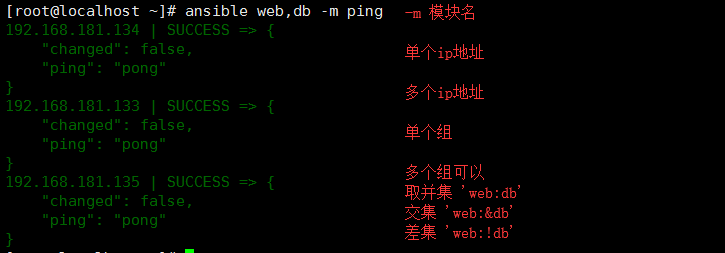
1. ping模块
host-pattern格式
2. 系统默认模块 command, 可以不指定-m
第一个command命令

ansible web -a 'chdir=/tmp pwd'    # 切换目录执行命令,使用场景是编译安装时使用

ansible web -a 'creates=/tmp pwd'  # 用来判断/tmp目录是否存在,存在就不执行操作

ansible web -a 'creates=/data pwd' # 因为data不存在,所有才会执行pwd命令

ansible web -a 'removes=/tmp pwd'  # 用来判断tmp目录是否存在,存在就执行操作

ansible web -a 'removes=/data pwd' # 因为data不存在,所有才不会执行
如果命令里包含特殊符号, 需要同shell模块 : $ < > | will not work use shell module
3. shell 执行远程文件
ansible web -m shell -a 'echo "123" | passwd --stdin alex'   # 批量创建密码

ansible 192.168.107.131 -m shell -a 'bash a.sh'              # 执行远程文件方式一

ansible 192.168.107.131 -m shell -a '/root/a.sh'             # 执行远程文件方式二,文件必须有执行权限, 需要 chmod +x

ansible 192.168.107.131 -m shell -a '/root/a.py'             # 执行远端的Python脚本
被管控机192.168.107.131

管控机就会创建 bulijngbuling2文件夹
4.script 执行本地文件
ansible web -m script -a '/root/m.sh'                # 执行本地的文件,即管控机上的脚本

ansible web -m script -a 'removes=/root/m.sh /root/m.sh'    # 用来判断被管控机上是不是存在文件,如果存在,存在就执行,不存在就不执行

ansible web -m script -a 'creates=/root/a.sh /root/m.sh'    #用来判断被管控机上是不是存在文件,如果存在,就不执行
管控机
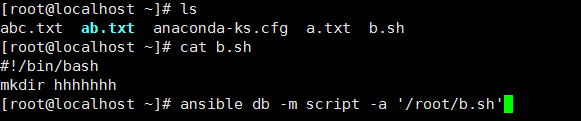
db组群 就会创建 hhhhhh文件夹
5. copy : Copies files to remote locations 把文件批量拷到被管控机上
ansible-doc -s copy:
backup     # 备份,以时间戳结尾
src           # 源文件

dest       # 目的地址

group      # 文件的属组

mode      # 文件的权限 r  w  x

owner      #文件的属主

# 通过md5码来判断是否需要复制

ansible web -m copy -a 'src=/root/m.sh dest=/tmp/a.sh'               # 复制本地文件的到远程主机

ansible web -m copy -a 'src=/root/m.sh dest=/tmp/a.sh mode=755'          # 修改文件的权限

ansible web -m copy -a 'src=/root/m.sh dest=/tmp/a.sh mode=755 owner=ryan'   # 修改文件的属主

ansible web -m copy -a 'src=/etc/init.d dest=/tmp/ mode=755 owner=ryan'      # 复制本地目录到远程主机,如果改变文件的属性,则文件夹内的文件也会被改变

ansible web -m copy -a 'src=/etc/init.d/ dest=/tmp/ mode=755 owner=ryan'       # 复制本地目录内的所有文件到远程主机

ansible web -m copy -a "content='白云深处有人家\n' dest=/tmp/b.txt"         # 直接将文本内容注入到远程主机的文件中
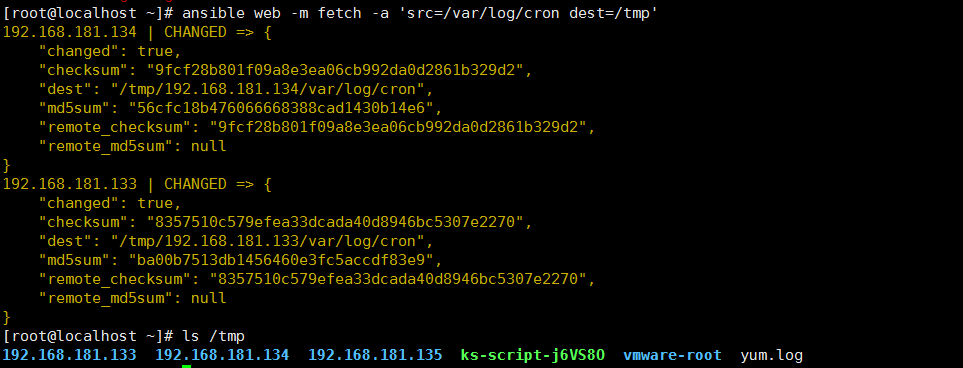
6. fetch : Fetches a file from remote nodes 把远程文件传到管控机, 如各机的log日志等, 与copy相反
dest        # 目的地址 (required) A directory to save the file into

src         # 源地址 (required) The file on the remote system to fetch,This `must' be a file, not a directory

ansible web -m fetch -a 'src=/var/log/cron dest=/tmp'    # 下载被控节点的文件,在管控机/tmp目录下以每台机器ip为名创建一个文件夹,并保留原来的目录结构
7. file
path:  # (required) Path to the file being managed.

src:   # path of the file to link to (applies only to `state=link' and `state=hard')

state: # directory  touch  link absent

owner: # chown'
ansible db -m file -a 'path=/lzmly2  state=directory'       #在远程机器上创建文件夹

ansible db -m file -a 'path=/root/q.txt  state=touch'       #用来在远程机器上创建文件

ansible db -m file -a 'path=/tmp/f src=/etc/fstab state=link'   #创建软连接src是源地址,path是目标地址

ansible db -m file -a 'path=/tmp/f state=absent'          #用来删除文件或者文件夹

gruop /owner /mode
8. yum
yum和rpm 的区别: yum解决依赖关系
rpm -q 包 查询是否安装
yum 安装包组
yum grouplist    # 查看包组信息

yum groupinstall # 安装包组
ansible 语法
disablerepo     # 禁用源

enablerepo      # 启用源

name         # 包名

state        # install (`present' or `installed', `latest'), or remove (`absent' or `removed')

ansible web -m yum -a 'name=wget'                 # 安装wget

ansible web -m yum -a 'name=python2-pip'          # 安装python2-pip

ansible web -m yum -a 'name=wget state=absent'    # 卸载软件包

ansible web -m yum -a 'name="@Development Tools"' # 安装包组
9. pip
pip install           # 安装包

pip freeze > a.txt    # 将python的环境打包到文件中

pip install -r a.txt  # 安装文件中的包

pip list              # 查看所有的以安装成功的包
ansible 语法
requirements   # The path to a pip requirements file, which should be local to the remote system. 就是pip install -r 指定文件安装

name        # 名

ansible web -m pip -a 'name=flask' # 安装flask模块
10. service
systemctl start nginx   # centos7 启动nginx

service nginx start     # centos6

systemctl enabled nginx   # centos7 开机自启动

chkconfig nginx on     # centos6 开机自启动
ansible:
enabled  # Whether the service should start on boot. 开机启动

name     # (required) Name of the service

state    # started stopped restarted reloaded

ansible web -m service -a 'name=nginx state=started enabled=yes' # 启动nginx, 开机启动nginx

ansible web -m service -a 'name=nginx state=stopped' # 关闭nginx
11. cron 计划任务
*  *  * * *   job

分 时 日 月 周  任务

 */ *  * *  job         每隔两个小时

 , * * * job         12点和13点

 - * * * job         12点到17点

 -/ * * ,,,     周1,周3,周6,周7 12点到17点每隔两个小时

crontab -e         # 编辑计划任务

crontab -l         # 查看计划任务

crontab -r         # 删除计划任务
ansible
minute      # 分钟

hour       # 小时

day       # 天

month      # 月

weekday    # 周

name      # 任务名字

job       # 任务

disabled    # 禁用

ansible db -m cron -a 'minute=26 job="touch /tmp/xzmly.txt" name=touchfile'          # 新建一个计划任务

ansible db -m cron -a 'name=touchfile state=absent'                         # 删除一个计划任务

ansible db -m cron -a 'minute=26 job="touch /tmp/xzmly.txt" name=touchfile disabled=yes'  # 禁用计划任务,以#表示禁用

ansible web -m cron -a 'name=synchronus minute=00 job="ntpdate time.window.com"'       # 每小时同步window时间
12 user
用户:

    管理员  root

    普通用户

        系统用户  不能登录  - centos7 - centos6

        登录用户  可以登录  - centos7 - centos6

用户组:

    管理员组 root

    系统用户组 - centos7 - centos6

    登录用户组 - centos7 - centos6

 -d  指定用户的家目录

 -g  指定用户的组

 -G  执行用户的附加组

 -s  指定登录后使用的shell

 -r  创建一个系统组

 -p  password

 useradd -r  ryan            # 创建系统用户, 从999倒序

 useradd -s /sbin/nologin may     # 创建的是普通用户,从1000开始升序

 useradd -d /opt/shey shey      # 创建用户时指定用户的家目录

 useradd -u  sheldon       # 创建用户并指定用户的uid

 userdel  sheldon            # 删除用户

 userdel -r shey            # 删除用户并删除用户的家目录
ansible
group    # 组

groups   # 附加组

home     # 家目录

name     # 用户名

password # 密码

remove   # 只有当state=absent 起作用, 删除用户家目录

shell    # 用户登录后使用的shell

system   # 创建一个系统用户

uid      # 用来指定用户的id

state   # 状态

ansible db -m user -a 'name=ryan uid=4000 home=/opt/wulaoshi groups=root shell=/sbin/nologin' #创建一个用户,并指定用户的id,用户的家目录,用户的附加组,用户的shell

ansible db -m user -a 'name=ryan1 state=absent' #删除用户但是不删除用户的家目录

ansible db -m user -a 'name=ryan2 state=absent remove=yes' # 删除用户并删除用户的家目录
13 group
gid      # 组的id

name    # 组名

system   # 系统组

state

ansible db -m group -a 'name=ryan3 system=yes' #创建系统组

ansible db -m group -a 'name=ryan4 state=absent' # 删除组
其他模块遇到的时候再补充
ansible 批量在远程主机上执行命令的更多相关文章
- 通过paramiko模块在远程主机上执行命令
安装paramiko模块 /usr/local/python36/bin/pip3 install paramiko 1.获取cpu使用率 #!/usr/bin/python #coding=utf8 ...
- 【Shell实战】批量在多台服务器上执行命令
功能说明:批量在多台服务器上执行命令 #!/bin/bash # ========================================== # 功能:批量在多台服务器上执行命令 # 方法: ...
- Ansible批量更新远程主机用户密码 (包括Ansible批量做ssh互信)
按照集团运维信息安全制度, 需要每个一段时间对线上服务器密码进行一次变更,通过shell脚本部署比较繁琐,所以决定采用ansible脚本对远程主机root密码进行批量重置,该脚本已经在稳定运行在正式环 ...
- expect实现远程主机自动执行命令脚本
2014年第一个脚本,哈哈!!! expect实现远程主机自动执行命令脚本: #!/usr/bin/expect -- if { [llength $argv] < 4 } { puts &qu ...
- Ansible批量在远程主机执行命令
Ansible直接执行远程命令,不用ssh登陆交互执行. 如下: ansible all -i 192.168.199.180, -m shell -a "ifconfig" -u ...
- ansible批量管理服务 上
1 ansible简介 1.1 ansible批量管理服务概述 (1)是基于python语言开发的自动化软件工具(2)是基于SSH远程管理服务实现远程主机批量管理(3)并行管理,部署简单,应用也简单方 ...
- linux免交互登陆远程主机并执行命令(密钥对和Expect)
原文章摘自:http://lizhenliang.blog.51cto.com/7876557/1607723/ Linux下实现免交互登陆一般有两种: 1. SSH无密码认证方式 客户端使用ssh- ...
- ssh在本地调用远程主机上的命令,不登录远程主机shell
需求描述: 在实际shell脚本的编写过程中,需要通过ssh远程执行一个命令,并返回执行的结果 简单来说,就是将命令发送到远程的主机上进行执行,但是并没有实际的登录到远程主机上.即通过 ssh的方式本 ...
- SSH 提示密码过期,如何通过 ansible 批量更新线上服务器密码
起因 线上环境是在内网,登陆线上环境需要使用 VPN + 堡垒机 登陆,但是我日常登陆线上环境都是 VPN + 堡垒机 + Socks5常驻代理,在shell端只需要保存会话,会话使用socks5代理 ...
随机推荐
- mssql注入指令
and exists (select * from sysobjects) //判断是否是MSSQL and exists(select * from tableName) //判断某表是否存在..t ...
- 华为手机nova2s使用第三方字体库
准备好一个字体文件,例如mynew.tff 设置>显示>字体样式>最热,搜索免费,安装一款"兰亭黑体"字体(当然也可以购买) 可以在找到 文件管理>本地&g ...
- 如何构建日均千万PV Web站点 (三) Sharding
其实国内许多大型网站为了应对日益复杂的业务场景,通过使用分而治之的手段将整个网站业务分成不同的产品线,比如说国内那些大型购物交易网站它们都将自己的网站首页.商铺.订单.买家.卖家等拆分不同的产品线,分 ...
- C++ template —— 模板基础(一)
<C++ Template>对Template各个方面进行了较为深度详细的解析,故而本系列博客按书本的各章顺序编排,并只作为简单的读书笔记,详细讲解请购买原版书籍(绝对物超所值).---- ...
- 【Java知识点专项练习】之 数据类型两大类
Java的数据类型分为两大类:基本类型和引用类型: 基本类型只能保存一些常量数据,引用类型除了可以保存数据,还能提供操作这些数据的功能: 为了操作基本类型的数据,java也对它们进行了封装, 得到八个 ...
- IE(兼容问题)错误:缺少标识符 字符串或数字的解决
在IE上遇到一个问题,缺少标识符 字符串或数字的解决. 问题是我的html页面在Firefox.chorme中运行正常,而在IE中老是报“缺少标识符 字符串或数字”的错误,原因: 这就是IE和Fire ...
- 【Shell脚本编程系列】知识储备以及建立规范的脚本
前言 学习shell脚本编程需要的知识储备: vi/vim编辑器命令 vimrc设置要熟练 基础命令,100多个要熟练 基础和常用的网络服务命令要会:nfs . rsync. inotify . la ...
- eagle学习汇总
一.原理图编辑器 1. 编辑->全局属性->可以设置全局变量,选择“文本框”,以‘>’开头代表引用全局属性的值. 2. 绘制->Frame->可绘制原理图边框,一般选择“ ...
- List的五种去重方式
//set集合去重,不改变原有的顺序 public static void pastLeep1(List<String> list){ System.out.println("l ...
- Android 1.6 PackageParser.java 源码分析
文件目录: android-1.6_r2\frameworks\base\core\java\android\content\pm\PackageParser.java # PackageParser ...