
Android TabHost的使用 顶部选项卡
用TabHost 来实现顶部选项卡,上代码:activity_main.xml
<?xml version="1.0" encoding="utf-8"?>

<android.support.constraint.ConstraintLayout xmlns:android="http://schemas.android.com/apk/res/android"

    xmlns:app="http://schemas.android.com/apk/res-auto"

    xmlns:tools="http://schemas.android.com/tools"

    android:layout_width="match_parent"

    android:layout_height="match_parent"

    tools:context=".MainActivity">

    <TabHost

        android:id="@+id/tabMenu"

        android:layout_width="match_parent"

        android:layout_height="0dp">

        <LinearLayout

            android:layout_width="match_parent"

            android:layout_height="match_parent"

            android:orientation="vertical">

            <TabWidget

                android:id="@android:id/tabs"

                android:layout_width="match_parent"

                android:layout_height="wrap_content" />

            <FrameLayout

                android:id="@android:id/tabcontent"

                android:layout_width="match_parent"

                android:layout_height="match_parent">

                <LinearLayout

                    android:id="@+id/tab1"

                    android:layout_width="match_parent"

                    android:layout_height="match_parent"

                    android:orientation="vertical">

                </LinearLayout>

                <LinearLayout

                    android:id="@+id/tab2"

                    android:layout_width="match_parent"

                    android:layout_height="match_parent"

                    android:orientation="vertical">

                </LinearLayout>

                <LinearLayout

                    android:id="@+id/tab3"

                    android:layout_width="match_parent"

                    android:layout_height="match_parent"

                    android:orientation="vertical">

                </LinearLayout>

            </FrameLayout>

        </LinearLayout>

    </TabHost>

</android.support.constraint.ConstraintLayout>
主方法MainActivity.java
package action.sun.com.tabhost;

import android.support.v7.app.AppCompatActivity;

import android.os.Bundle;

import android.util.Log;

import android.widget.TabHost;

public class MainActivity extends AppCompatActivity {

    private TabHost tabhost;

    @Override

    protected void onCreate(Bundle savedInstanceState) {

        super.onCreate(savedInstanceState);

        setContentView(R.layout.activity_main);

        //得到TabHost对象实例

        tabhost =(TabHost) findViewById(R.id.tabMenu);

        //调用 TabHost.setup()

        tabhost.setup();

        //创建Tab标签

        tabhost.addTab(tabhost.newTabSpec("one").setIndicator("红色").setContent(R.id.tab1));

        tabhost.addTab(tabhost.newTabSpec("two").setIndicator("黄色").setContent(R.id.tab2));

        tabhost.addTab(tabhost.newTabSpec("three").setIndicator("黄色").setContent(R.id.tab3));

        tabhost.setOnTabChangedListener(new TabHost.OnTabChangeListener() {

            @Override

            public void onTabChanged(String s) {

                Log.d("xxx", "onTabChanged: ="+s);

                if (s.equals("one")){

                    //可是让viewpage的视图显示出来

                    //viewPager.setCurrentItem(0);

                }else if (s.equals("two")){

                    ////可是让viewpage的视图显示出来

                   // viewPager.setCurrentItem(1);

                }

            }

        });

    }

}
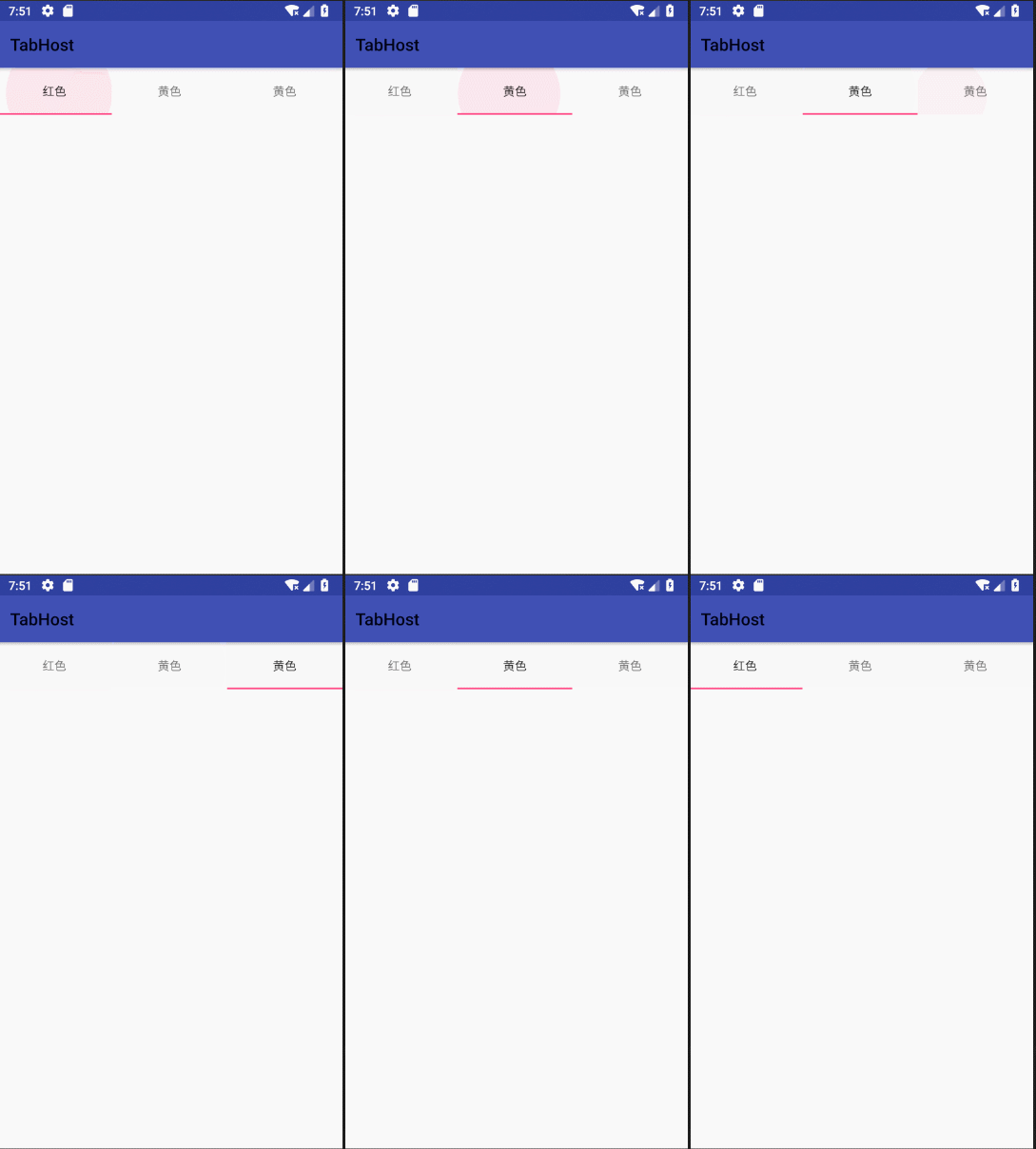
代码很简单,实现效果:
Android TabHost的使用 顶部选项卡的更多相关文章
- Android应用底部导航栏(选项卡)实例
现在很多android的应用都采用底部导航栏的功能,这样可以使得用户在使用过程中随意切换不同的页面,现在我采用TabHost组件来自定义一个底部的导航栏的功能. 我们先看下该demo实例的框架图: 其 ...
- Android TabHost使用
TabHost是Android中自带的选项卡控件,效果图如下: 主布局文件 <RelativeLayout xmlns:android="http://schemas.android. ...
- TabTopLayout【自定义顶部选项卡区域(固定宽度且居中)】
版权声明:本文为HaiyuKing原创文章,转载请注明出处! 前言 自定义顶部选项卡并居中显示.结合显示/隐藏view的方式实现切换功能(正常情况下可能是切换fragment). 效果图 代码分析 T ...
- TabTopUnderLineLayout【自定义顶部选项卡(带下划线)】
版权声明:本文为HaiyuKing原创文章,转载请注明出处! 前言 自定义顶部选项卡布局LinearLayout类,实现带下划线样式的效果. 备注:如果配合Fragment的话,MainActivit ...
- TabTopAutoLayout【自定义顶部选项卡区域(带下划线)(动态选项卡数据且可滑动)】
版权声明:本文为HaiyuKing原创文章,转载请注明出处! 前言 自定义顶部选项卡布局LinearLayout类,实现带下划线且可滑动效果.[实际情况中建议使用RecyclerView] 备注:如果 ...
- Android开发学习之TabView选项卡具体解释 -- 基于Android4.4
版权声明:本文为博主原创文章,未经博主同意不得转载. https://blog.csdn.net/he90227/article/details/24474197 直接上代码 -- 基于Android ...
- android去掉滑动到顶部和底部的阴影
android去掉滑动到顶部和底部的阴影 <ListView android:id="@+id/listView" android:layout_width="ma ...
- Android tabhost下的activity怎样获取传来的值
android tabhost下的activity怎样获取传来的值,具体解决方案如下: 解决方案: 其他activity设置intent:Intent intent=new Intent(); int ...
- Android - TabHost 与 Fragment 制作页面切换效果
Android - TabHost 与 Fragment 制作页面切换效果 Android API 19 , API 23 三个标签页置于顶端 效果图: 在文件BoardTabHost.java中定义 ...
随机推荐
- 字符集不同导致的ORA-00972
使用ssh登录RAC的两个节点,分别执行相同的sql语句,发现其中一个报错ora-00972: 检查后发现,左侧节点的客户端使用的字符集是SecureCRT的默认字符集,右侧使用的是UTF-8
- javascript的崛起及其生态元素
随着web的流行,人们花在浏览器上的时间吸引了巨头们对浏览器的重视,继而几年前富客户端概念,一批富客户端技术的涌现,如silverlight, flex等,曾经风起云涌,最终都败给了html5 和 j ...
- 坑爹的高德地图API
症状 ld: '-[MASearch poiSearchWithOption:]' in *****/Release-iphonesimulator/libMASearchKit.a(MASearch ...
- Java 8 – How to sort a Map
Java 8 – How to sort a Map 1. Quick ExplanationMap result = map.entrySet().stream() .sorted(Map.Entr ...
- SpringMVC之RequestContextHolder分析
最近遇到的问题是在service获取request和response,正常来说在service层是没有request的,然而直接从controlller传过来的话解决方法太粗暴,后来发现了Spring ...
- js json转url参数
var json = { sh: '上海' } var params = Object.keys(json).map(function (key) { // body... return encode ...
- exe4j打包java应用程序
转载地址:http://blog.csdn.net/fog911811/article/details/6151700 第一.将应用程序导出成一个JAR文件. 1.先打包程序成一个jar.在eclip ...
- 5. MIZ7035 PCIe测试 RIFFA【PCIE视频传输】
1.前言 MIZ7035官方提供了两种pcie的demo,一个就是普通的PIO测试,一个是BMD测试.我只是试验了PIO功能,可以对板卡直接进行IO寄存器读写.而另外一个BMD功能使用了DMA来加速数 ...
- PCIe简介及引脚定义
参考文章:http://www.2cto.com/os/201607/523581.html http://blog.csdn.net/michaelcao1980/article/details/4 ...
- BLIST,BindingSource
//gridControl1.DataSource = BList; //BindingSource bs = new BindingSource(); //bs.DataSource = BList ...