
SpringSecurity03 基于内存验证
1 需求
现有一个编写好的系统,需要实现用户登录验证即可,同时根据用户的权限来限制用户可以访问的接口
2 编写SpringSecurity配置类
继承 WebSecurityConfigurerAdapter 类并重写configure 方法

package cn.xiangxu.spring_security_system;

//import cn.xiangxu.spring_security_system.service.MyUserService;

import cn.xiangxu.spring_security_system.utils.MyPasswordEncoder;

import org.springframework.beans.factory.annotation.Autowired;

import org.springframework.context.annotation.Configuration;

import org.springframework.security.config.annotation.authentication.builders.AuthenticationManagerBuilder;

import org.springframework.security.config.annotation.web.builders.HttpSecurity;

import org.springframework.security.config.annotation.web.builders.WebSecurity;

import org.springframework.security.config.annotation.web.configuration.EnableWebSecurity;

import org.springframework.security.config.annotation.web.configuration.WebSecurityConfigurerAdapter;

/**

 * 权限服务类

 */

@Configuration // 等同于XML中的beans

@EnableWebSecurity // 开启webSecurity功能

public class SpringSecurityConfig extends WebSecurityConfigurerAdapter {

//    @Autowired

//    private MyUserService myUserService;

    @Override

    protected void configure(AuthenticationManagerBuilder auth) throws Exception {

        // 直接将用户信息和权限写死

        auth.inMemoryAuthentication()

                .withUser("admin")

                .password("123456")

                .roles("ADMIN");

        auth.inMemoryAuthentication()

                .withUser("wys")

                .password("123456")

                .roles("ADMIN");

        auth.inMemoryAuthentication()

                .withUser("demo")

                .password("123456")

                .roles("USER");

//        auth.userDetailsService(myUserService).passwordEncoder(new MyPasswordEncoder()); // 利用自定义的UserService进行管理

    }

    @Override

    protected void configure(HttpSecurity http) throws Exception {

        http.authorizeRequests()

                .antMatchers("/").permitAll() // 主页面请求拦截排除

                .anyRequest().authenticated()  // 除主页面外的所有请求都会被拦截

                .and()

                .logout().permitAll() // 注销请求拦截排除

                .and()

                .formLogin(); // 设置使用表单登录的方式

        http.csrf().disable(); // 关闭csrf验证

    }

    @Override

    public void configure(WebSecurity web) throws Exception {

        // 拦截排除设置

        web.ignoring().antMatchers("/js/**", "/css/**", "/images/**");

    }

}
SpringSecurity配置类
坑01:由于从springboot2.0.3开始使用的springsecurity的版本是5.x,这个版本需要提供一个PasswordEncoder的实例,否则就会如下错误

解坑01之方法01:只需要创建一个PasswordEncoder的Bean并被spring容器所管理即可
》创建一个实现了PasswordEncoder接口的实现类MyPasswordEncoder,在encode方法中编写加密算法,在matches方法中编写匹配算法
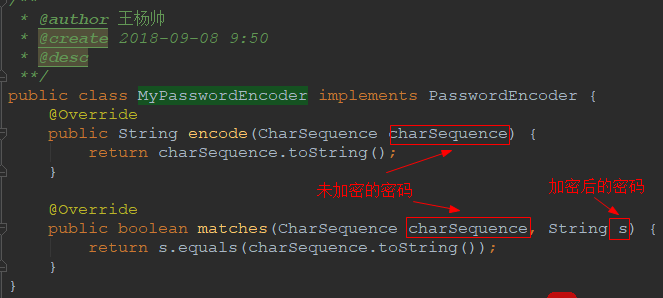
》在配置文件中配置MyPasswordEncoder对应的Bean即可(在一个标注了@Configuration注解的类中添加下面的逻辑即可)

解坑01之方法02:在创建内存用户的时候指定一个PasswordEncoder实例
》创建一个实现了PasswordEncoder接口的实现类MyPasswordEncoder,在encode方法中编写加密算法,在matches方法中编写匹配算法
》创建内存用户的时候直接指定PasswordEncoder即可

3 编写一些接口用于测试
package cn.xiangxu.spring_security_system;

import org.springframework.boot.SpringApplication;

import org.springframework.boot.autoconfigure.SpringBootApplication;

import org.springframework.security.access.prepost.PreAuthorize;

import org.springframework.security.config.annotation.method.configuration.EnableGlobalMethodSecurity;

import org.springframework.web.bind.annotation.GetMapping;

import org.springframework.web.bind.annotation.RestController;

@SpringBootApplication

@RestController

//@EnableGlobalMethodSecurity(prePostEnabled = true) // 开启@PreAuthorize注解

public class SpringSecuritySystemApplication {

    public static void main(String[] args) {

        SpringApplication.run(SpringSecuritySystemApplication.class, args);

    }

    @GetMapping(value = "/")

    public String home() {

        return "Welcome to study springSecurity.";

    }

    @GetMapping(value = "/hello")

    public String hello() {

        return "hello boy";

    }

//    @PreAuthorize("hasRole('ROLE_ADMIN')") // 设定权限校验:只用ADMIN角色才能调用该接口

    @GetMapping("/roleAuth")

    public String role() {

        return "admin role";

    }

}
4 请求测试接口
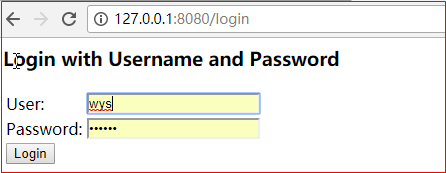
利用硬编码的用户名和密码进行登录
5 设置权限校验
5.1 在控制类上添加 @EnableGlobalMethodSecurity 注解
//

// Source code recreated from a .class file by IntelliJ IDEA

// (powered by Fernflower decompiler)

//

package org.springframework.security.config.annotation.method.configuration;

import java.lang.annotation.Documented;

import java.lang.annotation.ElementType;

import java.lang.annotation.Retention;

import java.lang.annotation.RetentionPolicy;

import java.lang.annotation.Target;

import org.springframework.context.annotation.AdviceMode;

import org.springframework.context.annotation.Configuration;

import org.springframework.context.annotation.Import;

import org.springframework.security.config.annotation.authentication.configuration.EnableGlobalAuthentication;

@Retention(RetentionPolicy.RUNTIME)

@Target({ElementType.TYPE})

@Documented

@Import({GlobalMethodSecuritySelector.class})

@EnableGlobalAuthentication

@Configuration

public @interface EnableGlobalMethodSecurity {

    boolean prePostEnabled() default false;

    boolean securedEnabled() default false;

    boolean jsr250Enabled() default false;

    boolean proxyTargetClass() default false;

    AdviceMode mode() default AdviceMode.PROXY;

    int order() default 2147483647;

}
@EnableGlobalMethodSecurity(prePostEnabled = true)
代码解释:
整个项目启用方法角色验证注解,prePostEnabled = true 表示启用@PreAuthorize 和 @PostAuthorize 两个方法角色验证注解(@PreFilter() 和 @PostFilter() 也会被启用)
5.2 在需要进行角色验证的接口上方添加 @PreAuthorize 注解
@PreAuthorize("hasRole('ROLE_ADMIN')")
代码解释:
有该注解的方法只有角色是ADMIN的用户才可以访问
package cn.xiangxu.spring_security_system;

import org.springframework.boot.SpringApplication;

import org.springframework.boot.autoconfigure.SpringBootApplication;

import org.springframework.security.access.prepost.PostAuthorize;

import org.springframework.security.access.prepost.PreAuthorize;

import org.springframework.security.config.annotation.method.configuration.EnableGlobalMethodSecurity;

import org.springframework.web.bind.annotation.GetMapping;

import org.springframework.web.bind.annotation.RestController;

@SpringBootApplication

@RestController

@EnableGlobalMethodSecurity(prePostEnabled = true) // 开启@PreAuthorize注解

public class SpringSecuritySystemApplication {

    public static void main(String[] args) {

        SpringApplication.run(SpringSecuritySystemApplication.class, args);

    }

    @GetMapping(value = "/")

    public String home() {

        return "Welcome to study springSecurity.";

    }

    @GetMapping(value = "/hello")

    public String hello() {

        return "hello boy";

    }

    @PreAuthorize("hasRole('ROLE_ADMIN')") // 设定权限校验:只用ADMIN角色才能调用该接口

    @GetMapping("/roleAuth")

    public String role() {

        return "admin role";

    }

}
6 权限校验注解
6.1 @PreAuthorize
在执行方法之前进行权限校验
6.1.1 角色验证
例如:@PreAuthorize("hasRole('ROLE_ADMIN') or hasRole('ROLE_USER')") // ADMIN 和 USER 角色都有权限调用这个接口
package cn.xiangxu.spring_security_system;

import org.springframework.boot.SpringApplication;

import org.springframework.boot.autoconfigure.SpringBootApplication;

import org.springframework.security.access.prepost.PostAuthorize;

import org.springframework.security.access.prepost.PostFilter;

import org.springframework.security.access.prepost.PreAuthorize;

import org.springframework.security.access.prepost.PreFilter;

import org.springframework.security.config.annotation.method.configuration.EnableGlobalMethodSecurity;

import org.springframework.web.bind.annotation.GetMapping;

import org.springframework.web.bind.annotation.RestController;

@SpringBootApplication

@RestController

@EnableGlobalMethodSecurity(prePostEnabled = true) // 开启@PreAuthorize注解

public class SpringSecuritySystemApplication {

    public static void main(String[] args) {

        SpringApplication.run(SpringSecuritySystemApplication.class, args);

    }

    @GetMapping(value = "/")

    public String home() {

        return "Welcome to study springSecurity.";

    }

    @GetMapping(value = "/hello")

    public String hello() {

        return "hello boy";

    }

    @PreAuthorize("hasRole('ROLE_ADMIN')") // 设定权限校验:只用ADMIN角色才能调用该接口

    @GetMapping("/roleAuth")

    public String role() {

        return "admin role";

    }

    @PreAuthorize("hasRole('ROLE_ADMIN') or hasRole('ROLE_USER')") // ADMIN 和 USER 角色都有权限调用这个接口

    @GetMapping("/test01")

    public String rest01() {

        return "test01";

    }

}
6.1.2 参数验证01
例如:@PreAuthorize("#id < 10")
代码解释: 方法必须有id参数,而且参数的值必须小于10

package cn.xiangxu.spring_security_system;

import org.springframework.boot.SpringApplication;

import org.springframework.boot.autoconfigure.SpringBootApplication;

import org.springframework.security.access.prepost.PostAuthorize;

import org.springframework.security.access.prepost.PostFilter;

import org.springframework.security.access.prepost.PreAuthorize;

import org.springframework.security.access.prepost.PreFilter;

import org.springframework.security.config.annotation.method.configuration.EnableGlobalMethodSecurity;

import org.springframework.web.bind.annotation.GetMapping;

import org.springframework.web.bind.annotation.PathVariable;

import org.springframework.web.bind.annotation.RestController;

@SpringBootApplication

@RestController

@EnableGlobalMethodSecurity(prePostEnabled = true) // 开启@PreAuthorize注解

public class SpringSecuritySystemApplication {

    public static void main(String[] args) {

        SpringApplication.run(SpringSecuritySystemApplication.class, args);

    }

    @GetMapping(value = "/")

    public String home() {

        return "Welcome to study springSecurity.";

    }

    @GetMapping(value = "/hello")

    public String hello() {

        return "hello boy";

    }

    @PreAuthorize("hasRole('ROLE_ADMIN')") // 设定权限校验:只用ADMIN角色才能调用该接口

    @GetMapping("/roleAuth")

    public String role() {

        return "admin role";

    }

    @PreAuthorize("hasRole('ROLE_ADMIN') or hasRole('ROLE_USER')") // ADMIN 和 USER 角色都有权限调用这个接口

    @GetMapping("/test01")

    public String rest01() {

        return "test01";

    }

    @PreAuthorize("#id < 10")

    @GetMapping("/test02/{id}")

    public String test02(@PathVariable("id") Integer id) {

        return "test02 -> 获取到的ID为:" + id;

    }

}
6.1.3 参数验证03
例如:@PreAuthorize("principal.username.equals(#username)")
代码解释:方法必须有username参数,而且参数的值必须是登录用户的用户名

package cn.xiangxu.spring_security_system;

import org.springframework.boot.SpringApplication;

import org.springframework.boot.autoconfigure.SpringBootApplication;

import org.springframework.security.access.prepost.PostAuthorize;

import org.springframework.security.access.prepost.PostFilter;

import org.springframework.security.access.prepost.PreAuthorize;

import org.springframework.security.access.prepost.PreFilter;

import org.springframework.security.config.annotation.method.configuration.EnableGlobalMethodSecurity;

import org.springframework.web.bind.annotation.GetMapping;

import org.springframework.web.bind.annotation.PathVariable;

import org.springframework.web.bind.annotation.RequestParam;

import org.springframework.web.bind.annotation.RestController;

@SpringBootApplication

@RestController

@EnableGlobalMethodSecurity(prePostEnabled = true) // 开启@PreAuthorize注解

public class SpringSecuritySystemApplication {

    public static void main(String[] args) {

        SpringApplication.run(SpringSecuritySystemApplication.class, args);

    }

    @GetMapping(value = "/")

    public String home() {

        return "Welcome to study springSecurity.";

    }

    @GetMapping(value = "/hello")

    public String hello() {

        return "hello boy";

    }

    @PreAuthorize("hasRole('ROLE_ADMIN')") // 设定权限校验:只用ADMIN角色才能调用该接口

    @GetMapping("/roleAuth")

    public String role() {

        return "admin role";

    }

    @PreAuthorize("hasRole('ROLE_ADMIN') or hasRole('ROLE_USER')") // ADMIN 和 USER 角色都有权限调用这个接口

    @GetMapping("/test01")

    public String rest01() {

        return "test01";

    }

    @PreAuthorize("#id < 10")

    @GetMapping("/test02/{id}")

    public String test02(@PathVariable("id") Integer id) {

        return "test02 -> 获取到的ID为:" + id;

    }

    @PreAuthorize("principal.username.equals(#username)")

    @GetMapping("/test03")

    public String test03(@RequestParam("username") String username) {

        return "test03 -> 获取到的username为:" + username;

    }

}
6.2 @PostAuthorize
在执行方法之后进行权限验证
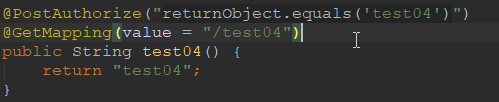
例如:@PostAuthorize("returnObject.equals('test04')")
代码解释:判断方法的返回值是否等于 test04 , 如果是就通过验证,如果不是就验证失败
技巧:returnObject代表方法的返回对象
package cn.xiangxu.spring_security_system;

import org.springframework.boot.SpringApplication;

import org.springframework.boot.autoconfigure.SpringBootApplication;

import org.springframework.security.access.prepost.PostAuthorize;

import org.springframework.security.access.prepost.PostFilter;

import org.springframework.security.access.prepost.PreAuthorize;

import org.springframework.security.access.prepost.PreFilter;

import org.springframework.security.config.annotation.method.configuration.EnableGlobalMethodSecurity;

import org.springframework.web.bind.annotation.GetMapping;

import org.springframework.web.bind.annotation.PathVariable;

import org.springframework.web.bind.annotation.RequestParam;

import org.springframework.web.bind.annotation.RestController;

@SpringBootApplication

@RestController

@EnableGlobalMethodSecurity(prePostEnabled = true) // 开启@PreAuthorize注解

public class SpringSecuritySystemApplication {

    public static void main(String[] args) {

        SpringApplication.run(SpringSecuritySystemApplication.class, args);

    }

    @GetMapping(value = "/")

    public String home() {

        return "Welcome to study springSecurity.";

    }

    @GetMapping(value = "/hello")

    public String hello() {

        return "hello boy";

    }

    @PreAuthorize("hasRole('ROLE_ADMIN')") // 设定权限校验:只用ADMIN角色才能调用该接口

    @GetMapping("/roleAuth")

    public String role() {

        return "admin role";

    }

    @PreAuthorize("hasRole('ROLE_ADMIN') or hasRole('ROLE_USER')") // ADMIN 和 USER 角色都有权限调用这个接口

    @GetMapping("/test01")

    public String rest01() {

        return "test01";

    }

    @PreAuthorize("#id < 10")

    @GetMapping("/test02/{id}")

    public String test02(@PathVariable("id") Integer id) {

        return "test02 -> 获取到的ID为:" + id;

    }

    @PreAuthorize("principal.username.equals(#username)")

    @GetMapping("/test03")

    public String test03(@RequestParam("username") String username) {

        return "test03 -> 获取到的username为:" + username;

    }

    @PostAuthorize("returnObject.equals('test04')")

    @GetMapping(value = "/test04")

    public String test04(@RequestParam("info") String info) {

        return info;

    }

}
6.3 @PreFilter
在方法执行前对列表型的参数进行一些验证
例如:@PreFilter("filterObject%2==0")
·代码解释:列表型的参数中的每个元素必须能被2整除
技巧:filterObject 代表列表型的参数
6.4 @PostFilter("filterObject%4 == 0")
在方法执行后对返回的列表型对象进行一些验证
例如:@PostFilter("filterObject%4 == 0")
代码解释:列表型的返回对象中的每个元素必须能被4整除
技巧:filterObject 代表列表型的返回对象

SpringSecurity03 基于内存验证的更多相关文章
- RDD:基于内存的集群计算容错抽象(转)
原文:http://shiyanjun.cn/archives/744.html 该论文来自Berkeley实验室,英文标题为:Resilient Distributed Datasets: A Fa ...
- tmpfs:一种基于内存的文件系统
tmpfs是一种基于内存的文件系统, tmpfs有时候使用rm(物理内存),有时候使用swap(磁盘一块区域).根据实际情况进行分配. rm:物理内存.real memery的简称? 真实内存就是电脑 ...
- 如何为基于windows验证的站点的某个页面、文件或文件夹单独设置匿名访问
在MOSS的项目中,我们经常碰到要单独为基于windows验证的站点的某个页面.文件或文件夹单独设置匿名访问即不登录就可以直接访问.比如说站点的A的某些图片或文件URL存在B站点下的文件夹下.此时访问 ...
- 高性能、高容错、基于内存的开源分布式存储系统Tachyon的简单介绍
Tachyon是什么? Tachyon是一个高性能.高容错.基于内存的开源分布式存储系统,并具有类Java的文件API.插件式的底层文件系统.兼容Hadoop MapReduce和Apache Spa ...
- Asp.net中基于Forms验证的角色验证授权
Asp.net的身份验证有有三种,分别是"Windows | Forms | Passport",其中又以Forms验证用的最多,也最灵活. Forms 验证方式对基于用户的验证授 ...
- 【转】Spark是基于内存的分布式计算引擎
Spark是基于内存的分布式计算引擎,以处理的高效和稳定著称.然而在实际的应用开发过程中,开发者还是会遇到种种问题,其中一大类就是和性能相关.在本文中,笔者将结合自身实践,谈谈如何尽可能地提高应用程序 ...
- RDD:基于内存的集群计算容错抽象
转载自:http://shiyanjun.cn/archives/744.html 摘要 本文提出了分布式内存抽象的概念--弹性分布式数据集(RDD,Resilient Distributed Dat ...
- java-消息中间件-基于内存的mq
如果用户的请求比较费时,可以考虑将用户的请求信息放到队列中,立即返回给用户处理中等信息,这样可以给用户比较流畅的体验,后端可以利用单独的服务消费消息,做到了解耦,提高了并发能力. 本文使用jdk为我们 ...
- Spark 介绍(基于内存计算的大数据并行计算框架)
Spark 介绍(基于内存计算的大数据并行计算框架) Hadoop与Spark 行业广泛使用Hadoop来分析他们的数据集.原因是Hadoop框架基于一个简单的编程模型(MapReduce),它支持 ...
随机推荐
- php输入输出
php是服务器脚本语言,js是客户端脚本语言 php用表单接收数据,echo 输出数据,$定义变量. <?php echo $_POST["sub"]; // POST后是表 ...
- Java多线程系列 JUC线程池06 线程池原理解析(五)
ScheduledThreadPoolExecutor解析 ScheduledThreadPoolExecutor适用于延时执行,或者周期性执行的任务调度,ScheduledThreadPoolExe ...
- hbase shell-namespace(命名空间指令)
hbase shell命名空间namespace篇: 1. alter_namespace (一般用于添加删除一个属性,很少使用) hbase(main)::> help 'alter_name ...
- 剑指offer之 二叉搜索树的后续遍历序列
题目描述: 输入一个整数数组,判断该数组是不是某二叉搜索树的后序遍历的结果.如果是则输出Yes,否则输出No.假设输入的数组的任意两个数字都互不相同. public class Solution { ...
- css的伪类选择器的使用
伪类选择器,在不同情况下显示的css,伪类选择器在处理页面的美观是很大帮助.其实很多美丽的按钮或者页面都是有这些基础的知识实现的,掌握好基础很重要. 名字 实例 说明 :link a:link 选择所 ...
- Python 标准库 —— 邮件(email)与邮件服务器(smtplib)
你真的懂邮件吗?邮件包括如下四部分内容: 发送人:from_addr 接收人:to_addr 主题:subject 正文:msg(mime text 格式文本) 其中发送者,接收者,又需要两部分的内容 ...
- 脚本手动执行正常,放cron中执行有问题的原因
问题原因: 1. crond服务没启动 2. 环境变量如 PATH LANG SHELL 等设置不对 3. 脚本中引用的文件地址是相对路径,而非绝对路径. 排查步骤: 以 check ...
- 求解范围中 gcd(a,b)== prime 的有序对数
题目: 给定整数N,求1<=x,y<=N且Gcd(x,y)为素数的数对(x,y)有多少对. 输入: 一个整数N. 输出: 如题. Sample Input 4 Sample Output ...
- POJ1379:Run Away
我对模拟退火的理解:https://www.cnblogs.com/AKMer/p/9580982.html 我对爬山的理解:https://www.cnblogs.com/AKMer/p/95552 ...
- hdu 4372 Count the Buildings —— 思路+第一类斯特林数
题目:http://acm.hdu.edu.cn/showproblem.php?pid=4372 首先,最高的会被看见: 然后考虑剩下 \( x+y-2 \) 个被看见的,每个带了一群被它挡住的楼, ...