
Git push错误non-fast-forward后的冲突解决
当要push代码到git时,出现提示:
error:failed to push some refs to ...
Dealing with “non-fast-forward” errors
From time to time you may encounter this error while pushing:
- $ git push origin master
- To ../remote/
- ! [rejected] master -> master (non-fast forward)
- error: failed to push some refs to '../remote/'
To prevent you from losing history, non-fast-forward updates were rejected
Merge the remote changes before pushing again. See the 'non-fast forward'
section of 'git push --help' for details.
This error can be a bit overwhelming at first, do not fear. Simply put, git cannot make the change on the remote without losing commits, so it refuses the push. Usually this is caused by another user pushing to the same branch. You can remedy this by fetching and merging the remote branch, or using pull to perform both at once.
In other cases this error is a result of destructive changes made locally by using commands like git commit --amend or git rebase. While you can override the remote by adding --force to the push command, you should only do so if you are absolutely certain this is what you want to do. Force-pushes can cause issues for other users that have fetched the remote branch, and is considered bad practice. When in doubt, don’t force-push.
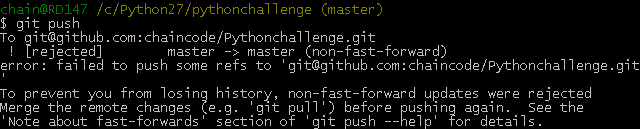
问题(Non-fast-forward)的出现原因在于:git仓库中已经有一部分代码,所以它不允许你直接把你的代码覆盖上去。于是你有2个选择方式:
1,强推,即利用强覆盖方式用你本地的代码替代git仓库内的内容
git push -f
2,先把git的东西fetch到你本地然后merge后再push
$ git fetch
$ git merge
这2句命令等价于
- $ git pull
可是,这时候又出现了如下的问题:
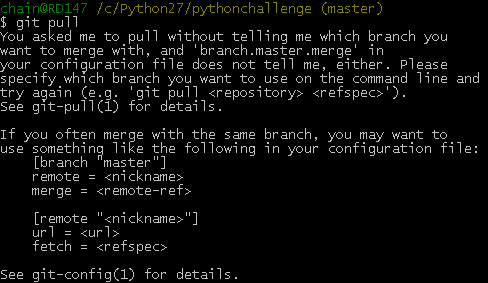
上面出现的 [branch "master"]是需要明确(.git/config)如下的内容
[branch "master"]
remote = origin
merge = refs/heads/master
这等于告诉git2件事:
1,当你处于master branch, 默认的remote就是origin。
2,当你在master branch上使用git pull时,没有指定remote和branch,那么git就会采用默认的remote(也就是origin)来merge在master branch上所有的改变
如果不想或者不会编辑config文件的话,可以在bush上输入如下命令行:
- $ git config branch.master.remote origin
- $ git config branch.master.merge refs/heads/master
之后再重新git pull下。最后git push你的代码吧。it works now~
Git push错误non-fast-forward后的冲突解决的更多相关文章
- Git错误non-fast-forward后的冲突解决
Git错误non-fast-forward后的冲突解决当要push代码到git时,出现提示: error:failed to push some refs to ... Dealing with “n ...
- Git分支(2/5) -- Fast Forward 合并
快捷操作: 切换并创建分支: git checkout -b 分支名. git checkout -b some-change 然后我打开某个文件(index.html)修改一下标题. Commit之 ...
- git push 错误,回滚 push操作
作者:故事我忘了¢个人微信公众号:程序猿的月光宝盒 0.记一次使用git push后,覆盖了同事代码的糗事 前言: 都在WebStorm中操作,Idea或者PyCharm同理 为了高度还原尴尬 ...
- mzy git学习,禁用Fast forward的普通合并(六)
git merge --no-ff -m "msg" x-branch:禁用Fast forward的普通合并 通常,合并分支时,如果可能,Git会用Fast forward模式, ...
- git push错误解决方案
错误提示: error: The requested URL returned error: 403 Forbidden while accessing https://nanfei9330@gith ...
- github多用户git push错误remote: Permission to user1/z.git denied to user2
背景:同一台电脑的public key同时添加到了github的两个账户,导致user1的仓库没法正常提交. 解决办法:为两个账户分别配置ssh key,配置~/.ssh/config文件(windo ...
- git push错误,如何回滚
--> git push Counting objects: 81, done.Delta compression using up to 4 threads.Compressing objec ...
- git分支与版本管理、版本回退、冲突解决记录
一.基础使用 1.初始化本地仓库 git init 2.关联远程仓库 git remote add origin git@github.com:用户名/仓库名.git 3.添加远程仓库文件到本地 gi ...
- Idea中Git的使用和两种类型的冲突解决
一.Git冲突解决 在idea开发工具中使用Git时,主要用到的快捷按钮如下五个: 这五个按钮的使用说明及在idea中如何配置和使用git可参考https://github.com/DayThin ...
随机推荐
- 通过sql做数据透视表,数据库表行列转换(pivot和Unpivot用法)(一)
在mssql中大家都知道可以使用pivot来统计数据,实现像excel的透视表功能 一.MSsqlserver中我们通常的用法 1.Sqlserver数据库测试 ---创建测试表 Create tab ...
- 简化版的Flappy Bird开发过程(不使用第三方框架)
目录 .1构造世界 .2在世界中添加元素 .3碰撞检测 .4添加动画特效 .5总结 .0 开始之前 之前曾经用Html5/JavaScript/CSS实现过2048,用Cocos2d-html5/Ch ...
- Java实战之04JavaWeb-08文件上传与下载
一.文件上传 1.文件上传的实质是什么 文件的拷贝,文件从客户端拷贝服务器端 2.文件上传的工作 (1)客户端怎样将本地文件输出去? 1)文件上传的表单项 <input type=”file”& ...
- 03_HttpClient_Post请求
[实例1.最最最简洁的POST请求] @Test public void test1() throws Exception{ //1.创建Htpclient实例(可关闭 Closeable) Clos ...
- struts2 package元素配置(转载)
package 元素的所有属性及对应功能: Attribute Required Description name yes key to for other packages to reference ...
- (int)、(int&)和(int*)的区别(转)
(1).首先通过一个例子看(int)和(int&)的区别: float a = 1.0f;cout << (int)a << endl;cout << (i ...
- 6.5 k个已排好序链表合并为一个排序链表
1 建立链表(带哨兵位的)2 建立最小堆方法3 合并已排好序的k个链表 typedef int DataType; //建立链表 class Link { private: struct Node { ...
- 九度OJ 1024 畅通工程 -- 并查集、贪心算法(最小生成树)
题目地址:http://ac.jobdu.com/problem.php?pid=1024 题目描述: 省政府"畅通工程"的目标是使全省任何两个村庄间都可以实现公路交通(但 ...
- mysql时间与日期函数
返回日期相关的 Now() || CURRENT_TIMESTAMP();返回当前时间 to_days(date) 返回日期date是西元0年至今多少天(不计算1582年以前) 转换为天数 date是 ...
- C++对象创建与释放
创建对象有以下四种形式: #include <iostream> using namespace std; class A{ private: int i; public: A(){ co ...