
Yahoo! Logo ASCII Animation in 462 bytes of C
Last week I put together another obfuscated C program and have been urged by my coworkers to post it publicly. I've made some refinements since posting it to our internal list, so here is the final version (to those who had seen it already: it's one line shorter now, and the angles are less screwy, and the animation is 2 seconds instead of 3). Go ahead, try it:
$ cat >yanim.c

c,p,i,j,n,F=40,k,m;float a,x,y,S=0,V=0;main(){for(;F--;usleep(50000),F?puts(

"\x1b[25A"):0)for(S+=V+=(1-S)/10-V/4,j=0;j<72;j+=3,putchar(10))for(i=0;x=S*(

i-27),i++<73;putchar(c[" ''\".$u$"]))for(c=0,n=3;n--;)for(y=S*(j+n-36),k=0,c

^=(136*x*x+84*y*y<92033)<<n,p=6,m=0;m<8;k++["<[\\]O=IKNAL;KNRbF8EbGEROQ@BSX"

"XtG!#t3!^"]/1.16-68>x*cos(a)+y*sin(a)?k=p,p="<AFJPTX"[m++]-50:k==p?c^=1<<n,

m=8:0)a=(k["O:85!fI,wfO8!yZfO8!f*hXK3&fO;:O;#hP;\"i[by asloane"]-79)/14.64;}

^D

$ gcc -o yanim yanim.c -lm

[warnings which real programmers ignore]

$ ./yanim

[you'll see - show the animation]
                  ...uuuu$$$$$uuuu...                      $$$$$$$uuuuuu

             ..u$$$$$$$$$$$$$$$$$$$$$$$u..                 $$$$$$$$$$$$'

          .u$$$$$$$$$$$$$$$$$$$$$$$$$$$$$$$u.              $$$$$$$$$$$$

        .$$$$$$$$$$$$$$$$$$$$$$$$$$$$$$$$$$$$$.            $$$$$$$$$$$"

      .$$$$$$$$$$$$$$$$$$$$$$$$$$$$$$$$$$$$$$$$$.          $$$$$$$$$$$

     u$$$$$$$$$$$$$$$$$$$$$$$$$$$$$$$$$$$$$$$$$$$u         $$$$$$$$$$$

   .$$$$$$$                 $$$$$$$$$$$$$$$$$$$$$$$.       $$$$$$$$$$'

   $$$$$$$$$$$$$u.      uu$$$$$''''''''''''''$$$$$$$       $$$$$$$$$$

  $$$$$$$$$$$$$$$$.      $$$$$$..         ..$$$$$$$$$      $$$$$$$$$"

  $$$$$$$$$$$$$$$$$u      "$$$$$$"'    u$$$$$$$$$$$$$      $$$$$$$$$

 u$$$$$$$$$$$$$$$$$$$      '$$$"'    u$$$$$$$$$$$$$$$u     $$$$$$$$$

 $$$$$$$$$$$$$$$$$$$$$.     '"'    u$$$$$$$$$$$$$$$$$$     $$$$$$$$

  $$$$$$$$$$$$$$$$$$$$$u        .u$$$$$$$$$$$$$$$$$$$      $$$$$$$$

  $$$$$$$$$$$$$$$$$$$$$$u      u$$$$$$$$$$$$$$$$$$$$$      $$$$$$$"

  '$$$$$$$$$$$$$$$$$$$$$$      $$$$$$$$$$$$$$$$$$$$$'      $$$$$$$

   "$$$$$$$$$$$$$$$$$$$$$      $$$$$$$$$$$$$$$$$$$$"       ""$$$$$

    '$$$$$$$$$$$$$$$"""""      """""$$$$$$$$$$$$$$'

      "$$$$$$$$$$$$$................$$$$$$$$$$$$"         ..

       '"$$$$$$$$$$$$$$$$$$$$$$$$$$$$$$$$$$$$$"'          $$$$$$$u

         '"$$$$$$$$$$$$$$$$$$$$$$$$$$$$$$$$$"'            $$$$$$$'

            '""$$$$$$$$$$$$$$$$$$$$$$$$$""'              .$$$$$$$

                ''"""$$$$$$$$$$$$$"""''                  '"""""$$

                         '''''
It's a 20fps, antialiased ASCII art animation of the Yahoo! logo. If you want to figure out how it works on your own, you're welcome to. Otherwise, read on.
I encourage you to play with the constants in the code: S+=V+=(1-S)/10-V/5 is the underdamped control system for the animation -- S is scale (=1/zoom), V is velocity, and 1/10 and 1/5 are the PD constants. S=0 corresponds to infinite zoom on the first frame. S<0 is funny. F is the frame counter. The 1.16 controls the scale of the polygon rendering (68 is an approximation of 79/1.16 so you have to adjust that too), and 136/84/92033 define the ellipse. The 14.64 is not a tunable parameter, though (it's 46/π, and for a good reason).
The antialiasing is simple: each character consists of three vertically-arranged samples and an 8-character lookup table for each arrangement of three on/off pixels. Each frame consists of 73x24 characters, or 73x72 pixels. The 73 horizontal choice was somewhat arbitrary; I suppose I could have gone up to 79.
The logo is rendered as an ellipse and eight convex polygons using a fairly neat method (I thought) with sub-pixel precision and no frame buffer. It required some design tradeoffs to fit into two printable-character arrays, but it's much less code than rendering triangles to a framebuffer, which is the typical way polygon rasterization is done.
To produce this, first I had to vectorize the "Y!" logo. I did this by taking some measurements of a reference image and writing coordinates down on graph paper. Then I wrote a utility program which takes the points and polygon definitions and turns them into angles and offsets as defined below. [I put the generator code on pastebin until I get can some code highlighting stuff set up for my blog].
The ellipse is fairly standard high-school math: x2/a2 + y2/b2 < 1. Each point is tested and if it's inside the ellipse, the pixel is plotted. (136x2 + 84y2 < 92033 was a trivial rearrangement of terms with a and b being the radii of the two axes of the ellipse measured from my source image, scaled to the pixel grid).
Each polygon is made up of a set of separating half-planes (a half-plane being all points on one side of an infinitely long line). If a given point is "inside" all of the half-planes, it's inside the polygon (which only works as long as the polygon is convex) and the pixel is toggled with the XOR operator ^ (thus it handles the "inverse" part inside the ellipse as well as the uninverted exclamation mark without any special cases). Each side of a polygon is defined by the equation ax + by > c. To represent both a and b I use an angle θ so that a = cos(θ) and b = sin(θ) and quantize the angle in π/46 increments — my angles are thus represented from -π to +π as ASCII 33 to 125 — '!' to '}' — with 'O' (ASCII 79) as zero. Then I solve for c, also quantized in scaled increments from -47 to +47, so that the midpoint of the side is considered inside the polygon.
Here's an extremely crude diagram: (I'm writing this on a plane and none of my drawing programs are working. Sorry.)
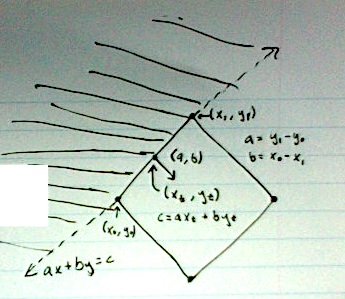
The shaded area is ax + by < c, implying it's outside the polygon, and the dashed line is ax + by = c.
(a,b) form a vector orthogonal to the line segment they represent pointing towards the inside of the polygon, so we can get them directly from the points defining the line segment by taking the vector defining the side — (x1 - x0, y1 - y0) — and rotating it 90 degrees, resulting in (a, b) = (y1 - y0, x0 - x1). Then we normalize (a, b) as the actual magnitude doesn't matter, but it will be 1 when we decode the angle and we can compensate with our choice of c later (if ax+by>c, then sax+sby>sc for some scale s>0). Then compute θ = atan2(a,b), quantize to one of our 94 angles, and get our new (a,b) = (cos(θ), sin(θ)).
c is easy to get by directly substituting any of the points making up the line on the side of the polygon into c = ax+by. I use the midpoint of the line segment on the side, (xt, yt) = ((x0 +x1)/2, (y0 + y1)/2), because the angle of the side can be slightly off after we quantize θ, and this evens the errors out across the length of the side.
You'll notice on the first couple frames (you can pause with ^S, resume with ^Q -- xon/xoff) that the bottom section of the 'Y' has little bites taken out of it due to the quantization error in the separating half-plane equations.
It could probably be made somewhat more efficient CPU-wise by careful reordering of the separating plane arrays so that most of the drawing area is rejected first. I didn't get to that in my generator code.
The animation is done by the <ESC>[25A sequence — it moves the cursor up 25 lines in just about any terminal emulation mode. I technically only need to move up 24 lines, but puts is shorter than printf and it implicitly adds a newline. If your terminal isn't at least 26 lines high, though, it does funky things to your scrollback. And usleep is there to limit it to 20fps, which is the only non-ANSI Cism about it.
And then I shrunk the code down by arranging it into clever for loops and taking unorthodox advantage of commas, conditionals, and globals being ints by default in C (which is all par for the course in obfuscated C code). And that pretty much reveals all the secrets as to how it was done.
It would be fairly easy to enhance this with a different movement sequence, or rotation (or any kind of 3D transform, as it's basically just ray-tracing the logo). I just animated the scale to prove the point that it was being rendered dynamically and not just a compressed logo, and kept the animation short and sweet.
I apologize in advance for the various sign errors I'm sure to have made when typing this up, but you get the idea.
Yahoo! Logo ASCII Animation in 462 bytes of C的更多相关文章
- booting logo & booting animation
開機第一張圖片: 圖片位置: linux_repo/vendor/mediatek/proprietary/bootable/bootloader/lk/dev/logo 因為 project 選用 ...
- 【C语言编程学习笔记】利用462字节代码实现雅虎logo ACSII 动画!
ACSII 动画演示: 不过本文介绍的是另一个作品:c 代码实现雅虎 logo ACSII 动图. 运行后,你将会看到: 它是一个 20fps.抗锯齿的 Yahoo! logo ASCII 动 ...
- 异常空格,ASCII (194,160)问题
今天运营的同学反映有一些店铺的名称后面带空格,我下意识的说不可能啊,我已经处理过了啊.然后就找出来看. 其中有个店铺的名称是“安踏 ”,第一眼看上去好像是带了个空格.然后我就仔细的看了下. pry(m ...
- 二进制;16进制; Byte , Python的bytes类; Base64数据编码; Bae64模块;
参考:中文维基 二进制 位操作(wiki) Byte字节 互联网数据处理:Base64数据编码 Python的模块Base64 16进制简介 python: bytes对象 字符集介绍:ascii 二 ...
- Python3中的bytes和str类型
Python 3最重要的新特性之一是对字符串和二进制数据流做了明确的区分.文本总是Unicode,由str类型表示,二进制数据则由bytes类型表示.Python 3不会以任意隐式的方式混用str和b ...
- Transact-SQL 数据类型转换
Syntax Syntax for CAST: CAST ( expression AS data_type [ ( length ) ] ) Syntax for CONVERT: CO ...
- python基础知识(四)
摘要:主要涉及lambda表达式.python内置函数(open文件重点).冒泡排序 一.lambda表达式 适用于创建简单函数,也叫匿名函数, 函数名 = lambda 参数 : 返回值 funct ...
- Python3使用urllib访问网页
介绍 改教程翻译自python官网的一篇文档. urllib.request是一个用于访问URL(统一资源定位符)的Python模块.它以urlopen函数的形式提供了一个非常简单的接口,可以访问使用 ...
- 初始python第三天(三)
全局变量与局部变量 1.什么是全局变量 在globals中的变量,都是全局变量,全局变量的作用域就是整个程序 NAME = 'alex' def global_test(): name = 'alex ...
随机推荐
- Socket知识总结
一.网络编程相关概念 1. 互联网通过ip定位电脑 2. 在电脑中通过port定位程序 3. 程序和程序之间通过协议定义通信数据格式 二.Socket相关概念 1. ip地址 1) 每台联网的电脑都有 ...
- java 网络API访问 web 站点
package cn.magicdu.think.socket; import java.io.BufferedReader; import java.io.InputStreamReader; im ...
- Android 获取天气预报
界面布局 <?xml version="1.0" encoding="utf-8"?> <LinearLayout xmlns:android ...
- Linux中Oracle数据库备份还原
一.备份Oracle数据库 1.使用数据库管理员账户登录 sqlplus system/system@orcl as sysdba; 2.创建备份目录,并指定备份目录(bak_dir)的物理路径 cr ...
- Objective-C 学习笔记(Day 3,上)
------------------------------------------- 类方法 ①类方法: + 开头的方法(定义的过程形式和对象方法一样,只不过 + 开头,这是唯一的 ...
- HTML5 Canvas 绘制时钟
网上会看到很多绘制的时钟,看代码也是云里雾里,自学了下Canvas,觉得不难,就自己做了一个. 先看一下截图: 比较简陋,但是该有的都有了,样式只加了个阴影. html代码就不贴了,就一个canvas ...
- php header示例代码(推荐)
<?php /*** Function: PHP header() examples (PHP) ** Desc: Some examples on how to use the header( ...
- 两种Ajax方法
两种Ajax方法 Ajax是一种用于快速创建动态网页的技术,他通过在后台与服务器进行少量的数据交换,可以实现网页的异步更新,不需要像传统网页那样重新加载页面也可以做到对网页的某部分作出更新,现在这项技 ...
- hdu 1576 A/B
原题链接:hdu 1576 A/B 同样是用扩展的欧几里得算法.A = 9973k+n = xB,从而转化为:xB-9973k=n求解x即可. 具体扩展欧几里得算法请参考:hdu 2669 Roman ...
- 网页中"IE限制网页访问脚本或ActiveX控件"的提示问题的解决方法
以前从来没有注意过"IE限制网页访问脚本或ActiveX控件"的提示问题,对于这个小细节问题,虽然感觉很别扭,但一直没考虑解决方法,今天才发现该问题可以轻松解决,以下做个小小记录. ...