
Angular 2 npm start 报错
首先, index.html 和styles.css是和app目录平级的, 不要扔到里面去, 否则会404
确认配置文件齐全, 路径都正确之后 npm start
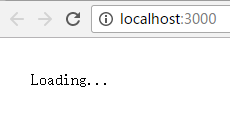
What?! 照着快速起步也会弄错吗? 人品问题吗?
很多人可能会看到npm报错:
$ npm start

> angular-quickstart@1.0. start F:\work\angular_quickstart\angular

> tsc && concurrently "tsc -w" "lite-server"

[] Did not detect a `bs-config.json` or `bs-config.js` override file. Using lite-server defaults...

[] ** browser-sync config **

[] { injectChanges: false,

[]   files: [ './**/*.{html,htm,css,js}' ],

[]   watchOptions: { ignored: 'node_modules' },

[]   server: { baseDir: './', middleware: [ [Function], [Function] ] } }

[] :: - Compilation complete. Watching for file changes.

[] [BS] Access URLs:

[]  --------------------------------------

[]        Local: http://localhost:3000

[]     External: http://192.168.155.1:3000

[]  --------------------------------------

[]           UI: http://localhost:3001

[]  UI External: http://192.168.155.1:3001

[]  --------------------------------------

[] [BS] Serving files from: ./

[] [BS] Watching files...

[] 16.11. ::  GET /index.html

[] 16.11. ::  GET /favicon.ico
除了404是上面说的文件摆放路径错误意外, 其实不需要care它的, 和正常启动应用无关, 属于npm版本相关问题, 此处不赘述。
重要的是console里面的log:

The module AppModule was bootstrapped, but it does not declare "@NgModule.bootstrap" components nor a "ngDoBootstrap" method. Please define one of these.
这句还是make sense的, 意思是
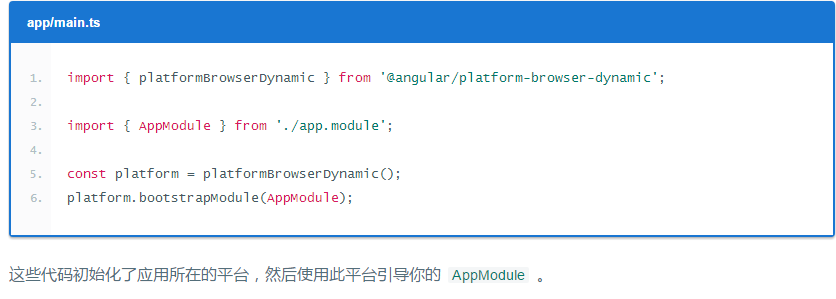
初始化的时候用的platform.bootstrapModule(), 却没有把bootstrap引用为[ AppComponent ]
问题就出在这里 
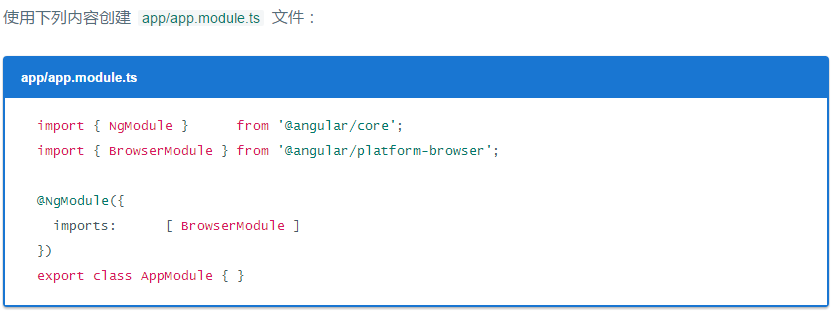
这里是应用的入口点。
由于 QuickStart 是运行在浏览器中的 Web 应用,所以根模块需要从
@angular/platform-browser中导入BrowserModule并添加到imports数组中。这是要让最小的应用在浏览器中运行时,对 Angular 的最低需求。
QuickStart 应用不做别的,也就先不需要其它模块。在真实的应用中,我们可能还得导入
FormsModule、RouterModule和HttpModule。这些会在 英雄指南教程中引入。
官方文档上给的最低需求,低到连它自己给出的index.html都显示不出来了...
我老眼昏花只用了最低配置, 而没有看到就在下面几行它其实又贴了一次这个文件:

这才是  要用的!
要用的!

You see, 改完这个文件以后应该就不会报错了, 最后的console应该变成这样:

Angular 2 npm start 报错的更多相关文章
- 执行npm install报错:npm ERR! code EINTEGRITY
命令行执行npm install报错如下: D:\frontend\viewsdev>npm install npm ERR! code EINTEGRITY npm ERR! sha512-8 ...
- npm install 报错:node-pre-gyp ERR! 问题解决
npm install报错问题解决 问题: E:\CodeSpace\GitlabTest\desktop>npm install > lifeccp-desktop@1.1.9 post ...
- vuejs npm chromedriver 报错
vuejs npm chromedriver 报错 # 全局安装 vue-cli$ npm install -g vue-cli# 创建一个基于 "webpack" 模板的新项 ...
- npm install 报错 error Unexpected end of JSON input while parsing near '...sShrinkwrap":false,"d' 解决办法
npm install 报错 : error Unexpected end of JSON input while parsing near '...sShrinkwrap":false,& ...
- 执行命令npm publish报错:403 Forbidden - PUT https://registry.npmjs.org/kunmomotest2 - You cannot publish over the previously published versions: 0.0.1.
前言 执行命令npm publish报错:403 Forbidden - PUT https://registry.npmjs.org/kunmomotest2 - You cannot publis ...
- 执行npm publish 报错:403 Forbidden - PUT https://registry.npmjs.org/kunmomotest - you must verify your email before publishing a new package: https://www.npmjs.com/email-edit
前言 执行npm publish 报错:403 Forbidden - PUT https://registry.npmjs.org/kunmomotest - you must verify you ...
- 执行npm publish 报错:401 Unauthorized - PUT https://registry.npmjs.org/kunmomotest - You must be logged in to publish packages.
前言 执行npm publish 报错:401 Unauthorized - PUT https://registry.npmjs.org/kunmomotest - You must be logg ...
- npm启动报错
npm 启动报错 event.js 160 报错原因: 端口号被占用 解决方法: 1.重新定义一个端口号. 2.任务管理器关掉node进程,重新运行npm.
- npm -v 报错:Error: EPERM: operation not permitted, mkdir 'C:\soft\nodejs'
npm -v 报错:Error: EPERM: operation not permitted, mkdir 'C:\soft\nodejs' 起因:原本安装node在C盘soft文件夹下,按node ...
随机推荐
- mybatis0203 一对一查询 resultMap实现
resultType实现的时候先要确定po类(数据库类)满不满足要求,如果不满足就要自定义一个pojo类(工具类). resultMap提供一对一关联查询的映射和一对多关联查询映射,一对一映射思路:将 ...
- 非常全面的java基础笔试题
下面是java基础笔试题,当时我去笔试,做了1个小时(80道选择题,后面的简答题就没时间做了),结果很吓人,太挫了,最后被面试官忽悠去培训去了,呵呵.我偷偷把面试题弄了下来,用来学习吧,也希望能对你们 ...
- j2ee学习笔记URLEncoder.encode(String , enc)处理特殊字符
从页面上传递数据时,特殊字符对于超链接会自动进行解码 : 其他方式需要手动进行解码.
- 加密算法 DES 3DES RSA AES 简介
数据加密的基本过程就是对原来为明文的文件或数据按某种算法进行处理,使其成为不可读的一段代码,通常称为[密文],使其只能在输入相应的[密钥]之后才能显示出本来内容,通过这样的途径来达到保护数据不被非法人 ...
- php5魔术函数、魔术常量
魔术函数 1.__construct() 实例化对象时被调用, 当__construct和以类名为函数名的函数同时存在时,__construct将被调用,另一个不被调用. 2.__destruct ...
- PHP 内存的分布问题
php运行,内存分为5个区域, 1.基本数据类型--->栈区 2.符合数据类型-->堆区 对象实例在堆区,对象名字在栈区(指向此对象实例的变量)
- 学习java随笔第三篇:java的基本数据类型
数据类型 一:整型 1.十进制 2.八进制 八进制数是满8进1,包含0~7的8个数字,在整数前面添加一个"0",表示是八进制数. 3.十六进制 十六进制数是满16进1,包含0~9, ...
- 字符编码笔记:ASCII、Unicode、UTF-8、UTF-16、UCS、BOM、Endian
转载:http://witmax.cn/character-encoding-notes.html 今天中午,我突然想搞清楚Unicode和UTF-8之间的关系,于是就开始在网上查资料. 结果,这个问 ...
- ios 添加通用断点定位到异常点
今天下午项目突然异常崩溃,因为代码没有多少结构改动,恢复旧版本还是不行,判定为网络获取信息异常,无奈从网络获取的信息太多,搞了很久后发现有个通用异常断点很好用,新手就是新手,浪费时间了.
- C#输出40以内的所有奇数程序代码
using System; using System.Collections.Generic; using System.Linq; using System.Text; namespace Cons ...