
autotools使用
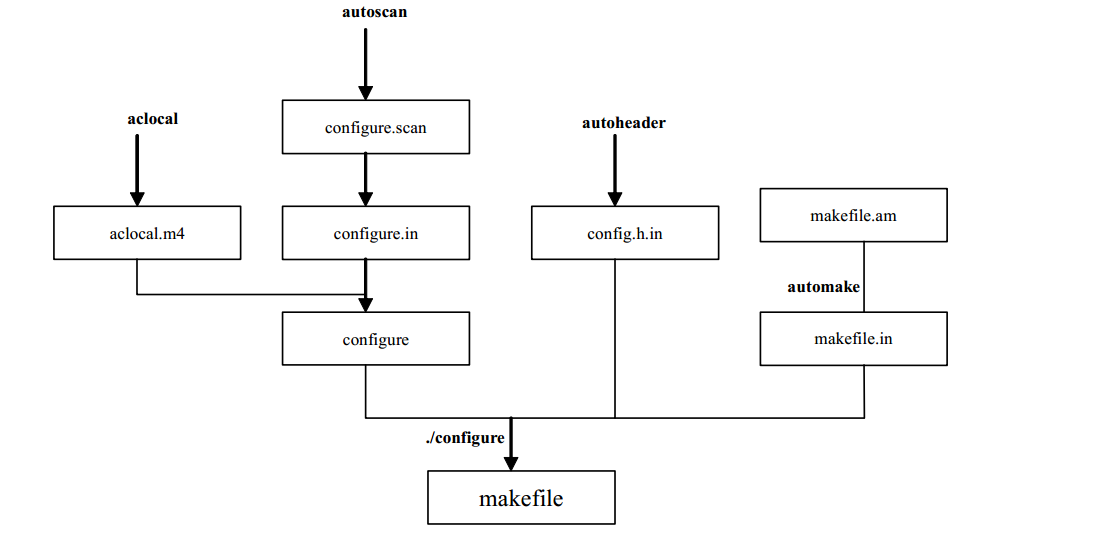
autotools制作makefile
下面以hello.c来说明生成makefile的过程。
基本步骤如下:
1)autoscan命令生成configure.scan文件,重命名configure.scan,并修改
2)aclocal命令生成aclocal.m4
3)autoconf命令生成configure
4)新建文件Makefile.am,执行automake命令生成Makefile.in文件
5)运行configure命令生成Makefile
具体步骤如下:
1. 先用which命令确认系统是否安装了以下工具
aclocal
autoscan
autoconf
autoheader
automake
2. 新建目录hello,cd hello, 编写hello.c
3. 执行命令 autoscan, 会生成configuer.scan和autoscan.log
autoscan.log configure.scan hello.c
4. 将configure.scan重命名为configure.in,并编辑。
# -*- Autoconf -*-

# Process this file with autoconf to produce a configure script.

#AC_PREREQ([2.69])

AC_INIT(hello, 1.0, xxxx@xxxx.cn)

AM_INIT_AUTOMAKE(hello, 1.0, xxxx@xxxx.cn)   -----------这里是AM,不是AC

#AC_CONFIG_SRCDIR([hello.c])

#AC_CONFIG_HEADERS([config.h])

# Checks for programs.

AC_PROG_CC

# Checks for libraries.

# Checks for header files.

# Checks for typedefs, structures, and compiler characteristics.

# Checks for library functions.

AC_OUTPUT(Makefile)

说明:
AC_PREREQ 宏声明本文件要求的 autoconf 版本
AC_INIT(FULL-PACKAGE-NAME,VERSION,BUG-REPORT-ADDRESS) ,用来定义软件的名称和版本等信息 ,第三个参数一般为作者的Email
AM_INIT_AUTOMAKE,是automake必备的宏,使automake自动生成makefile.in
AC_CONFIG_SRCDIR, 用来检查所指定的源码文件是否存在,以及确定源码目录的有效性。在此处源码文件为当前目录下的hello,c
AC_CONFIG_HEADER,用于生产config.h文件,以便autoheader使用
AC_CONFIG_FILES, 用于生成对应的Makefile文件。
5. 执行命令aclocal,生成aclocal.m4和autom4te.cache文件。
aclocal: warning: autoconf input should be named 'configure.ac', not 'configure.in' ----不用理会
-> ls
aclocal.m4 autom4te.cache autoscan.log configure.in hello.c
6. 执行命令autocon,生成configure文件
-> ls

aclocal.m4  autom4te.cache  autoscan.log  configure  configure.in  hello.c
7. 新建Makefile.am文件
AUTOMAKE_OPTIONS=foreign

bin_PROGRAMS=hello

hello_SOURCES=hello.c

其中:
AUTOMAKE_OPTIONS, 为设置automake的选项。GNU 对自己发布的软件有严格的规范,
比如必须附带许可证声明文件 COPYING 等,否则 automake 执行时会报错。 automake 提供了 3
种软件等级: foreign、 gnu 和 gnits,让用户选择采用,默认等级为 gnu。在本示例中采用 foreign
等级,它只检测必须的文件。


bin_PROGRAMS,定义要产生的执行文件名。如果要产生多个执行文件,每个文件名用空格隔开
hello_SOURCES,定义hello可执行文件所需要的原始文件。如果“hello”这个程序是由多个
原始文件所产生的,则必须把它所用到的所有原始文件都列出来,并用空格隔开。例如:若目标
体“hello”需要“hello.c”、“david.c”、“hello.h”三个依赖文件,则定义 hello_SOURCES=hello.c david.c
hello.h。要注意的是 ,如果要定义多个执行文件 ,则对每个执行程序都要定义相应的
file_SOURCES。
8. 执行命令automake --add-missing,生成Makefile.in文件
automake -a或者automake --add-missing,可以让automake自动添加一些必须的脚本文件。
automake: warning: autoconf input should be named 'configure.ac', not 'configure.in'

configure.in:: warning: AM_INIT_AUTOMAKE: two- and three-arguments forms are deprecated.  For more info, see:

configure.in:: http://www.gnu.org/software/automake/manual/automake.html#Modernize-AM_005fINIT_005fAUTOMAKE-invocation

configure.in:: installing './compile'

configure.in:: installing './install-sh'

configure.in:: installing './missing'

Makefile.am: installing './depcomp'

automake: warning: autoconf input should be named 'configure.ac', not 'configure.in'

注:在这个地方有可能会提示config.h.in未找到,先运行一下autoheader,再运行automake --add-missing

-> ls
aclocal.m4 autoscan.log configure depcomp install-sh Makefile.in
autom4te.cache compile configure.in hello.c Makefile.am missing
注:zutoheader命令,负责生成config.h文件。该工具通常会从acconfig.h文件中复制用户附加的符号定义,因为这里没有附加符号定义,所以不需要创建acconfig.h文件。
9. 执行命令 ./configure,生成Makefile
root@localhost:autotools# ./configure

checking for a BSD-compatible install... /usr/bin/install -c

checking whether build environment is sane... yes

checking for a thread-safe mkdir -p... /bin/mkdir -p

checking for gawk... gawk

checking whether make sets $(MAKE)... yes

checking whether make supports nested variables... yes

checking for gcc... gcc

checking whether the C compiler works... yes

checking for C compiler default output file name... a.out

checking for suffix of executables...

checking whether we are cross compiling... no

checking for suffix of object files... o

checking whether we are using the GNU C compiler... yes

checking whether gcc accepts -g... yes

checking for gcc option to accept ISO C89... none needed

checking whether gcc understands -c and -o together... yes

checking for style of include used by make... GNU

checking dependency style of gcc... gcc3

checking that generated files are newer than configure... done

configure: creating ./config.status

config.status: creating Makefile

config.status: executing depfiles commands

root@localhost:autotools# ls

aclocal.m4      autoscan.log  config.log     configure     depcomp  install-sh  Makefile.am  missing

autom4te.cache  compile       config.status  configure.in  hello.c  Makefile    Makefile.in
10. 执行命令make all,即可生成对应的hello可执行程序。
make install ---把该程序安装到系统中
make clean --清除编译生成的可执行文件和目标文件
make dist --将程序和相关文档打包成一个压缩文档,以便发布
具体流程如下图所示
autotools使用的更多相关文章
- 在 Linux 中使用 Eclipse 和 Gnu Autotools 管理 C/C++ 项目
在我该系列的之前的所有随笔中,都是采用 Linux 发行版自带的包管理工具(如 apt-get.yum 等)进行软件的安装和卸载,从来没有向大家展示使用源代码自行编译安装软件的方法.但是长期混迹于 U ...
- C/C++ makefile自动生成工具(comake2,autotools,linux),希望能为开源做点微薄的贡献!
序 在linux下C或C++项目开发,Makefile是必备的力气,但是发现手写很麻烦. 在百度有个comake2工具,用于自动生成Makefile工具,而在外边本想找一个同类工具,但发现 ...
- 使用autotools系列工具自动部署源代码编译安装
在Linux系统下开发一个较大的项目,完全手动建立Makefile是一件费力而又容易出错的工作.autotools系列工具只需用户输入简单的目标文件.依赖文件.文件目录等就可以比较轻松地生成Makef ...
- Linux Autotools
/********************************************************************** * Linux Autotools * 说明: * 我们 ...
- GNU Autotools的研究(转)
最近对Linux下软件项目的构建过程研究了一番.Linux下的软件项目通常用Autotools工具集和make工具来构建,我们通常使用./configure.make.make install这样的命 ...
- 如何使用autotools生成Makefile
安装autotools工具sudo apt-get install autoconf 一,四个代码文件init.s lcd.c addr.h uart.c 二,命令:autoscan 三,命令:vi ...
- Makefile自动生成工具-----autotools的使用(详细)
相信每个学习Linux的人都知道Makefile,这是一个很有用的东西,但是编写它是比较复杂,今天介绍一个它的自动生成工具,autotools的使用.很多GNULinux的的软件都是用它生成Makef ...
- autotools入门笔记(一)
GNU autotools作用:收集系统配置信息并自动生成Makefile文件. GNU autotools主要包括三个工具:autoconf.automake.libtool,还有很多辅助的工具,包 ...
- autotools归纳
最近接触到许多linux项目,其编译都是使用的autotools. autotools是一个自动化的编译工具.个人理解它的最主要功能就是生成Makefile. 因为直接写Makefiel,其依赖关系还 ...
- GNU autotools自动生成Makefile 介绍
一.目的 使用autotools工具来帮助我们自动地生成符合自由软件惯例的makefile(这样就可以像常见的GNU程序一样,只要使用"./configure", "ma ...
随机推荐
- (一)python 格式化 excel 格式
需求: 客户通过 sftp 上传了一个 poc测试的 excel文件, 下到 云桌面 查看,发现一堆格式问题, 怎么办呢? 公司又不允许 吧文件下载到本地处理, 只能在 服务器上进行处理. 一堆的类型 ...
- PDOStatement::fetch
PDOStatement::fetch — 从结果集中获取下一行(PHP 5 >= 5.1.0, PECL pdo >= 0.1.0) 说明 语法 mixed PDOStatement:: ...
- 转)JVM Internals
http://blog.jamesdbloom.com/JVMInternals.html (基于 Java 7)
- explain关键字使用解释
原文: 58沈剑 架构师之路 https://mp.weixin.qq.com/s/oWNrLHwqM-0ObuYbuGj98A <数据库允许空值,往往是悲剧的开始>一文通过explai ...
- “随手记”开发记录day04
今天完成了添加收入和支出的页面,其实挺简单的就是里面的那个图表有些难搞,你得把每个图标和文字对应起来 挺费事的 话不多说,上效果 其中点击旋转按钮转换收入支出是我们找了好久才找出来这个方法的,太不容易 ...
- Nginx.conf参数配置详解
Nginx的配置文件nginx.conf配置详解如下: user nginx nginx; #Nginx用户及组:用户 组.window下不指定 worker_processes 8; #工作进程:数 ...
- windows 下部署 .netcore 到 windows service
接上一篇 <windows 下部署 .netcore 到 iis>,这一篇记录一下怎么将 Asp.Net Core 以 windows 服务的方式部署. 一.修改代码 其实也很简单,只要调 ...
- C语言学习笔记之数组与指针的关系
首先,大家先需知道一个关于基类型的概念 基类型:组成一个新类型的基础类型 这句话是什么意思呢?举个例子: int a[3] = {1,2,3}; 上面是由三个int类型的数组成一个新的类型也就是数组, ...
- pageHelper使用时的注意点
1 在pom.xml中导入相关的依赖(注意版本问题,报错十有八九是因为版本问题) <dependency> <groupId>com.github.pagehelper< ...
- Hive操作——删除表(drop、truncate)
Hive删除操作主要分为几大类:删除数据(保留表).删除库表.删除分区. 一.仅删除表中数据,保留表结构 hive> truncate table 表名; truncate操作用于删除指定表中的 ...