
spring boot:redis+lua实现生产环境中可用的秒杀功能(spring boot 2.2.0)
一,秒杀需要具备的功能:
秒杀通常是电商中用到的吸引流量的促销活动方式
搭建秒杀系统,需要具备以下几点:
1,限制每个用户购买的商品数量,(秒杀价格为吸引流量一般会订的很低,不能让一个用户全部抢购到手)
2,处理速度要快,避免在高并发的情况下发生堵塞
3,高并发情况下,不能出现库存超卖的情况
因为redis中对lua脚本执行的原子性,不会出现因高并发而导致数据查询的延迟
所以我们选择使用redis+lua来实现秒杀的功能
例子:如果同一个秒杀活动中有多件商品,而有人用软件刷接口的方式来下单,
这时就需要有针对当前活动的购买数量限制
说明:刘宏缔的架构森林是一个专注架构的博客,地址:https://www.cnblogs.com/architectforest
对应的源码可以访问这里获取: https://github.com/liuhongdi/
说明:作者:刘宏缔 邮箱: 371125307@qq.com
二,本演示项目的相关信息
1,项目地址:
https://github.com/liuhongdi/seconddemo
2,项目原理:
在秒杀项目开始前,要把sku及其库存数同步到redis中,
有秒杀请求时,判断商品库存数,
判断用户已购买的同一sku数量,
判断用户已购买的同一秒杀活动中的商品数量,
如果以上两个数量大于0时,需要进行限制
如有问题时,返回秒杀失败
都没有问题时,减库存,返回秒杀成功
要注意的地方:
秒杀前要获取此活动中的对购买活动/sku的数量限制
秒杀成功后,如果用户未支付导致订单过期恢复库存时,redis中的库存数也要同步
3,项目结构:
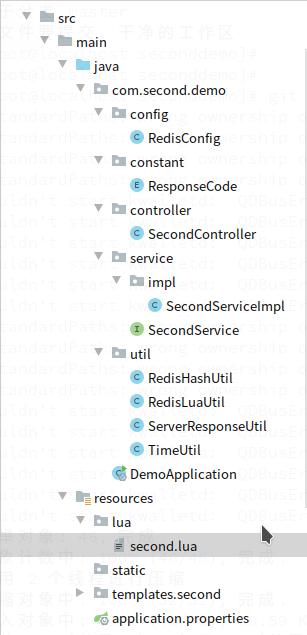
三,lua代码说明
1,second.lua
local userId = KEYS[1]

local buyNum = tonumber(KEYS[2])

local skuId = KEYS[3]

local perSkuLim = tonumber(KEYS[4])

local actId = KEYS[5]

local perActLim = tonumber(KEYS[6])

local orderTime = KEYS[7]

--用到的各个hash

local user_sku_hash = 'sec_'..actId..'_u_sku_hash'

local user_act_hash = 'sec_'..actId..'_u_act_hash'

local sku_amount_hash = 'sec_'..actId..'_sku_amount_hash'

local second_log_hash = 'sec_'..actId..'_log_hash'

--当前sku是否还有库存

local skuAmountStr = redis.call('hget',sku_amount_hash,skuId)

if skuAmountStr == false then

        --redis.log(redis.LOG_NOTICE,'skuAmountStr is nil ')

        return '-3'

end;

local skuAmount = tonumber(skuAmountStr)

 --redis.log(redis.LOG_NOTICE,'sku:'..skuId..';skuAmount:'..skuAmount)

 if skuAmount <= 0 then

   return '0'

end

redis.log(redis.LOG_NOTICE,'perActLim:'..perActLim)

local userActKey = userId..'_'..actId

--当前用户已购买此活动多少件

 if perActLim > 0 then

   local userActNumInt = 0

   local userActNum = redis.call('hget',user_act_hash,userActKey)

   if userActNum == false then

      --redis.log(redis.LOG_NOTICE,'userActKey:'..userActKey..' is nil')

      userActNumInt = buyNum

   else

      --redis.log(redis.LOG_NOTICE,userActKey..':userActNum:'..userActNum..';perActLim:'..perActLim)

      local curUserActNumInt = tonumber(userActNum)

      userActNumInt =  curUserActNumInt+buyNum

   end

   if userActNumInt > perActLim then

       return '-2'

   end

 end

local goodsUserKey = userId..'_'..skuId

--redis.log(redis.LOG_NOTICE,'perSkuLim:'..perSkuLim)

--当前用户已购买此sku多少件

if perSkuLim > 0 then

   local goodsUserNum = redis.call('hget',user_sku_hash,goodsUserKey)

   local goodsUserNumint = 0

   if goodsUserNum == false then

      --redis.log(redis.LOG_NOTICE,'goodsUserNum is nil')

      goodsUserNumint = buyNum

   else

      --redis.log(redis.LOG_NOTICE,'goodsUserNum:'..goodsUserNum..';perSkuLim:'..perSkuLim)

      local curSkuUserNumint = tonumber(goodsUserNum)

      goodsUserNumint =  curSkuUserNumint+buyNum

   end

   --redis.log(redis.LOG_NOTICE,'------goodsUserNumint:'..goodsUserNumint..';perSkuLim:'..perSkuLim)

   if goodsUserNumint > perSkuLim then

       return '-1'

   end

end

--判断是否还有库存满足当前秒杀数量

if skuAmount >= buyNum then

     local decrNum = 0-buyNum

     redis.call('hincrby',sku_amount_hash,skuId,decrNum)

     --redis.log(redis.LOG_NOTICE,'second success:'..skuId..'-'..buyNum)

     if perSkuLim > 0 then

         redis.call('hincrby',user_sku_hash,goodsUserKey,buyNum)

     end

     if perActLim > 0 then

         redis.call('hincrby',user_act_hash,userActKey,buyNum)

     end

     local orderKey = userId..'_'..skuId..'_'..buyNum..'_'..orderTime

     local orderStr = '1'

     redis.call('hset',second_log_hash,orderKey,orderStr)

   return orderKey

else

   return '0'

end
2,功能说明:
--用到的各个参数
local userId 用户id
local buyNum 用户购买的数量
local skuId 用户购买的sku
local perSkuLim 每人购买此sku的数量限制
local actId 活动id
local perActLim 此活动中商品每人购买数量的限制
local orderTime 下订单的时间
--用到的各个hash
local user_sku_hash 每个用户购买的某一sku的数量
local user_act_hash 每个用户购买的某一活动中商品的数量
local sku_amount_hash sku的库存数
local second_log_hash 秒杀成功的记录
判断的流程:
判断商品库存数,
判断用户已购买的同一sku数量,
判断用户已购买的同一秒杀活动中的商品数量
四,java代码说明:
1,SecondServiceImpl.java
功能:传递参数,执行秒杀功能
 /*

    * 秒杀功能,

    * 调用second.lua脚本

    * actId:活动id

    * userId:用户id

    * buyNum:购买数量

    * skuId:sku的id

    * perSkuLim:每个用户购买当前sku的个数限制

    * perActLim:每个用户购买当前活动内所有sku的总数量限制

    * 返回:

    * 秒杀的结果

    *  * */

    @Override

    public String skuSecond(String actId,String userId,int buyNum,String skuId,int perSkuLim,int perActLim) {

        //时间字串,用来区分秒杀成功的订单

        int START = 100000;

        int END = 900000;

        int rand_num = ThreadLocalRandom.current().nextInt(END - START + 1) + START;

        String order_time = TimeUtil.getTimeNowStr()+"-"+rand_num;

        List<String> keyList = new ArrayList();

        keyList.add(userId);

        keyList.add(String.valueOf(buyNum));

        keyList.add(skuId);

        keyList.add(String.valueOf(perSkuLim));

        keyList.add(actId);

        keyList.add(String.valueOf(perActLim));

        keyList.add(order_time);

        String result = redisLuaUtil.runLuaScript("second.lua",keyList);

        System.out.println("------------------lua result:"+result);

        return result;

    }
2,RedisLuaUtil.java
功能:负责调用lua脚本的类
@Service

public class RedisLuaUtil {

    @Resource

    private StringRedisTemplate stringRedisTemplate;

    private static final Logger logger = LogManager.getLogger("bussniesslog");

    /*

    run a lua script

    luaFileName: lua file name,no path

    keyList: list for redis key

    return other: fail

           1: success

    */

    public String runLuaScript(String luaFileName,List<String> keyList) {

        DefaultRedisScript<String> redisScript = new DefaultRedisScript<>();

        redisScript.setScriptSource(new ResourceScriptSource(new ClassPathResource("lua/"+luaFileName)));

        redisScript.setResultType(String.class);

        String result = "";

        String argsone = "none";

        //logger.error("开始执行lua");

        try {

            result = stringRedisTemplate.execute(redisScript, keyList,argsone);

        } catch (Exception e) {

            logger.error("发生异常",e);

        }

        return result;

    }

}
五,测试秒杀的效果
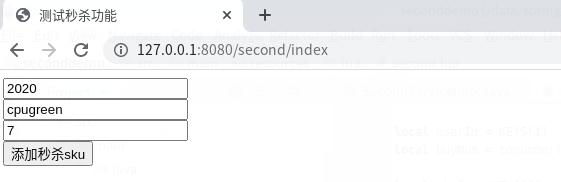
1,访问:http://127.0.0.1:8080/second/index
添加库存
如图:
2,配置jmeter开始测试:
参见这一篇:
https://www.cnblogs.com/architectforest/p/13087798.html
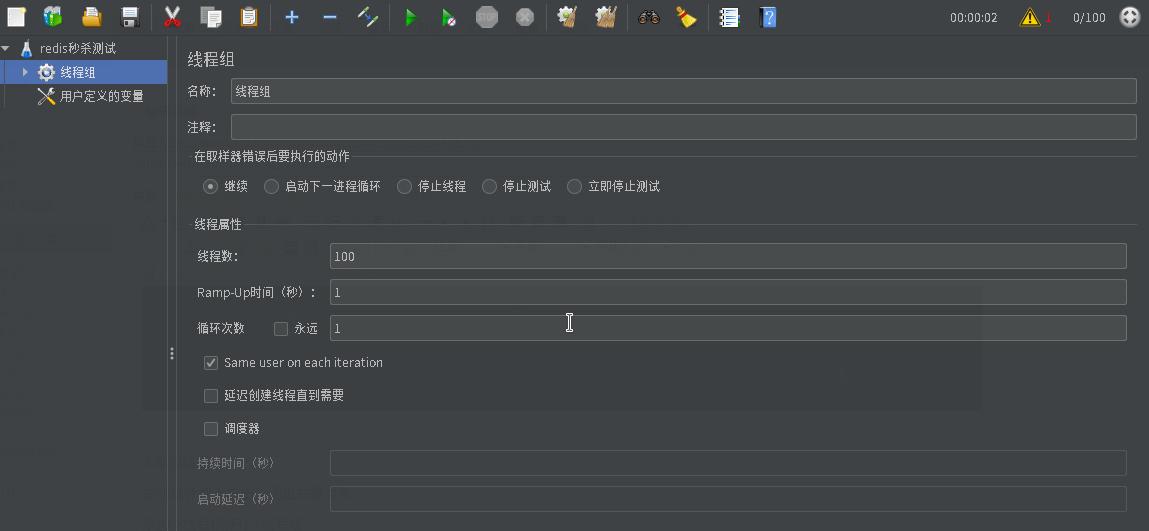
定义测试用到的变量:

定义线程组数量为100
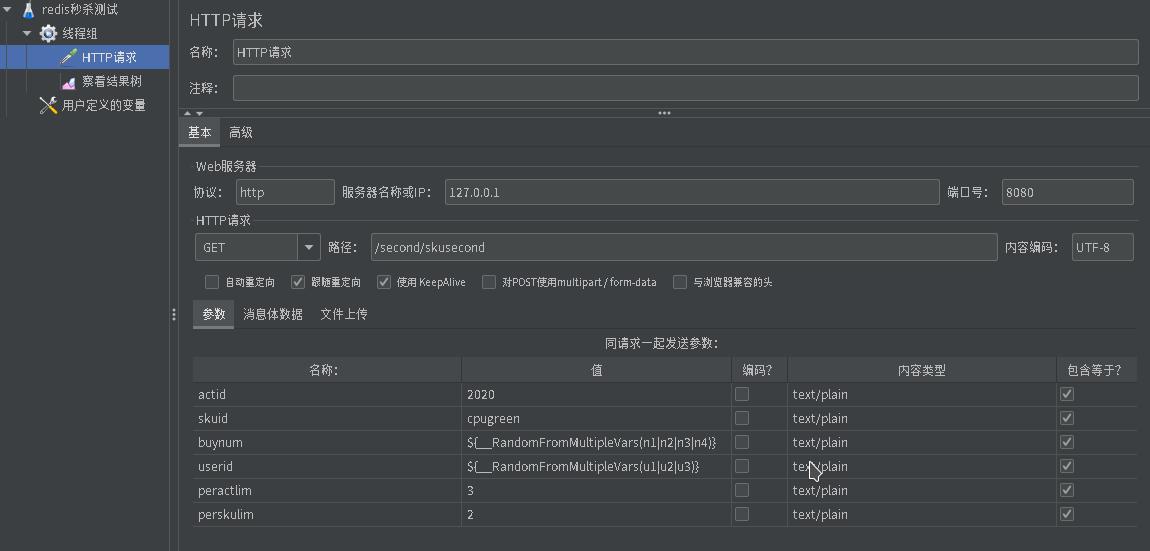
定义http请求:
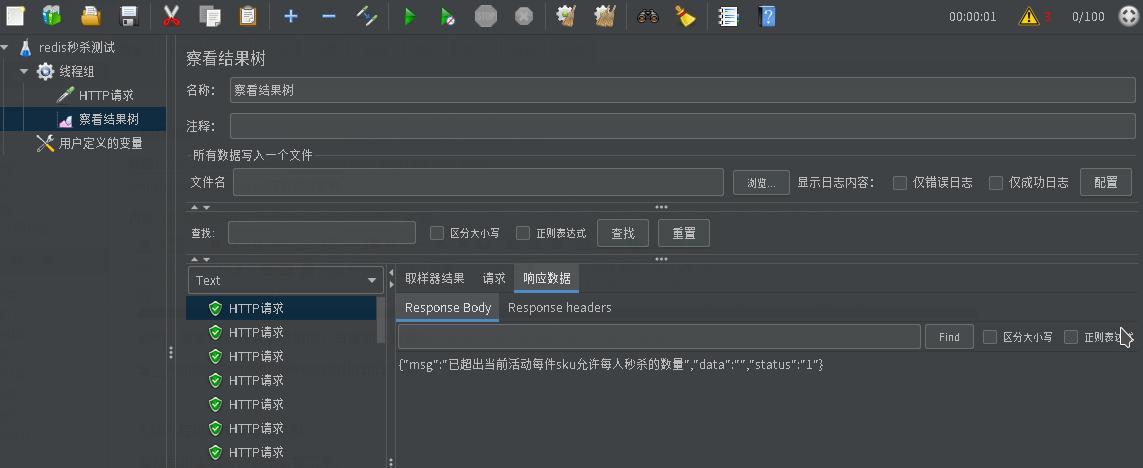
在查看结果树中查看结果:
3,查看代码中的输出:
------------------lua result:u3_cpugreen_1_20200611162435-487367

------------------lua result:-2

------------------lua result:u1_cpugreen_2_20200611162435-644085

------------------lua result:u3_cpugreen_1_20200611162435-209653

------------------lua result:-1

------------------lua result:u2_cpugreen_1_20200611162434-333603

------------------lua result:-1

------------------lua result:-2

------------------lua result:-1

------------------lua result:u2_cpugreen_1_20200611162434-220636

------------------lua result:-2

------------------lua result:-1

...
每个用户的购买数量均未超过2单,秒杀的限制成功
六,查看spring boot的版本:
  .   ____          _            __ _ _

 /\\ / ___'_ __ _ _(_)_ __  __ _ \ \ \ \

( ( )\___ | '_ | '_| | '_ \/ _` | \ \ \ \

 \\/  ___)| |_)| | | | | || (_| |  ) ) ) )

  '  |____| .__|_| |_|_| |_\__, | / / / /

 =========|_|==============|___/=/_/_/_/

 :: Spring Boot ::        (v2.2.0.RELEASE)
spring boot:redis+lua实现生产环境中可用的秒杀功能(spring boot 2.2.0)的更多相关文章
- spring boot:redis+lua实现顺序自增的唯一id发号器(spring boot 2.3.1)
一,为什么需要生成唯一id(发号器)? 1,在分布式和微服务系统中, 生成唯一id相对困难, 常用的方式: uuid不具备可读性,作为主键存储时性能也不够好, mysql的主键,在分库时使用不够方便, ...
- Spring Boot 利用 nginx 实现生产环境的伪热更新
当我们在服务器部署Java程序,特别是使用了 Spring Boot 生成单一 Jar 文件部署的时候,单一文件为我们开发单来的极大的便利性,保障程序的完整性.但同时对我们修改程序中的任何一处都带来重 ...
- 13.生产环境中的 redis 是怎么部署的?
作者:中华石杉 面试题 生产环境中的 redis 是怎么部署的? 面试官心理分析 看看你了解不了解你们公司的 redis 生产集群的部署架构,如果你不了解,那么确实你就很失职了,你的 redis 是主 ...
- Kubernetes 在生产环境中常用架构
Kubernetes 在生产环境中常用架构 首先,我们来梳理下Kubernetes生产架构,其设计适用于绝大多数环境.如下图所示 在该架构中,我们可以将其分为四层,如下: Client层:即Kuber ...
- 明白生产环境中的jvm参数
明白生产环境中的jvm参数 写代码的时候,程序写完了,发到线上去运行,跑一段时间后,程序变慢了,cpu负载高了--一堆问题出来了,所以了解一下生产环境的机器上的jvm配置是有必要的.比如说: JDK版 ...
- 生产环境中 Ngx_lua 使用技巧和应用的范例
生产环境中 Ngx_lua 使用技巧和应用的范例 时间 -- :: 51CTO技术博客 原文 http://rfyiamcool.blog.51cto.com/1030776/1252501 主题 L ...
- 生产环境中使用Docker Swarm的一些建议
译者按: 实践中会发现,生产环境中使用单个Docker节点是远远不够的,搭建Docker集群势在必行.然而,面对Kubernetes, Mesos以及Swarm等众多容器集群系统,我们该如何选择呢?它 ...
- 生产环境中tomcat的配置
生产环境中要以daemon方式运行tomcat 通常在开发环境中,我们使用$CATALINA_HOME/bin/startup.sh来启动tomcat, 使用$CATALINA_HOME/bin/sh ...
- Kubernetes用户指南(三)--在生产环境中使用Pod来工作、管理部署
一.在生产环境中使用Pod来工作 本节将介绍一些在生产环境中运行应用非常有用的功能. 1.持久化存储 容器的文件系统只有当容器正常运行时有效,一旦容器奔溃或者重启,所有对文件系统的修改将会丢失,从一个 ...
随机推荐
- pycharm写的代码提交到git上,提示需要merge失败时解决办法
当遇到pycharm代码提交需要合并报错时 原因:pycharm目录和git中目录冲突了 解决办法:1.先在git仓库中创建一个文件夹,比如day1 2.然后在pycharm中update一下,可以看 ...
- linux 信号机制
文章目录 1. 实时信号非实时信号 2. 信号状态: 3. 信号生命周期: 4. 信号的执行和注销 信号掩码和信号处理函数的继承 信号处理函数的继承 信号掩码的继承 sigwait 与多线程 sigw ...
- JVM强引用、软引用、弱引用、虚引用、终结器引用垃圾回收行为总结
JVM引用 我们希望能描述这样一类对象: 当内存空间还足够时,则能保留在内存中:如果内存空间在进行垃圾收集后还是很紧张,则可以抛弃这些对象. -[既偏门又非常高频的面试题]强引用.软引用.弱引用.虚引 ...
- Debian、kali类虚拟机网络设置
Linux发行版分类 先说一下Linux发行版的分类,因为不同的发行版,各自设置的网络的方式就不相同, - 我常用的Linux发行版 -- Debian --- debian --- ubuntu - ...
- hystrix(6) 命令执行
上一节中讲到了HystrixCommand有四种执行方法,这一节就来讲一下这四种方法直接的关系以及他们的实现. execute方法使用同步方式获取结果,本质是调用了queue方法获取了一个Future ...
- ftp客户端自动同步 Windows系统简单操作ftp客户端自动同步
服务器管理工具它是一款功能强大的服务器集成管理器,包含win系统和linux系统的批量连接,vnc客户端,ftp客户端等等实用功能.我们可以使用这款软件的ftp客户端定时上传下载的功能来进实现ftp客 ...
- SpringBoot-03-配置之yaml语法学习
3. SpringBoot配置 3.1 yaml语法学习 配置文件 Springboot使用一个全局的配置文件,配置文件名称固定 spplication.properties 语法结构:key=val ...
- 基于bellman-ford算法使用队列优化的spfa求最短路O(m),最坏O(n*m)
acwing851-spfa求最短路 #include<iostream> #include<cstring> #include<algorithm> #inclu ...
- 正则表达式基础(Regular Expression)
正则表达式简介 n 为什么需要正则表达式? q 文本的复杂处理. n 正则表达式的优势和用途? q 一种强大而灵活的文本处理工具: q 提供了一种紧凑的.动态的方式,能够以一种完全通用的方式 ...
- (转)Java中的值传递和引用传递
Java中的值传递和引用传递 当一个对象被当作参数传递到一个方法后,此方法可改变这个对象的属性,并可返回变化后的结果,那么这里到底是值传递还是引用传递? 答:是值传递.Java 编程语言只有值 ...