
python装饰器基础及应用
一、简介
装饰器是是修改其它函数功能的函数;其意义是让其他函数在不修改任何代码的前提下增加额外功能
二、数据类型

首先我们来看一段简单的代码:
from types import MethodType,FunctionType

class A(object):

    def f1(self):

        pass

def f2(a, b):

    return a + b

if __name__ == '__main__':

    a = A()

    print(type(a.f1))   #<class 'method'>

    print(type(f2))    #<class 'function'>
结论:不难看出,f1的类型是方法,f2的类型是函数;那有人会问了解这个有啥作用呢?其实了解这个有助于我们下面了解装饰器的原理
三、认识装饰器:

let's go... 我们来看一个案例:
def B():

    print("now you are inside the B() function")

    def sing():

        return "now you are in the sing() function"

    def eat():

        return "now you are in the eat() function"

    def sleep():

        return "now you are in the sleep() function"

    print(sing())

    print(eat())

    print(sleep())
#输出的结果为:

now you are inside the hi() function

now you are in the sing() function

now you are in the eat() function

now you are in the sleep() function
结论:那现在我们知道了可以在函数中定义另外的函数。也就是说:我们可以创建嵌套的函数
我们再接着看一段代码,如何让函数作为参数传给另外一个函数的:
def A():

    return "hi 小陈!"

def doSomethingBeforeA(func):

    print("I am doing some boring work before executing A()")

    print(func())

#执行:

doSomethingBeforeA(A)
#输出结果:

I am doing some boring work before executing A()

hi 小陈!
什么?你还没看懂,那我们再看一个案例:

from types import FunctionType

def text():

    return "Hello world!"

def add_itali(func: FunctionType):

    def new_func():

        #print("now you are in the new_func() function")

        return text()   #返回text()函数

    return new_func
#执行:

print(type(add_itali(text)))

print(add_itali(text)())
#输出结果:

<class 'function'>

Hello world!
难么现在你看懂了么?如果还是没懂,没关系我们再来看看下一段代码:
def new_decorator(func):

    def wrapTheFunction():

        print("I am doing some boring work before executing func()")

        func()

        print("I am doing some boring work after executing func()")

    return wrapTheFunction

def requiring_decoration():

    print("I am the function which needs  decoration")
#执行:

requiring_decoration()

#输出结果:

I am the function which needs  decoration
#执行:

new_decorator(requiring_decoration)()

#输出结果:

I am doing some boring work before executing func()

I am the function which needs  decoration

I am doing some boring work after executing func()
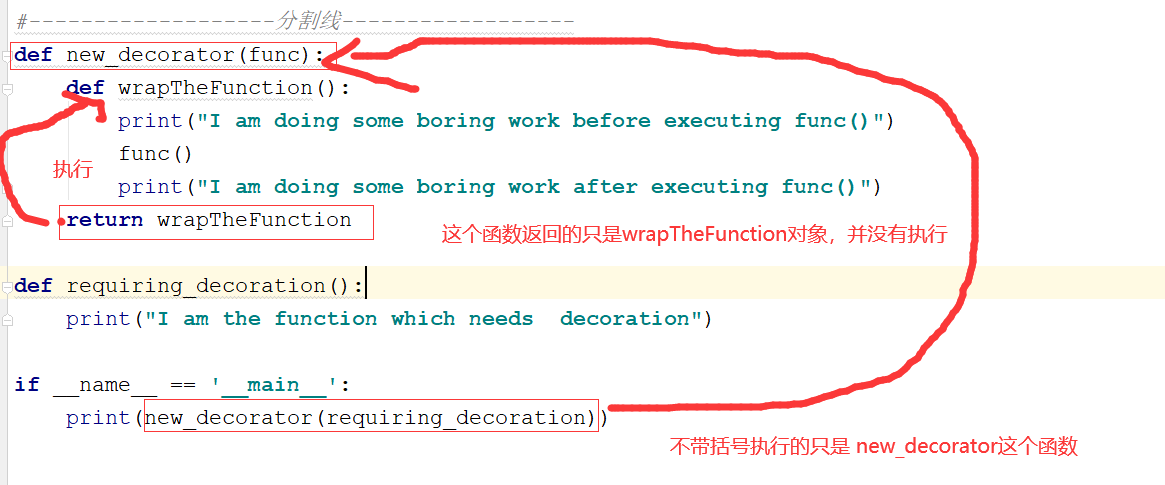
有人会有疑问,new_decorator(requiring_decoration)()为哈后面要加“()”呢去,请继续往下看:
#执行:

print(new_decorator(requiring_decoration))

#输出结果:

function new_decorator.<locals>.wrapTheFunction at 0x000001FC976BB620>
为什么会这样呢,请随我娓娓道来。。。
四、装饰器的优雅使用:

那么好,我们把上面代码再优化下,用装饰器常用的表达方式表示出来:
def new_decorator(func):

    def wrapTheFunction():

        print("I am doing some boring work before executing func()")

        func()  #被装饰的函数

        print("I am doing some boring work after executing func()")

    return wrapTheFunction

@new_decorator

def requiring_decoration():

    print("I am the function which needs  decoration")
#执行:

requiring_decoration()

#输出结果:

I am doing some boring work before executing func()

I am the function which needs  decoration

I am doing some boring work after executing func()
老铁们,现在你们懂了么,没懂我们再来看一段代码:
#需求:  <b><i> Hello World!</i></b>

from types import FunctionType


def add_bold(func: FunctionType):

    def new_func():

        return f"<b>{func()}</b>"

    return new_func

def add_itali(func: FunctionType):

    def new_func():

        return f"<i>{func()}</i>"

    return new_func

@add_itali  # 语法

@add_bold

def text():

    return "Hello world!"
#执行:

print(text())

#输出结果:

<i><b>Hello world!</b></i>
五、总结:

#语法:装饰器就是一个函数

def 装饰器名(func):

      def wrapper(*args, **kwargs):

             // 要做的装饰 ,,省略若干代码

             result = func(*args,**kwargs)

             return result

      return wrapper
python装饰器基础及应用的更多相关文章
- Python装饰器基础及运行时间
一.装饰器基础 装饰器是可调用的对象,其参数是另一个函数(被装饰的函数).装饰器可能会处理被装饰的函数,然后把他返回,或者将其替换成另一个函数或可调用对象. eg:decorate装饰器 @decor ...
- Python装饰器基础
一.Python装饰器引入 讲 Python 装饰器前,我想先举个例子,虽有点污,但跟装饰器这个话题很贴切. 每个人都有的内裤主要功能是用来遮羞,但是到了冬天它没法为我们防风御寒,咋办?我们想到的一个 ...
- Python基础(五) python装饰器使用
这是在Python学习小组上介绍的内容,现学现卖.多练习是好的学习方式. 第一步:最简单的函数,准备附加额外功能 # -*- coding:gbk -*- '''示例1: 最简单的函数,表示调用了两次 ...
- Python开发基础-Day7-闭包函数和装饰器基础
补充:全局变量声明及局部变量引用 python引用变量的顺序: 当前作用域局部变量->外层作用域变量->当前模块中的全局变量->python内置变量 global关键字用来在函数或其 ...
- [python 基础]python装饰器(一)添加functools获取原函数信息以及functools.partial分析
python装饰器学习的时候有两点需要注意一下 1,被装饰器装饰的函数取其func.__name__和func.func_doc的时候得到的不是被修饰函数的相关信息而是装饰器wrapper函数的doc ...
- python装饰器通俗易懂的解释!
1.python装饰器 刚刚接触python的装饰器,简直懵逼了,直接不懂什么意思啊有木有,自己都忘了走了多少遍Debug,查了多少遍资料,猜有点点开始明白了.总结了一下解释得比较好的,通俗易懂的来说 ...
- Python 装饰器学习
Python装饰器学习(九步入门) 这是在Python学习小组上介绍的内容,现学现卖.多练习是好的学习方式. 第一步:最简单的函数,准备附加额外功能 1 2 3 4 5 6 7 8 # -*- c ...
- Python装饰器由浅入深
装饰器的功能在很多语言中都有,名字也不尽相同,其实它体现的是一种设计模式,强调的是开放封闭原则,更多的用于后期功能升级而不是编写新的代码.装饰器不光能装饰函数,也能装饰其他的对象,比如类,但通常,我们 ...
- (转载)Python装饰器学习
转载出处:http://www.cnblogs.com/rhcad/archive/2011/12/21/2295507.html 这是在Python学习小组上介绍的内容,现学现卖.多练习是好的学习方 ...
随机推荐
- .netcore基于mysql的codefirst
.netcore基于mysql的codefirst 此文仅是对于netcore基于mysql的简单的codefirst实现的简单记录.示例为客服系统消息模板的增删改查实现 第一步.创建实体项目,并在其 ...
- 力扣 - 19. 删除链表的倒数第N个节点
目录 题目 思路1 代码实现 思路2 代码实现 题目 给定一个链表,删除链表的倒数第 n 个节点,并且返回链表的头结点. 示例: 给定一个链表: 1->2->3->4->5, ...
- ubuntu12.04管理文件系统工具
ubuntu12.04管理文件系统工具 以前可以自动管理系统盘和移动硬盘,刚重新安装了UBUNTU12.04LTS之后不行了,原来是这个工具: "PCMANFM" 群星_-_偏偏喜 ...
- [MIT6.006] 5. Binary Search Trees, BST Sort 二分搜索树,BST排序
第5节课主要讲述了二分搜索树概念和BST排序.讲师提出一个关于"跑道预订系统"的问题,假设飞机场只有一个跑道,飞机需要为未来降落时间t进行预订,如果时间集合R中,在t时间前后k分钟 ...
- waf 引擎 云原生平台tproxy 实现调研
了解了基本 云原生架构,不清楚的查看之前的文章:https://www.cnblogs.com/codestack/p/13914134.html 现在来看看云原生平台tproxy waf引擎串联实现 ...
- synchronized 到底该不该用?
我是风筝,公众号「古时的风筝」,一个兼具深度与广度的程序员鼓励师,一个本打算写诗却写起了代码的田园码农! 文章会收录在 JavaNewBee 中,更有 Java 后端知识图谱,从小白到大牛要走的路都在 ...
- NOIP前一些题目的理解
ZYB和售货机(图论,环) 题目链接 个人感觉这道题与基环树没有任何关系,你会发现,每个点最多只有一个入度和出度,所以只能是链或环. 还有就是本题的突破点就在于正确建图,题目的限制保证每个点的入度不大 ...
- vdbench测试实时可视化显示
前言 前一段时间碰到一个系统,用rados bench 去跑都还比较正常,但是一跑数据库就非常慢,测试工具会抛出延时过大的提示,经过排查发现,云平台中有一台虚拟机还运行着备份数据库的服务,而这个备份软 ...
- 自行实现的jar包中,日志库的适配实现
日常情况下,我们自己都会自行实现一些基础的jar包,如dao包.service包或一些其他完成特定功能的jar包.如果没有一套调试日志信息,出现问题时想查找问题非常不方便.可能大多数小伙伴都会有自 ...
- Qt For Android 环境搭建
由于时间有限,未抽出时间进行android环境搭建整理的流程,这里先贴出几个参考的地址 https://blog.csdn.net/foruok/article/details/23528293 此链 ...