
SPI应用 用SPI总线读取气压传感器SCP1000的数据
Using SPI to read a Barometric Pressure Sensor
This example shows how to use the SPI (Serial Peripheral Interface) Communications Library to read data from a SCP1000 Barometric Pressure sensor. Please click here for more information on SPI.
Hardware Required 硬件准备
Arduino or Genuino board
SCP1000 Pressure Sensor Breakout Board
hook-up wires
Circuit 电路图
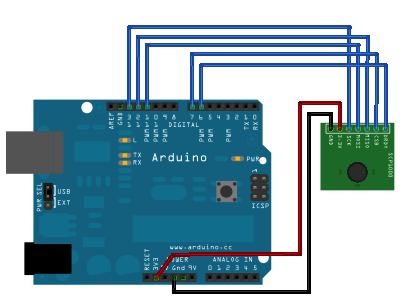
image developed using Fritzing. For more circuit examples, see the Fritzing project page
Schematic 原理图
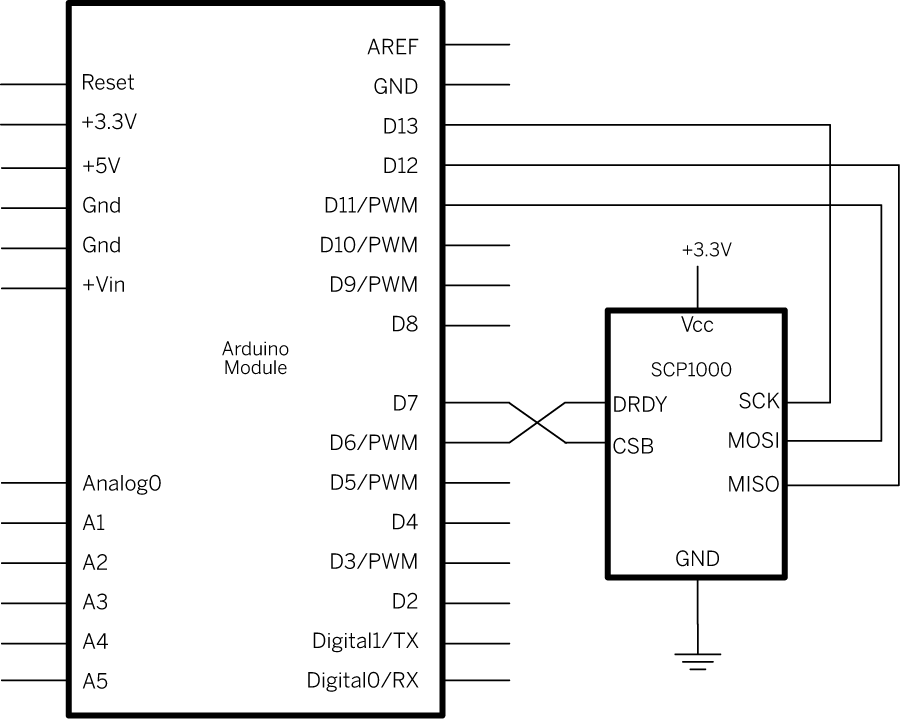
The SCP1000 barometric pressure sensor can read both air presure and temperature and report them via the SPI connection. For details of the control registers, see the SCP1000 data sheet.
SCP1000传感器可测量气压和温度,并通过SPI总线与控制器连接
Code 程序代码
The code below starts out by setting the SCP1000's configuration registers in the setup(). In the main loop, it sets the sensor to read in high resolution mode, meaning that it will return a 19-bit value, for the pressure reading, and 16 bits for the temperature. The actual reading in degrees Celsius is the 16-bit result divided by 20.
使用时首先用setup()对SCP1000的配置寄存器进行设置。测量结果包含19位的气压值,16位的温度值。摄氏度等于16位数据除以20。
Then it reads the temperature's two bytes. Once it's got the temperature, it reads the pressure in two parts. First it reads the highest three bits, then the lower 16 bits. It combines these two into one single long integer by bit shifting the high bits then using a bitwise OR to combine them with the lower 16 bits. The actual pressure in Pascal is the 19-bit result divide by 4.
读取压力值时,先读高3位,再读低16位,然后通过移位组成19位的整数。帕斯卡数等于19位数据除以4。
  1 /*

  2  SCP1000 Barometric Pressure Sensor Display

  3

  4  Shows the output of a Barometric Pressure Sensor on a

  5  Uses the SPI library. For details on the sensor, see:

  6  http://www.sparkfun.com/commerce/product_info.php?products_id=8161

  7  http://www.vti.fi/en/support/obsolete_products/pressure_sensors/

  8

  9  This sketch adapted from Nathan Seidle's SCP1000 example for PIC:

 10  http://www.sparkfun.com/datasheets/Sensors/SCP1000-Testing.zip

 11

 12  Circuit:  SCP1000与控制板的接线

 13  SCP1000 sensor attached to pins 6, 7, 10 - 13:

 14  DRDY: pin 6   dataReadyPin

 15  CSB: pin 7     chipSelectPin

 16  MOSI: pin 11

 17  MISO: pin 12

 18  SCK: pin 13

 19

 20  created 31 July 2010

 21  modified 14 August 2010

 22  by Tom Igoe

 23  */

 24 // the sensor communicates using SPI, so include the library:

 25 #include <SPI.h>

 26

 27 //Sensor's memory register addresses:

 28

 29 const int PRESSURE = 0x1F;      //3 most significant bits of pressure

 30 const int PRESSURE_LSB = 0x20;  //16 least significant bits of pressure

 31 const int TEMPERATURE = 0x21;   //16 bit temperature reading

 32 const byte READ = 0b11111100;     // SCP1000's read command  SCP1000的读指令

 33 const byte WRITE = 0b00000010;   // SCP1000's write command  SCP1000的写指令

 34

 35 // pins used for the connection with the sensor

 36 // the other you need are controlled by the SPI library):

 37 const int dataReadyPin = 6;

 38 const int chipSelectPin = 7;

 39 void setup()

 40

 41 {

 42   Serial.begin(9600);

 43   // start the SPI library:

 44   SPI.begin();

 45

 46   // initalize the  data ready and chip select pins:

 47   pinMode(dataReadyPin, INPUT);   //数据准备信号来自传感器

 48   pinMode(chipSelectPin, OUTPUT);   //芯片选择信号来自控制器

 49

 50   //Configure SCP1000 for low noise configuration:

 51   writeRegister(0x02, 0x2D);

 52   writeRegister(0x01, 0x03);

 53   writeRegister(0x03, 0x02);

 54   // give the sensor time to set up:

 55   delay(100);

 56 }

 57

 58

 59 void loop()

 60

 61  {

 62   //Select High Resolution Mode

 63   writeRegister(0x03, 0x0A);

 64

 65   // don't do anything until the data ready pin is high:

 66   if (digitalRead(dataReadyPin) == HIGH)

 67

 68 {

 69     //Read the temperature data

 70     int tempData = readRegister(0x21, 2);  //2个字节

 71     // convert the temperature to celsius and display it:

 72     float realTemp = (float)tempData / 20.0;   //转换为摄氏温度

 73     Serial.print("Temp[C]=");

 74     Serial.print(realTemp);

 75

 76

 77     //Read the pressure data highest 3 bits:

 78     byte  pressure_data_high = readRegister(0x1F, 1);

 79     pressure_data_high &= 0b00000111;    //you only needs bits 2 to 0

 80

 81     //Read the pressure data lower 16 bits:

 82     unsigned int  pressure_data_low = readRegister(0x20, 2);

 83     //combine the two parts into one 19-bit number:  并转换为帕斯卡

 84     long pressure = ((pressure_data_high << 16) | pressure_data_low) / 4;

 85     // display the temperature:

 86     Serial.println("\tPressure [Pa]=" + String(pressure));

 87   }

 88 }

 89

 90 //Read from or write to register from the SCP1000:

 91 unsigned int  readRegister(byte thisRegister, int bytesToRead)   //读SCP1000的寄存器

 92

 93 {

 94   byte inByte = 0;           // incoming byte from the SPI

 95   unsigned int result = 0;   // result to return

 96   Serial.print(thisRegister, BIN);

 97   Serial.print("\t");

 98   // SCP1000 expects the register name in the upper 6 bits

 99   // of the byte. So shift the bits left by two bits:

100   thisRegister = thisRegister << 2;

101   // now combine the address and the command into one byte

102   byte dataToSend = thisRegister & READ;   //  READ是读指令0b11111100

103   Serial.println(thisRegister, BIN);

104   // take the chip select low to select the device:

105   digitalWrite(chipSelectPin, LOW);

106   // send the device the register you want to read:

107   SPI.transfer(dataToSend);    //传送寄存器地址

108   // send a value of 0 to read the first byte returned:

109   result = SPI.transfer(0x00);   //传送0x00以得到第1个字节的数据

110   // decrement the number of bytes left to read:

111   bytesToRead--;

112   // if you still have another byte to read:

113   if (bytesToRead > 0)

114

115 {

116     // shift the first byte left, then get the second byte:

117     result = result << 8;

118     inByte = SPI.transfer(0x00);

119     // combine the byte you just got with the previous one:

120     result = result | inByte;

121     // decrement the number of bytes left to read:

122     bytesToRead--;

123   }

124   // take the chip select high to de-select:

125   digitalWrite(chipSelectPin, HIGH);

126   // return the result:

127   return (result);

128 }

129

130 //Sends a write command to SCP1000

131 void writeRegister(byte thisRegister, byte thisValue)    //写SCP1000的寄存器

132

133 {

134   // SCP1000 expects the register address in the upper 6 bits

135   // of the byte. So shift the bits left by two bits:

136   thisRegister = thisRegister << 2;

137   // now combine the register address and the command into one byte:

138   byte dataToSend = thisRegister | WRITE;  // WRITE是写指令0b00000010

139   // take the chip select low to select the device:

140   digitalWrite(chipSelectPin, LOW);

141   SPI.transfer(dataToSend);    //Send register location

142   SPI.transfer(thisValue);       //Send value to record into register

143   // take the chip select high to de-select:

144   digitalWrite(chipSelectPin, HIGH);

145 }

146

147
SPI应用 用SPI总线读取气压传感器SCP1000的数据的更多相关文章
- 【转载】IIC SPI UART串行总线
一.SPISPI(Serial Peripheral Interface,串行外设接口)是Motorola公司提出的一种同步串行数据传输标准,在很多器件中被广泛应用. 接口SPI接口经常被称为4线串行 ...
- SPI通信协议(SPI总线)学习
1.什么是SPI? SPI是串行外设接口(Serial Peripheral Interface)的缩写.是 Motorola 公司推出的一 种同步串行接口技术,是一种高速的,全双工,同步的通信总线. ...
- Linux驱动 - SPI驱动 之三 SPI控制器驱动
通过第一篇文章,我们已经知道,整个SPI驱动架构可以分为协议驱动.通用接口层和控制器驱动三大部分.其中,控制器驱动负责最底层的数据收发工作,为了完成数据的收发工作,控制器驱动需要完成以下这些功能:1. ...
- Dubbo 扩展点加载机制:从 Java SPI 到 Dubbo SPI
SPI 全称为 Service Provider Interface,是一种服务发现机制.当程序运行调用接口时,会根据配置文件或默认规则信息加载对应的实现类.所以在程序中并没有直接指定使用接口的哪个实 ...
- Java SPI 与 Dubbo SPI
SPI(Service Provider Interface)是JDK内置的一种服务提供发现机制.本质是将接口实现类的全限定名配置在文件中,并由服务加载器读取配置文件,加载实现类.这样可以在运行时,动 ...
- 联盛德 HLK-W806 (十一): 软件SPI和硬件SPI驱动ST7567液晶LCD
目录 联盛德 HLK-W806 (一): Ubuntu20.04下的开发环境配置, 编译和烧录说明 联盛德 HLK-W806 (二): Win10下的开发环境配置, 编译和烧录说明 联盛德 HLK-W ...
- Java spi 和Spring spi
service provider framework是一个系统, 实现了SPI, 在系统里多个服务提供者模块可以提供一个服务的实现, 系统让客户端可以使用这些实现, 从而实现解耦. 一个service ...
- SPI应用 用SPI控制一个数字电位器
Controlling a Digital Potentiometer Using SPI In this tutorial you will learn how to control the AD5 ...
- 联盛德 HLK-W806 (四): 软件SPI和硬件SPI驱动ST7735液晶LCD
目录 联盛德 HLK-W806 (一): Ubuntu20.04下的开发环境配置, 编译和烧录说明 联盛德 HLK-W806 (二): Win10下的开发环境配置, 编译和烧录说明 联盛德 HLK-W ...
随机推荐
- 文件属性及find命令总结
第1章 文件属性 1.1 文件的属性 1.1.1 查看文件的详细属性 PS:ls查看的文件或目录默认的是按照名字的第一个字母进行正序排序 ls 参数选项: -t ...
- Redis锁实现防重复提交和并发问题
@Slf4j @Component public class RedisLock { public static final int LOCK_EXPIRE = 5000; @Autowired pr ...
- Unity坐标系详解
1. World Space(世界坐标系): 我们在场景中添加的物体(如:Cube),他们都是以世界坐标显示在场景中.transform.position 获取的便是这个 坐标数值. 2. Scene ...
- 【平台开发】— 4.mysql建库建表
本想着把前端脚手架run起来了,然后就可以借着登录来捋一下前后端交互的过程.但是后端导入JPA的时候就发现了,还没有数据库. 既然是本着学习的目的,那咱也不想只在后端写死返回的数据,要做就做全套. 一 ...
- The Unique MST(最小生成树的唯一性判断)
Given a connected undirected graph, tell if its minimum spanning tree is unique. Definition 1 (Spann ...
- Linux—账号管理及命令使用详解
关注微信公众号:CodingTechWork,一起学习进步. 引言 在Linux系统中,我们常常会看到目录或文件的所属关系: [root@linux01 ~]# ll -d test.sh -rw ...
- vue mixin混入
基本结构 export default { data() { return {} }, computed: { }, methods: { }, filters: { }, created() { } ...
- Native Comments
local variables referenced from a Lambda expression must be final or effectively final. Lambda表达式中引用 ...
- Python数据类型方法整理
前言:主要是对Python数据类型做一个整理,部分知识点源于<python3程序开发指南(第二版)> 一.Python的关键要素 1.1 要素1:数据类型 int类型 str类型 ...
- SpringMVC-08-整合SSM之CRUD
查询书籍功能 完善Controller:BookController @Controller @RequestMapping("/book") public class BookC ...