
Soul API 网关源码解析 02
如何读开源项目:对着文档跑demo,对着demo看代码,懂一点就开始试,有问题了问社区。
今日目标:
1.运行examples下面的 http服务
2.学习文档,结合divde插件,发起http请求soul网关,体验http代理
3.记录心得,写博客分享。
一、从官方文档开始
打开 用户使用文档 - http用户 页面,开始整理关键要素。
1、接入说明:
接入前,需要先启动
soul-adminsoul 使用 divde 插件来处理 http 请求,插件在 admin 后台开启。
2、网关需要引入代理插件
网关 pom 增加依赖:
  <!--if you use http proxy start this-->

   <dependency>

       <groupId>org.dromara</groupId>

       <artifactId>soul-spring-boot-starter-plugin-divide</artifactId>

        <version>${last.version}</version>

   </dependency>

   <dependency>

       <groupId>org.dromara</groupId>

       <artifactId>soul-spring-boot-starter-plugin-httpclient</artifactId>

        <version>${last.version}</version>

   </dependency>
重启网关使配置生效。
3、Http 服务接入网关
接入前需确保 soul-admin 已开启 divide 插件
3.1 soul-client方式接入
适用于 SpringMVC 体系用户,分为:
spring 版本
spring-boot 版本
两种版本依赖和配置有所差异,但在服务配置上都使用 @SoulSpringMVCClient,其用法并无差异。
3.1.1 spring 版本 SpringMVC 接入
1)被代理服务 pom.xml 引入如下依赖:
     <dependency>

         <groupId>org.dromara</groupId>

         <artifactId>soul-spring-boot-starter-client-springmvc</artifactId>

         <version>${last.version}</version>

     </dependency>
2)xml 中新增如下 bean 配置:
   <bean id ="springMvcClientBeanPostProcessor" class ="org.dromara.soul.client.springmvc.init.SpringMvcClientBeanPostProcessor">

        <constructor-arg  ref="soulSpringMvcConfig"/>

   </bean>

   <bean id="soulSpringMvcConfig" class="org.dromara.soul.client.springmvc.config.SoulSpringMvcConfig">

        <property name="adminUrl" value="http://localhost:9095"/>

        <property name="port" value="你的端口"/>

        <property name="contextPath" value="/你的contextPath"/>

        <property name="appName" value="你的名字"/>

        <property name="full" value="false"/>

   </bean>
3)Controller 加上 @SoulSpringMVCClient 注解,针对其 path 属性有两种配置场景
该 Controller 下所有服务均需被网关代理
注解加在 Controller 类上,path 配置为
/前缀路径/**该 Controller 下部分服务需被网关代理
类上注解的 path 配置为
/前缀路径,方法上注解的 path 配置为/对应的服务路径
4)启动项目,服务接入到网关。
3.1.2 spring-boot 版本 SpringMVC 接入
1)被代理服务 pom.xml 引入如下依赖:
     <dependency>

         <groupId>org.dromara</groupId>

         <artifactId>soul-spring-boot-starter-client-springmvc</artifactId>

         <version>${last.version}</version>

     </dependency>
2)yml 中增加如下配置:
   soul:

     http:

       adminUrl: http://localhost:9095

       port: 你本项目的启动端口

       contextPath: /http

       appName: http

       full: false
adminUrl:soul-admin 项目的ip + 端口,注意要加http://
port:本项目的启动端口,需要与实际启动端口一致
contextPath:本项目在soul网关的路由前缀, 比如/order ,/product 等等,网关根据这个前缀来进行路由.
appName:你的应用名称,不配置则默认取
spring.application.name的值full:true 表示代表代理整个服务,false 表示代理其中某几个controller
3)Controller 加上 @SoulSpringMVCClient 注解,配置场景同 spring 版本
4)启动项目,服务接入到网关。
3.2 非 soul-client 方式接入
divide 插件手动配置方式,参见 选择器规则介绍
自定义 http-client 方式,参见 多语言 Http 客户端开发
4、用户请求
请求方式有两点变化:
修改 ip + 端口
需要将 直接指向用户的请求,改为通过网关发起访问。
加上 context path
在 ip + 端口 后面,紧跟目标项目中配置的路由前缀
例如:
原请求 url:http://localhost:8080/test/save
现请求 url:http://localhost:9195/order/test/save_
http://localhost:9195 为网关 ip + 端口,注意默认端口为9195
/order 为配置的 contextpath
二、官方示例分析
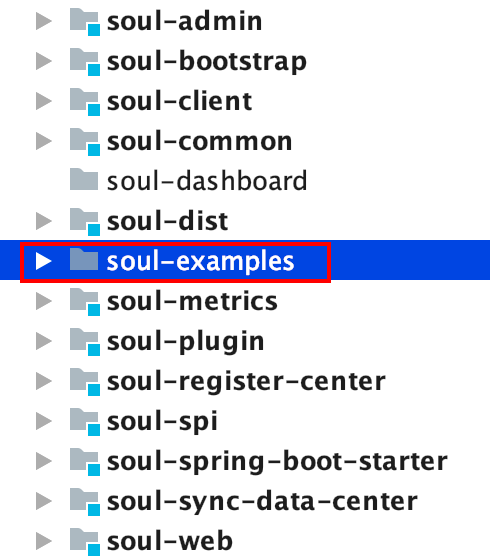
1、打开 soul-examples 项目
位于 soul 项目下,未集成到 soul 项目 maven 中统一管理,需要单独打开
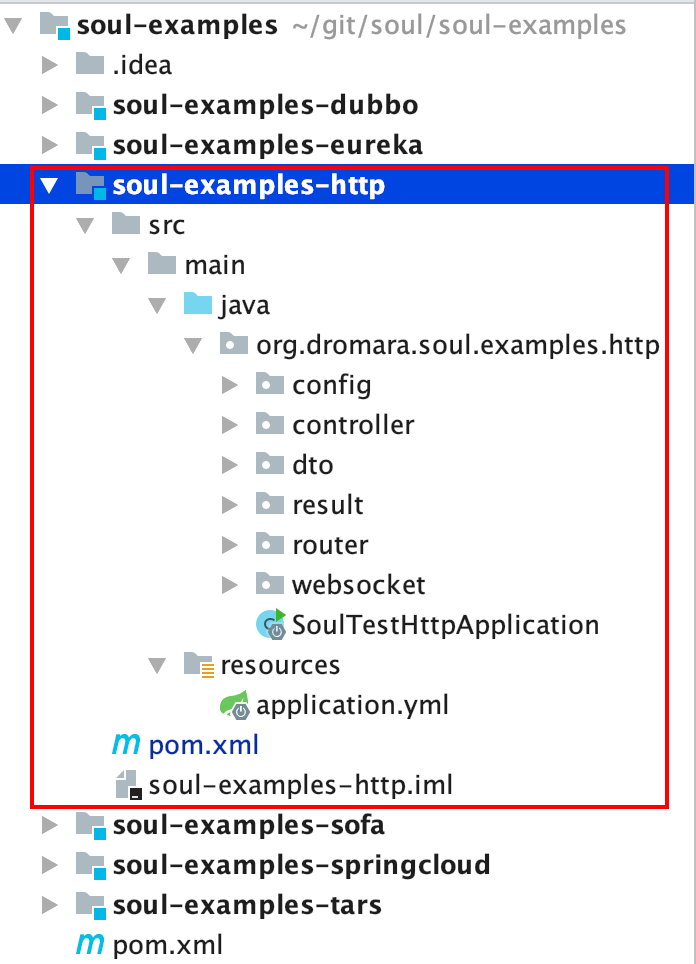
2、定位待分析目标示例模块
待分析目标示例为 http 示例,选择并展开
3、依赖分析
打开 pom.xml,依赖关系如下:
        <!-- soul-client -->

        <dependency>

            <groupId>org.dromara</groupId>

            <artifactId>soul-spring-boot-starter-client-springmvc</artifactId>

            <version>${soul.version}</version>

        </dependency>

        <!-- webflix -->

        <dependency>

            <groupId>org.springframework.boot</groupId>

            <artifactId>spring-boot-starter-webflux</artifactId>

        </dependency>

        <dependency>

            <groupId>org.springframework.boot</groupId>

            <artifactId>spring-boot-starter</artifactId>

        </dependency>

        <dependency>

            <groupId>org.springframework.boot</groupId>

            <artifactId>spring-boot-starter-logging</artifactId>

        </dependency>

        <dependency>

            <groupId>org.springframework.boot</groupId>

            <artifactId>spring-boot-starter-test</artifactId>

            <scope>test</scope>

        </dependency>

        <dependency>

            <groupId>org.projectlombok</groupId>

            <artifactId>lombok</artifactId>

        </dependency>
很明显是 spring-boot 项目,除了官方文档中要求引入的 soul-spring-boot-starter-client-springmvc 外,还引入了 webflix
4、配置分析
打开 application.yml,配置内容如下:
# 服务信息

server:

  port: 8188

  address: 0.0.0.0

# soul-client 配置

soul:

  http:

    adminUrl: http://localhost:9095

    port: 8188

    contextPath: /http

    appName: http

    full: false

# 日志配置

logging:

  level:

    root: info

    org.springframework.boot: info

    org.apache.ibatis: info

    org.dromara.soul.test.bonuspoint: info

    org.dromara.soul.test.lottery: debug

    org.dromara.soul.test: debug
soul-client 部分的配置格式与官方文档一致,注意核对下 soul-admin 的 ip + 端口是否与实际一致。
5、Controller 分析
展开 org.dromara.soul.examples.http.controller 包,自带两个controller
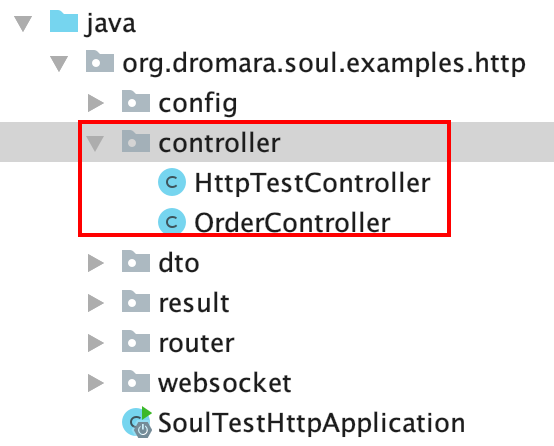
1)HttpTestController.java
/**

 * TestController.

 *

 * @author xiaoyu

 */

@RestController

@RequestMapping("/test")

@SoulSpringMvcClient(path = "/test/**")

public class HttpTestController {

    /**

     * Post user dto.

     *

     * @param userDTO the user dto

     * @return the user dto

     */

    @PostMapping("/payment")

    public UserDTO post(@RequestBody final UserDTO userDTO) {

        return userDTO;

    }

    /**

     * Find by user id string.

     *

     * @param userId the user id

     * @return the string

     */

    @GetMapping("/findByUserId")

    public UserDTO findByUserId(@RequestParam("userId") final String userId) {

        UserDTO userDTO = new UserDTO();

        userDTO.setUserId(userId);

        userDTO.setUserName("hello world");

        return userDTO;

    }

    /**

     * Gets path variable.

     *

     * @param id   the id

     * @param name the name

     * @return the path variable

     */

    @GetMapping("/path/{id}")

    public UserDTO getPathVariable(@PathVariable("id") final String id, @RequestParam("name") final String name) {

        UserDTO userDTO = new UserDTO();

        userDTO.setUserId(id);

        userDTO.setUserName("hello world");

        return userDTO;

    }

    /**

     * Test rest ful string.

     *

     * @param id the id

     * @return the string

     */

    @GetMapping("/path/{id}/name")

    public UserDTO testRestFul(@PathVariable("id") final String id) {

        UserDTO userDTO = new UserDTO();

        userDTO.setUserId(id);

        userDTO.setUserName("hello world");

        return userDTO;

    }

    /**

     * Put path variable and body string.

     *

     * @param id      the id

     * @param userDTO the user dto

     * @return the string

     */

    @PutMapping("/putPathBody/{id}")

    public UserDTO putPathVariableAndBody(@PathVariable("id") final String id, @RequestBody final UserDTO userDTO) {

        userDTO.setUserId(id);

        userDTO.setUserName("hello world");

        return userDTO;

    }

}
类上使用了 @SoulSpringMvcClient(path = "/test/**") 表示注册该 Controller 下所有服务。
注册的服务清单:
/payment
/findByUserId
/path/{id}
/path/{id}/name
/putPathBody/{id}
都是简单的 mock 服务
2)OrderController.java
/**

 * TestController.

 *

 * @author xiaoyu

 */

@RestController

@RequestMapping("/order")

@SoulSpringMvcClient(path = "/order")

public class OrderController {

    /**

     * Save order dto.

     *

     * @param orderDTO the order dto

     * @return the order dto

     */

    @PostMapping("/save")

    @SoulSpringMvcClient(path = "/save" , desc = "Save order")

    public OrderDTO save(@RequestBody final OrderDTO orderDTO) {

        orderDTO.setName("hello world save order");

        return orderDTO;

    }

    /**

     * Find by id order dto.

     *

     * @param id the id

     * @return the order dto

     */

    @GetMapping("/findById")

    @SoulSpringMvcClient(path = "/findById", desc = "Find by id")

    public OrderDTO findById(@RequestParam("id") final String id) {

        OrderDTO orderDTO = new OrderDTO();

        orderDTO.setId(id);

        orderDTO.setName("hello world findById");

        return orderDTO;

    }

    /**

     * Gets path variable.

     *

     * @param id   the id

     * @param name the name

     * @return the path variable

     */

    @GetMapping("/path/{id}/{name}")

    @SoulSpringMvcClient(path = "/path/**")

    public OrderDTO getPathVariable(@PathVariable("id") final String id, @PathVariable("name") final String name) {

        OrderDTO orderDTO = new OrderDTO();

        orderDTO.setId(id);

        orderDTO.setName("hello world restful: " + name);

        return orderDTO;

    }

    /**

     * Test rest ful order dto.

     *

     * @param id the id

     * @return the order dto

     */

    @GetMapping("/path/{id}/name")

    @SoulSpringMvcClient(path = "/path/**/name")

    public OrderDTO testRestFul(@PathVariable("id") final String id) {

        OrderDTO orderDTO = new OrderDTO();

        orderDTO.setId(id);

        orderDTO.setName("hello world restful inline " + id);

        return orderDTO;

    }

}
类上使用了 @SoulSpringMvcClient(path = "/order"),表示该 Controller 下部分服务需要注册,配合方法上的 SoulSpringMvcClient 指定具体注册的服务。
注册的服务清单:
/save
/findById
/path/{id}/{name}
/path/{id}/name
注意到注册 GET 请求的服务时,url 中的参数需要用 ** 代替
6、启动示例模块
官方文档里提到:
需要在网关的 pom 里增加 soul-spring-boot-starter-plugin-divide 和 soul-spring-boot-starter-plugin-httpclient 依赖,并重启网关。
需要这么麻烦么?
百度查阅相关文章后,了解到 soul 本身提供的 soul-bootstrap 模块已经集成了这两个插件,所以启动 soul-admin 后,再启动 soul-bootstrap 就可以了。
接下来愉快地启动示例吧
运行 SoulTestHttpApplication.java,启动示例模块

通过控制台日志可以看到,模块启动后向网关注册了5条 http-client 元数据。
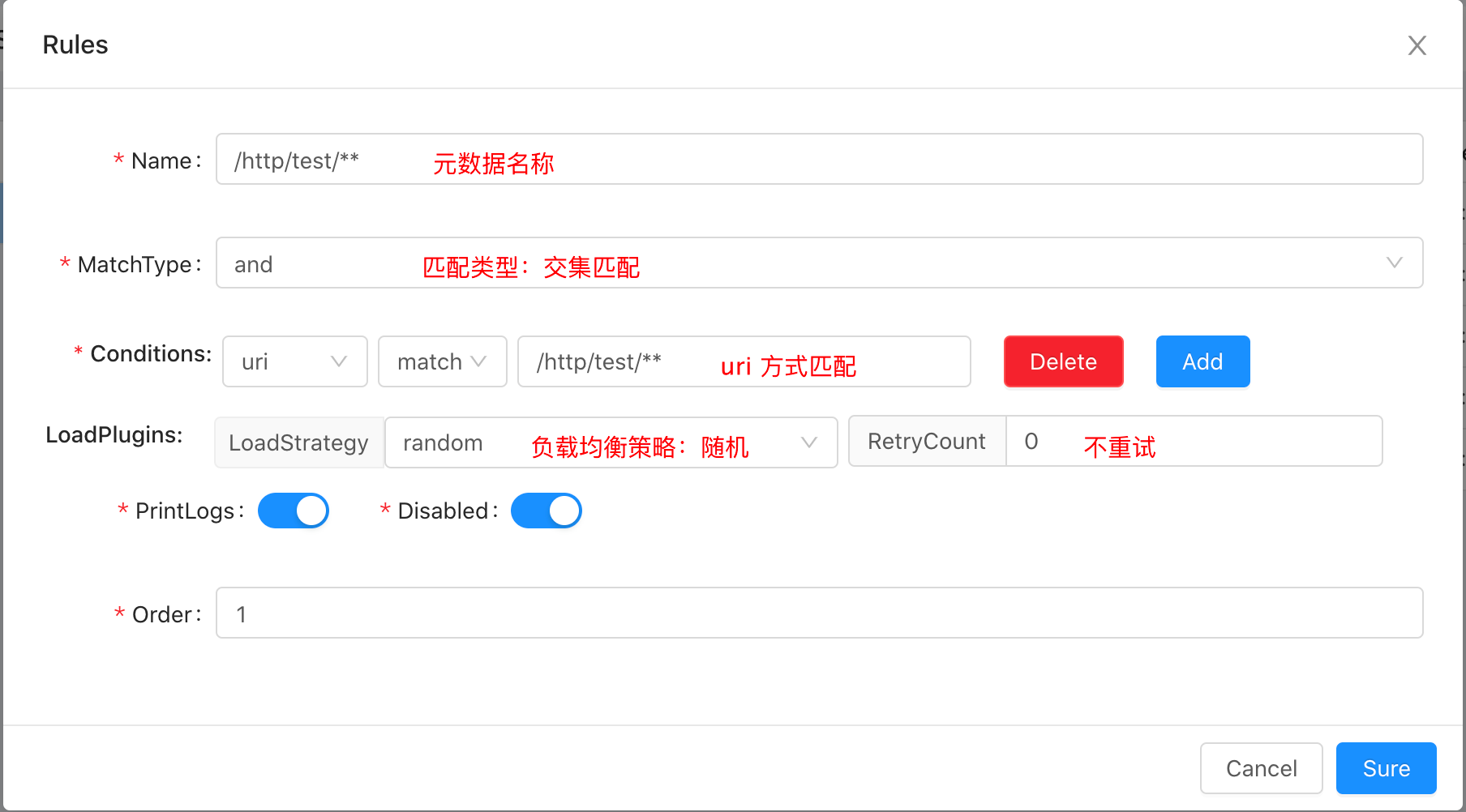
其中 HttpTestController 统一注册了1条元数据 /http/test/**,而 OrderController 则分别注册了4条元数据。
猜测元数据记录与 @SoulSpringMvcClient 注解一一对应。
登录 http://localhost:9095/#/plug/divide,在 divide 插件一栏可以看到 http 服务注册信息
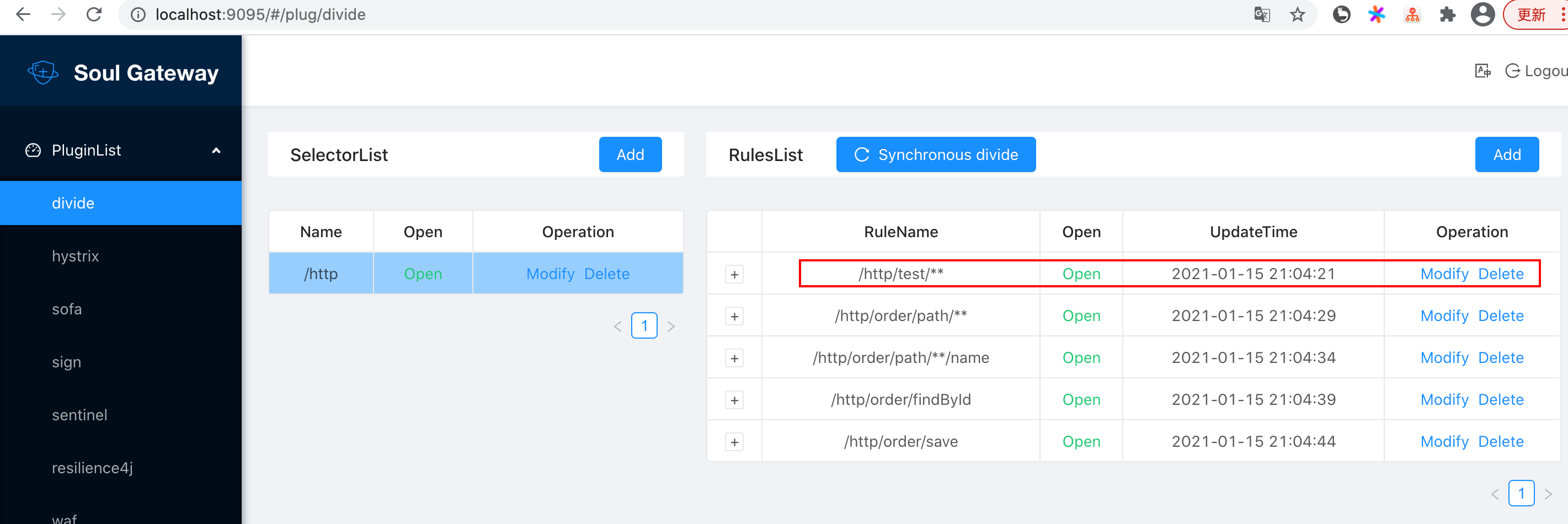
点击 Modify 按钮可以查看或修改注册的元数据信息
7、http 请求 网关
此处使用 Postman 发起 http 请求,与浏览器直接发起请求等价。
1)先尝试请求原 http 服务
待访问 http 服务: /test/findByUserId,请求url:localhost:8188/test/findByUserId?userId=001
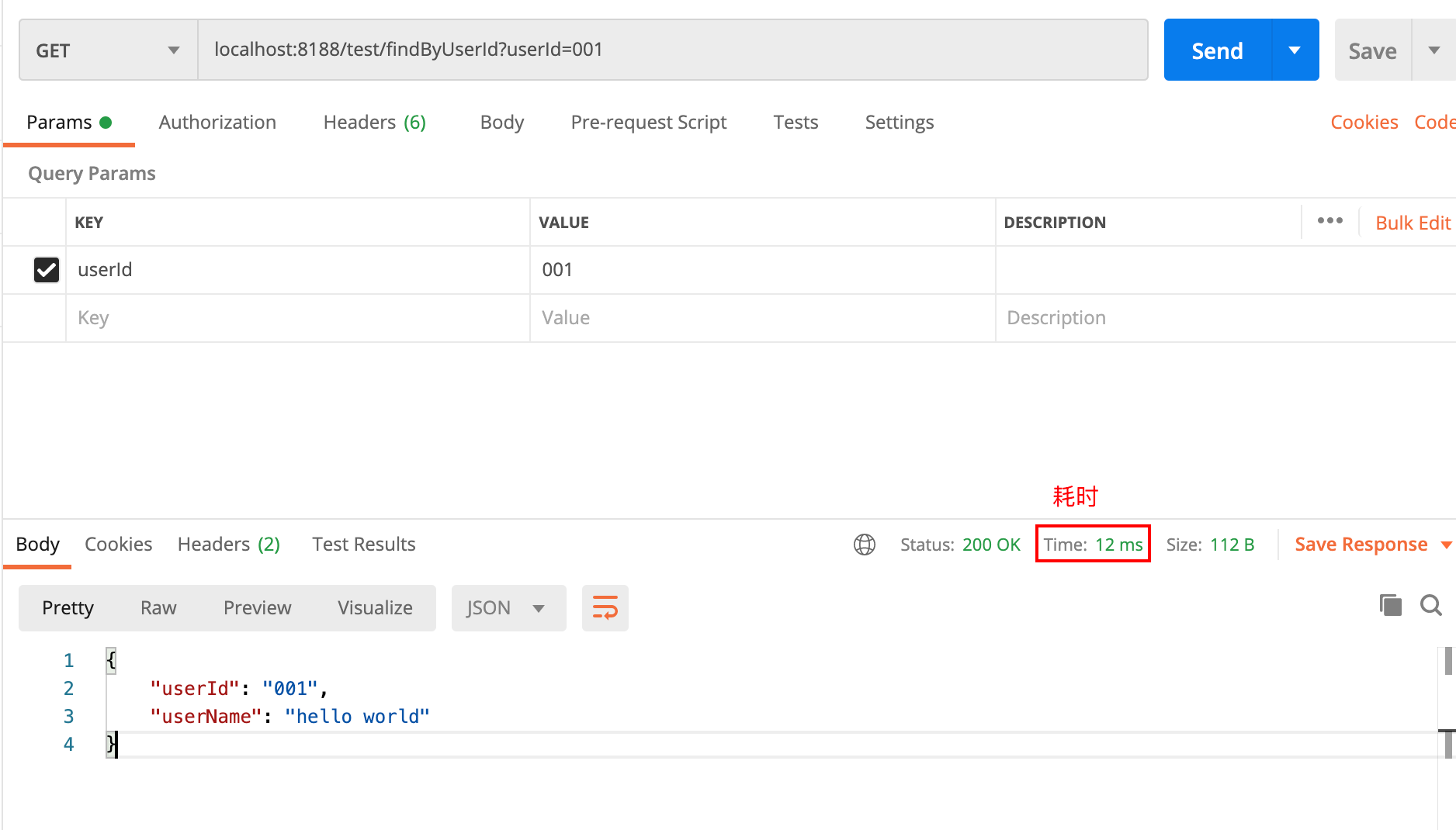
访问成功,耗时 12ms
2)再通过网关访问代理的 http 服务
网关 ip + 端口:http://localhost:9195
contextPath:/http
待访问 http 服务: /test/findByUserId
要素拼装后请求url:localhost:9195/http/test/findByUserId?userId=001
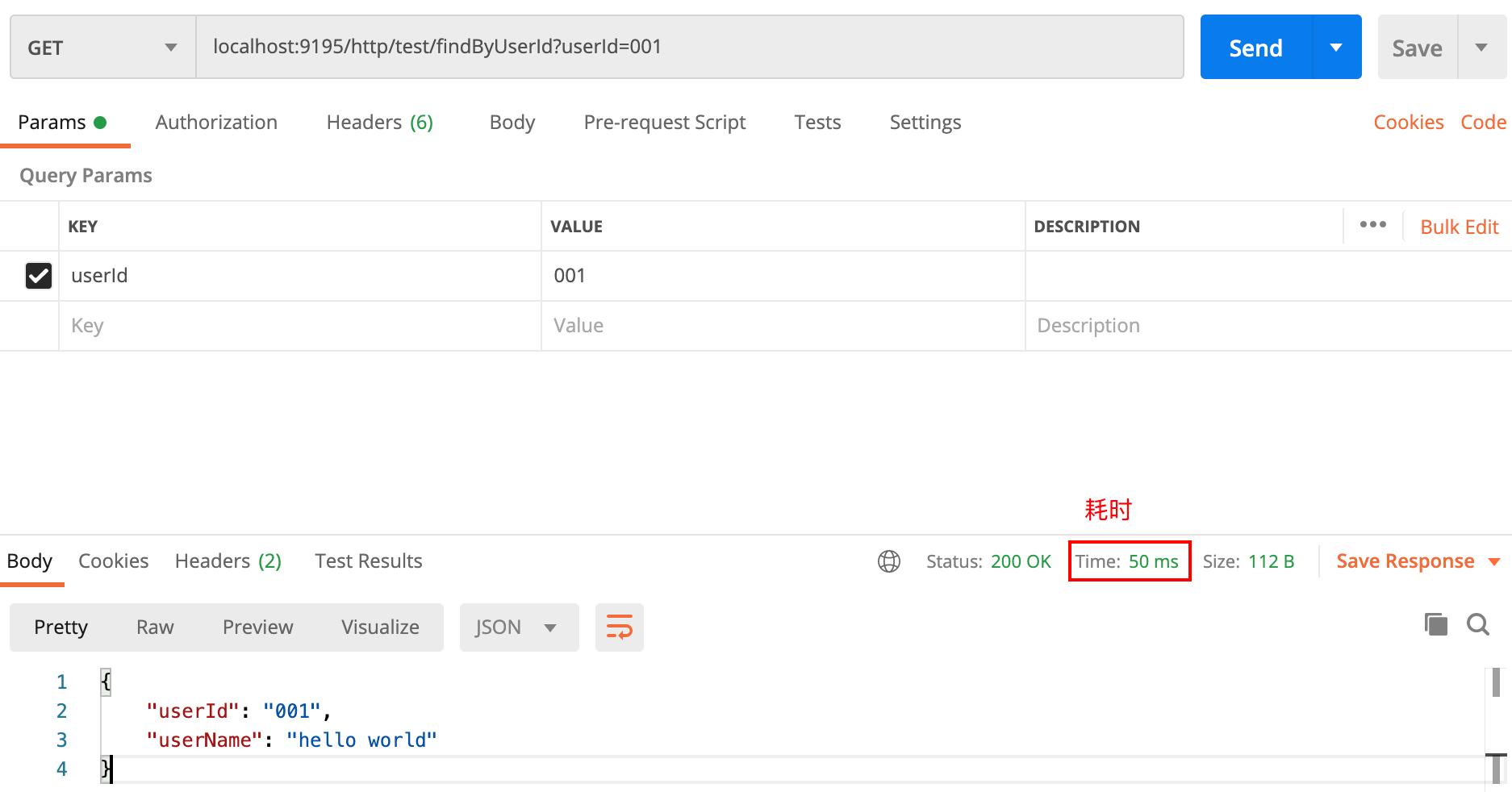
访问成功,耗时 50ms
至此,网关成功代理 http 服务,注意到网关代理服务耗时确实比原 http 服务长,毕竟多了一次路由转发,性能方面待后续压测。
三、总结
http 服务接入 soul 网关:
先启动
soul-admin网关需要引入相关代理插件并重启,若使用
soul-bootstrap则直接soul-bootstrap启动即可http 服务接入网关方式:
soul-client方式,自动注册元信息
divide 插件方式,手动配置元信息
自定义 http-client 方式
将直接指向用户的请求,改为通过网关发起访问,并加上相应的 contextPath。
参考文章
个人知识库
Soul API 网关源码解析 02的更多相关文章
- Soul API 网关源码解析 03
目标 使用 soul 代理 dubbo 服务 dubbo 服务如何注册到网关的? dubbo 插件是如何工作的? 理清 http --> 网关--> dubbo provider 整条链路 ...
- zuul网关源码解析
zuul网关源码解析 zuul请求的生命周期 ZuulServlet ZuulServlet定义了对zuul整个过程的处理,如下: public void service(javax.servlet. ...
- Spring中AOP相关的API及源码解析
Spring中AOP相关的API及源码解析 本系列文章: 读源码,我们可以从第一行读起 你知道Spring是怎么解析配置类的吗? 配置类为什么要添加@Configuration注解? 谈谈Spring ...
- Spring源码解析02:Spring IOC容器之XmlBeanFactory启动流程分析和源码解析
一. 前言 Spring容器主要分为两类BeanFactory和ApplicationContext,后者是基于前者的功能扩展,也就是一个基础容器和一个高级容器的区别.本篇就以BeanFactory基 ...
- Soul 网关 Nacos 数据同步源码解析
学习目标: 学习Soul 网关 Nacos 数据同步源码解析 学习内容: 环境配置 Soul 网关 Nacos 数据同步基本概念 源码分析 学习时间:2020年1月28号 早7点 学习产出: 环境配置 ...
- sqler sql 转rest api 源码解析(一)应用的启动入口
sqler sql 转rest api 的源码还是比较简单的,没有比较复杂的设计,大部分都是基于开源 模块实现的. 说明: 当前的版本为2.0,代码使用go mod 进行包管理,如果本地运行注意gol ...
- Istio技术与实践02:源码解析之Istio on Kubernetes 统一服务发现
前言 文章Istio技术与实践01: 源码解析之Pilot多云平台服务发现机制结合Pilot的代码实现介绍了Istio的抽象服务模型和基于该模型的数据结构定义,了解到Istio上只是定义的服务发现的接 ...
- EventBus源码解析 源码阅读记录
EventBus源码阅读记录 repo地址: greenrobot/EventBus EventBus的构造 双重加锁的单例. static volatile EventBus defaultInst ...
- Java 集合系列13之 WeakHashMap详细介绍(源码解析)和使用示例
概要 这一章,我们对WeakHashMap进行学习.我们先对WeakHashMap有个整体认识,然后再学习它的源码,最后再通过实例来学会使用WeakHashMap.第1部分 WeakHashMap介绍 ...
随机推荐
- Java基础进阶:继承重点摘要,继承详解,方法重写注意事项,方法重载与重写的区别,抽象类,代码块, 附重难点,代码实现源码,课堂笔记,课后扩展及答案
继承重点摘要 *继承的特点: 子类在初始化之前,一定要先完成父类数据的初始化 子类在初始化之前,一定要先访问父类构造,完成父类数据的初始化 系统在每一个构造方法中默认隐藏了一句super(); 如果我 ...
- C# List的并集、交集、差集
并集---Union 集合的并集是合并两个集合的所有项,去重,如下图所示: List<int> ls1 = new List<int>() { 1,2,3,5,7,9 }; ...
- C#中RDLC报表常用表达式(字符串和转换)
字符串函数 (1)使用串联运算符和 Visual Basic 常量可将多个字段组合在一起.以下表达式返回两个字段,它们分别位于同一文本框的不同行中:=Fields!FirstName.Value &a ...
- Python 最简单的数字相乘
风变编程第18关,快要结束了,捎带着复习了一下前面的基础.结果悲剧了. 打开题目是这样的: 比如我们想写一个根据圆的半径(R)来求面积(S)和周长(L)的代码,可以画出以下的流程图 抬眼一看,好简单的 ...
- git使用下
Git 内部工作原理 Git 本质上是一个内容寻址文件系统,最初是一套面向版本控制系统的工具集,而不是一个完整的用户友好的版本控制系统.因此它还包含了一些用于完成底层工作的命令,这些命令被称为&quo ...
- 回车禁止form提交表单
今天遇到回车自动提交表单特此记录下 document.getElementsByTagName('form')[0].onkeydown = function(e) { var e = e || ev ...
- Thymeleaf Shiro标签
记录一下 guest标签 <shiro:guest> </shiro:guest> 用户没有身份验证时显示相应信息,即游客访问信息. user标签 <shiro:user ...
- Java串口编程例子
最近笔者接触到串口编程,网上搜了些资料,顺便整理一下.网上都在推荐使用Java RXTX开源类库,它提供了Windows.Linux等不同操作系统下的串口和并口通信实现,遵循GNU LGPL协议.看起 ...
- RPC框架从0到10
RPC(Remote Procedure Call) 从单机走向分布式,产生了很多分布式的通信方式 最古老也是最有效,并且永不过时的,TCP/UDP的二进制传输,事实上所有的通信方式归根结底都是TCP ...
- vue中使用AES.js和crypto.js加密
一:crypto-js加密 1.1:安装依赖 npm install crypto-js --save-dev 1.2 :在项目目录上创建一个js文件里面写入加密,解密的代码 mport Crypto ...