
Qt Undo Framework
Qt undo/redo 框架
- 基于Command设计模式
- 支持命令压缩和命令合成
- 提供了与工具包其他部分融合很好的widgets和actions
术语(Terminology)
- Command - 对文档的一个作用行为,比如
- 图像编辑器的模糊操作
- 文本处理器的剪切操作
- 采样编辑器的最大化操作
- Undo-stack - commands的堆栈
- Document - 被应用程序编辑的内部数据,比如
- 音频编辑器中的waveform(波形)
- 图像编辑器中的bitmap(位图)
基本的undo stack操作
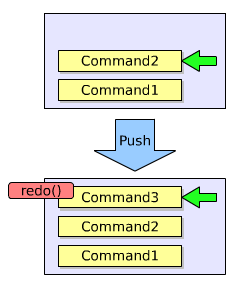
- Push
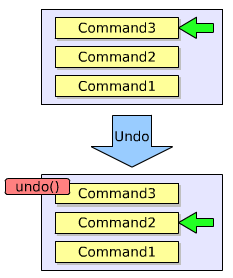
- Undo
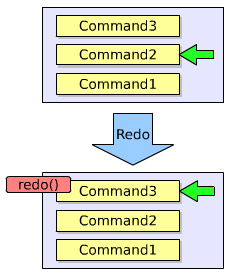
- Redo
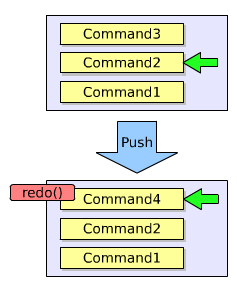
注意,push可能会删掉一些操作,如图
类们
只有四个类!
- QtUndoCommand - 用于修改document的对象的基类
- QtUndoStack - QtUndoCommand对象的堆栈
- QtUndoGroup - undo堆栈的组。很多应用程序允许用户同时打开超过一个文档,该类允许你把一组undo堆栈按一单个stack对待。
- QtUndoView - 继承自QListWidget,用来展示undo堆栈的内容,以字符串形式
实例
前提说明:下面这个例子,我们将为一个文本编辑器实现undo/redo;文档我们就用一个简单的QString来代表;我们先实现文档中插入字符这样一个command
commands的实现
插入字符操作
class InsertChars : public QUndoCommand

{

public:

    InsertChars(int index, const QString &chars, QString *document)

        : QUndoCommand("Insert characters") {

        m_index = index;

        m_chars = chars;

        m_document  = document;

    }

    virtual void redo() {

        m_document->insert(m_index, m_chars);

    }

    virtual void undo() {

        m_document->remove(m_index, m_chars.length());

    }

private:

    int m_index;

    QString m_chars;

    QString *m_document;

};
删除字符操作
class RemoveChars : public QUndoCommand

{

public:

    RemoveChars(int index, int count, QString *document)

        : QUndoCommand("Remove characters") {

        m_index = index;

        m_count = cout;

        m_document  = document;

    }

    virtual void redo() {

        m_removedChars = m_document->mid(m_index, m_count);

        m_document->remove(m_index, m_count);

    }

    virtual void undo() {

        m_document->insert(m_index, m_removedChars);

    }

private:

    int m_index, m_count;

    QString m_removedChars;

    QString *m_document;

};
在文本编辑器中使用
MyEditor::MyEditor(QWidget *parent) : QWidget(parent) {

    // …

    m_document = new QString;

    m_stack = new QUndoStack(this);

    m_toolBar->addAction(m_stack->createUndoAction);

    m_toolBar->addAction(m_stack->createRedoAction);

    // …

}

void MyEditor::keyPressEvent(QKeyEvent *event) {

    QString chars = events->text();

    int index = cursorIndex();

    switch (event->key()) {

        case Qt::Key_Backspace:

            if (index > 0)

                m_stack->push(new RemoveChars(index-1, 1, m_document));

            break;

        case Qt::Key_Delete:

            if (index < m_document.length())

                m_stack->push(new RemoveChars(index, 1, m_document));

            break;

        default:

            if (!chars.isEmpty())

                m_stack->push(new InsertChars(index, chars, m_document));

            break;

    }

}
command的压缩(compression)
命令压缩,是一种把若干个commands压成一个command的行为。 典型的案例就是文本编辑器中输入一大堆文字,撤销,把这一大堆都撤销了。
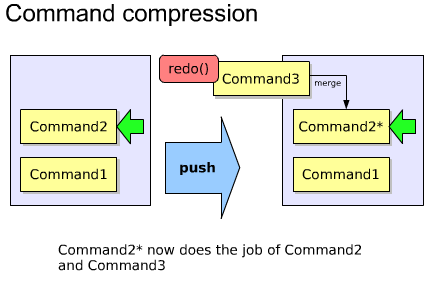
主要用到了QUndoCommand的id()和mergeWith()方法。代码如下
static const int InsertCharsId = 1000;

static const int RemoveCharsId = 1001;

//...

int InsertChars::id() const {

    return InsertCharsId;

}

bool InsertChars::mergeWith(const QCommand *command) {

    // 该类型转换是安全的,因为stack检查过id()了

    InsertChars *other = static_cast<InsertChars* > (command);

    // 只有当其他插入的字符在我的字符后面时,才merge

    if (m_index + m_chars.length() != other->m_index)

        return false;

    // 把它merge了

    m_chars.append(other->m_chars);

    return true;

}
command的合成(composition)
也就是传说中的宏(macros)
通过合并一系列简单的commands,从而创建复杂的commands
主要是用到了QUndoStack的beginMacro()和endMacro()方法。代码如下
void MyEditor::replace(const QString &oldChars, const QString &newChars) {

    if(!m_document->contains(oldChars))

        return;

    QString title = QString("Replace '%1' with '%2'").arg(oldChars).arg(newChars);

    m_stack->beginMacro(title);

    int index = 0;

    for(;;) {

        index = m_document->indexOf(oldChars, index);

        if(index == -1)

            break;

        m_stack->push(new RemoveChars(index,oldChars.length(), m_document));

        m_stack->push(new InsertChars(index, newChars, m_document));

        index += newChars.length();

    }

    m_stack->endMacro();

}
高级command合成
你大部分的需要,beginMacro()和endMacro()都能充分满足。
每个command可以有很多子commands
通过添加子command,构成一个复杂的command
自定义的command合成有很大益处,你可以在push到stack之前,逐步构建command
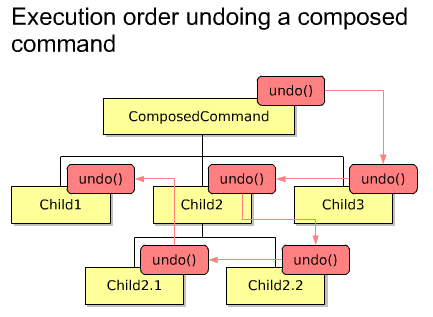
合成命令的undo顺序如下
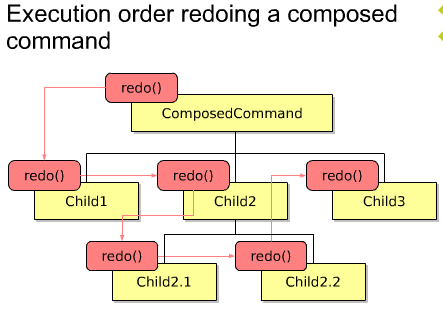
合成命令的redo顺序如下
QUndoCommand* MyEditor::createReplaceCommand(const QString &oldChars, const QString &newChars) {

    QUndoCommand *replaceCommand = new QUndoCommand(QString("Replace '%1' with '%2'").arg(oldChars).arg(newChars));

    int offset = 0;

    int index = 0;

    for(;;) {

        index = m_document->indexOf(oldChars, index);

        if (index == -1)

            break;

        new RemoveChars(index + offset, oldChars.count(), m_document, replaceCommand);

        new InsertChars(index + offset, newChars, m_document, replaceCommand);

        index += newChars.cout();

        offset += newChars.count() - oldChars.cout();

    }

    return replaceCommand;

}
QUndoGroup
一个应用程序,一般有若干个打开的文档,每个都拥有他们自己的undo stack。
这些undo stack们可以放到一个undo group里
该组group里的stack可以使用QUndoStack的setActive ()方法将自己设置为active stack。
在同一时间,只能有一个stack是active的。
void MyEditor::MyEditor(QWidget *parent) : QWidget(parent)

{

    //...

    m_undoGroup = new QUndoGroup(this);

    m_toolBar->addAction(m_undoGroup->createUndoAction(this));

    m_toolBar->addAction(m_undoGroup->createRedoAction(this));

    //...

}

Document *MyEditor::createDocument() {

    Document *doc = new Document(this);

    m_documents.append(doc);

    m_undoGroup->addStack(doc->undoStack());

    return doc;

}

bool Document::event(QEvent *event) {

    if( event->type() == QEvent::WindowActivate)

        m_undoStack->setActive(true);

    // ..

    return QWidget::event(event);

}
Tips
- 按照commands来设计实现你的应用程序功能---后期很难增加undo/redo
- Undo commands不应该储存指向document中实际对象的指针---储存其拷贝或者储存足够必要的用于重创建新对象的信息
- 如果你非得想让commands里储存指向document中对象的指针时,你必须做到如下:
- 当这些对象在document中被删除的时候,获得对象的多有权
- 当该command实例被销毁时,delete掉你拥有的那个对象
- 如果你十分渴望能改变或者移除stack里已经被push的command的话,你很可能会犯以下错误:
- 你尝试在不只一个文档的情况下使用一个undo堆栈来代表。(原文You are trying to use one undo stack for something that needs to be represented as more than one document)
- 你的command不是atomic(应该就是说该命令是有若干命令合成或压缩的,不是最最基本的命令)
- 当命令修改了文档,立马更新该文档的state,使用QUndoStack的indexChanged()信号
- 该更新信号不应该从command里发射。
摘自:https://www.cnblogs.com/muyr/p/3621385.html
Qt Undo Framework的更多相关文章
- Qt Undo Framework Demo
Qt Undo Framework Demo eryar@163.com Abstract. Qt’s Undo Framework is an implementation of the Comma ...
- Qt's Undo Framework
Overview of Qt's Undo Framework Introduction Qt's Undo Framework is an implementation of the Command ...
- Qt Installer Framework 使用说明(三)
目录 6.Qt Installer Framework 示例 7.参考 Reference 配置文件 Configuration File 配置文件元素的简要说明 Summary of Configu ...
- Qt Installer Framework翻译(7-4)
组件脚本 对于每个组件,您可以指定一个脚本,来准备要由安装程序执行的操作.脚本格式必须与QJSEngine兼容. 构造 脚本必须包含安装程序在加载脚本时创建的Component对象. 因此,脚本必须至 ...
- Qt Installer Framework翻译(7-6)
工具 Qt Installer Framework包含以下工具: > installerbase > binarycreator > repogen > archivegen ...
- 使用Qt installer framework制作安装包
一.介绍 使用Qt库开发的应用程序,一般有两种发布方式:(1)静态编译发布.这种方式使得程序在编译的时候会将Qt核心库全部编译到一个可执行文件中.其优势是简单单一,所有的依赖库都集中在一起,其缺点也很 ...
- Qt Installer Framework的学习
Qt Installer Framework是Qt默认包的发布框架.它很方便,使用静态编译Qt制作而成.并且使用了压缩率很高的7z对组件进行压缩.之所以有这些好处,我才觉得值得花一点儿精力研究一下这个 ...
- qt: qt install framework使用问题;
qt提供了qt install framework用于程序打包,方便.快捷,并且可以对界面和功能进行自定义. 但是, 如果使用默认的打包配置,不进行安装页面功能自定义的话, 在修改安装路径时,在对程序 ...
- Qt Installer Framework 使用说明(二)
目录 4.教程: 创建一个安装程序 创建软件包目录 创建配置文件 创建程序包信息文件 指定组件信息 指定安装程序版本 添加许可证 选择默认内容 创建安装程序内容 创建安装程序二进制文件 5.创建安装程 ...
随机推荐
- Redis 基础知识点总结
关系型数据库 VS 非关系型数据库(NoSQL) 关系型数据库 我们过去使用的 mysql.Oracle 都属于关系型数据库.关系型数据库的特点是数据表之间可以存在联系,表内每列数据也存在关联,同时支 ...
- sqlmap进阶篇—POST注入三种方法
测试是否存在post注入 第一种方法 直接加--form让它自动加载表单 第二种方法 把form表单里面提交的内容复制出来,放到data中跑 第三种方法 先用burp suite抓包,把包的内容存到本 ...
- Python进阶——什么是描述符?
本文的文字及图片来源于网络,仅供学习.交流使用,不具有任何商业用途,如有问题请及时联系我们以作处理 在 Python 开发中,你可能听说过「描述符」这个概念,由于我们很少直接使用它,所以大部分开发人员 ...
- 5行Python代码就能实现刷爆全网的动态条形图!
说起动态图表,最火的莫过于动态条形图了. 在B站上搜索「数据可视化」这个关键词,可以看到很多与动态条形图相关的视频. 好多视频都达到了上百万的播放量,属实厉害. 目前网上实现动态条形图现成的工具也很多 ...
- win10/win7下vs2013自带IISExpress支持局域网访问
打开IISExpress安装目录(C:\Users\Administrator\Documents\IISExpress\config),一般为我的文档下,用记事本打开applicationhost. ...
- Spring源码深度解析之Spring MVC
Spring源码深度解析之Spring MVC Spring框架提供了构建Web应用程序的全功能MVC模块.通过策略接口,Spring框架是高度可配置的,而且支持多种视图技术,例如JavaServer ...
- 在项目中随手把haseMap改成了currenHaseMap差点被公司给开除了。
前言 在项目中随手把haseMap改成了currenHaseMap差点被公司给开除了. 判断相等 字符串判断相等 String str1 = null; String str2 = "jav ...
- Base 128 Varints 编码(压缩算法)
Base 128 Varint可以说是一种编码方式,也可以说是一种压缩算法.这种压缩算法是用来压缩数字的传输的,压缩的依据是基于一个现实:越小的数字,越经常使用 我们来看看一个例子: 如果我们要网络传 ...
- gitlab git仓库地址修改后更新方法
背景 由于gitlab地址修改后导致本地仓库的远程仓库失效 解决办法 直接修改本地的远程仓库地址 - 进入项目地址git remote -v 查看旧地址 - 更新指令 git remote set-u ...
- CSS卡片旋转
html{ perspective: 800px; } body{ display:flex; flex-wrap: wrap; } .card{ transform-style: preserve- ...