
Qt Undo Framework
Qt undo/redo 框架
- 基于Command设计模式
- 支持命令压缩和命令合成
- 提供了与工具包其他部分融合很好的widgets和actions
术语(Terminology)
- Command - 对文档的一个作用行为,比如
- 图像编辑器的模糊操作
- 文本处理器的剪切操作
- 采样编辑器的最大化操作
- Undo-stack - commands的堆栈
- Document - 被应用程序编辑的内部数据,比如
- 音频编辑器中的waveform(波形)
- 图像编辑器中的bitmap(位图)
基本的undo stack操作
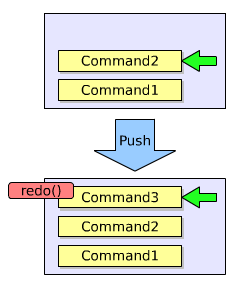
- Push
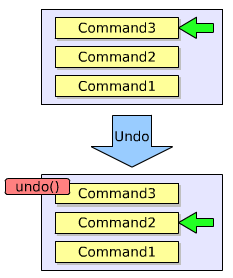
- Undo
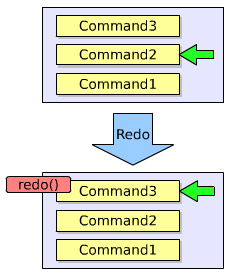
- Redo
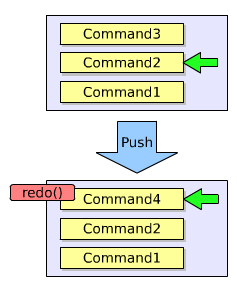
注意,push可能会删掉一些操作,如图
类们
只有四个类!
- QtUndoCommand - 用于修改document的对象的基类
- QtUndoStack - QtUndoCommand对象的堆栈
- QtUndoGroup - undo堆栈的组。很多应用程序允许用户同时打开超过一个文档,该类允许你把一组undo堆栈按一单个stack对待。
- QtUndoView - 继承自QListWidget,用来展示undo堆栈的内容,以字符串形式
实例
前提说明:下面这个例子,我们将为一个文本编辑器实现undo/redo;文档我们就用一个简单的QString来代表;我们先实现文档中插入字符这样一个command
commands的实现
插入字符操作
class InsertChars : public QUndoCommand

{

public:

    InsertChars(int index, const QString &chars, QString *document)

        : QUndoCommand("Insert characters") {

        m_index = index;

        m_chars = chars;

        m_document  = document;

    }

    virtual void redo() {

        m_document->insert(m_index, m_chars);

    }

    virtual void undo() {

        m_document->remove(m_index, m_chars.length());

    }

private:

    int m_index;

    QString m_chars;

    QString *m_document;

};
删除字符操作
class RemoveChars : public QUndoCommand

{

public:

    RemoveChars(int index, int count, QString *document)

        : QUndoCommand("Remove characters") {

        m_index = index;

        m_count = cout;

        m_document  = document;

    }

    virtual void redo() {

        m_removedChars = m_document->mid(m_index, m_count);

        m_document->remove(m_index, m_count);

    }

    virtual void undo() {

        m_document->insert(m_index, m_removedChars);

    }

private:

    int m_index, m_count;

    QString m_removedChars;

    QString *m_document;

};
在文本编辑器中使用
MyEditor::MyEditor(QWidget *parent) : QWidget(parent) {

    // …

    m_document = new QString;

    m_stack = new QUndoStack(this);

    m_toolBar->addAction(m_stack->createUndoAction);

    m_toolBar->addAction(m_stack->createRedoAction);

    // …

}

void MyEditor::keyPressEvent(QKeyEvent *event) {

    QString chars = events->text();

    int index = cursorIndex();

    switch (event->key()) {

        case Qt::Key_Backspace:

            if (index > 0)

                m_stack->push(new RemoveChars(index-1, 1, m_document));

            break;

        case Qt::Key_Delete:

            if (index < m_document.length())

                m_stack->push(new RemoveChars(index, 1, m_document));

            break;

        default:

            if (!chars.isEmpty())

                m_stack->push(new InsertChars(index, chars, m_document));

            break;

    }

}
command的压缩(compression)
命令压缩,是一种把若干个commands压成一个command的行为。 典型的案例就是文本编辑器中输入一大堆文字,撤销,把这一大堆都撤销了。
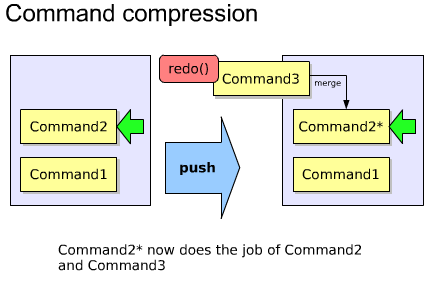
主要用到了QUndoCommand的id()和mergeWith()方法。代码如下
static const int InsertCharsId = 1000;

static const int RemoveCharsId = 1001;

//...

int InsertChars::id() const {

    return InsertCharsId;

}

bool InsertChars::mergeWith(const QCommand *command) {

    // 该类型转换是安全的,因为stack检查过id()了

    InsertChars *other = static_cast<InsertChars* > (command);

    // 只有当其他插入的字符在我的字符后面时,才merge

    if (m_index + m_chars.length() != other->m_index)

        return false;

    // 把它merge了

    m_chars.append(other->m_chars);

    return true;

}
command的合成(composition)
也就是传说中的宏(macros)
通过合并一系列简单的commands,从而创建复杂的commands
主要是用到了QUndoStack的beginMacro()和endMacro()方法。代码如下
void MyEditor::replace(const QString &oldChars, const QString &newChars) {

    if(!m_document->contains(oldChars))

        return;

    QString title = QString("Replace '%1' with '%2'").arg(oldChars).arg(newChars);

    m_stack->beginMacro(title);

    int index = 0;

    for(;;) {

        index = m_document->indexOf(oldChars, index);

        if(index == -1)

            break;

        m_stack->push(new RemoveChars(index,oldChars.length(), m_document));

        m_stack->push(new InsertChars(index, newChars, m_document));

        index += newChars.length();

    }

    m_stack->endMacro();

}
高级command合成
你大部分的需要,beginMacro()和endMacro()都能充分满足。
每个command可以有很多子commands
通过添加子command,构成一个复杂的command
自定义的command合成有很大益处,你可以在push到stack之前,逐步构建command
合成命令的undo顺序如下
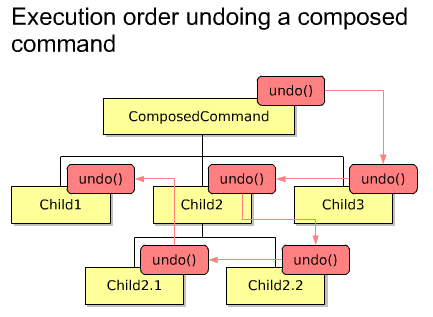
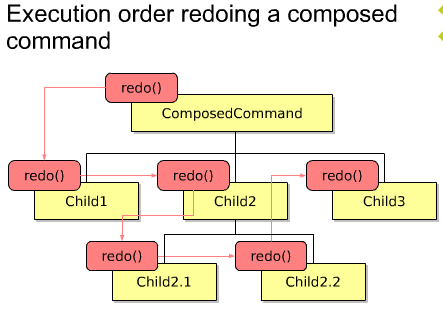
合成命令的redo顺序如下
QUndoCommand* MyEditor::createReplaceCommand(const QString &oldChars, const QString &newChars) {

    QUndoCommand *replaceCommand = new QUndoCommand(QString("Replace '%1' with '%2'").arg(oldChars).arg(newChars));

    int offset = 0;

    int index = 0;

    for(;;) {

        index = m_document->indexOf(oldChars, index);

        if (index == -1)

            break;

        new RemoveChars(index + offset, oldChars.count(), m_document, replaceCommand);

        new InsertChars(index + offset, newChars, m_document, replaceCommand);

        index += newChars.cout();

        offset += newChars.count() - oldChars.cout();

    }

    return replaceCommand;

}
QUndoGroup
一个应用程序,一般有若干个打开的文档,每个都拥有他们自己的undo stack。
这些undo stack们可以放到一个undo group里
该组group里的stack可以使用QUndoStack的setActive ()方法将自己设置为active stack。
在同一时间,只能有一个stack是active的。
void MyEditor::MyEditor(QWidget *parent) : QWidget(parent)

{

    //...

    m_undoGroup = new QUndoGroup(this);

    m_toolBar->addAction(m_undoGroup->createUndoAction(this));

    m_toolBar->addAction(m_undoGroup->createRedoAction(this));

    //...

}

Document *MyEditor::createDocument() {

    Document *doc = new Document(this);

    m_documents.append(doc);

    m_undoGroup->addStack(doc->undoStack());

    return doc;

}

bool Document::event(QEvent *event) {

    if( event->type() == QEvent::WindowActivate)

        m_undoStack->setActive(true);

    // ..

    return QWidget::event(event);

}
Tips
- 按照commands来设计实现你的应用程序功能---后期很难增加undo/redo
- Undo commands不应该储存指向document中实际对象的指针---储存其拷贝或者储存足够必要的用于重创建新对象的信息
- 如果你非得想让commands里储存指向document中对象的指针时,你必须做到如下:
- 当这些对象在document中被删除的时候,获得对象的多有权
- 当该command实例被销毁时,delete掉你拥有的那个对象
- 如果你十分渴望能改变或者移除stack里已经被push的command的话,你很可能会犯以下错误:
- 你尝试在不只一个文档的情况下使用一个undo堆栈来代表。(原文You are trying to use one undo stack for something that needs to be represented as more than one document)
- 你的command不是atomic(应该就是说该命令是有若干命令合成或压缩的,不是最最基本的命令)
- 当命令修改了文档,立马更新该文档的state,使用QUndoStack的indexChanged()信号
- 该更新信号不应该从command里发射。
摘自:https://www.cnblogs.com/muyr/p/3621385.html
Qt Undo Framework的更多相关文章
- Qt Undo Framework Demo
Qt Undo Framework Demo eryar@163.com Abstract. Qt’s Undo Framework is an implementation of the Comma ...
- Qt's Undo Framework
Overview of Qt's Undo Framework Introduction Qt's Undo Framework is an implementation of the Command ...
- Qt Installer Framework 使用说明(三)
目录 6.Qt Installer Framework 示例 7.参考 Reference 配置文件 Configuration File 配置文件元素的简要说明 Summary of Configu ...
- Qt Installer Framework翻译(7-4)
组件脚本 对于每个组件,您可以指定一个脚本,来准备要由安装程序执行的操作.脚本格式必须与QJSEngine兼容. 构造 脚本必须包含安装程序在加载脚本时创建的Component对象. 因此,脚本必须至 ...
- Qt Installer Framework翻译(7-6)
工具 Qt Installer Framework包含以下工具: > installerbase > binarycreator > repogen > archivegen ...
- 使用Qt installer framework制作安装包
一.介绍 使用Qt库开发的应用程序,一般有两种发布方式:(1)静态编译发布.这种方式使得程序在编译的时候会将Qt核心库全部编译到一个可执行文件中.其优势是简单单一,所有的依赖库都集中在一起,其缺点也很 ...
- Qt Installer Framework的学习
Qt Installer Framework是Qt默认包的发布框架.它很方便,使用静态编译Qt制作而成.并且使用了压缩率很高的7z对组件进行压缩.之所以有这些好处,我才觉得值得花一点儿精力研究一下这个 ...
- qt: qt install framework使用问题;
qt提供了qt install framework用于程序打包,方便.快捷,并且可以对界面和功能进行自定义. 但是, 如果使用默认的打包配置,不进行安装页面功能自定义的话, 在修改安装路径时,在对程序 ...
- Qt Installer Framework 使用说明(二)
目录 4.教程: 创建一个安装程序 创建软件包目录 创建配置文件 创建程序包信息文件 指定组件信息 指定安装程序版本 添加许可证 选择默认内容 创建安装程序内容 创建安装程序二进制文件 5.创建安装程 ...
随机推荐
- DRF类视图让你的代码DRY起来
刚开始写views.py模块的代码,一般都是用def定义的函数视图,不过DRF更推荐使用class定义的类视图,这能让我们的代码更符合DRY(Don't Repeat Yourself)设计原则: 使 ...
- metinfo小于v6.2.0版本SQL盲注利用脚本
#coding=utf-8 import requests import re import sys import time #获取config_safe.php中的 key def getKey(u ...
- spring整合sharding-jdbc实现分库分表
1.创建两个库,每个库创建两个分表t_order_1,t_order_2 DROP TABLE IF EXISTS `t_order_1`; CREATE TABLE `t_order_1` ( `i ...
- ConcurrentHashMap线程安全吗?
前言 没啥深入实践的理论系同学,在使用并发工具时,总是认为把HashMap改为ConcurrentHashMap,就完美解决并发了呀.或者使用写时复制的CopyOnWriteArrayList,性能更 ...
- C# 9 新特性 —— 增强的 foreach
C# 9 新特性 -- 增强的 foreach Intro 在 C# 9 中增强了 foreach 的使用,使得一切对象都有 foreach 的可能 我们来看一段代码,这里我们试图遍历一个 int 类 ...
- jdbc编程学习之增删改查(2)
一,enum类型的使用 在SQL中没有布尔类型的数据,我们都使用过布尔类型,当属性的值只用两种情况时.例如性别等.那在数据库对这些属性的值个数比较少时我们应该使用什么数据类型呢?SQL给我们提供了枚举 ...
- 使用Android Studio来阅读Android源码
在编译android系统后,执行下面命令来生成索引. mmm development/tools/idegen/mv ./out/target/product/tiny4412/obj/GYP/sha ...
- myeclipse经常弹出Subversion Native Library Not Available框解决办法
两种解决方案:(1)在myeclipse中选择 "Windows" -> Perferences. 然后通过左上方的筛选,选出svn设置菜单,点解左侧的"SVN&q ...
- 知乎上看到的一篇讲解Epoll的文章,较形象生动
作者:蓝形参链接:https://www.zhihu.com/question/20122137/answer/14049112来源:知乎著作权归作者所有.商业转载请联系作者获得授权,非商业转载请注明 ...
- 线程上下文类加载器(Context ClassLoader)
1.线程上下文类加载器是从jdk1.2开始引入的,类Thread中的getContextClassLoader()与setContextClassLoader(ClassLoader c1),分别用来 ...